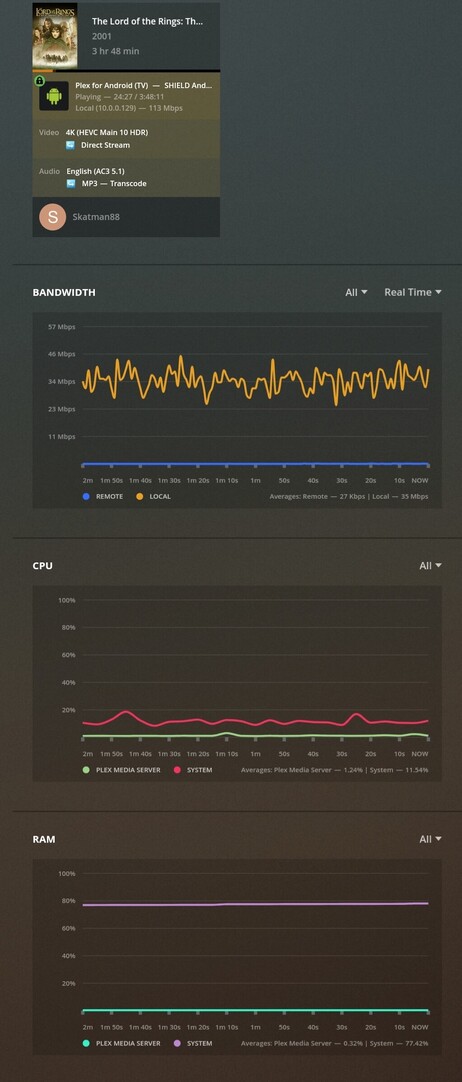
Server Version#: 1.23.3.4707 (Docker Container)
Player Version#: ExoPlayer (NVidia Shield TV Pro)
Trying to play some 4K HDR content on my newly purchased NVidia Shield TV Pro and its displayed perfectly except for the fact that it buffers pretty much every 10 seconds.
It’s direct playing and my CPU, memory, and network bandwidth are all nowhere near saturated. Only thing that’s transcoding is audio from AC3 to MP3. It’s also set to hardware transcode (Intel quicksync).
Checked the logs in verbose and there’s nothing I can see of interest. Any ideas? Let me know which logs you’d like me to upload.
Normally DD (AC3) audio doesn’t need to transcode on the Shield. Are you using audio passthrough to a device that can’t play it? The other things that stand out are the 113Mbps (that seems extra high) and your 80% System Ram utilization on your server.
Yeah, I thought the same, so I had a play shortly after posting this and I had pass through set to ‘optical’ (my sound system is a Sonos Playbar and has optical from the TV so guessed this was right). I changed it to HDMI and now it does direct stream fine but still buffers.
Yeah, I saw that too. The reason why it’s so high is because of the size/bitrate of the file. It’s basically a 4k HDR remux with Dolby Atmos/Vision and all the bells and whistles, but the shield is right next to the AP, so shouldn’t have any issues with 113Mbps.
It’s only so high because the transcode file is in the RAM. It’s usually floating around the 60% mark and is also a docker on Unraid.
What TV do you have? I can check the quick settings on my Sony X950G to see which Picture Mode is enabled since my HDR10 and DV modes are different (as is my normal SDR one).
As for the Shield DV/Refresh rate settings, go to:
Settings->Device Preferences->Display & Sound->Resolution
You should see some common options there.
Choose ‘4K 59.94Hz HDR10 Ready’ to only enable HDR10 for the first test.
Choose the ‘4K 23.976Hz DV and HDR10 Ready’ for the second test.
For testing these, don’t forget to disable refresh rate (and resolution) switching in the Plex settings.
Just to be sure, you have an HDMI 2.0 or greater cable, right?
On the Shield, you could try Settings->Device Preferences->System->Processor mode = ‘Max performance’ and Fan mode = ‘Cool’ to get the Shield operating at it’s peak.
Otherwise I suggest grabbing and posting some client logs. Hopefully someone from Plex can help.