# Adding music // meta data
**URL:** https://forums.plex.tv/t/adding-music-meta-data/443318
**Category:** Metadata & Adding Files
**Tags:** server-synology
**Created:** [August 8, 2019, 2:43pm UTC](https://forums.plex.tv/t/adding-music-meta-data/443318 "2019-08-08T14:43:07Z")
**Posts on this page:** 5
**Page:** 1
### Author:  [@Brendianer](https://forums.plex.tv/u/Brendianer)
#### Post date: [August 8, 2019, 2:43pm UTC](https://forums.plex.tv/t/adding-music-meta-data/443318/1 "2019-08-08T14:43:07Z")
Dear all
I am trying to add my MP3 files to the server to play them via SONONS.
I have two quesitons:
- how can I force PLEX to take the metadata from the MP3 files?
- how can I configure SONOS only to show the PLEX MP3 files and not all the rest.
Thanks.
Brendianer
---
### Author:  [@OttoKerner](https://forums.plex.tv/u/OttoKerner)
#### Post date: [August 8, 2019, 2:52pm UTC](https://forums.plex.tv/t/adding-music-meta-data/443318/2 "2019-08-08T14:52:09Z")
I can only help you with the first question:
Go to
Settings - Server - Agents - Albums - last.fm
make sure that the line ‘Local Media Assets’ is at the topmost position
Repeat the same under
Settings - Server - Agents - Albums - Plex Music
+
Delete and then re-create [your music library](https://support.plex.tv/hc/en-us/articles/200289266-Editing-Libraries "your library"),
go to the ‘Advanced’ tab
enable ‘Use embedded metatags’
* * *
Here are some tips regarding music
multi-disc albums
> [@Organizing Music - Soundtracks and Various Artists (Hit collections)](https://forums.plex.tv/t/organizing-music-soundtracks-and-various-artists-hit-collections/121354/2):
>
> I am going to do a bit of copy/paste of posts I did in the Plex Pass only forums: ===== 1.“Various Artists” is the usual choice for ‘Sampler’ style albums. There may be exceptions for ‘collaboration’ albums which are credited to all participating artists on the album cover. 2. use the title of the single as it appears on the cover. You can augment that information with (CDM) or (single) or (Maxi) or (EP) as it fits. If it is a genuine release, Gracenote should have no problem identifying it. …
handling singles and EP’s
[https://forums.plex.tv/t/best-way-to-add-album-singles-ep-to-a-premium-music-library/128108/8](https://forums.plex.tv/t/best-way-to-add-album-singles-ep-to-a-premium-music-library/128108/8)
possible ‘side car’ files for music
> [@Music Album artwork](https://forums.plex.tv/t/music-album-artwork/170552/10):
>
> Little tip: If you have lots of bootlegs etc. you want to bring your embedded metatags into order first. Then you need to have the Local Media Assets agent in top position. I wouldn’t trust last.fm to fetch correct info about bootlegs and special editions of albums, like those recent expanded re-releases of Zappa albums. Put as much info into the meta tags as possible. Put a cover art inside the album folder and you should be good. Makes sure to set at least ‘AlbumArtist’ and ‘AlbumTitle’ to…
soundtracks and ‘various artists’
> [@Plex Folder View - folder.jpg not recognized?](https://forums.plex.tv/t/plex-folder-view-folder-jpg-not-recognized/198133/6):
>
> @naddel81 said: album view does not work properly, because if you have various artists on an album (most cases) then it shows them as “various artists” instead of the album name. folder view would be the best option and I guess it has been asked before. is it too hard to implement? You can put what you like into the AlbumArtist meta tag, if you don’t like it to appear under VA. You could use the game title or the game developer or the game ‘universe’ (if you have several albums which fit in…
---
### Author:  [@Brendianer](https://forums.plex.tv/u/Brendianer)
#### Post date: [August 8, 2019, 3:12pm UTC](https://forums.plex.tv/t/adding-music-meta-data/443318/3 "2019-08-08T15:12:20Z")
Thanks that helped.
How can I let show the music in SONOS?
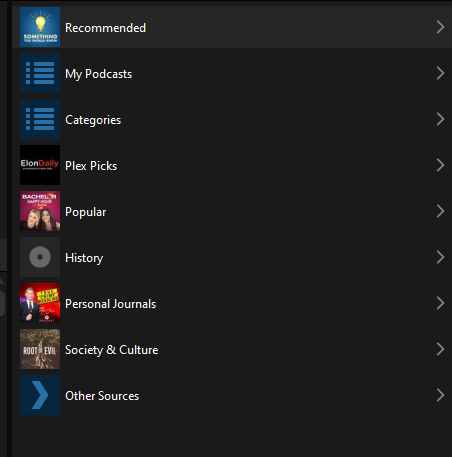
And delete unwanted PLEX sources?
---
### Author:  [@OttoKerner](https://forums.plex.tv/u/OttoKerner)
#### Post date: [August 8, 2019, 3:18pm UTC](https://forums.plex.tv/t/adding-music-meta-data/443318/4 "2019-08-08T15:18:32Z")
I can’t tell you, I am not using Sonos.
But from the looks of it, you are not in your library at all. You appear to be looking at the Podcasts category.
If you are not into Podcasts at all, you can disable them in general in your Plex user account. [https://ninjas.plex.tv/desktop/master/index.html#!/settings/online-media-sources](https://ninjas.plex.tv/desktop/master/index.html#!/settings/online-media-sources)
---
### Author:  [@system](https://forums.plex.tv/u/system)
#### Post date: [November 6, 2019, 3:18pm UTC](https://forums.plex.tv/t/adding-music-meta-data/443318/5 "2019-11-06T15:18:38Z")
This topic was automatically closed 90 days after the last reply. New replies are no longer allowed.