# Adding Nvidia Hardware transcoding to a Synology NAS
**URL:** https://forums.plex.tv/t/adding-nvidia-hardware-transcoding-to-a-synology-nas/877431
**Category:** Plex Media Server
**Tags:** server-synology
**Created:** [May 12, 2024, 5:50pm UTC](https://forums.plex.tv/t/adding-nvidia-hardware-transcoding-to-a-synology-nas/877431 "2024-05-12T17:50:36Z")
**Posts on this page:** 20
**Page:** 1
### Author:  [@RockStar](https://forums.plex.tv/u/RockStar)
#### Post date: [May 12, 2024, 5:50pm UTC](https://forums.plex.tv/t/adding-nvidia-hardware-transcoding-to-a-synology-nas/877431/1 "2024-05-12T17:50:36Z")
Apparently, it is now possible to add Nvidia GPUS to a Synology NAS using hacked drivers, following this [guide](https://www.reddit.com/r/synology/comments/16vl38e/comment/kpnjo0h/)
This will enable hardware transcoding on Synology boxes that doesnt already have a quick sync enabled GPU
Have anyone here tried? Any issues? Does tone mapping work?
---
### Author:  [@ChuckPa](https://forums.plex.tv/u/ChuckPa)
#### Post date: [May 12, 2024, 9:14pm UTC](https://forums.plex.tv/t/adding-nvidia-hardware-transcoding-to-a-synology-nas/877431/2 "2024-05-12T21:14:15Z")
That’s quite the hack-and-a-half.
I understand what’s being done and it’s impressive.
Unfortunately, there’s nothing we can do to support it.
---
### Author:  [@RockStar](https://forums.plex.tv/u/RockStar)
#### Post date: [May 12, 2024, 9:58pm UTC](https://forums.plex.tv/t/adding-nvidia-hardware-transcoding-to-a-synology-nas/877431/3 "2024-05-12T21:58:07Z")
Plex allready works with the card so Im not sure you would need to do anything. Im just trying to figure out how well. If tonemapping HDR sources will work. Experiences from forum users would be awesome before i give this a shot myself.
---
### Author:  [@ChuckPa](https://forums.plex.tv/u/ChuckPa)
#### Post date: [May 12, 2024, 10:18pm UTC](https://forums.plex.tv/t/adding-nvidia-hardware-transcoding-to-a-synology-nas/877431/4 "2024-05-12T22:18:52Z")
I use Nvidia here and they are rock solid. (I don’t run bleeding-edge drivers. I sit back a few versions for safety)
Given the technique here
1. Nvidia kernel modules on the host OS
2. Nvidia runtime libraries in the namespace (container)
Matches how I put Nvidia support in LXC (which is another type of container)
---
### Author:  [@kesawi](https://forums.plex.tv/u/kesawi)
#### Post date: [May 13, 2024, 12:04am UTC](https://forums.plex.tv/t/adding-nvidia-hardware-transcoding-to-a-synology-nas/877431/5 "2024-05-13T00:04:51Z")
The PDBear nVidia drivers are based on version 525.105.17 so they will support HW HDR tone mapping.
HW transcoding with HDR tone mapping is supported on nVidia GPU cards that have HVEC 10-bit decoding. You can check which cards have compatability [here](https://developer.nvidia.com/video-encode-and-decode-gpu-support-matrix-new). It is supported by Pascal based cards and above for H.265 (HEVC) 4:2:0, and from Turing based cards and above for H.265 (HEVC) 4:4:4.
I’ve played around with Xpenology on my own hardware using the PDBear drivers with a GTX1660Ti. HW transcoding in Plex including HDR tone mapping works.
---
### Author:  [@RockStar](https://forums.plex.tv/u/RockStar)
#### Post date: [May 13, 2024, 6:17am UTC](https://forums.plex.tv/t/adding-nvidia-hardware-transcoding-to-a-synology-nas/877431/6 "2024-05-13T06:17:19Z")
Thank you!
I better get to it then! Did you apply the Nvidia unlimited transcode patch? If so, i could use some help understanding how to run the bash patch
---
### Author:  [@kesawi](https://forums.plex.tv/u/kesawi)
#### Post date: [May 13, 2024, 7:05am UTC](https://forums.plex.tv/t/adding-nvidia-hardware-transcoding-to-a-synology-nas/877431/7 "2024-05-13T07:05:35Z")
No, I didn’t apply the patch. I was playing around with the nVidia drivers primarily to get deep video analytics working within Synology Surveillance Station under a Xpenology VM. I only set up Plex to test whether the drivers were working with the VM. My main Plex Media Server runs in Ubuntu and supports 5 transcoding instances which is more than enough for my current needs.
---
### Author:  [@RockStar](https://forums.plex.tv/u/RockStar)
#### Post date: [May 13, 2024, 10:39am UTC](https://forums.plex.tv/t/adding-nvidia-hardware-transcoding-to-a-synology-nas/877431/8 "2024-05-13T10:39:50Z")
Allright, thanks for the info so far.
Ive ordered a T400 and will try setting it up next week. This is pretty big imo.
---
### Author:  [@ChuckPa](https://forums.plex.tv/u/ChuckPa)
#### Post date: [May 13, 2024, 3:17pm UTC](https://forums.plex.tv/t/adding-nvidia-hardware-transcoding-to-a-synology-nas/877431/9 "2024-05-13T15:17:51Z")
FWIW: Anything P2200 or greater won’t need the patch. It’s already big enough
---
### Author:  [@RockStar](https://forums.plex.tv/u/RockStar)
#### Post date: [May 13, 2024, 4:11pm UTC](https://forums.plex.tv/t/adding-nvidia-hardware-transcoding-to-a-synology-nas/877431/10 "2024-05-13T16:11:48Z")
Yea Im sure. I went with a snakker card due to it only requireing 30W.
---
### Author:  [@kesawi](https://forums.plex.tv/u/kesawi)
#### Post date: [May 13, 2024, 8:44pm UTC](https://forums.plex.tv/t/adding-nvidia-hardware-transcoding-to-a-synology-nas/877431/11 "2024-05-13T20:44:06Z")
The T400 is limited to 8 concurrent sessions according to the details in the nVidia page I linked to before. Not sure if that applies to the PDBear drivers.
---
### Author:  [@RockStar](https://forums.plex.tv/u/RockStar)
#### Post date: [May 13, 2024, 8:55pm UTC](https://forums.plex.tv/t/adding-nvidia-hardware-transcoding-to-a-synology-nas/877431/12 "2024-05-13T20:55:24Z")
Dont need more than eight so ill be fine then. Ive read somewhere that the 4 gig cards only will do 3 concurrent 4K streams. Does anyone know if thats accurate?
---
### Author:  [@RockStar](https://forums.plex.tv/u/RockStar)
#### Post date: [May 23, 2024, 5:03pm UTC](https://forums.plex.tv/t/adding-nvidia-hardware-transcoding-to-a-synology-nas/877431/13 "2024-05-23T17:03:58Z")
Allright. I thought Id give you guys an update. I just received my new Nvidia T400 card and have just installed it today. The whole thing is pretty easy.
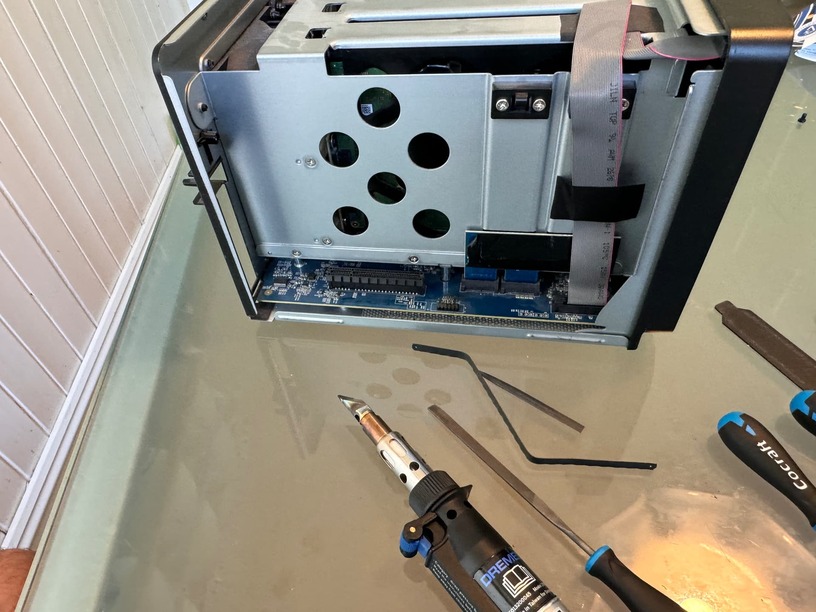
The first thing I had to do was to file down the end of the PCIe lane, in order to make the card fit.
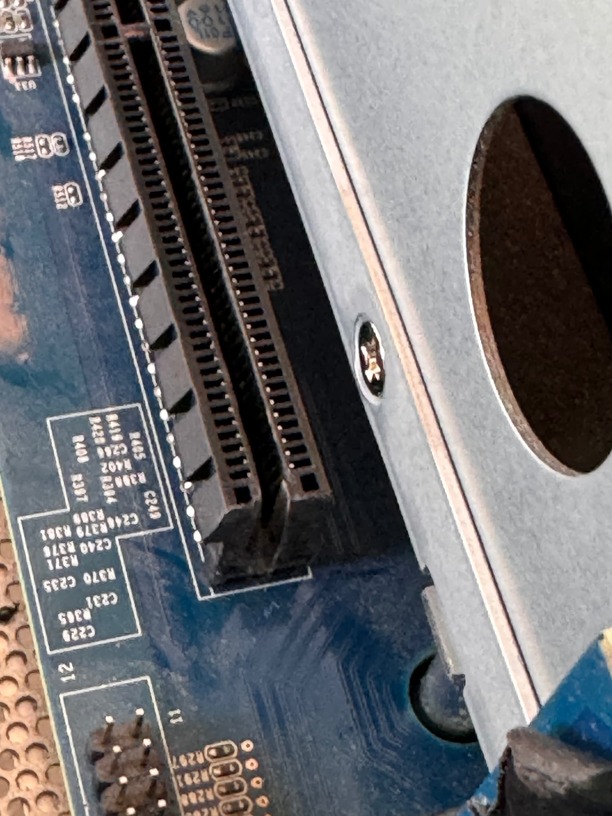
This was pretty nerve-wracking as I was scared if destroying pins. All went fine though
The card is tiny and fits well within the NAS:
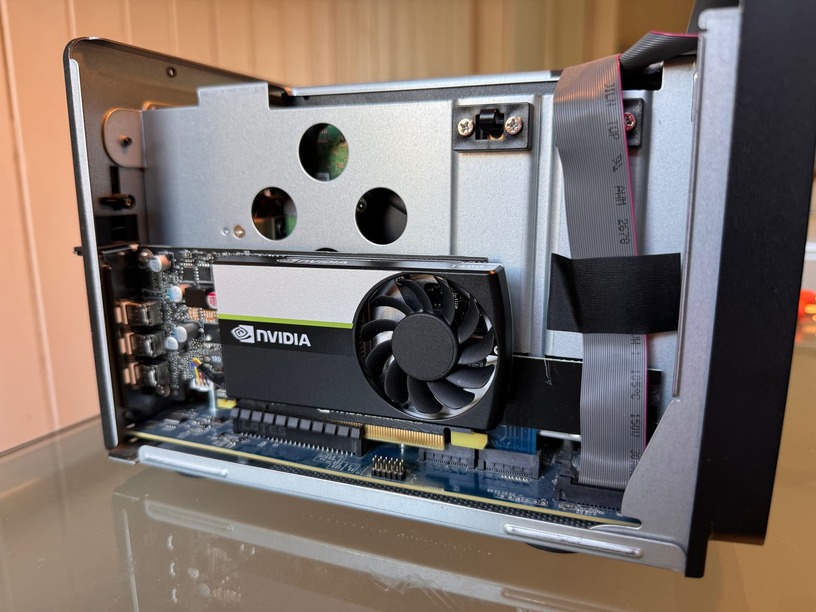
After this, pretty much all I had to do was install the hacked driver:

and telnet into the box and run a command - sudo vgpuDaemon fix followed by sudo reboot
When the NAS rebooted, the card was detected and GPU shows up in the resource monitor:

Plex also detects the card and now lets med HW transcode:
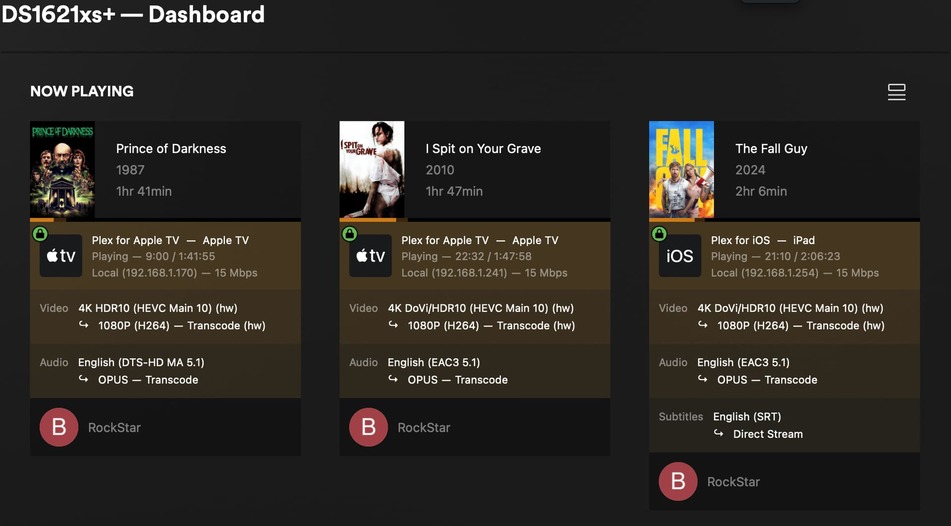
Now a question; this is the weakest and cheapest Nvidia card available. It lets me transcode 3 x 4K streams no problem, but if I start a fourth, it chokes. At 3 transcodes, it has only used about half its V-ram and has about two gigs left.
I was under the impression that V-ram was pretty much the limitating factor on these cards. If I get the T1000 with double the V-ram (8 gigs), can I really expect it to do 6 x 4K streams?
---
### Author:  [@ChuckPa](https://forums.plex.tv/u/ChuckPa)
#### Post date: [May 23, 2024, 5:24pm UTC](https://forums.plex.tv/t/adding-nvidia-hardware-transcoding-to-a-synology-nas/877431/14 "2024-05-23T17:24:23Z")
This isn’t a “V-RAM only” problem.
You still have all the limitations of the PCI bus, Memory bus, and CPU (running PMS + audio).
Just because you put a jet engine in your box doesn’t mean you’ll break the sound barrier 🙂
---
### Author:  [@RockStar](https://forums.plex.tv/u/RockStar)
#### Post date: [May 23, 2024, 5:33pm UTC](https://forums.plex.tv/t/adding-nvidia-hardware-transcoding-to-a-synology-nas/877431/15 "2024-05-23T17:33:56Z")
According to this, it seems clear that vram is very important: [nVidia Hardware Transcoding Calculator for Plex Estimates](https://www.elpamsoft.com/?p=Plex-Hardware-Transcoding)

---
### Author:  [@ChuckPa](https://forums.plex.tv/u/ChuckPa)
#### Post date: [May 23, 2024, 6:07pm UTC](https://forums.plex.tv/t/adding-nvidia-hardware-transcoding-to-a-synology-nas/877431/16 "2024-05-23T18:07:58Z")
Didn’t say it wasn’t important.
You still need enough memory on the card to do the transcode and tonemap for each instance.
This is one instance. All you need to do is multiply it out for worst case
```auto
Every 5.0s: nvidia-smi glockner: Thu May 23 14:07:23 2024
Thu May 23 14:07:23 2024
+---------------------------------------------------------------------------------------+
| NVIDIA-SMI 535.161.08 Driver Version: 535.161.08 CUDA Version: 12.2 |
|-----------------------------------------+----------------------+----------------------+
| GPU Name Persistence-M | Bus-Id Disp.A | Volatile Uncorr. ECC |
| Fan Temp Perf Pwr:Usage/Cap | Memory-Usage | GPU-Util Compute M. |
| | | MIG M. |
|=========================================+======================+======================|
| 0 Quadro P2200 On | 00000000:07:00.0 Off | N/A |
| 53% 50C P0 46W / 75W | 576MiB / 5120MiB | 21% Default |
| | | N/A |
+-----------------------------------------+----------------------+----------------------+
+---------------------------------------------------------------------------------------+
| Processes: |
| GPU GI CI PID Type Process name GPU Memory |
| ID ID Usage |
|=======================================================================================|
| 0 N/A N/A 16856 C ...lib/plexmediaserver/Plex Transcoder 572MiB |
+---------------------------------------------------------------------------------------+
```
In the practical sense, If you’re trying to run 10 transcodes on a Syno maybe we should be having a different type of discussion 🏴☠️ lol
---
### Author:  [@RockStar](https://forums.plex.tv/u/RockStar)
#### Post date: [May 23, 2024, 6:28pm UTC](https://forums.plex.tv/t/adding-nvidia-hardware-transcoding-to-a-synology-nas/877431/17 "2024-05-23T18:28:12Z")
Id buy the T1000 with 8 gigs of vram if I was confident it would double my 4K transcodes. I just think its weird my current card reports using about two gigs of vram when doing 3 transcodes, but when I add a fourth session, performance just tanks
---
### Author:  [@ChuckPa](https://forums.plex.tv/u/ChuckPa)
#### Post date: [May 23, 2024, 6:49pm UTC](https://forums.plex.tv/t/adding-nvidia-hardware-transcoding-to-a-synology-nas/877431/18 "2024-05-23T18:49:57Z")
> [@RockStar](#):
>
> I just think its weird my current card reports using about two gigs of vram when doing 3 transcodes, but when I add a fourth session, performance just tanks
VRAM != Performance
With that 4th transcode, you’ve pushed the card’s compute demand over what it can do.
---
### Author:  [@RockStar](https://forums.plex.tv/u/RockStar)
#### Post date: [May 23, 2024, 7:18pm UTC](https://forums.plex.tv/t/adding-nvidia-hardware-transcoding-to-a-synology-nas/877431/19 "2024-05-23T19:18:30Z")
Allright. Yea, you seem to be right
In any event; If anyone have experience with 4K transcoding using the T1000, Id love to know how it performs. With its 50W TDP, it to should work great in these Synologys
---
### Author:  [@ChuckPa](https://forums.plex.tv/u/ChuckPa)
#### Post date: [May 23, 2024, 7:20pm UTC](https://forums.plex.tv/t/adding-nvidia-hardware-transcoding-to-a-synology-nas/877431/20 "2024-05-23T19:20:14Z")
you MUST also remember, those Synology NAS boxes have a 200 / 250 watt supply to run everything.
You must be aware of all everything including power consumption AND cooling. (Syno’s are designed for passive cooling)
Run the entire budget / provisioning before committing to the expense
[Next page](https://forums.plex.tv/t/adding-nvidia-hardware-transcoding-to-a-synology-nas/877431.md?page=2)