# Adding TV Show to another as a different version
**URL:** https://forums.plex.tv/t/adding-tv-show-to-another-as-a-different-version/429887
**Category:** Metadata & Adding Files
**Tags:** server-windows
**Created:** [July 4, 2019, 9:07pm UTC](https://forums.plex.tv/t/adding-tv-show-to-another-as-a-different-version/429887 "2019-07-04T21:07:11Z")
**Posts on this page:** 20
**Page:** 1
### Author:  [@markloveland](https://forums.plex.tv/u/markloveland)
#### Post date: [July 4, 2019, 9:07pm UTC](https://forums.plex.tv/t/adding-tv-show-to-another-as-a-different-version/429887/1 "2019-07-04T21:07:11Z")
Added new TV Shows to library. But didn’t show in player. Found that it is adding the new TV shows to an existing TV Show as a different version even though the filenames and metadata are totally different.
---
### Author:  [@tom80H](https://forums.plex.tv/u/tom80H)
#### Post date: [July 4, 2019, 9:43pm UTC](https://forums.plex.tv/t/adding-tv-show-to-another-as-a-different-version/429887/2 "2019-07-04T21:43:03Z")
would you mind sharing the file names and folder structure of those 2 shows?
---
### Author:  [@markloveland](https://forums.plex.tv/u/markloveland)
#### Post date: [July 5, 2019, 8:54pm UTC](https://forums.plex.tv/t/adding-tv-show-to-another-as-a-different-version/429887/3 "2019-07-05T20:54:09Z")
P\Phoenix Nights\Season 1\Phoenix Nights S01E01.mp4
(2 seasons and 6 episodes per season)
Gets added as a different version to;
P\Peaky Blinders\Season 1\Peaky Blinders S01E01.mp4
(again same for the other episodes and seasons)
---
### Author:  [@NewPlaza](https://forums.plex.tv/u/NewPlaza)
#### Post date: [July 5, 2019, 8:55pm UTC](https://forums.plex.tv/t/adding-tv-show-to-another-as-a-different-version/429887/4 "2019-07-05T20:55:44Z")
> [@markloveland](#):
>
> P\Phoenix Nights\Season 1\
It that the folder “P”?
What path does plex point to?
---
### Author:  [@markloveland](https://forums.plex.tv/u/markloveland)
#### Post date: [July 5, 2019, 8:56pm UTC](https://forums.plex.tv/t/adding-tv-show-to-another-as-a-different-version/429887/5 "2019-07-05T20:56:41Z")
S:\Media\TV Shows\P
---
### Author:  [@markloveland](https://forums.plex.tv/u/markloveland)
#### Post date: [July 5, 2019, 8:57pm UTC](https://forums.plex.tv/t/adding-tv-show-to-another-as-a-different-version/429887/6 "2019-07-05T20:57:18Z")
S:\Media\TV Shows\P\Phoenix Nights\Season 1
---
### Author:  [@NewPlaza](https://forums.plex.tv/u/NewPlaza)
#### Post date: [July 5, 2019, 8:59pm UTC](https://forums.plex.tv/t/adding-tv-show-to-another-as-a-different-version/429887/7 "2019-07-05T20:59:11Z")
> [@NewPlaza](#):
>
> Phoenix Nights
I would rename `Phoenix Nights` to `Phoenix Nights (2001)` and [plex dance](https://forums.plex.tv/t/the-plex-dance/197064) them BUT what you can do is `split` the two series apart and `fix match`.
---
### Author:  [@markloveland](https://forums.plex.tv/u/markloveland)
#### Post date: [July 5, 2019, 8:59pm UTC](https://forums.plex.tv/t/adding-tv-show-to-another-as-a-different-version/429887/8 "2019-07-05T20:59:38Z")
If I browse by folder I get the following; 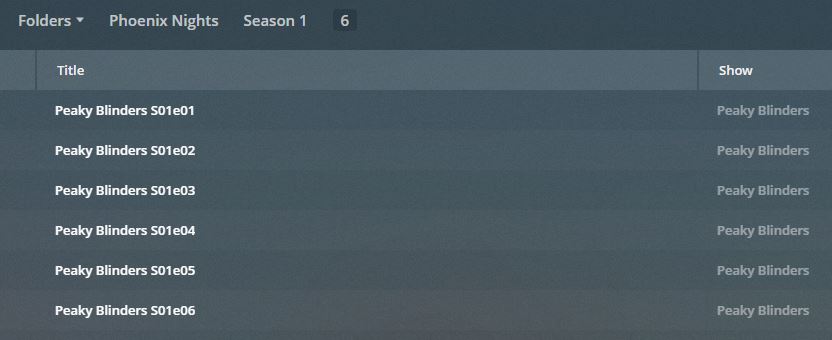
---
### Author:  [@markloveland](https://forums.plex.tv/u/markloveland)
#### Post date: [July 5, 2019, 9:02pm UTC](https://forums.plex.tv/t/adding-tv-show-to-another-as-a-different-version/429887/9 "2019-07-05T21:02:18Z")
How do I split them?
---
### Author:  [@markloveland](https://forums.plex.tv/u/markloveland)
#### Post date: [July 5, 2019, 9:11pm UTC](https://forums.plex.tv/t/adding-tv-show-to-another-as-a-different-version/429887/10 "2019-07-05T21:11:16Z")
Tried renaming files and folders by adding the “(2001)” and re-scanning but still the same
---
### Author:  [@markloveland](https://forums.plex.tv/u/markloveland)
#### Post date: [July 5, 2019, 9:18pm UTC](https://forums.plex.tv/t/adding-tv-show-to-another-as-a-different-version/429887/11 "2019-07-05T21:18:37Z")
Removed all the metadata and still the same
---
### Author:  [@NewPlaza](https://forums.plex.tv/u/NewPlaza)
#### Post date: [July 5, 2019, 11:11pm UTC](https://forums.plex.tv/t/adding-tv-show-to-another-as-a-different-version/429887/12 "2019-07-05T23:11:30Z")
> [@markloveland](#):
>
> How do I split them
[https://support.plex.tv/articles/201018248-merge-or-split-items/](https://support.plex.tv/articles/201018248-merge-or-split-items/)
The article goes over movies but it is identical for tv series.
Just be sure you are at the top level of the series(not within a season)
> [@Subtitled/Dubbed series in two different folders (intentionally) but show up stacked/versions](https://forums.plex.tv/t/subtitled-dubbed-series-in-two-different-folders-intentionally-but-show-up-stacked-versions/231092/4):
>
> You must be at the top level of the series. Do not drill into the series. Correct wayIncorrect way
---
### Author:  [@markloveland](https://forums.plex.tv/u/markloveland)
#### Post date: [July 6, 2019, 10:16am UTC](https://forums.plex.tv/t/adding-tv-show-to-another-as-a-different-version/429887/13 "2019-07-06T10:16:26Z")
Can’t get it to display a “split apart” option.
   
---
### Author:  [@OttoKerner](https://forums.plex.tv/u/OttoKerner)
#### Post date: [July 6, 2019, 10:29am UTC](https://forums.plex.tv/t/adding-tv-show-to-another-as-a-different-version/429887/14 "2019-07-06T10:29:09Z")
> [@markloveland](#):
>
> S:\Media\TV Shows\P
I doubt that your library is looking at the `P` folder. Because the symptoms you have are exactly as if the library were looking only at `TV Shows`.
Or maybe it _used to_ look at `TV Shows` only. In which case you need to [Plex Dance](https://forums.plex.tv/t/plex-incorrectly-identifying-tv-episodes/100265/4 "Plex Dance").
---
### Author:  [@NewPlaza](https://forums.plex.tv/u/NewPlaza)
#### Post date: [July 6, 2019, 1:30pm UTC](https://forums.plex.tv/t/adding-tv-show-to-another-as-a-different-version/429887/15 "2019-07-06T13:30:43Z")
Just noticed the name `Peaky Blinders S01e01`. Are these MP4 files? Check to make sure they do not have embedded metadata.
---
### Author:  [@markloveland](https://forums.plex.tv/u/markloveland)
#### Post date: [July 7, 2019, 12:39pm UTC](https://forums.plex.tv/t/adding-tv-show-to-another-as-a-different-version/429887/16 "2019-07-07T12:39:25Z")
Yes, all the files are MP4 and have the correct metadata attached. But I have also tried deleting all the metadata from the files and re-adding them to the library.
---
### Author:  [@JuiceWSA](https://forums.plex.tv/u/JuiceWSA)
#### Post date: [July 7, 2019, 1:48pm UTC](https://forums.plex.tv/t/adding-tv-show-to-another-as-a-different-version/429887/17 "2019-07-07T13:48:55Z")
Until you ‘Plex Dance’ files you fiddle with NOTHING will ever change.
If you don’t name and structure your files properly you’ll never enjoy a problem free Plex.
Until you either stop using MP4/M4V files, or lower the priority of Local Media Assets to the lowest possible position in ALL the agents’ lists (do NOT disable, simply demote) you’ll never enjoy a problem free Plex.
You can manually inject every MP4/M4V file with all the proper metadata - then spend countless hours trying to get it all to display correctly - or you can name your files properly for an instant match to the online database required and be done with it. I suggest the latter. Life is short.
---
### Author:  [@markloveland](https://forums.plex.tv/u/markloveland)
#### Post date: [July 7, 2019, 9:14pm UTC](https://forums.plex.tv/t/adding-tv-show-to-another-as-a-different-version/429887/18 "2019-07-07T21:14:39Z")
FIXED.
Under TV Shows I had created directories A - Z to simplify navigation on other devices. Plex doesn’t like this structure.
However, if you put a new show in the “TV Shows” directory. Do a scan. Then you can move it into the directory structure as above. Do another scan. Plex works and keeps a simpler directory structure for other devices.
---
### Author:  [@NewPlaza](https://forums.plex.tv/u/NewPlaza)
#### Post date: [July 7, 2019, 9:19pm UTC](https://forums.plex.tv/t/adding-tv-show-to-another-as-a-different-version/429887/19 "2019-07-07T21:19:59Z")
> [@markloveland](#):
>
> Under TV Shows I had created directories A - Z to simplify navigation on other devices.
Yep… The reason why I asked and @OttoKerner commented on . If you **insist** on doing this you can skip the part about moving in and out the TV Shows directory by adding the paths a~z to your plex library.
```auto
S:\Media\TV Shows\A
S:\Media\TV Shows\B
S:\Media\TV Shows\C
S:\Media\TV Shows\D
etc...
S:\Media\TV Shows\Z
```
EDIT: And remove the path `S:\Media\TV Shows\`
---
### Author:  [@system](https://forums.plex.tv/u/system)
#### Post date: [October 5, 2019, 9:20pm UTC](https://forums.plex.tv/t/adding-tv-show-to-another-as-a-different-version/429887/20 "2019-10-05T21:20:09Z")
This topic was automatically closed 90 days after the last reply. New replies are no longer allowed.