Anybody else switching to Jellyfin?

I moved to Emby after Plex dropped their Android UI update back in March. I have enjoyed my time with it and the wife actually prefers it to the old Plex UI.

This article below is handy given the new Plex UI is horrible and barely customisable:

https://emby.media/community/index.php?/blogs/entry/604-designing-the-perfect-emby-home-screen-a-complete-customization-guide/

I did try Jellyfin first and even after a good while setting it up in Docker I canned it as it was just not good enough compared to Plex. The Emby install was so much easier and it just works with little tweaking, even direct playing more than Plex.

2 Likes

Last time I tested out Emby was longer ago than testing Jellyfin so it’s entirely possible Emby has changed but I don’t think so. Not to say your experience isn’t accurate but my explanation of my experience might’ve not read entirely clearly. It’s mostly about the matching of multiple versions.

So my question then is if I have a title with two file versions with bunch of extra info in them just with periods or spaces (like title.year.resolution.videocodec.hdr.audiocidec1.audiocodec2.source.ext), will it match as two versions of the same title with clean dropdowns? Last time I used Emby and Jellyfin they both matched my different versions and editions as duplicate titles and ones it did pick up (simpler names) it had everything after the title in the dropdown (which looked messy).

In the Emby and Jellyfin forums the reps said to put that extra info into txt or nfo files instead of the filename and the filenames had to be exact name but with “- 4K” or “- 1080p” or similar to prevent duplicate titles (they have a merge option but it’s evidently not great). I can’t even put that info into brackets to hide it like Plex would let me do. Putting that info into a file I have to open kinda defeats the purpose. There were a bunch of threads on it from people using similar system as me.

Plus, I keep files in batches, not dedicated title folders, which Plex is “fine” with even with versions and editions. Older habit that let’s me be a little lazy.

Editions function is totally different between Emby/Jellyfin and Plex so that’s a thing too.

Honestly, if you don’t have editions and keep strict folder structure and file naming (closer to Emby rules) you should be able to run all three with good matching. I don’t fit that scenario.

That’s why I laid out my whole setup because there were multiple reasons Emby/Jellyfin matching would mean a bunch of file management to get them sorted out for me.

If you don’t have lots of versions (most of mine do) and you follow Plex current naming format strictly, you’ll probably be mostly fine. I’ve been using plex a long time and my file organizing got built around its flexibility with file names and matching and version/edition handling.

I’d love to hear more though because this file naming/matching thing is one of my frictions for switching.

Yes versions are more involved with naming in Emby that is very true. However I just have single versions of everything in 4K HDR and let it transcode for any devices that are not, which is not many these days. All my TVs and mobile devices play 4K HDR very well.

I have on occasion needed a 1080p SDR version but then I just ask Emby to do a conversion to 1080p and chose keep original and it just takes care of the naming so they both show up in the versions drop-down.

Lastly I NEVER rename any of my media files as I like to keep the file names for reference since they have lots of useful info in them. Even so, the matching is maybe 95% as good as Plex and I very rarely need to go and “fix” a match these days. But yes Plex matches and deals with versions better. However, the UI changes and a fair number of issues playing certain files in Plex made me move. Emby seems to play way more stuff in direct play.

Here is just one great example and its only one of many improvements I’ve seen so far for playback. See the below image of the same remux played on my Pixel 8 Pro in Emby vs Plex. Note this is not the brand new Plex app as that is hot garbage and I prevented the update so its the last version of the old style one (v10.26):

https://imgur.com/a/2sxcL8d

The middle image where I tried to engage PGS subs just breaks Plex completely and I have full hardware transcoding of video and audio but this same configuration direct plays in Emby. Its witchcraft, my phone has no Atmos support and that is a full True HD with Atmos track!

Edit: another example of why I don’t need versions - Plex on my older iPad never played 4K HDR stuff correctly with a washed out look so I had to force it to transcode and tone map to SDR. Yes its not an HDR screen but can play 4K H265 (HEVC) but Emby just plays it in with a perfect SDR graded picture and does not even transcode to do it! No need for an SDR version.

1 Like

The new Roku UI is worse than that mess they released a few years back and had to pull back. I hate it and am now working on making a switch.

2 Likes

That transcoding aspect was something my multiple versions was accounting for as I used to have underpowered hardware and stuck to direct play options as much as possible. I could ditch my non4k\nonhdr versions now and let transcoding take care of everything (even my midrange QNAP server can handle most transcoding situations just fine). It’s just hard for me to do! My 1080p(720p)\AC3 files are natively compatible with pretty much everything so even if I have to fall back to DLNA I have those files to play without any transcoding required. HDR tone mapping was buggy for a long time too so that was another reason for versions. And lastly TrueHD\DTS-MA has almost no native support so that requires transcoding (though much easier and I’ve started including an AC3 track but asking folks to watch for different audio tracks is tricky).

So yeah… for my situation it’s almost entirely about that version management.

It’s interesting that you get different direct play results. I know Android devices are a bit more fractured so maybe Emby is doing a better job at client specific handling than Plex? I wouldn’t be terribly surprised if that’s the case but hadn’t heard about that before. Plex on Roku has a bug with DTS-MA 7.1 files I reported where they won’t play the DTS Core even though Roku native player works fine (unless they fixed it and didn’t put it in release notes - I don’t have a lot of DTS-MA 7.1 and gave up testing when they never responded to my reports) so I’d be curious if Emby is handling that better; one reason I like Roku is it’s DTS passthrough support. That’s very interesting. :slight_smile:

I like hearing these experiences because it makes it easier to understand and weigh benefits. And mentioning them here as reason why folks might leave Plex hopefully puts a bug in Plex’s ear a bit too. :stuck_out_tongue:

Edit: The Home Screen customization is a big one for me too; with dynamic\smart collections. I got used to it and like it a lot because it removes “decision fatigue” so well for me and Emby v5 is supposed to have some parity there but currently Emby and Jellyfin can’t do it. It’s a QoL function that I’d miss a lot.

1 Like

Sure just ask anything about how its working.

My wife much preferred the Emby interface when we moved from Plex as its much cleaner than Plex. Plex now is such a mess it reminds me of Netflix and we both hate that UI. I like the Emby home screen customisation but I simply have these categories and nothing else:


Continue Watching (the most useful right on top)

My Media - TV Shows, Movies etc to get into selection with a down and a click

Latest TV Shows

Latest Movies

Recently Released Movies


And that’s it. Super clean!

I have kind of honed my home devices over the years to be direct play monsters with two LG OLEDs that both support DTS, sound bars that have full audio support, an Nvidia Shield that plays it all. My one exception is the LG C1 in the bedroom that does not have DTS but lets be honest, any NAS worth its salt can transcode just the audio track without it even showing up on the resource charts.

If I were you just install Emby server on your NAS and point it your folders so you can run Plex and Emby side by side. Yes it will have a ton of duplicates for now but just to test the playback on all your devices. If all the 4K stuff plays everywhere then archive your 1080p and 720p files in other folders and see how you get on. Plex is not worth sticking with for that feature given Emby IMO is better for day to day use now.

1 Like

Good info, I appreciate it!

Totally agree on the audio transcoding, but as an “old school” boy I still feel like DLNA is my true fallback… just old habits. Really, is there ever not going to be a server platform I can’t install to handle this stuff from a NAS? :slight_smile:

I tried Shield but it had hiccups with my media equipment and besides some audio sync issues I either had to give up DV support or TrueHD support … just a mismatch with equipment. Was really hoping the AppleTV “passthrough” stuff in TVOS26 would work out but that was not what people were hoping it’d be. Infuse on AppleTV will at least convert TrueHD\DTS-MA to raw LPCM rather than convert to 1mEAC3\640kAC3 respectively but honestly can’t really hear that much difference. :slight_smile:

I was more than happy to use Synology’s DS Video server and client for years. It worked pretty well. I miss my WDTV box sometimes too. That was a workhorse. :slight_smile:

I have installed both before and ran for a bit even with bad matching and they do both work fine. The stripped down interfaces are kinda nice in some ways too. I like Emby over Jellyfin myself - particularly on Roku as Jellyfin Roku client, even v2, is pretty clunky - as Emby was less fiddly to get sorted out (some folks want fiddly, just a preference).

I think one of my biggest QoL features I’d miss you kinda highlighted: Home Screen customization.

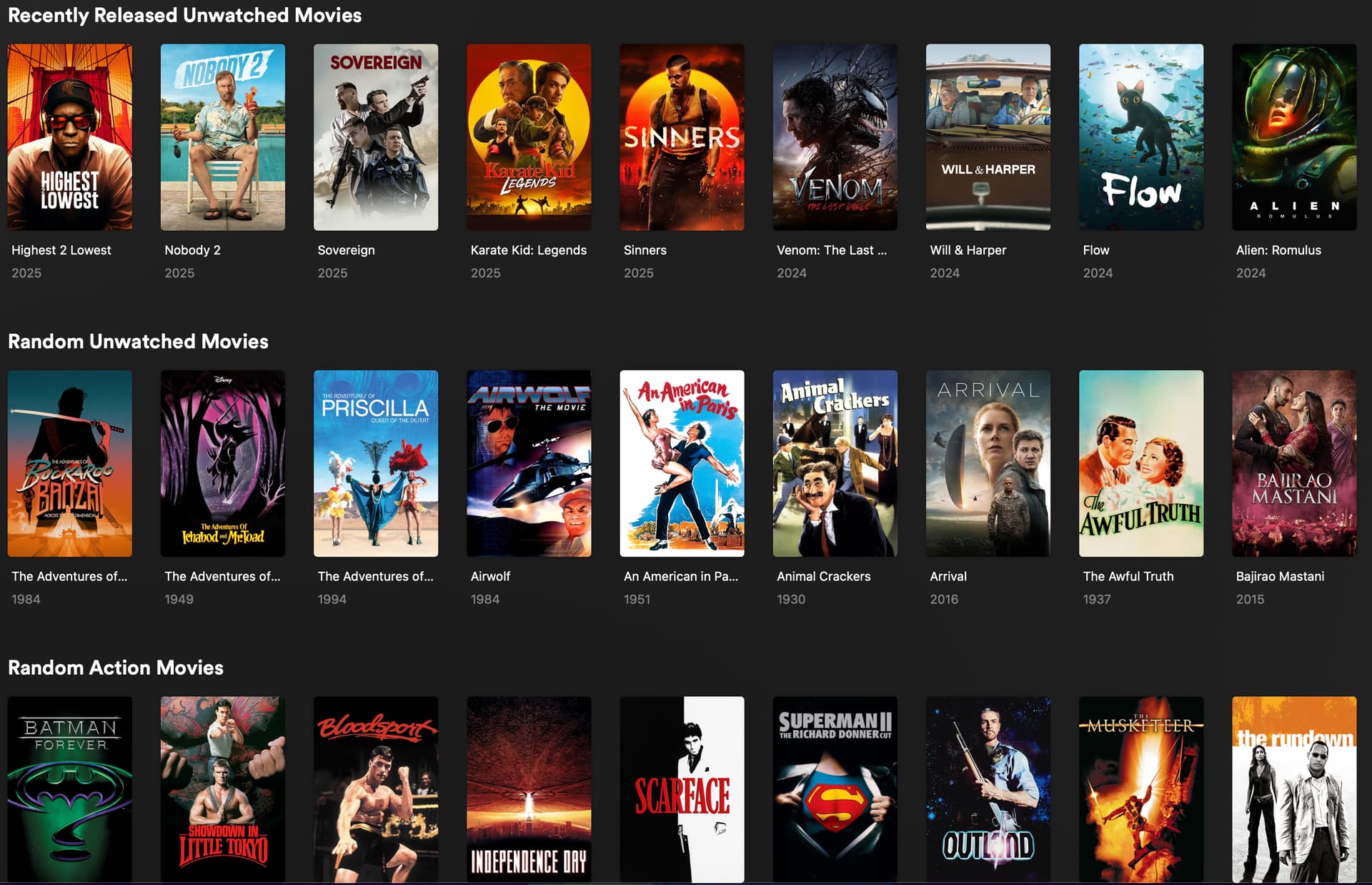
Here are those custom rows I mentioned just in more detail (no judging my titles!):

Looking at it now it looks like I gotta fix that first row - it’s in alphabetical order… not random. That’s a newer one I created and hadn’t noticed. :slight_smile:
Edit: if you have to update a row - like I just did - if you update the smart collection filters you have to remove the row from the Home Screen and re-add it for the Home Screen row to use the new filters. It also might hang when you do that but it still goes through.

Those are built using smart collections with some filter parameters (including watch history - and leveraging the watched flag is not the same as watch history for Plex though it’s a little buggy if you flip that flag). Other than those I have Continue Watching and the standard “recently added” for my movie, tv and anime library.

Those rows have drastically reduced decision fatigue when looking for something to watch. You know that thing where you scroll Netflix for half an hour trying to decide what to watch and then just fall asleep anyways? Or navigate to your library to browse the hundreds of titles even if you fiddle with filters and just click click click click row after row? With this, my family pretty much never leaves the Home Screen when trying to decide what to watch (if it isn’t already in continue watching). This is a huge QoL feature for me and Emby and Jellyfin cannot replicate it… yet. Can I live without it? Of course! But I don’t want to… and the New Experience UI doesn’t bug me nearly as much as it bugs others (justifiably) because I almost never navigate away from the Home Screen. If you dig around some of my beta feedback (not really worth the time unless you are super interested) a lot of my commentary there is around UI oddities like wasted space and element weighting and alignment for flow on the Home Screen. :slight_smile:

Emby v5 is supposed to get smart collections and the option to put custom collections on the Home Screen so I’m watching for that… but that’s quite a ways out I think.

I’ve been hoping competition from Emby and Jellyfin would push Plex a bit since they haven’t been the default media center solution for quite some time now but the problem there I think is that Plex and Emby\Jellyfin aren’t competing in the same area anymore. Plex is moving focus and resources towards it’s services and away from local media. Plex is moving more towards fewer granular options and more “do it yourself” (see the upcoming nfo file support) and less customer centric metadata management (all the new artwork restrictions for example) so that their cost cut resources can focus on recurring income streams from their services and local media is not as significant in that area (my lifetime pass was purchased long ago).

Like I said in another post, the new Plex management\philosophy\enshittification, is more likely to move me to another platform but even that is less of a push because they aren’t getting any more money from my several year old lifetime pass.

Oh, and an aspect that some folks might not realize is that Emby\Jellyfin can do audiobooks and ebooks (epub\mobi\azw) and comics (cbr\cbz). That’s something folks have been asking for from Plex but ain’t gonna happen (PlexAmp can kinda do audio books but…)

I like all this discussion on the different features and functions and experiences. I appreciate all the participation from folks who have used them extensively.

2 Likes

I don’t want to, because I’ve enjoyed using Plex for ~15 years.

But if it can’t find my libraries, what good is it to me?

I’ll have to switch to something else.

3 Likes

I like the chart with similarities and differences. Do you have a link for that?

I installed the Emby server and its Roku client and added my movies and TV shows. I haven’t encountered any problems. I’m still learning it, though. So far, I like it and I haven’t yet purchased the premium version.

Some might find this Emby blog post helpful: How to Migrate from Plex to Emby: A Step-by-Step Guide - Emby Blog - Emby Community … some good info. Some of it will overlap with Jellyfin too. I’ve found the Emby and Jellyfin documentation is also easier to browse than the Plex KB article setup. It’s laid out a bit cleaner and more accessible to find stuff you didn’t know you needed to know. I used to do documentation and KB management for IT stuff and Emby and Jellyfin follow some of the structures I prefer anyways that allow browsing for answers instead of focused on searching; searching is less useful if you don’t know what you don’t know.

Emby: Emby Documentation Home | Emby Documentation

Jellyfin: Introduction | Jellyfin

4 Likes

I am pleased that the chart was found to be useful. My primary objective is to share information effectively. As it is my original creation, I do not have an associated link to provide.

1 Like

I’m testing out Emby based on a friend’s recommendation. A lot of people suggest Jellyfin so that’ll be next.

I’ve been testing Jellyfin and Emby for awhile now. One thing I do like from a support standpoint is that you get a lot more direct response from devs on the Emby forums. My only real complaint is in regard to not great support for Apple TV, especially for 4K content (it will play fine but not switch over to HDR automatically). However, Infuse can connect to Plex, JF and Emby and play without issues.

(JF doesn’t really have better support for Apple TV devices either.)

1 Like

Same, I like the way Plex does almost everything better but even after the bugs are fixed, the interface is going to be a deal breaker.

2 Likes

I have been evaluating Jellyfin and Emby. I have them both running simultaneously on the same WIN10 PC running plex. Libraries for all 32 TB of libraries (movies, tv shows, photos) have been created in all platforms I was leaning heavily toward Jellyfin thinking I didn’t want to have to pay for Emby Premiere. It turns out, there are no premiere features that I need or require. Emby looks more polished, in my opinion. When I showed my wife all three platform running on our Roku Ultra, she agreed that Plex needs to go and she liked the Emby look much better than Jellyfin. As soon as I get all my collections setup the same as I had in Plex, Plex will be shut down. I hope to have that all done by the weekend.

5 Likes

I also hate the stupid horizontal library list, and also the way it auto-hides and reappears seemingly at random, but it is customizable somewhat (you can hide libraries or at least decide which ones to include or exclude, and you can re-arrange the order in which they appear on the list), although apparently whatever choices you make will apply across all your Roku devices and you can’t configure them differently for different TVs, unless I’ve missed something.

I just switched to Jellyfin. Took about a half hour. Easy as pie.

1 Like

Not just Roku devices… all clients; if I am remembering what was mentioned by reps correctly. I believe the push is to “unify” more aspects at account level setting so it’ll match across all clients going forward (which can be good or bad depending on personal preferences). It’ll also reduce the code\dev for client apps that won’t need to keep track of personal settings for it per device anymore.

Lots of great info in this thread - thanks to everyone for sharing it. Like many folks I’ve started to think about moving to Jellyfin or Emby since Plex released this hot pile of garbage for Roku. But there’s one big issue I haven’t seen mentioned about the conversion/migration process (or if it was mentioned I missed it). Specifically, will Emby (or Jellyfin) retain all or any of the customized info I’ve entered into Plex over the years, e.g., the studios, taglines and summaries I’ve entered, the genres I’ve assigned to my movies or TV shows, the collections I’ve created, etc.? Or would I have to re-enter all that info in the new platform? And what about the poster art? Out of the 6,200+ movies I have in Plex I’ve probably chosen (and sometimes created or obtained and stored locally) at least 4,000 of those posters rather than relying on the default posters supplied by Plex - would I have to go through all 6,200+ again and replicate that poster selection effort?

Getting damn close. Finally reclaimed my server and now Plex can’t find it again.

This is a major fustercluck and Plex seems disinterested in paying customers.

1 Like
