# Buzzing sound with PMP
**URL:** https://forums.plex.tv/t/buzzing-sound-with-pmp/681380
**Category:** Plex Players
**Created:** [January 23, 2021, 12:08am UTC](https://forums.plex.tv/t/buzzing-sound-with-pmp/681380 "2021-01-23T00:08:31Z")
**Posts on this page:** 20
**Page:** 1
### Author:  [@jvpix.com](https://forums.plex.tv/u/jvpix.com)
#### Post date: [January 23, 2021, 12:08am UTC](https://forums.plex.tv/t/buzzing-sound-with-pmp/681380/1 "2021-01-23T00:08:31Z")
Hi there, I play movies using PMP on my Windows 10 PC which is plugged into an AVR using 7.1 audio. When I play the movie A Beautiful Day in the Neighborhood, at the end when Mr. Rogers plays the piano, there is a slight buzzing sound coming from the speakers along with the piano music. this only happens while he’s playing piano. If I play the movie using the PMS through a browser (Edge), the buzzing is not there. Why would PMP be causing this buzzing sound?
thanks
---
### Author:  [@AllenSR](https://forums.plex.tv/u/AllenSR)
#### Post date: [January 23, 2021, 1:27am UTC](https://forums.plex.tv/t/buzzing-sound-with-pmp/681380/2 "2021-01-23T01:27:27Z")
Are you using the same AVR speakers in both cases? Do you have a way to play the movie through the AVR without going through the computer?
---
### Author:  [@jvpix.com](https://forums.plex.tv/u/jvpix.com)
#### Post date: [January 23, 2021, 1:30am UTC](https://forums.plex.tv/t/buzzing-sound-with-pmp/681380/3 "2021-01-23T01:30:53Z")
Yes, same avr and speakers both time. Yes, i can connect my media streamer to the avr. I’ll try that, thanks. I played the movies using headphones without having the pc connected to the avr and it was fine. But the headphones were plugged in using the usb port. Couldnt get it working ising the headphone jack.
---
### Author:  [@AllenSR](https://forums.plex.tv/u/AllenSR)
#### Post date: [January 23, 2021, 5:07am UTC](https://forums.plex.tv/t/buzzing-sound-with-pmp/681380/4 "2021-01-23T05:07:58Z")
That is weird. You blew my original theories:-(. This sounded like:
1. ground loop that is recorded on the movie
2. Ground loop between your PC and the speakers.
You should hear 1) with good headphones or the speakers and in this case both times you used the same speakers.
2) this should always be there.
It may be yet your Plex to speakers is a better quality path then the other method of playing.
Sorry can’t help more.
---
### Author:  [@AllenSR](https://forums.plex.tv/u/AllenSR)
#### Post date: [January 23, 2021, 8:34am UTC](https://forums.plex.tv/t/buzzing-sound-with-pmp/681380/5 "2021-01-23T08:34:06Z")
So how is the audio connected to the AVR? Assume it is via computer to AVR input. Do you have the luxury of connection the AVR up with digital SPDIF cable?
---
### Author:  [@AllenSR](https://forums.plex.tv/u/AllenSR)
#### Post date: [January 23, 2021, 9:18am UTC](https://forums.plex.tv/t/buzzing-sound-with-pmp/681380/6 "2021-01-23T09:18:23Z")
Wait a minute. You said you were doing 7.1 audio. I missed that. I assume then you are using an optical cable which would preclude an analog ground loop in your connection path.
There is a good chance you wouldn’t hear the buzz when listening in two channel stereo. Dolby, and all of its friends, do some real advanced signal processing and phase canceling to extract 5.1’or 7.1 out of a 2 channel signal.
---
### Author:  [@OttoKerner](https://forums.plex.tv/u/OttoKerner)
#### Post date: [January 23, 2021, 10:01am UTC](https://forums.plex.tv/t/buzzing-sound-with-pmp/681380/7 "2021-01-23T10:01:59Z")
First things first:
- what type of audio stream is played? [https://support.plex.tv/articles/201998867-investigate-media-information-and-formats/](https://support.plex.tv/articles/201998867-investigate-media-information-and-formats/)
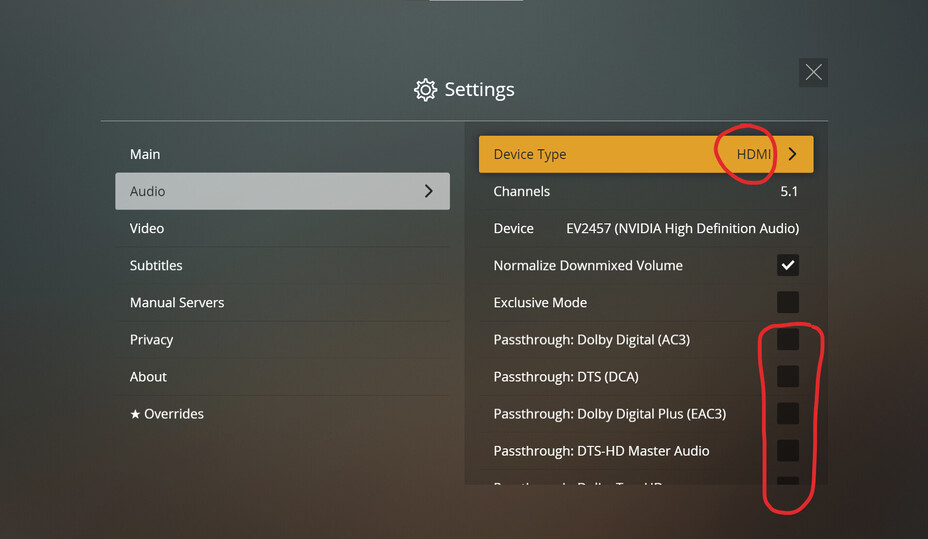
- Is “passthrough” activated in the preferences of PMP?
- what kind of connection exists between the PC and the TV?
- how in the signal chain is the sound system connected? What kind of connection?
---
### Author:  [@jvpix.com](https://forums.plex.tv/u/jvpix.com)
#### Post date: [January 23, 2021, 3:24pm UTC](https://forums.plex.tv/t/buzzing-sound-with-pmp/681380/8 "2021-01-23T15:24:13Z")
The pc is connected to the denon avr using an hdmi cable. The computer has an 1050Ti video card. So i guess the audio is coming from that? I can try setting the avr to stereo mode and see what happens, that’s a great idea. Plus im going to try plugging in my media streamer and see how it sounds
---
### Author:  [@jvpix.com](https://forums.plex.tv/u/jvpix.com)
#### Post date: [January 23, 2021, 3:33pm UTC](https://forums.plex.tv/t/buzzing-sound-with-pmp/681380/9 "2021-01-23T15:33:09Z")
First things first:
-
Mkv remux files. I tried two, one was 4k and the other was 1080p.
- not sure but I’ll check. But if i turn off the avr, the movie still plays on the tv
- pc is connected to avr using hdmi cable. Avr connected to tv using hdmi cable. Pc has a 1050Ti video card
- not sure what you mean.
---
### Author:  [@jvpix.com](https://forums.plex.tv/u/jvpix.com)
#### Post date: [January 23, 2021, 4:28pm UTC](https://forums.plex.tv/t/buzzing-sound-with-pmp/681380/10 "2021-01-23T16:28:59Z")
Update: i put the avr in stereo mode and the noise was still there. I swapped out the pc with a media streamer playing the same file and the noise was gone. I played it in both dts surround and stereo mode. So the noise is definitely coming from the pc. I checked PMP for the passthrough setting but couldn’t find it.
---
### Author:  [@OttoKerner](https://forums.plex.tv/u/OttoKerner)
#### Post date: [January 23, 2021, 5:13pm UTC](https://forums.plex.tv/t/buzzing-sound-with-pmp/681380/11 "2021-01-23T17:13:39Z")
> [@jvpix.com](#):
>
> Mkv remux files. I tried two, one was 4k and the other was 1080p.
The _audio_ format is most interesting.
---
### Author:  [@jvpix.com](https://forums.plex.tv/u/jvpix.com)
#### Post date: [January 23, 2021, 5:58pm UTC](https://forums.plex.tv/t/buzzing-sound-with-pmp/681380/12 "2021-01-23T17:58:43Z")
Ok I’ll get you that later. Thanks
---
### Author:  [@jvpix.com](https://forums.plex.tv/u/jvpix.com)
#### Post date: [January 23, 2021, 8:42pm UTC](https://forums.plex.tv/t/buzzing-sound-with-pmp/681380/13 "2021-01-23T20:42:12Z")
I’m not sure which is the audio format, but here is some info:
English DTS-HD MA 7.1
codec: AC3
is this what you’re looking for?
---
### Author:  [@OttoKerner](https://forums.plex.tv/u/OttoKerner)
#### Post date: [January 24, 2021, 10:00am UTC](https://forums.plex.tv/t/buzzing-sound-with-pmp/681380/14 "2021-01-24T10:00:10Z")
These are both audio formats. But they are contradicting each other. An audio stream cannot be both of these at the same time.
So which one is selected when you play the movie?
Please copy the first ~20 lines from the [Plex **XML** info](https://support.plex.tv/hc/en-us/articles/201998867-Investigate-Media-Information-and-Formats "Plex XML info") of this movie.
---
### Author:  [@jvpix.com](https://forums.plex.tv/u/jvpix.com)
#### Post date: [January 24, 2021, 2:51pm UTC](https://forums.plex.tv/t/buzzing-sound-with-pmp/681380/15 "2021-01-24T14:51:28Z")
I don’t know where to get that info, but if I click on the Get Info option of the movie, I get this:
- Codec H264
- Bitrate 25938 kbps
- Language English
- Bit Depth 8
- Chroma Location left
- Chroma Subsampling 4:2:0
- Coded Height 1088
- Coded Width 1920
- Frame Rate 23.976 fps
- Height 1080
- Level 4.1
- Profile high
- Ref Frames 2
- Scan Type progressive
- Title A.Beautiful.Day.in.the.Neighborhood.2019.1080p.BluRay.REMUX.AVC.DTS-X.7.1-FGT
- Width 1920
- Display Title 1080p (H.264)
- Extended Display Title A.Beautiful.Day.in.the.Neighborhood.2019.1080p.BluRay.REMUX.AVC.DTS-X.7.1-FGT (1080p H.264)
- Codec DCA
- Channels 8
- Bitrate 5953 kbps
- Language English
- Audio Channel Layout 7.1
- Bit Depth 24
- Profile ma
- Sampling Rate 48000 Hz
- Title A.Beautiful.Day.in.the.Neighborhood.2019.1080p.BluRay.REMUX.AVC.DTS-X.7.1-FGT
- Display Title English (DTS-HD MA 7.1)
- Extended Display Title A.Beautiful.Day.in.the.Neighborhood.2019.1080p.BluRay.REMUX.AVC.DTS-X.7.1-FGT (English DTS-HD MA 7.1)
- Codec AC3
- Channels 6
- Bitrate 640 kbps
- Language English
- Audio Channel Layout 5.1(side)
- Sampling Rate 48000 Hz
- Title A.Beautiful.Day.in.the.Neighborhood.2019.1080p.BluRay.REMUX.AVC.DTS-X.7.1-FGT
- Display Title English (AC3 5.1)
- Extended Display Title A.Beautiful.Day.in.the.Neighborhood.2019.1080p.BluRay.REMUX.AVC.DTS-X.7.1-FGT (English AC3 5.1)
---
### Author:  [@OttoKerner](https://forums.plex.tv/u/OttoKerner)
#### Post date: [January 24, 2021, 7:40pm UTC](https://forums.plex.tv/t/buzzing-sound-with-pmp/681380/16 "2021-01-24T19:40:44Z")
> [@jvpix.com](#):
>
> I don’t know where to get that info,
I set a link for you above, which describes where to get it.
Your details tell us at least that the video file has 2 audio streams. Now we just need to know which one did you select for playback.
You can also see which one is selected when you go to the video’s preplay screen in the web app.
---
### Author:  [@jvpix.com](https://forums.plex.tv/u/jvpix.com)
#### Post date: [January 24, 2021, 8:07pm UTC](https://forums.plex.tv/t/buzzing-sound-with-pmp/681380/17 "2021-01-24T20:07:17Z")
so i didnt give you the info you need?
---
### Author:  [@OttoKerner](https://forums.plex.tv/u/OttoKerner)
#### Post date: [January 25, 2021, 9:48am UTC](https://forums.plex.tv/t/buzzing-sound-with-pmp/681380/18 "2021-01-25T09:48:40Z")
No, I still don’t know which of the two audio streams you did select.
---
### Author:  [@OttoKerner](https://forums.plex.tv/u/OttoKerner)
#### Post date: [January 25, 2021, 10:45am UTC](https://forums.plex.tv/t/buzzing-sound-with-pmp/681380/19 "2021-01-25T10:45:33Z")
Another detail which is very important:
Which mode of PMP are you using? The TV mode or the web mode?
The audio settings of interest are only visible in the TV mode.
---
### Author:  [@jvpix.com](https://forums.plex.tv/u/jvpix.com)
#### Post date: [January 25, 2021, 6:08pm UTC](https://forums.plex.tv/t/buzzing-sound-with-pmp/681380/20 "2021-01-25T18:08:25Z")
Is there a way i can send you the xml file of the movie? I cant post it here its too big. As for the pmp, im not using the tv mode so i guess its the web mode. If i switch to tv mode, i dont seem to have access to settings. I used to though, not sure why i dont have settings anymore. I’m using pmp version 4.29.2.
[Next page](https://forums.plex.tv/t/buzzing-sound-with-pmp/681380.md?page=2)