Server Version#: Windows 10
Player Version#: Not sure what you are referring to
I’m about to just give up trying to setup Remote Access using my Plex Media Server, but I’m coming here for help because I’m sure I’m not the only person having this problem. When I looked through the older topics regarding this issue, it’s stopped logging replies at December 2019. So, I’m looking to get this discussion started up again because maybe there’s new information out there that I’m missing.
I’ve enable Remote Access on my route and I’ve even setup the NAT/Gaming as well. In addition, I have my Plex Server set for Manual Port Forwarding and it’s set at 32400. All that keeps happening is that I’m getting about 1 minute of a connection, then all of a sudden it says ‘Not available outside your home network’.
At this point, I’m almost considering seeing if I can pay someone to fix this issue for me. Ha!
Anyway, can someone help out? Please.
Have you assigned a static IP address to your Plex Media Server or reserved an IP address for it in the router?
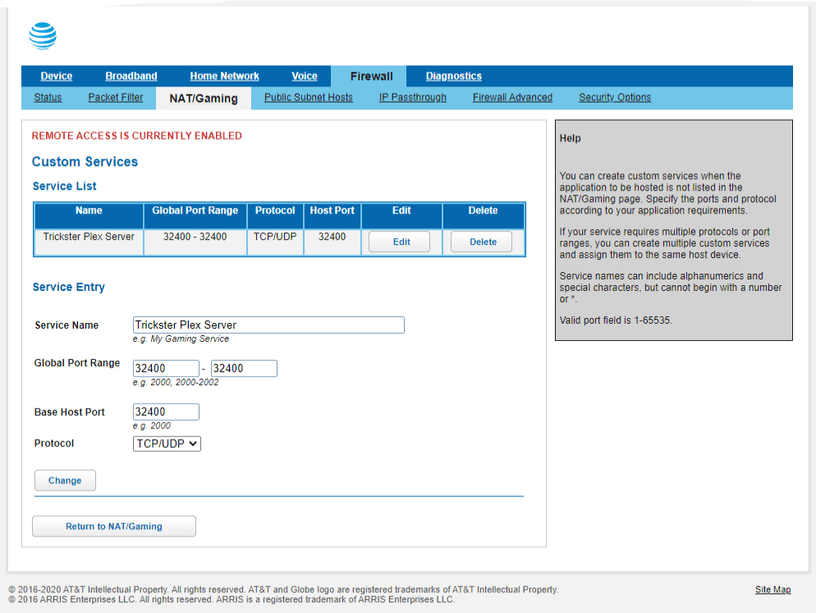
Please share a screenshot of the port forwarding rule in the router.
What is displayed in canyouseeme.org (Success/Error)? Use a system on the same local network as your Plex Server. Substitute 32400 for the default port.
Not sure if it’s OK to add on to the same discussion, but I have the same issue as this poster.
I have the same router and followed the same steps as the poster.
Running Plex Media Server on a windows 10 machine.
I am not aware of having any VPN software.
I am running McAfee, and I tried turning off the firewall which did not help.
Plex Server Version 1.20.2.3402
I assigned a static IP address to the computer running Plex Media Server.
I did this at control panel, view network status and tasks, change adapter settings, right click “ethernet” - properties, Internet Protocol Version 4 (TCP/IPv4), properties. Then I set an ip address and copied over info on subnet mask and default gateway. I also set DNS servers manually. Explaining the steps since I don’t really know what I’m doing.
I uploaded two screen shots of my attempt to set up port forwarding. I was uncertain about the device, but I picked the desktop where the plex server is running.
At canyouseeme, I got the following error message: Error: I could not see your service on xx.xx.xxx.xx on port ( 32400 )
Reason: Connection timed out
Leaving a reply for others. It turns out I was pointing to the wrong desktop on my network. Once I changed the device to the one that corresponded to the correct IP address, this appeared to fix this.
The way I determined the correct device was I went to my AT&T router login, firewall, ip passthrough, changed the allocation method to default server, which allowed me to review the device list (by default server internal address). At that device list, the IP address of each device is included, which made it obvious I had chosen the wrong device originally.
Thanks a lot. I had given up a bit on this matter, but I will definitely check this out today. I’ll reply tomorrow to let you know how it turns out for me.
Ok, I took a break from this because this was giving me a major headache. Now I’m back and it’s still giving me an headache, because I’m at a loss as to why I can’t get my Remote Access to work. My system can’t be this complicate to setup.
I’ve gotten an successful response when testing my ip address on canyouseeme.org
The version of Plex Media Server I’m using is 1.20.3.3483, but this shouldn’t make that big of a difference I check for an update pretty regularly.
In terms of setting up an static IP address, I’m pretty confident that I have it all setup correctly because I can see the IP address listed on the Remote Access page where it shows
Private: My Static IP Address Public IP Address coming into router Internet
Then, I have manually specify public port checked along with me using 32400 as my port
At this point, I almost feel I need to have someone physically in my house looking at my setup because I have no clue as to what I’m overlooking right now.
Please assist. Thanks!
P.S.
Could the problem be that I need to restart my router once I’ve assigned the static IP address? Or, is that not necessary?
Just curious if your setup is still functioning well. I followed the steps you laid out for me but system is still not connecting. Question, did you change the IP Passthrough from off to Default Server? Or, did you just select that in order to verify which ip address you needed to be using?
In Nat/Gaming you have to select your plex server from the drop down box .
The host application Service box should read ( Plex media server) not Plex. If it is not in the list choose the ( Custom Services) box at the bottom , in the (service name box) type in Plex Media Server.
The Device needed will be the device Hosting the Plex Media Server e.g. Dads Computer or the Name you gave the host computer. Then click add, now go back to NAT/Gaming and select Plex Media Server from the service drop down menu, then make sure the name of your host device is selected in the list as the Needed by Device box the click add. Refresh Plex .
I did what bdiddy said and mine is now working. I had set it to localhost thinking that would cover all devices connecting! Had to do it to the exact device hosting the plex server. All good now