# Can't figure out why transcoding
**URL:** https://forums.plex.tv/t/cant-figure-out-why-transcoding/826917
**Category:** Plex Media Server
**Created:** [January 15, 2023, 10:34am UTC](https://forums.plex.tv/t/cant-figure-out-why-transcoding/826917 "2023-01-15T10:34:43Z")
**Posts on this page:** 20
**Page:** 1
### Author:  [@docimotroy](https://forums.plex.tv/u/docimotroy)
#### Post date: [January 15, 2023, 10:34am UTC](https://forums.plex.tv/t/cant-figure-out-why-transcoding/826917/1 "2023-01-15T10:34:43Z")
I spent several weeks here awhile back to no avail, i have a family member who runs a plex server and is a pc guy and he couldnt help me, i contacted my Internet provide (i was told to get a static IP, i did that and that didnt help), ive changed settings, ive had a ton of advice but no one seems to have “the” answer. Why do my videos all transcode when family members watch them. I want them to see the same quality i upload.
I currently am using a plex pass. my videos are on an external hard drive (same as my family member has done for many years) I’ll include screenshots. Anyone who thinks they can put a finger on it please help. Very frustrated indeed…


---
### Author:  [@docimotroy](https://forums.plex.tv/u/docimotroy)
#### Post date: [January 15, 2023, 10:35am UTC](https://forums.plex.tv/t/cant-figure-out-why-transcoding/826917/2 "2023-01-15T10:35:25Z")
That is my current set up but ive tried many different configurations based on advice all to no avail…
---
### Author:  [@skc176](https://forums.plex.tv/u/skc176)
#### Post date: [January 15, 2023, 10:48am UTC](https://forums.plex.tv/t/cant-figure-out-why-transcoding/826917/3 "2023-01-15T10:48:11Z")
Your family members plex clients (Firestick, AppleTV or TV Apps, etc) need to have remote/internet streaming set to max or original quality and Direct Play and Direct Stream to Allow/on. Settings are a little different on different platforms. This will give original quality when watching providing you have enough upload bandwidth and they have enough download bandwidth.
---
### Author:  [@docimotroy](https://forums.plex.tv/u/docimotroy)
#### Post date: [January 15, 2023, 1:27pm UTC](https://forums.plex.tv/t/cant-figure-out-why-transcoding/826917/4 "2023-01-15T13:27:19Z")
What about my settings?
---
### Author:  [@skc176](https://forums.plex.tv/u/skc176)
#### Post date: [January 15, 2023, 1:40pm UTC](https://forums.plex.tv/t/cant-figure-out-why-transcoding/826917/5 "2023-01-15T13:40:33Z")
You shouldn’t need to change anything. As you have a Plex Pass, make sure you turn on Hardware transcoding - but hopefully your server will not need to transcode at all - this will help if it does.
---
### Author:  [@docimotroy](https://forums.plex.tv/u/docimotroy)
#### Post date: [January 15, 2023, 2:16pm UTC](https://forums.plex.tv/t/cant-figure-out-why-transcoding/826917/6 "2023-01-15T14:16:53Z")
I enclosed a pic of how im set up with the hardware transcoding, is it correct. I didnt have a plex pass before, was that a reason why it may have been transcoding. When we used to use my nephews plex, none of us ever changed any settings on our end btw. So if all my settings appear to be ok, then i have to make sure my friends and family have max/original quality and direct play/ stream on and you think that will do it? Thx for the info
---
### Author:  [@docimotroy](https://forums.plex.tv/u/docimotroy)
#### Post date: [January 15, 2023, 2:22pm UTC](https://forums.plex.tv/t/cant-figure-out-why-transcoding/826917/7 "2023-01-15T14:22:19Z")

---
### Author:  [@skc176](https://forums.plex.tv/u/skc176)
#### Post date: [January 15, 2023, 2:31pm UTC](https://forums.plex.tv/t/cant-figure-out-why-transcoding/826917/8 "2023-01-15T14:31:18Z")
It all looks fine. Just check the box ‘Use hardware acceleration when available’.
Plex pass only enable you to use hardware acceleration. It will still transcode, if needed, with or without Plex Pass, just with the check boxes it will use the GPU for transcoding instead of the CPU. You can still direct play/stream without the pass. Just make sure you’ve done what I’ve said in my first reply - setting clients to max/original quality etc
---
### Author:  [@skc176](https://forums.plex.tv/u/skc176)
#### Post date: [January 15, 2023, 2:37pm UTC](https://forums.plex.tv/t/cant-figure-out-why-transcoding/826917/9 "2023-01-15T14:37:04Z")
Settings should look something like this on the clients:

---
### Author:  [@Divideby0](https://forums.plex.tv/u/Divideby0)
#### Post date: [January 15, 2023, 3:57pm UTC](https://forums.plex.tv/t/cant-figure-out-why-transcoding/826917/10 "2023-01-15T15:57:29Z")
I think you’re missing something here. The server claims that remote access is not possible, so I suspect that all users are forced to use Plex’s [relay](https://support.plex.tv/articles/216766168-accessing-a-server-through-relay/) system to get to the server. This uses Plex’s servers to forward the traffic, so to keep too many people from using up their internet, they restrict any video streams through it to ~2 Mbps. Unless you use extremely low quality 480p rips, this will pretty much guarantee a transcode by the server to that quality.
- To verify, check the server dashboard when someone is streaming. You should see a yellow circle with a `!` in it, and the word `Indirect`, like so:
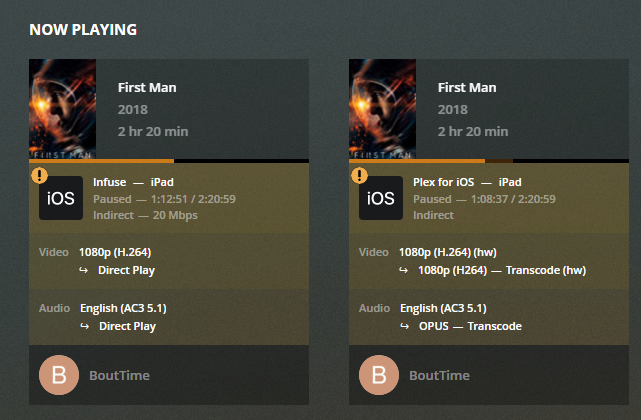
Most likely the OP does not have port forwarding enabled. Go into your router (probably a router/modem combo), and do port forwarding for port `32400` to your server’s IP address, which is _(checks screenshot)_ `192.168.1.5`. Port forwarding may seem a bit scary, but it’s eventually pretty simple if you enter the correct information in the correct fields. There are too many different router models for me to give step-by-step instructions for you, but if you google `(router model) + port forward` you may find someone that has created a tutorial for your device.
I don’t know who told you that you needed a static IP address for your internet. That shouldn’t be necessary here. If your IP ever changes, the Plex server automatically detects that and updates this IP record for anyone that wants to access it.
---
### Author:  [@skc176](https://forums.plex.tv/u/skc176)
#### Post date: [January 15, 2023, 4:12pm UTC](https://forums.plex.tv/t/cant-figure-out-why-transcoding/826917/11 "2023-01-15T16:12:57Z")
D’Oh. I just saw that. The most obvious thing. Remote access was not working!
---
### Author:  [@mbmast](https://forums.plex.tv/u/mbmast)
#### Post date: [January 15, 2023, 7:52pm UTC](https://forums.plex.tv/t/cant-figure-out-why-transcoding/826917/12 "2023-01-15T19:52:20Z")
Dear OP (i.e. @docimotroy):
1. In the future, please try to be more descriptive in your question’s titles. Many users here who are capable of helping with this specific problem may have just skipped your post because they have no idea what you’re frustrated about.
2. @Divideby0 has it exactly right. Follow those instructions.
---
### Author:  [@docimotroy](https://forums.plex.tv/u/docimotroy)
#### Post date: [January 15, 2023, 8:50pm UTC](https://forums.plex.tv/t/cant-figure-out-why-transcoding/826917/14 "2023-01-15T20:50:17Z")
Sorry and ty
---
### Author:  [@docimotroy](https://forums.plex.tv/u/docimotroy)
#### Post date: [January 15, 2023, 8:51pm UTC](https://forums.plex.tv/t/cant-figure-out-why-transcoding/826917/15 "2023-01-15T20:51:25Z")
It says remote access isn’t working but in actuality it is I have a few people I share with, the problem is it transcodes so they see it at lesser quality
---
### Author:  [@skc176](https://forums.plex.tv/u/skc176)
#### Post date: [January 15, 2023, 9:11pm UTC](https://forums.plex.tv/t/cant-figure-out-why-transcoding/826917/16 "2023-01-15T21:11:40Z")
Look at @Divideby0’s post above. As remote access is not working, people can still connect but have reduced quality due to an indirect connection. Your original screenshot also says Not available outside your network in red. It should say Fully available outside your network in green. Look at my attached screen shot. You will need port forward as described by @Divideby0.

---
### Author:  [@docim](https://forums.plex.tv/u/docim)
#### Post date: [January 15, 2023, 9:24pm UTC](https://forums.plex.tv/t/cant-figure-out-why-transcoding/826917/17 "2023-01-15T21:24:09Z")
It used to work but then it would keep turning from red to green, I think my nephew set the specific port for that reason, I guess that wasn’t the solution
---
### Author:  [@skc176](https://forums.plex.tv/u/skc176)
#### Post date: [January 15, 2023, 9:38pm UTC](https://forums.plex.tv/t/cant-figure-out-why-transcoding/826917/18 "2023-01-15T21:38:54Z")
Open the 32400 port on your router. Then click RETRY on Plex. Then it should work.
Have a look at this page: [https://support.plex.tv/articles/200931138-troubleshooting-remote-access/?utm\_campaign=Plex%20Apps&utm\_medium=Plex%20Web&utm\_source=Plex%20Apps](https://support.plex.tv/articles/200931138-troubleshooting-remote-access/?utm_campaign=Plex%20Apps&utm_medium=Plex%20Web&utm_source=Plex%20Apps)
---
### Author:  [@JaysPlex](https://forums.plex.tv/u/JaysPlex)
#### Post date: [January 15, 2023, 9:45pm UTC](https://forums.plex.tv/t/cant-figure-out-why-transcoding/826917/19 "2023-01-15T21:45:08Z")
Take a screen shot of your routers static ip setting and the port forwarding rules
Do you have a vpn enabled on the computer where the Plex server resides?
You also have to check your firewall to see if Plex is being blocked there
I would just disable both and see if it starts working
---
### Author:  [@docimotroy](https://forums.plex.tv/u/docimotroy)
#### Post date: [January 15, 2023, 9:46pm UTC](https://forums.plex.tv/t/cant-figure-out-why-transcoding/826917/20 "2023-01-15T21:46:46Z")
Thx for the info I’ll check it out after work 👍
---
### Author:  [@docimotroy](https://forums.plex.tv/u/docimotroy)
#### Post date: [January 15, 2023, 9:48pm UTC](https://forums.plex.tv/t/cant-figure-out-why-transcoding/826917/21 "2023-01-15T21:48:12Z")
I use a vpn sometimes I no longer have a static ip I cancelled it because I thought it wasn’t working. Should I get it again?
[Next page](https://forums.plex.tv/t/cant-figure-out-why-transcoding/826917.md?page=2)