# Dll errors
**URL:** https://forums.plex.tv/t/dll-errors/426296
**Category:** General Discussions
**Tags:** server-windows
**Created:** [June 24, 2019, 3:20pm UTC](https://forums.plex.tv/t/dll-errors/426296 "2019-06-24T15:20:10Z")
**Posts on this page:** 9
**Page:** 1
### Author:  [@igadget791](https://forums.plex.tv/u/igadget791)
#### Post date: [June 24, 2019, 3:20pm UTC](https://forums.plex.tv/t/dll-errors/426296/1 "2019-06-24T15:20:10Z")
I keep getting errors (attached images). I have numbered them in order of appearance.
I have tried to reinstall as suggested by the error message and that has made no difference.
Plex server runs fine and I only get the messages when the machines is rebooted.
Windows 10 Pro 64bit
Dedicated PC:- Core i5-4590 3.3GHz, 8GB Ram
Latest Plex version:- PlexMediaServer-1.16.1.1246-1d09ac057-x86
Any help appreciated
Thanks 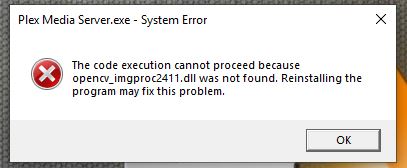
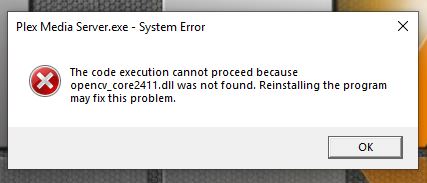

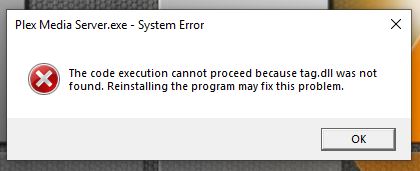
---
### Author:  [@Xhaka](https://forums.plex.tv/u/Xhaka)
#### Post date: [June 24, 2019, 4:49pm UTC](https://forums.plex.tv/t/dll-errors/426296/2 "2019-06-24T16:49:26Z")
A friend has those missing .dll errors a while back.
Any nVidia graphics in your system?
I’m pretty sure he reinstalled all his nVidia stuff and the issue cleared.
---
### Author:  [@igadget791](https://forums.plex.tv/u/igadget791)
#### Post date: [June 24, 2019, 6:50pm UTC](https://forums.plex.tv/t/dll-errors/426296/3 "2019-06-24T18:50:14Z")
Thanks for the reply
PC is using Intel HD Graphics
---
### Author:  [@Xhaka](https://forums.plex.tv/u/Xhaka)
#### Post date: [June 24, 2019, 8:09pm UTC](https://forums.plex.tv/t/dll-errors/426296/4 "2019-06-24T20:09:47Z")
Sorry cant help then.
---
### Author:  [@igadget791](https://forums.plex.tv/u/igadget791)
#### Post date: [June 24, 2019, 8:50pm UTC](https://forums.plex.tv/t/dll-errors/426296/5 "2019-06-24T20:50:16Z")
You tried though and I appreciate it 🙂
---
### Author:  [@igadget791](https://forums.plex.tv/u/igadget791)
#### Post date: [June 25, 2019, 11:38am UTC](https://forums.plex.tv/t/dll-errors/426296/6 "2019-06-25T11:38:19Z")
There used to be a lot of help on this forum that was great.
Now there appears to be none (not ignoring Hitsville-UK)
Is there no help?
---
### Author:  [@OttoKerner](https://forums.plex.tv/u/OttoKerner)
#### Post date: [June 25, 2019, 11:49am UTC](https://forums.plex.tv/t/dll-errors/426296/7 "2019-06-25T11:49:15Z")
Re-download the installer. Use a different web browser or even a ‘download manager’ software.
Verify the digital signature of the downloaded file for validity.
Update “manually”:
- Stop/quit/end Plex Server with the tray icon
- deinstall Plex Server with the regular ‘Apps’ control panel of Windows (do **not** use 3rd party ‘Uninstaller’ software like Revo etc.)
- for safety, reboot Windows
- download the installation exe of the newer version and install it
(If you want to install an **older** version of PMS, take a look into `%LOCALAPPDATA%\Plex Media Server\Updates`)
---
### Author:  [@igadget791](https://forums.plex.tv/u/igadget791)
#### Post date: [June 25, 2019, 6:21pm UTC](https://forums.plex.tv/t/dll-errors/426296/8 "2019-06-25T18:21:58Z")
Thank you Otto, I will give it a try.
I did try a manual install but will uninstall and reinstall as you suggest
---
### Author:  [@system](https://forums.plex.tv/u/system)
#### Post date: [September 23, 2019, 6:26pm UTC](https://forums.plex.tv/t/dll-errors/426296/9 "2019-09-23T18:26:52Z")
This topic was automatically closed 90 days after the last reply. New replies are no longer allowed.