Server Version#: 1.29.0.6244
Player Version#:
Tuner Make/Model: HDHR5-2US
Guide/Lineup name: Local OTA
Using XMLTV?: I don’t think so?
Channel number/Name: all tested
Over the weekend I moved my plex server from an install on Synology to a Ubuntu system. I followed the instructions for migrating libraries from the plex website and all went well.
My setup is now plex running on an Ubuntu box with an SMB share that points to a single PlexMedia folder which contains Movies and Shows. These are pointed to separately within Plex.
The only remaining item that I have yet to iron out is that, upon conclusion of a DVR recording, Plex thinks that it is recording long after the program is over, it has been processed with comskip, and added to the library. I can see/watch/delete the show in the library and up in the corner the activity tab is still spinning. It also shows that whichever tuner was being used by that recording is still in use. The HDHR unit, however, confirms that it has stopped being used.
I tried it both with and without comskip, tried watching Live TV to force it to choose which tuner to end the recording on (it did not prompt me that they were is use even though it seems to think they are).
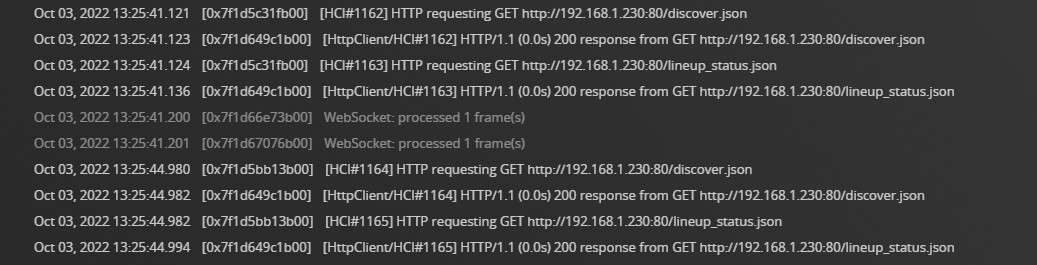
When I look at the console, I just see this message over and over (192.168.1.230 is the tuner IP):
Have I messed up something up in the migration? I even deleted the tuner, deleted the entire epg folder within ubuntu, and readded the tuner and rescanned. It seems like plex is working normally in reality, but is giving a false activity marker.
Do you happen to have “Convert Video While Recording” enabled (On)? If so, try setting it to “Off.” I’ve experienced what you described when that was enabled on my server, but that was a long time ago. I haven’t tested it recently.
@pshanew
I did check that box is unchecked after you mentioned it. I’ve never been able to use it before as the old synology wasn’t powerful enough to keep up, so it remains unchecked.
@pl_5309
I had a scheduled recording last night. It recorded and saved as and shows up in the library, but as of this morning it is still spinning up around the activity icon telling me the recording is in progress.
I ended up solving this (as far as I can tell) in an expected (to me) way.
My network was initially set to use ANY network adapter. The server I migrated from was set to use a specific adapter as it had many. It seems like this, or just the general use of ANY (this at one point confused the other server too).
In any case, this seems to have solved the problem. I started and let run some partial recording of TV today and they all concluded properly. Will test with some complete recordings scheduled tonight.