# Extras with Multiple Editions - What Am I Missing?
**URL:** https://forums.plex.tv/t/extras-with-multiple-editions-what-am-i-missing/923555
**Category:** Metadata & Adding Files
**Tags:** server-synology
**Created:** [June 19, 2025, 6:34pm UTC](https://forums.plex.tv/t/extras-with-multiple-editions-what-am-i-missing/923555 "2025-06-19T18:34:12Z")
**Posts on this page:** 3
**Page:** 1
### Author:  [@jlg3](https://forums.plex.tv/u/jlg3)
#### Post date: [June 19, 2025, 6:34pm UTC](https://forums.plex.tv/t/extras-with-multiple-editions-what-am-i-missing/923555/1 "2025-06-19T18:34:12Z")
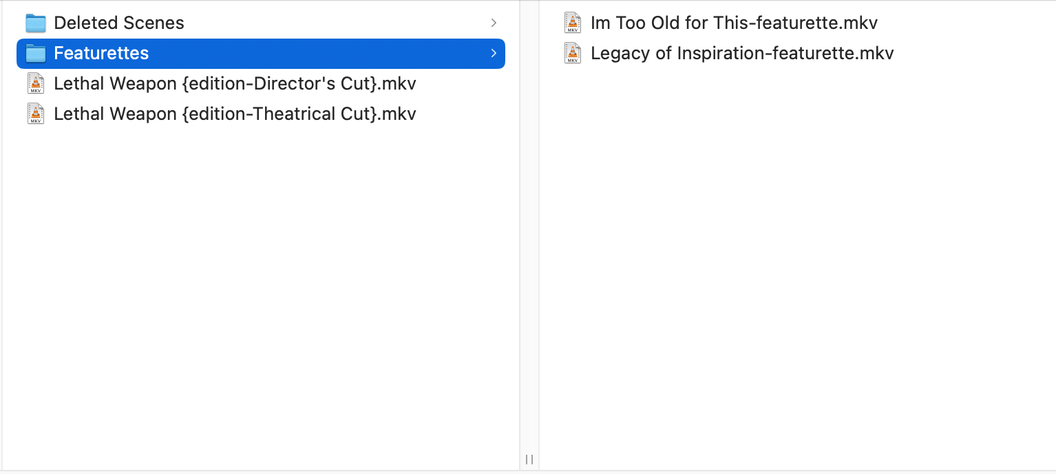
I’m unable to get extras to show in Plex with a movie that has multiple editions. I’ve followed the documented naming conventions with the files in the same directory as the movies, and with the extras in separate folders in side the same directory as the movies. After refreshing metadata on the movie, the extras still don’t show.
Screenshots below, any ideas?


---
### Author:  [@FordGuy61](https://forums.plex.tv/u/FordGuy61)
#### Post date: [June 19, 2025, 6:56pm UTC](https://forums.plex.tv/t/extras-with-multiple-editions-what-am-i-missing/923555/2 "2025-06-19T18:56:25Z")
**Naming**
If using subfolders, you do not need the inline naming. For example, use `.../Deleted Scenes/Deleted Scenes.mkv`, not `.../Deleted Scenes/Deleted Scenes-deleted.mkv` (it still works, just isn’t needed).
**Editions and Extras**
The editions must be in separate folders.
To have the extras appear with both editions, add them to both folders.
You _might_ be able to use a symlink so the extras do not take up double the space. I’ve never tried it, so don’t know for sure that it works. Maintaining the symlinks would be manual, via Linux CLI. If the files were ever moved/renamed/etc. you would have to fix the symlinks yourself.
**Reference**
[Plex Documentation](https://support.plex.tv/articles/) → [Your Media](https://support.plex.tv/articles/categories/your-media/)
→ [Multiple Editions - Movies](https://support.plex.tv/articles/multiple-editions/)
→ [Local Files for Movie Trailers & Extras](https://support.plex.tv/articles/local-files-for-trailers-and-extras/)
It is mentioned in the Movie Trailers & Extras document, not in the Editions document.
_ **Note** : If you’re making use of multiple editions for movies, you need to make sure that each edition is stored in its own named movie directory. The local trailers and extras can then be placed inside that specific edition folder, like normal. See information on [naming movie files/folders](https://support.plex.tv/articles/naming-and-organizing-your-movie-media-files/)._
---
### Author:  [@system](https://forums.plex.tv/u/system)
#### Post date: [September 17, 2025, 6:56pm UTC](https://forums.plex.tv/t/extras-with-multiple-editions-what-am-i-missing/923555/3 "2025-09-17T18:56:39Z")
This topic was automatically closed 90 days after the last reply. New replies are no longer allowed.