# Fully accessible outside your network.......NOT!
**URL:** https://forums.plex.tv/t/fully-accessible-outside-your-network-not/406945
**Category:** Remote Access
**Tags:** server-windows
**Created:** [May 1, 2019, 10:51pm UTC](https://forums.plex.tv/t/fully-accessible-outside-your-network-not/406945 "2019-05-01T22:51:58Z")
**Posts on this page:** 20
**Page:** 1
### Author:  [@brianzx7](https://forums.plex.tv/u/brianzx7)
#### Post date: [May 1, 2019, 10:51pm UTC](https://forums.plex.tv/t/fully-accessible-outside-your-network-not/406945/1 "2019-05-01T22:51:58Z")
Server Version#:1.15.3.876
Player Version#:Plex.tv
My Remote Access on the plex server says that it is fully accessible outside your network, however, I cannot reach it from any device or even the webapp. After I log into the webapp for instance, it just says “The Server “blablabla” is unavailable”.
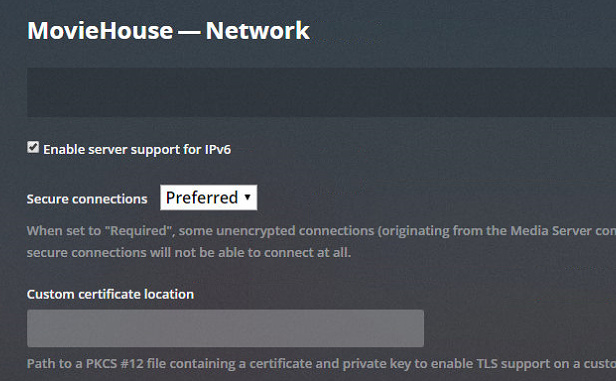
The secure setting is set to “Preferred”
Help please.
Thanks,
~Brian
---
### Author:  [@BigWheel](https://forums.plex.tv/u/BigWheel)
#### Post date: [May 1, 2019, 10:58pm UTC](https://forums.plex.tv/t/fully-accessible-outside-your-network-not/406945/2 "2019-05-01T22:58:58Z")
> [@brianzx7](#):
>
> After I log into the webapp for instance, it just says “The Server “blablabla” is unavailable”.
If it is unavailable how are you accessing the settings?
---
### Author:  [@brianzx7](https://forums.plex.tv/u/brianzx7)
#### Post date: [May 1, 2019, 11:00pm UTC](https://forums.plex.tv/t/fully-accessible-outside-your-network-not/406945/3 "2019-05-01T23:00:15Z")
Locally on the server (I use Team Viewer to get to the server)
---
### Author:  [@BigWheel](https://forums.plex.tv/u/BigWheel)
#### Post date: [May 1, 2019, 11:02pm UTC](https://forums.plex.tv/t/fully-accessible-outside-your-network-not/406945/4 "2019-05-01T23:02:40Z")
are you using [https://app.plex.tv/desktop](https://app.plex.tv/desktop) or via ip?
---
### Author:  [@brianzx7](https://forums.plex.tv/u/brianzx7)
#### Post date: [May 1, 2019, 11:04pm UTC](https://forums.plex.tv/t/fully-accessible-outside-your-network-not/406945/5 "2019-05-01T23:04:14Z")
> [@BigWheel](#):
>
> [https://app.plex.tv/desktop](https://app.plex.tv/desktop?_ga=2.266271247.1614068011.1556749621-1398315145.1556749621)
Desktop browser app
---
### Author:  [@brianzx7](https://forums.plex.tv/u/brianzx7)
#### Post date: [May 1, 2019, 11:04pm UTC](https://forums.plex.tv/t/fully-accessible-outside-your-network-not/406945/6 "2019-05-01T23:04:46Z")
Also tried android app - same result
---
### Author:  [@BigWheel](https://forums.plex.tv/u/BigWheel)
#### Post date: [May 1, 2019, 11:14pm UTC](https://forums.plex.tv/t/fully-accessible-outside-your-network-not/406945/7 "2019-05-01T23:14:12Z")
when you access your computer through team viewer. go to the remote access settings and look at what is shows for public IP and port
then in your remote browser go to `http://publicIP:port/web` and/or `https://publicIP:port/web` do either of them work?
---
### Author:  [@brianzx7](https://forums.plex.tv/u/brianzx7)
#### Post date: [May 1, 2019, 11:20pm UTC](https://forums.plex.tv/t/fully-accessible-outside-your-network-not/406945/8 "2019-05-01T23:20:50Z")
Negative
---
### Author:  [@BigWheel](https://forums.plex.tv/u/BigWheel)
#### Post date: [May 1, 2019, 11:24pm UTC](https://forums.plex.tv/t/fully-accessible-outside-your-network-not/406945/9 "2019-05-01T23:24:02Z")
can you please post a screenshot of what you are seeing (that includes the URL bar)
---
### Author:  [@brianzx7](https://forums.plex.tv/u/brianzx7)
#### Post date: [May 1, 2019, 11:39pm UTC](https://forums.plex.tv/t/fully-accessible-outside-your-network-not/406945/10 "2019-05-01T23:39:56Z")

---
### Author:  [@brianzx7](https://forums.plex.tv/u/brianzx7)
#### Post date: [May 1, 2019, 11:41pm UTC](https://forums.plex.tv/t/fully-accessible-outside-your-network-not/406945/11 "2019-05-01T23:41:24Z")
Image removed ( don’t post your public IP online)
---
### Author:  [@brianzx7](https://forums.plex.tv/u/brianzx7)
#### Post date: [May 1, 2019, 11:48pm UTC](https://forums.plex.tv/t/fully-accessible-outside-your-network-not/406945/12 "2019-05-01T23:48:13Z")
---
### Author:  [@BigWheel](https://forums.plex.tv/u/BigWheel)
#### Post date: [May 1, 2019, 11:59pm UTC](https://forums.plex.tv/t/fully-accessible-outside-your-network-not/406945/13 "2019-05-01T23:59:13Z")
In that top image it looks like secure has been turned off. Can you change the that 0 at the end of URL to a 1
---
### Author:  [@brianzx7](https://forums.plex.tv/u/brianzx7)
#### Post date: [May 2, 2019, 12:12am UTC](https://forums.plex.tv/t/fully-accessible-outside-your-network-not/406945/14 "2019-05-02T00:12:29Z")

Same result.
---
### Author:  [@BigWheel](https://forums.plex.tv/u/BigWheel)
#### Post date: [May 2, 2019, 12:38am UTC](https://forums.plex.tv/t/fully-accessible-outside-your-network-not/406945/15 "2019-05-02T00:38:28Z")
would you mind changing the secure connections to `required` and trying again. something odd going on I am not thinking of.
the fact that is says unable to connect securely means it sees it just can’t connect. so odd it does not work when using secure=0
---
### Author:  [@brianzx7](https://forums.plex.tv/u/brianzx7)
#### Post date: [May 2, 2019, 3:45pm UTC](https://forums.plex.tv/t/fully-accessible-outside-your-network-not/406945/16 "2019-05-02T15:45:58Z")
I changed it to “Required” and tried both ways with the 1 & 0 on the end and have the same issue. It also still says Fully accessible outside your network
---
### Author:  [@Brokeda](https://forums.plex.tv/u/Brokeda)
#### Post date: [May 2, 2019, 6:04pm UTC](https://forums.plex.tv/t/fully-accessible-outside-your-network-not/406945/17 "2019-05-02T18:04:10Z")
Try to logout from plex account and relogin! I have the same issues.
---
### Author:  [@brianzx7](https://forums.plex.tv/u/brianzx7)
#### Post date: [May 2, 2019, 6:14pm UTC](https://forums.plex.tv/t/fully-accessible-outside-your-network-not/406945/18 "2019-05-02T18:14:06Z")
Tried logging out on both client and server and same issue. Also rebooted server…same issue.
---
### Author:  [@Zigfire66](https://forums.plex.tv/u/Zigfire66)
#### Post date: [May 2, 2019, 6:18pm UTC](https://forums.plex.tv/t/fully-accessible-outside-your-network-not/406945/19 "2019-05-02T18:18:08Z")
Same issue for me with the latest version. This has been going on for several days now. I have checked my fire wall and tried the same things brianzx7 has with no change as well. The server update is the issue not any settings that users have changed as if its not broken no one is fixing it!!! This needs to be addressed now. Its been going on for over a week.
---
### Author:  [@BigWheel](https://forums.plex.tv/u/BigWheel)
#### Post date: [May 2, 2019, 7:24pm UTC](https://forums.plex.tv/t/fully-accessible-outside-your-network-not/406945/20 "2019-05-02T19:24:29Z")
Looks like you are using Chrome. Can you inspect the page and look at the console when look to see if there are any errors.
[Next page](https://forums.plex.tv/t/fully-accessible-outside-your-network-not/406945.md?page=2)