heap0
August 21, 2022, 8:14pm
1
hello,
Intel® Xeon® Processor E3-1230 v6 (8M Cache, 3.50 GHz) quick reference with specifications, features, and technologies.
what do you suggest in that case? do i need to buy some extra card for example as https://www.gpuzoo.com/GPU-NVIDIA/GeForce_GT_1030_DDR4.html to offload cpu with gpu?
appreciate!
I have an E5-2690v4 with an Nvidia P2200
It’s a solid workhorse.
Without the Nvidia, I would be hard-pressing the CPU to deliver.
You want a GT-1050 or better.
heap0
August 21, 2022, 9:27pm
3
ChuckPa:
It’s a solid workhorse.
hello, thanks,
what do u mean by all base?
also my issue? is that board spec sayshttps://www.supermicro.com/en/products/motherboard/x11ssl-f
and the cards are bus interface PCIe 3.0 x16 ; will it work?
NVIDIA GP107, 1455 MHz, 640 Cores, 40 TMUs, 32 ROPs, 2048 MB GDDR5, 1752 MHz, 128 bit
also i need lowprofile … and that 1050 seems is out of the stock on ebay uk
I have a SuperMicro X10SRA-F motherboard.
This pic is just before I got the P2200. (was taken as the NAS became live)
heap0
August 21, 2022, 10:05pm
5
looks great, what kind of cooling is that? never saw something like that?
well i think your board is pcie 16 ; but mine spec says 8 in 16? no idea whats that… is there similar card as yours but lets say bit cheaper?
thanks
Do you want the full build list?
heap0
August 21, 2022, 10:20pm
7
feel free, if possible.
but for a what reason do u use you gpu and is it possible to say if mine pcie 8in16 will works with such a cards? thx
Here’s the BOM and my total cost to build
[chuck@lizum ~.2006]$ cat Glockner-build.txt

Glocker BYO NAS build


 1.  SuperMicro X10SRA-F-O                                                      $  368.35
 2.  256GB DDR4 RDIMM                                                           $    0.00 - gift
 3.  Xeon E5-2690 v4 CPU                                                        $    0.00 - gift
 4.  Seasonic Prime TX-850 PSU                                                  $  189.72
 5.  Fractal Design Define 7 XL Black Brushed Aluminum case                     $  249.55
 6.  LSI 9201-16 SAS HBA                                                        $  299.99
 7   Intel X710-T2L 10 GbE 2-port                                               $  287.05
 8.  QNAP QM2-384p PCIe - NVMe carrier                                          $  149.00
 9.  Fractal Design Dynamic X2 GP-14 PWM Fan (qty: 2)                           $   37.98
10.  Nvidia P2200 GPU                                                           $    0.00 - gift
11.  VGA to HDMI adapter (IPMI Console)                                         $   10.99
12.  WD 12TB Ultrastar - HUH7271212 (HC520) (qty: 10)                           $ 4775.88
13   Samsung  870 EVO 250GB SSD (qty 4)                                         $  256.76
14.  Samsung  970 Pro NVMe 1TB SSD (qty :2)                                     $  379.98
15.  Samsung  860 EVO 500GB (qty: 4)                                            $  319.96
16.  Samsung  860 EVO 1TB                                                       $  159.88
17.  Corsair XTM50 CPU compound                                                 $    7.99
18.  Corsair H115i RGB PRO XT Liquid CPU Cooler                                 $    0.00 - gift
19.  Cable Matters 3-Pack - SATA-3 Cable  (qty: 3)                              $   23.97
20   Fractal Design Hard Drive Tray - Type B (qty: 7)                           $  162.12
21.  SFF-8087 - SATA breakout 1.0m  (qty: 2)                                    $   25.98
22.  SFF-8087 - SATA breakout 0.5m  (qty: 2)                                    $   23.98
23.  Sabrent 2.5" to 3.5" adapter (SSDs) (qty: 4)                               $   27.96
24.  Seasonic HBA55 cable (qty: 2)                                              $   10.00
25.  Seasonic HBA65 cable (qty: 2)                                              $   10.00
26.  Molex -> SATA Power splitter (SSDs)                                        $   11.98
27.  Furniture mover dolly                                                      $   21.99
                                                                               ==========
                                                                     Sub-total  $ 7812.05


On-hand:
 1.  Samsung  870 EVO 250GB SSD (qty: 2)                                        $  128.38
 2.  Samsung  860 EVO 500GB SSD (qty: 4)                                        $  319.96
 3.  Samsung  860 EVO 1TB (qty: 1)                                              $  159.88
 4.  WD 12TB Ultrastar - HUH7271212 (HC520) (qty: 8)                            $ 3219.92
 5.  QNAP QM2-384p                                                              $  149.00
 6.  Samsung  970 Pro NVMe 1TB SSD (qty :2)                                     $  379.98
                                                                               ==========
                                                                     Sub-total    4357.12

                                                                               ==========
                                                                     Net Cost   $ 3454.93


Configuration:
  1. 4x  250GB Samsung SATA SSD - OS/Boot    (RAID 1)
  2. 4x  500GB Samsung SATA SSD - /home      (RAID 10)
  3. 2x  1TB Samsung NVMe SSD -   /mnt/vmssd (RAID 0)
  4. 12x 12TB WD HUH721212ALE604- /mnt/vol   (RAID 6)
  5. X710-T2L  bond + bridge 20GbE
  6. Nvidia P2200 GPU
  7. 3x 140mm front, 2x 140mm top, 1x 140mm rear
  8. Ubuntu Server 20.04 w/ Cockpit
  9. Cockpit remote GUI
 10. NFS
 11. Server backed up to QNAP -- mirror backup

Visible configuration:
  [chuck@glockner ~.1139]$ df -h
  Filesystem      Size  Used Avail Use% Mounted on
  udev            126G     0  126G   0% /dev
  /dev/md0        233G   14G  219G   6% /
  /dev/sda1       511M  5.3M  506M   2% /boot/efi
  /dev/md2        1.9T  804G  1.1T  43% /mnt/vmssd
  /dev/md1        931G  984M  930G   1% /home
  /dev/md3        109T   52T   57T  47% /mnt/vol
Regarding the PCIe 8/16 lane, Yes you can put that in an 8 lane slot.
Most of us who put in a GPU card will put it in slot #1 (closest to the CPU) so it gets first crack at the PCIe lanes.
The only thing you have to watch out for with SuperMicro boards is their use of PCIe extenders & repeaters. Certain slots share bandwidth based on what’s plugged in.
My P2200 is for PMS. Since the machine is a NAS/server, there is no desktop to bother with.
The card consumes 4w when idle.
heap0
August 21, 2022, 10:33pm
9
uhm thats cool setup, just can be jealous…
so what is that card used for? only for plex streaming?
also doh, its only personal nas? the price is crazy !
heap0
August 21, 2022, 10:34pm
10
is there anything specific in manual i have to watch out? ie how to identify that.
ChuckPa
August 21, 2022, 10:37pm
12
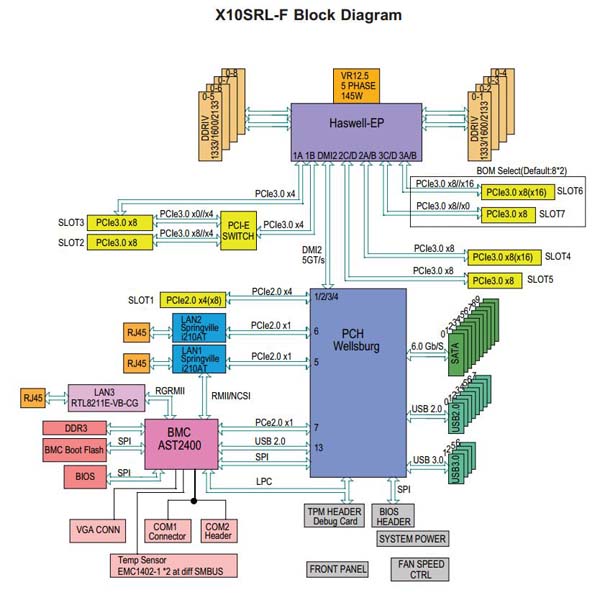
This is my machine:
Observe on the PCIe slot drawings where they show “8/16”.
That indicates 8-lane when both slots are in use (biforcated) or 16-lane otherwise.
Look at the PCI-E Switch. That’s where you also need be careful
For PMS use with an Nvidia GPU – NOT a problem.
I like this board because it has BMC (IPMI). If you don’t get a board with it, you will NEED a monitor hooked up. With BMC, you have access to the BIOS through your web browser
As part of any build strategy: Review the CPU specs carefully before selecting the board.
Intel® Xeon® Processor E3-1230 v6 (8M Cache, 3.50 GHz) quick reference with specifications, features, and technologies.
PCI Express Revision 3.0
PCI Express Configurations ‡ 1x16, 2x8, 1x8+2x4
Max # of PCI Express Lanes 16
heap0
August 21, 2022, 10:45pm
13
so basically u dont use box for anything else as media ? its not like truenas or Esxi stuff etc…?
but for full bluray you also need some nice projector and audio right?
by PMS you mean?
yeah i have the supermicro i shared link here … but it only handles 64gb ram etc so reaching limits.
yeah maybe i also selected wrong cpu so …
ChuckPa
August 21, 2022, 10:47pm
14
On the machine, I have a few things running but No, it’s not an “Appliance” box.
I have a few LXC (Linux containers).
Home automation (Philips Homebridge)
Media processing (all my OTA television is handled in the LXC)
LXD itself
I routinely through around so much data during any particular day that having a NAS which can keep up with 10GbE sustained is important.
I do have two NUC8-i7-HVK boxes which run ESXi.
heap0
August 21, 2022, 10:49pm
15
and do you somehow backup that beast?
ChuckPa
August 21, 2022, 10:51pm
16
Yep. I have my old primary nas (QNAP TVS-1282T3) with 10GbE itself.
The main NAS does a weekly rsync mirror backup to the QNAP.
Automatic: Power on - Backup OS - Backup media - Power off
The reason I built the new machine is because the QNAP wasn’t fast enough.
Now I am 850MB - 1 GB/sec sustained – and I still have to wait
heap0
August 21, 2022, 10:54pm
17
so u have another 100tb+ for a mirror?
ChuckPa
August 21, 2022, 10:56pm
18
Not full 100 TB… 8x 12TB
HDDs were very hard to get and I didn’t know how things wouldl fair out.
Worst case scenario, I pull from the QNAP, lower its RAID level and keep going.
At this point, I don’t foresee filling this any time within the next few years
If absolute disaster strikes, I have my DS1815+ Syno sitting adjacent the QNAP.
ChuckPa
August 21, 2022, 11:18pm
19
@heap0
Looking over your Mobo choice so far:
https://www.supermicro.com/en/products/motherboard/X11SRL-F?locale=en
Supports:
Intel® Xeon® W-2100 Processors, Intel® Xeon® W-2200 Processors, Single Socket LGA-2066 (Socket R4) supported, CPU TDP supports Up to 165W TDP
Your CPU is:
Sockets Supported FCLGA1151
The board you’ve chosen won’t fit the CPU
heap0
August 21, 2022, 11:25pm
20



 lol
lol