# Hardware Transcoding
**URL:** https://forums.plex.tv/t/hardware-transcoding/655885
**Category:** Plex Media Server
**Tags:** server-linux
**Created:** [November 21, 2020, 3:29pm UTC](https://forums.plex.tv/t/hardware-transcoding/655885 "2020-11-21T15:29:11Z")
**Posts on this page:** 20
**Page:** 1
### Author:  [@Admin\_expressohosting\_com](https://forums.plex.tv/u/Admin_expressohosting_com)
#### Post date: [November 21, 2020, 3:29pm UTC](https://forums.plex.tv/t/hardware-transcoding/655885/1 "2020-11-21T15:29:11Z")
Server Version#: Version 1.20.5.3600
Player Version#:
Hello
I am running an Ubuntu 18.04 Plex server on a i7-6700. This config has an onboard intel HD Graphics 530 gpu.
I have hardware transcoding turned on, however i get CUDA errors in the logs and no (hw) text in the details of a playing video being transcoded.
Im at a complete loss…any help would be great.
EDIT: Additionally running ls -la /dev/dri gived ls: cannot access ‘/dev/dri’: No such file or directory so i do think something is wrong.
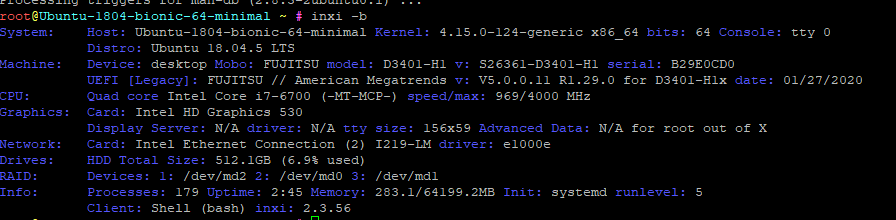
EDIT 2: Sorry i should have been clearer…my goal is to have HW transcoding working and using the onboard Intel 530 GPU. I don’t believe this is working.
---
### Author:  [@ChuckPa](https://forums.plex.tv/u/ChuckPa)
#### Post date: [November 21, 2020, 3:58pm UTC](https://forums.plex.tv/t/hardware-transcoding/655885/2 "2020-11-21T15:58:25Z")
The CUDA errors can be ignored.
You’re seeing the transcoder probing for hardware capabilities.
It is very generous in what it reports – sometimes too generous.
---
### Author:  [@Admin\_expressohosting\_com](https://forums.plex.tv/u/Admin_expressohosting_com)
#### Post date: [November 21, 2020, 4:11pm UTC](https://forums.plex.tv/t/hardware-transcoding/655885/3 "2020-11-21T16:11:25Z")
> [@Admin\_expressohosting\_com](#):
>
> cannot access ‘/dev/dri’: No such file or directory
Ok, but i assume the error with “cannot access ‘/dev/dri’: No such file or directory” is a problem?
---
### Author:  [@ChuckPa](https://forums.plex.tv/u/ChuckPa)
#### Post date: [November 21, 2020, 4:29pm UTC](https://forums.plex.tv/t/hardware-transcoding/655885/4 "2020-11-21T16:29:04Z")
Yes. that is a problem.
May I see your logs?
---
### Author:  [@Admin\_expressohosting\_com](https://forums.plex.tv/u/Admin_expressohosting_com)
#### Post date: [November 21, 2020, 4:43pm UTC](https://forums.plex.tv/t/hardware-transcoding/655885/5 "2020-11-21T16:43:37Z")
Sure, which logs you need?
---
### Author:  [@ChuckPa](https://forums.plex.tv/u/ChuckPa)
#### Post date: [November 21, 2020, 5:04pm UTC](https://forums.plex.tv/t/hardware-transcoding/655885/6 "2020-11-21T17:04:53Z")
`Plex Media Server*.log` (the set of 6) at minimum in a ZIP.
It’s usually easier to just download the set from PMS and attach it. I don’t mind.
---
### Author:  [@Admin\_expressohosting\_com](https://forums.plex.tv/u/Admin_expressohosting_com)
#### Post date: [November 21, 2020, 5:07pm UTC](https://forums.plex.tv/t/hardware-transcoding/655885/7 "2020-11-21T17:07:38Z")
(File removed)
Attached
---
### Author:  [@ChuckPa](https://forums.plex.tv/u/ChuckPa)
#### Post date: [November 21, 2020, 5:30pm UTC](https://forums.plex.tv/t/hardware-transcoding/655885/8 "2020-11-21T17:30:10Z")
Is this in a VM?
An i7 -6700 @ 3.4 Ghz should not be starved for CPU.
```auto
Nov 21, 2020 16:49:14.992 [0x7f07c77fe700] WARN - Held transaction for too long (../Library/MetadataItem.cpp:3680): 0.150000 seconds
Nov 21, 2020 16:49:19.760 [0x7f07e6ffd700] WARN - [Transcode] Got a transcode session ping without a session GUID (or with an invalid one).
Nov 21, 2020 16:49:19.774 [0x7f0849ffb700] WARN - Held transaction for too long (../Library/MetadataItem.cpp:3680): 0.190000 seconds
Nov 21, 2020 16:49:20.362 [0x7f08497fa700] WARN - Held transaction for too long (../Library/MetadataItem.cpp:1128): 0.130000 seconds
Nov 21, 2020 16:49:20.364 [0x7f08497fa700] WARN - Held transaction for too long (../Library/MetadataItem.cpp:9217): 0.140000 seconds
Nov 21, 2020 16:49:28.973 [0x7f082ffff700] WARN - Held transaction for too long (../Library/MetadataItem.cpp:3680): 0.180000 seconds
Nov 21, 2020 16:49:33.982 [0x7f08497fa700] WARN - Waited one whole second for a busy database.
Nov 21, 2020 16:49:34.194 [0x7f07c77fe700] WARN - Held transaction for too long (../Library/MetadataItem.cpp:3680
```
Also, when is the last time the database was optimized?
Did “Optimize database” in Scheduled Tasks get disabled ?
---
### Author:  [@pshanew](https://forums.plex.tv/u/pshanew)
#### Post date: [November 21, 2020, 5:50pm UTC](https://forums.plex.tv/t/hardware-transcoding/655885/9 "2020-11-21T17:50:03Z")
> [@Admin\_expressohosting\_com](#):
>
> EDIT: Additionally running ls -la /dev/dri gived ls: cannot access ‘/dev/dri’: No such file or directory so i do think something is wrong.
The output of the following commands may provide some insight as to why /dev/dri isn’t being populated:
`sudo lshw -C display`
`vainfo`
`apt list --installed | grep mesa`
`apt list --installed | grep xorg`
---
### Author:  [@Admin\_expressohosting\_com](https://forums.plex.tv/u/Admin_expressohosting_com)
#### Post date: [November 22, 2020, 1:34am UTC](https://forums.plex.tv/t/hardware-transcoding/655885/10 "2020-11-22T01:34:22Z")
> [@pshanew](#):
>
> apt list --installed | grep xorg
Hi There,
No, this is a dedicated server, so has plenty of grunt. The CPU and memory etc are hardly being touched, so i dont know why it has a busy database. Ive attached the output of those commands. Happy to give you access to ssh if you want to look yourself, just let me know.

---
### Author:  [@pshanew](https://forums.plex.tv/u/pshanew)
#### Post date: [November 22, 2020, 2:33am UTC](https://forums.plex.tv/t/hardware-transcoding/655885/11 "2020-11-22T02:33:22Z")
Thanks. Since `vainfo` isn’t installed there isn’t any info about the VAAPI drivers reported. You can install it using:
`sudo apt install vainfo`
If it’s not already installed, it will pull in libva2 and some other dependencies. After it’s installed, try running it again:
`vainfo`
Also, what are the results of the following:
`apt list --installed | grep i965`
`apt list --installed | grep intel`
`lsmod | grep drm`
---
### Author:  [@Admin\_expressohosting\_com](https://forums.plex.tv/u/Admin_expressohosting_com)
#### Post date: [November 22, 2020, 2:56am UTC](https://forums.plex.tv/t/hardware-transcoding/655885/12 "2020-11-22T02:56:22Z")
> [@pshanew](#):
>
> lsmod | grep drm
Ok, i just did a fresh install from scratch, and the video is still unclaimed. Installed viainfo, and screen below

---
### Author:  [@ChuckPa](https://forums.plex.tv/u/ChuckPa)
#### Post date: [November 22, 2020, 3:08am UTC](https://forums.plex.tv/t/hardware-transcoding/655885/13 "2020-11-22T03:08:04Z")
If I may?
This will confirm if the i915 is found by the kernel.
If it is:
1. /dev/dri will be created by the kernel
2. PMS will also respond to both /dev/dri/renderD128 at that point.
```auto
[chuck@lizum debian.544]$ ls -la /sys/module/i915/drivers/pci:i915/
total 0
drwxr-xr-x 2 root root 0 Nov 21 01:49 ./
drwxr-xr-x 39 root root 0 Nov 21 01:49 ../
lrwxrwxrwx 1 root root 0 Nov 21 22:06 0000:00:02.0 -> ../../../../devices/pci0000:00/0000:00:02.0/
--w------- 1 root root 4096 Nov 21 22:06 bind
lrwxrwxrwx 1 root root 0 Nov 21 22:06 module -> ../../../../module/i915/
--w------- 1 root root 4096 Nov 21 22:06 new_id
--w------- 1 root root 4096 Nov 21 22:06 remove_id
--w------- 1 root root 4096 Nov 21 01:49 uevent
--w------- 1 root root 4096 Nov 21 22:06 unbind
[chuck@lizum debian.545]$
```
Observe the i915 has a PCI address.
---
### Author:  [@pshanew](https://forums.plex.tv/u/pshanew)
#### Post date: [November 22, 2020, 3:12am UTC](https://forums.plex.tv/t/hardware-transcoding/655885/14 "2020-11-22T03:12:19Z")
I was actually going to suggest something similar. Since /dev/dri/ is populated by the drm module, try the following:
`modprobe drm`
And:
`modprobe i915`
By the way, is the a GUI-less server?
---
### Author:  [@ChuckPa](https://forums.plex.tv/u/ChuckPa)
#### Post date: [November 22, 2020, 3:23am UTC](https://forums.plex.tv/t/hardware-transcoding/655885/15 "2020-11-22T03:23:26Z")
Note:
As of 1.21.0, I have updated the hardware detection in Debian packaging to use the technique I show above.
It’s a more reliable detection for Intel QSV than looking for `/dev/dri/renderD128`.
`renderD128` simply tells us if there is a `drm` provider in the system. It doesn’t tell us what it is.
---
### Author:  [@Admin\_expressohosting\_com](https://forums.plex.tv/u/Admin_expressohosting_com)
#### Post date: [November 22, 2020, 5:21am UTC](https://forums.plex.tv/t/hardware-transcoding/655885/16 "2020-11-22T05:21:50Z")
Ok, none of those commands return anything, see attached.
Yep, its console only.

EDIT: I guess untill i can get the gpu “claimed” then none of these will do anything. Is it s driver issue?
---
### Author:  [@pshanew](https://forums.plex.tv/u/pshanew)
#### Post date: [November 22, 2020, 5:58am UTC](https://forums.plex.tv/t/hardware-transcoding/655885/17 "2020-11-22T05:58:46Z")
I should have been more specific; the two modprobe commands shouldn’t return anything. They are loading the kernel modules which provide direct rendering and provide the driver interface. Check /dev/dri/ now to see if exists and is populated. Also, run vainfo now to see if it reports anything.
For what it’s worth, everything will probably “just work” if you install the desktop version of Ubuntu. The desktop features pull in all the required drivers by default and load everything at boot. However, as far as I know, these are the packages you must have for this to work:
- libva2
- i965-va-driver -or- intel-media-va-driver
- vainfo (optional)
And, of course, the kernel modules.
---
### Author:  [@ChuckPa](https://forums.plex.tv/u/ChuckPa)
#### Post date: [November 22, 2020, 5:59am UTC](https://forums.plex.tv/t/hardware-transcoding/655885/18 "2020-11-22T05:59:50Z")
Is this a “Server” distro which is loaded?
If so, none of these drivers will be installed by default.
For Plex use, Workstation is always best. You can turn of the GUI after install.
---
### Author:  [@Admin\_expressohosting\_com](https://forums.plex.tv/u/Admin_expressohosting_com)
#### Post date: [November 22, 2020, 6:19am UTC](https://forums.plex.tv/t/hardware-transcoding/655885/19 "2020-11-22T06:19:51Z")
> [@pshanew](#):
>
> vainfo
Yes this is the server distro.
Still getting -bash: cd: /dev/dri: No such file or directory
Ive checked and all those packages are installed. vainfo gives:
error: can’t connect to X server!
error: failed to initialize display
Which kernel modules are needed.
---
### Author:  [@ChuckPa](https://forums.plex.tv/u/ChuckPa)
#### Post date: [November 22, 2020, 6:27am UTC](https://forums.plex.tv/t/hardware-transcoding/655885/20 "2020-11-22T06:27:30Z")
That’s a huge list to write. It’s really outside the scope of the support I can provide given the OS distro does it automatically.
[Next page](https://forums.plex.tv/t/hardware-transcoding/655885.md?page=2)