# Home on new iOS preview
**URL:** https://forums.plex.tv/t/home-on-new-ios-preview/903336
**Category:** Plex Experience Preview
**Tags:** ios-legacy
**Created:** [January 23, 2025, 11:21pm UTC](https://forums.plex.tv/t/home-on-new-ios-preview/903336 "2025-01-23T23:21:05Z")
**Posts on this page:** 14
**Page:** 1
### Author:  [@virajajmeri](https://forums.plex.tv/u/virajajmeri)
#### Post date: [January 23, 2025, 11:21pm UTC](https://forums.plex.tv/t/home-on-new-ios-preview/903336/1 "2025-01-23T23:21:05Z")
Is the Home Screen in the preview suppose to feature nothing from your library??
If that’s the direction then another app to delete if it goes live!
---
### Author:  [@BigWheel](https://forums.plex.tv/u/BigWheel)
#### Post date: [January 23, 2025, 11:43pm UTC](https://forums.plex.tv/t/home-on-new-ios-preview/903336/2 "2025-01-23T23:43:36Z")
it should show the library recommendation rows that you favorite in the app. The same as it does with pinned libraries in current app.
This is assuming you have recommendation rows enabled for your libraries in the manage recommendation settings or don’t have them set to show their content on home screen in the library individual settings
---
### Author:  [@Stormdragon](https://forums.plex.tv/u/Stormdragon)
#### Post date: [January 24, 2025, 5:57am UTC](https://forums.plex.tv/t/home-on-new-ios-preview/903336/3 "2025-01-24T05:57:37Z")
I’m seeing the same thing in the home page…nothing of my content.
When I check the favourite library screen all of my libraries have a heart by them. Where is the manage recommendation settings or the option in the individual library settings to show on home screen?
Are there screenshots of where these are as I’ve looked for them and cannot see them.
Note: I’m on build 810.
---
### Author:  [@BigWheel](https://forums.plex.tv/u/BigWheel)
#### Post date: [January 24, 2025, 4:26pm UTC](https://forums.plex.tv/t/home-on-new-ios-preview/903336/4 "2025-01-24T16:26:53Z")
> [@Stormdragon](#):
>
> Where is the manage recommendation settings
[https://support.plex.tv/articles/manage-recommendations/](https://support.plex.tv/articles/manage-recommendations/)
> [@Stormdragon](#):
>
> or the option in the individual library settings to show on home screen?
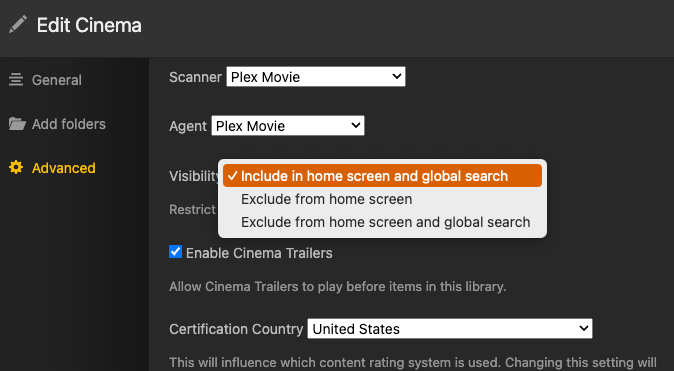
---
### Author:  [@Stormdragon](https://forums.plex.tv/u/Stormdragon)
#### Post date: [January 24, 2025, 4:48pm UTC](https://forums.plex.tv/t/home-on-new-ios-preview/903336/5 "2025-01-24T16:48:47Z")
Oh i see…from the server side.
I have confirmed that they are correct and that it all works for the non-preview version. Also in previous preview versions I did not have this issue, only recently.
For example, for movies…


On the preview version, it only has Plex-specific stuff…

I will try and remove all of the checked recommendations and report back 😉
---
### Author:  [@Stormdragon](https://forums.plex.tv/u/Stormdragon)
#### Post date: [January 24, 2025, 4:56pm UTC](https://forums.plex.tv/t/home-on-new-ios-preview/903336/6 "2025-01-24T16:56:02Z")
Either removing all of the recommendation check boxes or just leaving “Recently Added”, along with keeping the Home one checked does not update the home page with my media, even after reloading the app.
The only thing those options do it affect the “Recommended” in the actual library, which does make sense.
---
### Author:  [@BigWheel](https://forums.plex.tv/u/BigWheel)
#### Post date: [January 24, 2025, 5:44pm UTC](https://forums.plex.tv/t/home-on-new-ios-preview/903336/7 "2025-01-24T17:44:44Z")
In your screenshot of your iPad I don’t see your user avatar on the top right. Are you signed into the app?
---
### Author:  [@virajajmeri](https://forums.plex.tv/u/virajajmeri)
#### Post date: [January 24, 2025, 5:58pm UTC](https://forums.plex.tv/t/home-on-new-ios-preview/903336/8 "2025-01-24T17:58:55Z")
I’m signed in and i see nothing relevant

---
### Author:  [@BigWheel](https://forums.plex.tv/u/BigWheel)
#### Post date: [January 24, 2025, 6:06pm UTC](https://forums.plex.tv/t/home-on-new-ios-preview/903336/9 "2025-01-24T18:06:10Z")
Can we get the app logs after opening the app and the home screen loads
---
### Author:  [@virajajmeri](https://forums.plex.tv/u/virajajmeri)
#### Post date: [January 24, 2025, 6:22pm UTC](https://forums.plex.tv/t/home-on-new-ios-preview/903336/10 "2025-01-24T18:22:19Z")
Sorry not sure how to
---
### Author:  [@BigWheel](https://forums.plex.tv/u/BigWheel)
#### Post date: [January 24, 2025, 6:47pm UTC](https://forums.plex.tv/t/home-on-new-ios-preview/903336/11 "2025-01-24T18:47:26Z")
Link to info on how here [Documentation, Features, and Common Questions](https://forums.plex.tv/t/documentation-features-and-common-questions/893801)
---
### Author:  [@Atomatth](https://forums.plex.tv/u/Atomatth)
#### Post date: [January 24, 2025, 6:59pm UTC](https://forums.plex.tv/t/home-on-new-ios-preview/903336/12 "2025-01-24T18:59:32Z")
Do your PMS libraries show up when you select the Libraries source at the bottom? It could be that you have not Favorited any of your Libraries. Favoriting is similar to how Pinning Libraries works on our existing clients. Once Favorited/Pinned those Libraries hubs will show up in your Home. They can also be sorted and their ordering is reflected in Home, just like our existing clients.
---
### Author:  [@Stormdragon](https://forums.plex.tv/u/Stormdragon)
#### Post date: [January 24, 2025, 8:18pm UTC](https://forums.plex.tv/t/home-on-new-ios-preview/903336/13 "2025-01-24T20:18:18Z")
The avatar is there, I just edited it out for the screenshot
---
### Author:  [@Stormdragon](https://forums.plex.tv/u/Stormdragon)
#### Post date: [January 24, 2025, 8:25pm UTC](https://forums.plex.tv/t/home-on-new-ios-preview/903336/14 "2025-01-24T20:25:48Z")
Everything is favorited as I mentioned before but what is really odd is I went back into the app just now and I see my libraries are at the top of the homepage… Unfortunately, I still see a lot of the other stuff I don’t want below it (e.g. Plex Picks, etc)
I’m not sure what changed or if it took time to propagate the changes from the server.