# How to edit cast information
**URL:** https://forums.plex.tv/t/how-to-edit-cast-information/551946
**Category:** Metadata & Adding Files
**Tags:** server-mac, server-synology, library-management
**Created:** [March 7, 2020, 10:56pm UTC](https://forums.plex.tv/t/how-to-edit-cast-information/551946 "2020-03-07T22:56:45Z")
**Posts on this page:** 7
**Page:** 1
### Author:  [@MoJoKitty87](https://forums.plex.tv/u/MoJoKitty87)
#### Post date: [March 7, 2020, 10:56pm UTC](https://forums.plex.tv/t/how-to-edit-cast-information/551946/1 "2020-03-07T22:56:46Z")
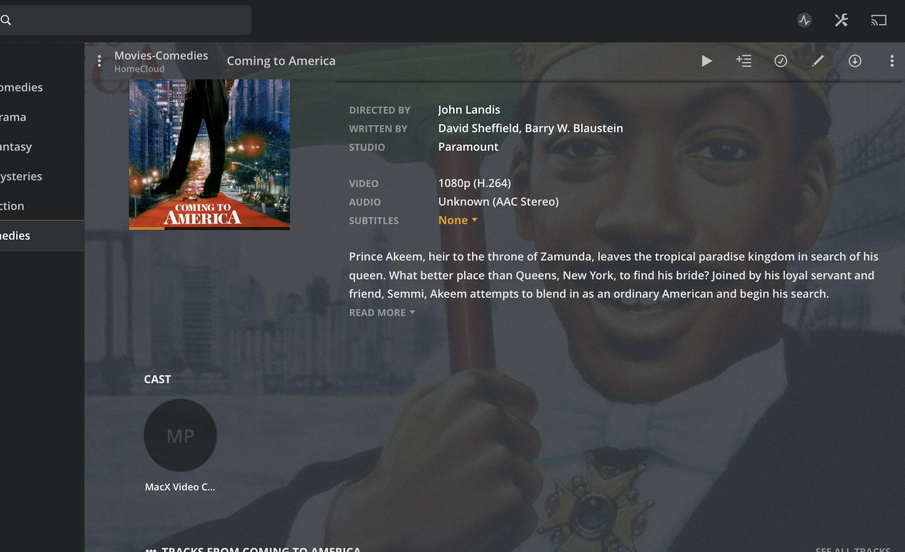
Hi, Is there a way to edit cast information? The cast is listed as the software I used to cover my DVD to MP4. I have the metadata set to The Movie Database. Please help Thank you 🙂
Server Version#:
Player Version#:
---
### Author:  [@anon5074910](https://forums.plex.tv/u/anon5074910)
#### Post date: [March 7, 2020, 11:03pm UTC](https://forums.plex.tv/t/how-to-edit-cast-information/551946/2 "2020-03-07T23:03:30Z")
Yeah but not the way you might be hoping.
If you register on TMDB then you can edit the movie/show there. Wait 24hrs for the plex cache servers to pickup the change and then refresh the metadata in your local plex server to pickup the changes.
---
### Author:  [@tom80H](https://forums.plex.tv/u/tom80H)
#### Post date: [March 7, 2020, 11:40pm UTC](https://forums.plex.tv/t/how-to-edit-cast-information/551946/3 "2020-03-07T23:40:13Z")
That looks more like your mp4 file has embedded metadata and `Local Media Assets` enabled and prioritized over the content you get from The Movie Database (`Settings` \> `Server` \> `Agents` \> `Movies` \> `The Movie Database`).
Options to solve this are:
1. remove the embedded metadata – your tagging is a little overwhelming… if you’re on a Mac, you can use Subler for that purpose
2. go to the agent settings and lower the priority of `Local Media Assets` by moving it below `The Movie Database`
When you’ve done that (one or both options) refresh the movie’s metadata from within Plex.
---
### Author:  [@anon5074910](https://forums.plex.tv/u/anon5074910)
#### Post date: [March 8, 2020, 12:02am UTC](https://forums.plex.tv/t/how-to-edit-cast-information/551946/4 "2020-03-08T00:02:46Z")
Oh sorry, misread the post ☹
Yeah, its probably local metadata embedded in the mp4.
---
### Author:  [@MoJoKitty87](https://forums.plex.tv/u/MoJoKitty87)
#### Post date: [March 8, 2020, 5:12pm UTC](https://forums.plex.tv/t/how-to-edit-cast-information/551946/5 "2020-03-08T17:12:16Z")
This was the fix. 🙂Thank you very much
---
### Author:  [@MoJoKitty87](https://forums.plex.tv/u/MoJoKitty87)
#### Post date: [March 8, 2020, 5:12pm UTC](https://forums.plex.tv/t/how-to-edit-cast-information/551946/6 "2020-03-08T17:12:49Z")
Now worries, I appreciate the help 🙂
---
### Author:  [@system](https://forums.plex.tv/u/system)
#### Post date: [June 6, 2020, 5:12pm UTC](https://forums.plex.tv/t/how-to-edit-cast-information/551946/7 "2020-06-06T17:12:51Z")
This topic was automatically closed 90 days after the last reply. New replies are no longer allowed.