# HW transcoding issue: QTS + Nvidia T600
**URL:** https://forums.plex.tv/t/hw-transcoding-issue-qts-nvidia-t600/881872
**Category:** Plex Media Server
**Tags:** server-qnap
**Created:** [July 6, 2024, 10:32am UTC](https://forums.plex.tv/t/hw-transcoding-issue-qts-nvidia-t600/881872 "2024-07-06T10:32:13Z")
**Posts on this page:** 19
**Page:** 1
### Author:  [@Marvv](https://forums.plex.tv/u/Marvv)
#### Post date: [July 6, 2024, 10:32am UTC](https://forums.plex.tv/t/hw-transcoding-issue-qts-nvidia-t600/881872/1 "2024-07-06T10:32:13Z")
Hello everyone,
I have a Qnap server, but I get the same error message when transcoding. (at least at 20Mbit)
With the jellyfish video I could not repoduce it but with the movie Ready Player One in 4K HVEC 74k Bitrate I could.
I don’t know if it helps or if a thread should be created for this, but I’ll post my logs.
Version 1.40.3.8555
Qnap QTS 5.1.7.2770
T600 GPU
Windows version 1.96.0.177-dc5df788

[Transcode Log.zip](https://forums.plex.tv/uploads/short-url/piAhxl8eSVKG8eKK6J0Ia7lAboe.zip) (73,1 KB)
---
### Author:  [@ChuckPa](https://forums.plex.tv/u/ChuckPa)
#### Post date: [July 6, 2024, 8:11pm UTC](https://forums.plex.tv/t/hw-transcoding-issue-qts-nvidia-t600/881872/2 "2024-07-06T20:11:23Z")
@Marvv
I moved you here because QTS and TrueNAS operate very differently.
The QNAP is running the native application where TrueNAS is using Docker.
Would you please turn VERBOSE logging OFF ? It only serves to complicate debuffing because it’s reporting every packet received or sent…
After changing the logging level, please restart PMS.
I did find this where the block of data was transcoded.
Could this be a player problem?
```auto
Jul 06, 2024 12:15:15.918 [140254573726520] DEBUG - Completed: [127.0.0.1:34142] 206 PUT /video/:/transcode/session/out5kg799ukfcuxf25s9e364/d4a08a04-d3ea-449f-b54f-b6ec4211e11b/progress?progress=0.5&size=-22&remaining=1049&vdec_packets=1108&vdec_hw_ok=1105&speed=7.7&vdec_hw_status=1 (10 live) #4307 0ms 355 bytes (pipelined: 32) (range: bytes=0-)
Jul 06, 2024 12:15:16.446 [140254466763576] DEBUG - Request: [127.0.0.1:34142 (Loopback)] PUT /video/:/transcode/session/out5kg799ukfcuxf25s9e364/d4a08a04-d3ea-449f-b54f-b6ec4211e11b/progress?progress=0.6&size=-22&remaining=1121&vdec_packets=1196&vdec_hw_ok=1193&speed=7.2&vdec_hw_status=1 (10 live) #430d Signed-in Token (PlexPowerUser) (range: bytes=0-) / Accept => */* / Connection => keep-alive / Host => 127.0.0.1:32400 / Icy-MetaData => 1 / Range => bytes=0- / User-Agent => Lavf/LIBAVFORMAT_VERSION / X-Plex-Http-Pipeline => infinite / X-Plex-Token => xxxxxxxxxxxxxxxxxxxxxxxxxxxxxxxxxxxxxxxxxx
```
---
### Author:  [@Marvv](https://forums.plex.tv/u/Marvv)
#### Post date: [July 7, 2024, 10:05am UTC](https://forums.plex.tv/t/hw-transcoding-issue-qts-nvidia-t600/881872/3 "2024-07-07T10:05:35Z")
I activated the [debug logging](https://support.plex.tv/articles/201643703-reporting-issues-with-plex-media-server/#toc-1) again and restarted the server.
I was able to reproduce the error with the Windows app, iOS app as well as Android (cell phone) and Android (TV) were able to play the transcoding in various stages without errors.
I am not at all experienced in being able to read an error in the code now. Loopback shouldn’t occur though I guess.
Here are the new logs again. If I can help with more info/logs, please let me know
[Logs.zip](https://forums.plex.tv/uploads/short-url/waTxWG8LfnY2UDNrAQ6TaR6AW9t.zip) (563,2 KB)
---
### Author:  [@ChuckPa](https://forums.plex.tv/u/ChuckPa)
#### Post date: [July 7, 2024, 12:26pm UTC](https://forums.plex.tv/t/hw-transcoding-issue-qts-nvidia-t600/881872/4 "2024-07-07T12:26:18Z")
@Marvv
Would you please recreate the error with Plex/web and attach that logs ZIP please ?
---
### Author:  [@Marvv](https://forums.plex.tv/u/Marvv)
#### Post date: [July 8, 2024, 4:41pm UTC](https://forums.plex.tv/t/hw-transcoding-issue-qts-nvidia-t600/881872/5 "2024-07-08T16:41:24Z")
Unfortunately I can’t get it to work, in Plex Web I can only select 720P / 2 Mbit as quality…
---
### Author:  [@ChuckPa](https://forums.plex.tv/u/ChuckPa)
#### Post date: [July 8, 2024, 4:57pm UTC](https://forums.plex.tv/t/hw-transcoding-issue-qts-nvidia-t600/881872/6 "2024-07-08T16:57:44Z")
Plex/web has a quality setting just as all the other players. It’s a little obscure to find it (mid-upper left in browser). Was it set for more than 720p/2Mbps? — which is the default for an indirect/plex-[relay connection](https://support.plex.tv/articles/216766168-accessing-a-server-through-relay/).
---
### Author:  [@Marvv](https://forums.plex.tv/u/Marvv)
#### Post date: [July 8, 2024, 5:25pm UTC](https://forums.plex.tv/t/hw-transcoding-issue-qts-nvidia-t600/881872/7 "2024-07-08T17:25:41Z")
After restarting PMS, more quality levels were available at once.
I have now played the same movie in Plex Web, at 20 and 12Mbit nothing loaded (black screen) but no error was displayed.
10 and 8Mbit could be transcoded and played.
[Plex Media Server.zip](https://forums.plex.tv/uploads/short-url/xGhE6lAkOS5h2Wc2OAuaOH5ffCc.zip) (170,2 KB)
---
### Author:  [@ChuckPa](https://forums.plex.tv/u/ChuckPa)
#### Post date: [July 8, 2024, 5:50pm UTC](https://forums.plex.tv/t/hw-transcoding-issue-qts-nvidia-t600/881872/8 "2024-07-08T17:50:32Z")
@Marvv
PMS is not seeing a usable device.
> Jul 08, 2024 19:17:17.358 [140031164140344] DEBUG - [Req#18a/Transcode] Audio Stream: 92654, Subtitle Stream: 0
> Jul 08, 2024 19:17:17.362 [140031164140344] DEBUG - [Req#18a/Transcode] Found session GUID of o682rolvrchezeqndr9p5a49 in session start.
> Jul 08, 2024 19:17:17.362 [140031164140344] DEBUG - [Req#18a/Transcode] Cleaning directory for session o682rolvrchezeqndr9p5a49 ()
> Jul 08, 2024 19:17:17.362 [140031164140344] DEBUG - [Req#18a/Transcode] Starting a transcode session o682rolvrchezeqndr9p5a49 at offset -1.0 (state=3)
> Jul 08, 2024 19:17:17.362 [140031164140344] DEBUG - [Req#18a/Transcode] TPU: hardware transcoding: enabled, but no hardware decode accelerator found
> Jul 08, 2024 19:17:17.363 [140031164140344] DEBUG - [Req#18a/Transcode] [Universal] Using local file path instead of URL: /share/CACHEDEV1\_DATA/video/Filme/Ready Player One 2018 2160p.mkv
> Jul 08, 2024 19:17:17.363 [140031164140344] DEBUG - [Req#18a/Transcode] TPU: hardware transcoding: final decoder: , final encoder:
> Jul 08, 2024 19:17:17.363 [140031164140344] DEBUG - [Req#18a/Transcode/JobRunner] Job running: FFMPEG\_EXTERNAL\_LIBS=‘/share/CACHEDEV1\_DATA/.qpkg/PlexMediaServer/Library/Plex\ Media\ Server/Codecs/ad47460-ffe81d9cd51bd27cb3fbbe09-linux-x86\_64/’ X\_PLEX\_TOKEN=xxxxxxxxxxxxxxxxxxxxxxxxxxxxxxxxxxxxxxxxxx “/share/CACHEDEV1\_DATA/.qpkg/PlexMediaServer/Plex Transcoder” -codec:0 hevc -codec:3 dca -ss 0 -noaccurate\_seek -analyzeduration 20000000 -probesize 20000000 -i “/share/CACHEDEV1\_DATA/video/Filme/Ready Player One 2018 2160p.mkv” -map 0:0 -metadata:s:0 language=eng -codec:0 copy -filter\_complex “[0:3] aresample=async=1:ochl=‘stereo’:rematrix\_maxval=0.000000dB:osr=48000[0]” -map “[0]” -metadata:s:1 language=deu -codec:1 aac -b:1 256k -f dash -seg\_duration 5 -dash\_segment\_type mp4 -init\_seg\_name ‘init-stream$RepresentationID$.m4s’ -media\_seg\_name ‘chunk-stream$RepresentationID$-$Number%05d$.m4s’ -window\_size 5 -delete\_removed false -skip\_to\_segment 1 -time\_delta 0.0625 -manifest\_name "[http://127.0.0.1:32400/video/:](http://127.0.0.1:32400/video/:)
Both of the QNAP-provided Nvidia packages (kernel and runtime) are installed and QTS restarted ?
PMS looks for a card at PMS start.
The card must be in “QTS mode” (Control Panel - Hardware)
(PMS can only use
---
### Author:  [@Marvv](https://forums.plex.tv/u/Marvv)
#### Post date: [July 9, 2024, 4:07pm UTC](https://forums.plex.tv/t/hw-transcoding-issue-qts-nvidia-t600/881872/9 "2024-07-09T16:07:54Z")
Thanks for the feedback but I think I need to elaborate a bit more on my server.
My server has been running for 4 years without any problems, the whole setup is not new. But since I have been away for the last 4 weeks, I had to transcode series or movies more often.
In rare cases, this error code has been displayed.
The Nvidia graphics card is of course running in QTS mode and all the necessary drivers are installed and up to date.
Because of the other thread with the same error message (TrueNAS), I got in touch and wanted to contribute logs to localize the error.
I will try other movies than Ready Payer One or series this weekend. I get no error message via Plex Web, just a black screen. This could also be due to the TrueHD / DTS-HD audio transcoding.
- i have changed the T600 to an T400 - not surprising

---
### Author:  [@ChuckPa](https://forums.plex.tv/u/ChuckPa)
#### Post date: [July 9, 2024, 7:52pm UTC](https://forums.plex.tv/t/hw-transcoding-issue-qts-nvidia-t600/881872/10 "2024-07-09T19:52:35Z")
Please look carefully at the nvidia-smi output.
1. First, your T400 is better than my P2200
2. Look at the “CUDA Version:” `N/A` ??
You cannot hardware tonemap without CUDA.
Please observe my P2200
```auto
[chuck@lizum ~.2021]$ nvidia-smi
Tue Jul 9 15:43:55 2024
+---------------------------------------------------------------------------------------+
| NVIDIA-SMI 535.183.01 Driver Version: 535.183.01 CUDA Version: 12.2 |
|-----------------------------------------+----------------------+----------------------+
| GPU Name Persistence-M | Bus-Id Disp.A | Volatile Uncorr. ECC |
| Fan Temp Perf Pwr:Usage/Cap | Memory-Usage | GPU-Util Compute M. |
| | | MIG M. |
|=========================================+======================+======================|
| 0 Quadro P2200 On | 00000000:07:00.0 Off | N/A |
| 47% 37C P8 4W / 75W | 1MiB / 5120MiB | 0% Default |
| | | N/A |
+-----------------------------------------+----------------------+----------------------+
+---------------------------------------------------------------------------------------+
| Processes: |
| GPU GI CI PID Type Process name GPU Memory |
| ID ID Usage |
|=======================================================================================|
| No running processes found |
+---------------------------------------------------------------------------------------+
[chuck@lizum ~.2022]$
```
Something is not working right at here.
---
### Author:  [@ChuckPa](https://forums.plex.tv/u/ChuckPa)
#### Post date: [July 9, 2024, 10:41pm UTC](https://forums.plex.tv/t/hw-transcoding-issue-qts-nvidia-t600/881872/11 "2024-07-09T22:41:38Z")
Got access to our TS877 machine.
from the shell:
```auto
[/share/CACHEDEV1_DATA/.qpkg/NVIDIA_GPU_DRV/usr/bin] # export LD_LIBRARY_PATH=$LD_LIBRARY_PATH:../lib
[/share/CACHEDEV1_DATA/.qpkg/NVIDIA_GPU_DRV/usr/bin] # ./nvidia-smi
Tue Jul 9 18:40:28 2024
+-----------------------------------------------------------------------------+
| NVIDIA-SMI 515.48.07 Driver Version: 515.48.07 CUDA Version: 11.7 |
|-------------------------------+----------------------+----------------------+
| GPU Name Persistence-M| Bus-Id Disp.A | Volatile Uncorr. ECC |
| Fan Temp Perf Pwr:Usage/Cap| Memory-Usage | GPU-Util Compute M. |
| | | MIG M. |
|===============================+======================+======================|
| 0 NVIDIA GeForce ... Off | 00000000:0F:00.0 Off | N/A |
| 29% 29C P8 N/A / 75W | 2MiB / 4096MiB | 0% Default |
| | | N/A |
+-------------------------------+----------------------+----------------------+
+-----------------------------------------------------------------------------+
| Processes: |
| GPU GI CI PID Type Process name GPU Memory |
| ID ID Usage |
|=============================================================================|
| No running processes found |
+-----------------------------------------------------------------------------+
[/share/CACHEDEV1_DATA/.qpkg/NVIDIA_GPU_DRV/usr/bin]
```
Using our GT1050
```auto
[/share/CACHEDEV1_DATA/.qpkg/NVIDIA_GPU_DRV/usr/bin] # ./nvidia-smi
Tue Jul 9 18:49:21 2024
+-----------------------------------------------------------------------------+
| NVIDIA-SMI 515.48.07 Driver Version: 515.48.07 CUDA Version: 11.7 |
|-------------------------------+----------------------+----------------------+
| GPU Name Persistence-M| Bus-Id Disp.A | Volatile Uncorr. ECC |
| Fan Temp Perf Pwr:Usage/Cap| Memory-Usage | GPU-Util Compute M. |
| | | MIG M. |
|===============================+======================+======================|
| 0 NVIDIA GeForce ... Off | 00000000:0F:00.0 Off | N/A |
| 29% 53C P0 N/A / 75W | 607MiB / 4096MiB | 65% Default |
| | | N/A |
+-------------------------------+----------------------+----------------------+
+-----------------------------------------------------------------------------+
| Processes: |
| GPU GI CI PID Type Process name GPU Memory |
| ID ID Usage |
|=============================================================================|
| 0 N/A N/A 25011 C ...diaServer/Plex Transcoder 603MiB |
+-----------------------------------------------------------------------------+
[/share/CACHEDEV1_DATA/.qpkg/NVIDIA_GPU_DRV/usr/bin] #
```

---
### Author:  [@Marvv](https://forums.plex.tv/u/Marvv)
#### Post date: [July 10, 2024, 3:25pm UTC](https://forums.plex.tv/t/hw-transcoding-issue-qts-nvidia-t600/881872/12 "2024-07-10T15:25:14Z")
oh, okay! I hadn’t noticed that
But I only used the nvidia-smi command for the first time recently…
I uninstalled the Nvidia GPU driver, restarted the server and reinstalled the driver. But I can’t delete or stop the NVKernel driver.
The Cuda driver is still not available in nvidia-smi.
Can I install it manually?
---
### Author:  [@ChuckPa](https://forums.plex.tv/u/ChuckPa)
#### Post date: [July 10, 2024, 4:44pm UTC](https://forums.plex.tv/t/hw-transcoding-issue-qts-nvidia-t600/881872/13 "2024-07-10T16:44:25Z")
I forget how that works.
You need to ask QNAP.
From what I remember, you can go into the shell and manually uninstall them
(there’s a `uninstall.sh` file somewhere
---
### Author:  [@Marvv](https://forums.plex.tv/u/Marvv)
#### Post date: [July 10, 2024, 5:07pm UTC](https://forums.plex.tv/t/hw-transcoding-issue-qts-nvidia-t600/881872/14 "2024-07-10T17:07:56Z")
I was able to remove the kernel driver using the uninstall command.
I had to reinstall the GPU driver several times until the driver worked.
The CUDA driver is still not available
I’m at a bit of a loss now, I can’t do more than uninstall and reinstall

---
### Author:  [@ChuckPa](https://forums.plex.tv/u/ChuckPa)
#### Post date: [July 10, 2024, 5:19pm UTC](https://forums.plex.tv/t/hw-transcoding-issue-qts-nvidia-t600/881872/15 "2024-07-10T17:19:31Z")
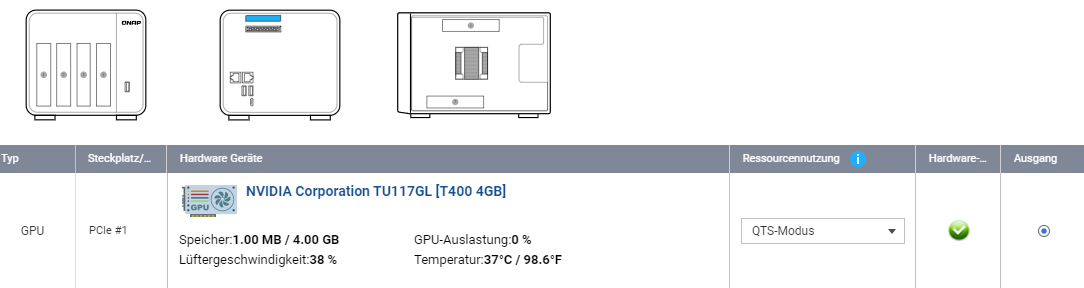
Can you confirm, in Control Panel - Hardware, the GPU is in “QTS Mode” ?
---
### Author:  [@Marvv](https://forums.plex.tv/u/Marvv)
#### Post date: [July 10, 2024, 5:21pm UTC](https://forums.plex.tv/t/hw-transcoding-issue-qts-nvidia-t600/881872/16 "2024-07-10T17:21:27Z")
yes
---
### Author:  [@ChuckPa](https://forums.plex.tv/u/ChuckPa)
#### Post date: [July 10, 2024, 8:10pm UTC](https://forums.plex.tv/t/hw-transcoding-issue-qts-nvidia-t600/881872/17 "2024-07-10T20:10:07Z")
I wonder if you got an update to the drivers?
(Your card is not listed)
`https://www.qnap.com/en-us/compatibility/device_category=gpgpu&brand=nvidia`
Here’s where you can get older versions.
`https://www.qnap.com/en/download`
---
### Author:  [@Marvv](https://forums.plex.tv/u/Marvv)
#### Post date: [July 11, 2024, 3:05pm UTC](https://forums.plex.tv/t/hw-transcoding-issue-qts-nvidia-t600/881872/18 "2024-07-11T15:05:30Z")
The fact that the card is not listed should not really matter with the same chip (TU117). Otherwise it would not be recognized
I have contacted Qnap to officially support and list the GPU T400 and T600.
The hardware transcoding works anyway, without Cuda.


---
### Author:  [@system](https://forums.plex.tv/u/system)
#### Post date: [October 9, 2024, 3:06pm UTC](https://forums.plex.tv/t/hw-transcoding-issue-qts-nvidia-t600/881872/19 "2024-10-09T15:06:03Z")
This topic was automatically closed 90 days after the last reply. New replies are no longer allowed.