# \[implemented\] Feature request: disable transcoding
**URL:** https://forums.plex.tv/t/implemented-feature-request-disable-transcoding/101180
**Category:** Feature Suggestions
**Created:** [April 29, 2015, 4:40pm UTC](https://forums.plex.tv/t/implemented-feature-request-disable-transcoding/101180 "2015-04-29T16:40:01Z")
**Posts on this page:** 20
**Page:** 1
### Author:  [@\_Omega](https://forums.plex.tv/u/_Omega)
#### Post date: [April 29, 2015, 4:40pm UTC](https://forums.plex.tv/t/implemented-feature-request-disable-transcoding/101180/1 "2015-04-29T16:40:01Z")
If we can have an option on the server side to disable transcoding altogether. I'm fully converting library to support direct play on almost all plex clients and bandwidth is not an issue.
This would force the not so plex savy users to force direct play regardless of settings on their end.
---
### Author:  [@cayars](https://forums.plex.tv/u/cayars)
#### Post date: [April 30, 2015, 11:57am UTC](https://forums.plex.tv/t/implemented-feature-request-disable-transcoding/101180/2 "2015-04-30T11:57:18Z")
Just rename the transcoder EXE in the plex directory. If Plex can't find it then it can't transcode.
---
### Author:  [@RockStar](https://forums.plex.tv/u/RockStar)
#### Post date: [April 30, 2015, 1:45pm UTC](https://forums.plex.tv/t/implemented-feature-request-disable-transcoding/101180/3 "2015-04-30T13:45:10Z")
Thats one option. Id rather have a toggle in settings.
---
### Author:  [@\_Omega](https://forums.plex.tv/u/_Omega)
#### Post date: [April 30, 2015, 5:19pm UTC](https://forums.plex.tv/t/implemented-feature-request-disable-transcoding/101180/4 "2015-04-30T17:19:10Z")
Thought about disabling the plexnewtranscoder.exe but that just renders the client useless if the user does not have the correct setting enabled. Exactly what I'm trying to do but more a feature on the server side to just force the client to direct play if the client supports it.
---
### Author:  [@RockStar](https://forums.plex.tv/u/RockStar)
#### Post date: [May 5, 2015, 7:46am UTC](https://forums.plex.tv/t/implemented-feature-request-disable-transcoding/101180/5 "2015-05-05T07:46:33Z")
Which is probably one reason why this feature hasn't been added. Think about all the support issues Plex would have with people who accidentally toggled transcoding off and now all of a sudden, half their clients stopped working. If such a feature was implemented, it would probably have to be paired with some client notification message or auto-setting feature, possibly both.
While I do want this feature, this is one of those things that kind of works itself out. Internet connections are getting faster and so are chips. Eventually, you will get to a point where you really dont care if your server is transcoding or not. I am pretty much there already.
---
### Author:  [@mb](https://forums.plex.tv/u/mb)
#### Post date: [May 13, 2015, 5:43am UTC](https://forums.plex.tv/t/implemented-feature-request-disable-transcoding/101180/6 "2015-05-13T05:43:25Z")
Would also help with low-resource installations, e.g. my Atom 1.6 will die under a 1080p transcode, terrible laggy experience.
---
### Author:  [@cameron](https://forums.plex.tv/u/cameron)
#### Post date: [May 13, 2015, 5:21pm UTC](https://forums.plex.tv/t/implemented-feature-request-disable-transcoding/101180/7 "2015-05-13T17:21:27Z")
> Which is probably one reason why this feature hasn't been added. Think about all the support issues Plex would have with people who accidentally toggled transcoding off and now all of a sudden, half their clients stopped working.
Hide it under "Advanced".
---
### Author:  [@\_Omega](https://forums.plex.tv/u/_Omega)
#### Post date: [August 21, 2015, 1:56pm UTC](https://forums.plex.tv/t/implemented-feature-request-disable-transcoding/101180/8 "2015-08-21T13:56:32Z")
Would like to reword this feature request. Use more of a “smart transcoder” which determines if the media can be played on client without the use of the transcoder. The smart transcoder would adjust manually and directly serve media if and only if the client permits it.
---
### Author:  [@Hanterdro](https://forums.plex.tv/u/Hanterdro)
#### Post date: [July 3, 2016, 5:43pm UTC](https://forums.plex.tv/t/implemented-feature-request-disable-transcoding/101180/9 "2016-07-03T17:43:15Z")
+1 for disabling transcoding on the server.
I have all my stuff in the correct format for my devices and I don’t wan’t under any circumstances my server cpu is under load because of transcoding if e.g. a guest have access with a devices which does not support my video formats.
---
### Author:  [@kclimie](https://forums.plex.tv/u/kclimie)
#### Post date: [July 4, 2016, 1:55am UTC](https://forums.plex.tv/t/implemented-feature-request-disable-transcoding/101180/10 "2016-07-04T01:55:08Z")
> @Hanterdro said:
> +1 for disabling transcoding on the server.
>
> I have all my stuff in the correct format for my devices and I don’t wan’t under any circumstances my server cpu is under load because of transcoding if e.g. a guest have access with a devices which does not support my video formats.
+1
The worst part is having to wait for the server to transcode the file which plays fine through iTunes and the iOS built-in Video app when you want to sync.
---
### Author:  [@HTP.ProXy](https://forums.plex.tv/u/HTP.ProXy)
#### Post date: [July 4, 2016, 1:53pm UTC](https://forums.plex.tv/t/implemented-feature-request-disable-transcoding/101180/11 "2016-07-04T13:53:11Z")
+1
All my media is prepared using handbrake and will play on all my devices, but Plex still starts transcoding on my NAS, which lasts several hours. This option would help a lot!
---
### Author:  [@GuyGizmo](https://forums.plex.tv/u/GuyGizmo)
#### Post date: [July 9, 2016, 3:52pm UTC](https://forums.plex.tv/t/implemented-feature-request-disable-transcoding/101180/12 "2016-07-09T15:52:13Z")
Interested in a feature like this too. I have my Plex library shared to some friends but it’s on an older machine with a slower processor, and it can’t handle transcoding more than one piece of media at a time, and when it is transcoding browsing is very slow.
It’s be great if I could disable transcoding for particular users, because I still need it and want to use it for all of my devices, but I don’t want my friends from preventing me from being able to watch my media or browse it in a timely fashion.
---
### Author:  [@geekonice](https://forums.plex.tv/u/geekonice)
#### Post date: [July 23, 2016, 11:40am UTC](https://forums.plex.tv/t/implemented-feature-request-disable-transcoding/101180/13 "2016-07-23T11:40:07Z")
Have been searching all morning for this very thing. My Synology isn’t really powerful enough to do streaming transcoding, but for some reason it’s still enabled in the server. I’d **much** rather get an error in the client that the movie can’t be played than to get something that “plays” but pauses every few seconds to buffer.
---
### Author:  [@luismarcilio](https://forums.plex.tv/u/luismarcilio)
#### Post date: [November 18, 2017, 9:05pm UTC](https://forums.plex.tv/t/implemented-feature-request-disable-transcoding/101180/14 "2017-11-18T21:05:51Z")
It’s two years since we requested this feature…
Is it implemented?
---
### Author:  [@niallobr](https://forums.plex.tv/u/niallobr)
#### Post date: [December 23, 2017, 11:19am UTC](https://forums.plex.tv/t/implemented-feature-request-disable-transcoding/101180/15 "2017-12-23T11:19:35Z")
Please add some kind of control over this or adjust the default client quality settings?
I keep explaining to folks how to set their client to ‘maximum’ or ‘original’ quality, then they play a movie and I see this:
**Client 1 (Chromecast)**
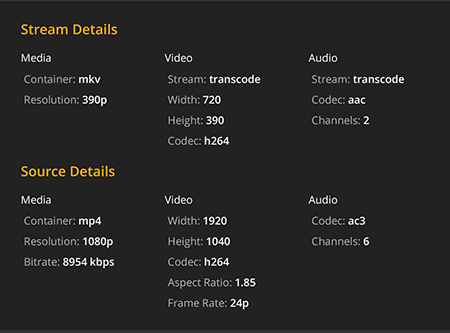
**Client 2 (LG WebOS 4K TV)**
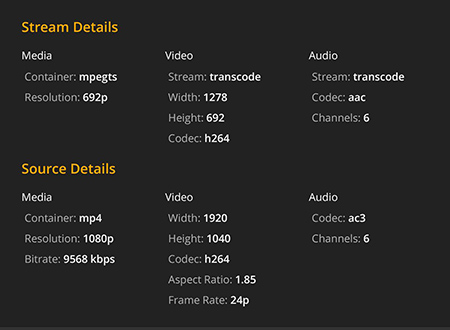
The average Joe doesn’t ‘get it’. What really bothers me is not so much the transcoding but the fact Plex is serving them up awful video quality using the default settings and I have no control over it. Presumably this is all intended to prevent buffering but surely this also reflects badly on Plex when they see the movie is full HD in the menu then they get something entirely different during playback.
I mean 1080p --\> 390p? It’s not acceptable.
I know they both have decent broadband at home. It’s not an isolated thing either this happens with most movies they try to play and I have them all encoded the same way (mp4 container, h264 video, ac3 audio). I’d imagine this library is compatible with the majority of clients (audio transcoding is fine).
Please do us admins a favour and adjust the default client settings to ‘original’ quality or give us the ability to enforce quality settings ourselves OR force direct play whenever possible.
---
### Author:  [@Bababooey84](https://forums.plex.tv/u/Bababooey84)
#### Post date: [December 29, 2017, 2:22am UTC](https://forums.plex.tv/t/implemented-feature-request-disable-transcoding/101180/16 "2017-12-29T02:22:01Z")
@niallobr I fully agree with you. I have friends and family which isn’t very tech savvy and they watch great content in 360p, it’s so frustrating. They usually have access to fast internet, so they shouldn’t have to stream at this low quality. When I ask them why they are streaming in so low resolutions they have no idea what I’m talking about, looks okay on their end. They must be blind.
To be able to set a default minimum resolution would have been nice. So they have to adjust down the quality if they for some reason are stuck with a crappy connection. Otherwise the content are streamed in decent quality or better if they don’t change the settings.
---
### Author:  [@niallobr](https://forums.plex.tv/u/niallobr)
#### Post date: [December 30, 2017, 4:02am UTC](https://forums.plex.tv/t/implemented-feature-request-disable-transcoding/101180/17 "2017-12-30T04:02:40Z")
Yes, it’s really puzzling! I just re-installed the iOS app and can see the default setting for internet streaming is only **_2Mbps 720p_**. I think this is pretty low. People are now used to streaming 1080p on Netflix (yes at optimised bitrates, but still). This has to be changed manually by the user in order to stream at original quality.
I’ve tried renaming the transcoder to disable it but if the client is set to transcode it just gets stuck loading when you try to play a video, so the user would still need to manually select ‘original’ for playback to work. So still not really a solution.
EDIT: I think if admins were allowed disable **‘augmented profiles’** this may also be a good solution?
This post discusses what augmented profiles do and is another example of how a transcode can be badly handled based on settings the user either isn’t aware of or doesn’t care about:
> **[Plex Profiles, Specifically Chromecast and an "Augmented profile"](https://forums.plex.tv/discussion/comment/1363048/#Comment_1363048)**
>
> TL;DR make sure the settings on the device you are casting from is set to original. The Chromecast will use the casting devices quality settings I figured out what was causing my initial problem, so I will explain the issue and solution in case...
---
### Author:  [@shaiknbaik](https://forums.plex.tv/u/shaiknbaik)
#### Post date: [March 12, 2018, 5:08am UTC](https://forums.plex.tv/t/implemented-feature-request-disable-transcoding/101180/18 "2018-03-12T05:08:34Z")
Please allow us to disable transcoding or set a preference that strongly favoring streaming natively… PLEASE! I think it should be a per user setting. Something like “Allow this user to transcode” or something
---
### Author:  [@plex\_cgraham\_com](https://forums.plex.tv/u/plex_cgraham_com)
#### Post date: [October 15, 2019, 12:56pm UTC](https://forums.plex.tv/t/implemented-feature-request-disable-transcoding/101180/19 "2019-10-15T12:56:24Z")
My underpowered QNAP NAS is running Plex and it cannot transcode ANYTHING. It simply lacks the processing power. I need a way to COMPLETELY disable transcoding.
---
### Author:  [@\_MASTER](https://forums.plex.tv/u/_MASTER)
#### Post date: [November 10, 2019, 8:25pm UTC](https://forums.plex.tv/t/implemented-feature-request-disable-transcoding/101180/20 "2019-11-10T20:25:04Z")
Same here, my nas is to old for transcoding but my internet upload is big enough to share it without transcoding. Please add a “toggle” with warning in the advanced menu.
[Next page](https://forums.plex.tv/t/implemented-feature-request-disable-transcoding/101180.md?page=2)