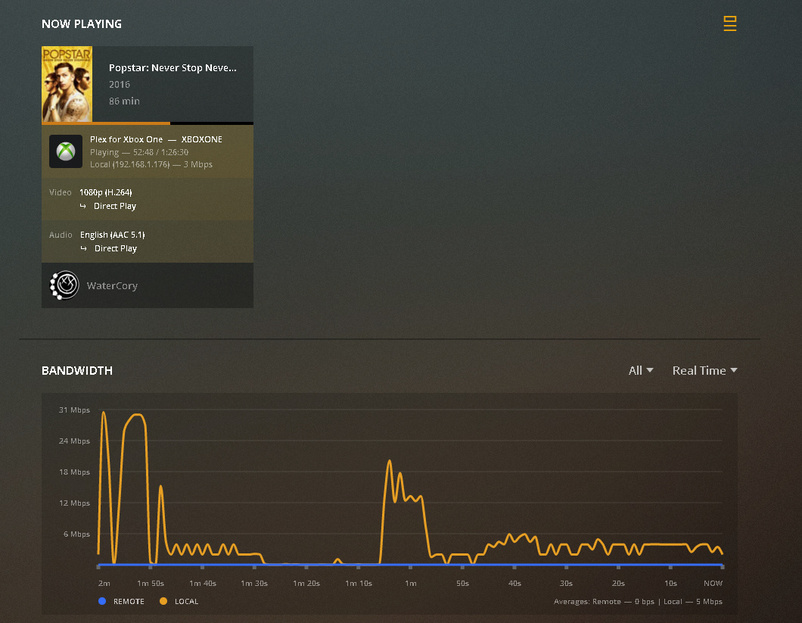
I have had Plex running fine for a while now, however I recently changed internet providers and had a new router and since then when accessing media on my Xbox One it says indirect connection and streams in much worse quality. However if I use it on either of my TV’s Plex app or my Fire Sticks Plex app it works fine, streams in full quality and shows as connected.
My server is showing as being accessible to an outside network as you can see in the image below.
On my old router I was able to forward plex through however when trying to do so on the new one it will not allow me to do so as the ports that Plex are using are already being used as you can see on UPnP.
As it only seems to be an issue on my Xbox One Plex app, is there something I’m missing? I have taken a look at a few other topics regarding the DNS but still a little confused as this only seems to be an issue with one Plex app on my local network, not any others.
If you’re playing media within your home network, that should not require remote access. So you’re having a different underlying problem… why does the Xbox client try to play this through a remote connection in the first place (that is unless it’s actually in a different location).
Are those devices (PMS, Xbox) on a different subnet or are you using some custom local IP addresses that are not in line with RFC-1918 (no official home network / private IPs)?
As for your remote connection:
If you use a manual port forward, make sure to also check the Manually specify public port box and specify that port inside your Plex remote access settings.
My Xbox is connected to the Ethernet by a devolo cockpit plugged into the mains, although I tried by connecting to the same Wi-Fi as the Tv’s/Fire stick and I still had an indirect connection on my Xbox.
Xbox One IPv4:
IP Address: 192.168.1.xxx
Subnet Mask: 255.255.255.0
Gateway: 192.168.x.x
Machine Plex Media Server is on:
IP address: 192.168.1.xxx
Subnet mask: 255.255.255.0
Gateway: 192.168.x.x
IP address does not match, last three digits are different, subnet mask and gateway both match.
Can you sign-out from the Xbox Plex client, force-quit and restart the app and sign-in again, verifying you’re using the same account that is logged into your server.
What version of PMS do you have installed on that server of yours?
I have done what you have asked with the Xbox, no luck still. I even tried re-installing the app on the Xbox. When first trying to watch something once signed in it just mention something about relay which I can see is like a middleman when a connection can’t be made.
I have checked devolo and it all looks good, I even reset them and set them back up. I’ve also tried the Xbox with Wi-Fi with no luck, however I noticed in the settings on the Xbox App I had Allow Fallback to Insecure Connections set to never, so I’ve changed that to match what PMS server has it to which is ‘On same network.’ The server is now showing as local, however videos still won’t play in the local quality and it buffers a lot.
So I’ve just gone and turned the Xbox back on and put something on to test and it seems to be back to normal, playing the original quality with minimal buffering. So it looks like after changing the ‘Allow Fallback to Insecure Connections’ to ‘On same network’ and giving it some time has possibly fixed the issue.