Do you have more than one Windows user account?
If you do, log into all accounts and “log out” explicitly. Do not use the “switch user” feature.
Log into the user account which you are using for your daily work.
Then reboot Windows.
Please tell if the Windows user account which you use for your daily work has changed recently.
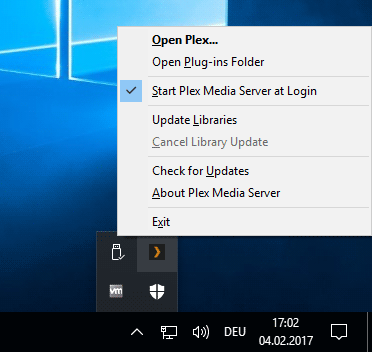
The Plex icon in the task tray must only appear in one of the Windows user accounts (your main one). If it appears in one of the other accounts as well, right-click on the icon and disable “Start Plex Media Server at Login”.
Do you have more than one machine with Plex server installed?
In your account I see 2 different server, but both have been created years ago.
So whatever happened, it must have restored some old registry values. I doubt that a regular server update can cause this.
Are you seeing your old libraries (at least in the MORE menu at the bottom of the side bar?)
I had 2 servers, one of which ran Plex and the other I installed Plex on to migrate to but ended up not going with that migration. However the other server (while on the same domain) was never used.
The server with UUID 88d5f3… is the same physical hardware as b655e95…
I don’t see my old libraries, in the old server I just have an ( ! ) showing that I can’t connect to it and the new server is up. It looks like I have db backups in the %LOCALAPPDATA% folder and everything, just the registry item seems to have changed?
Could you make a screenshot of the folder with the main database files? I’d like use the file sizes to see if the original database might be still in there.
It’s possible that I had a directory Symlinked to a spinning disk drive (though I keep DB and app files on SSD), but I’m not seeing any other locations with plex files.
Are you using some kind of “uninstaller” or “registry cleaner” software? (Revo, CCleaner etc)