# Issue with Ugreen DXP4800PLUS
**URL:** https://forums.plex.tv/t/issue-with-ugreen-dxp4800plus/906775
**Category:** Plex Media Server
**Tags:** server-docker
**Created:** [February 24, 2025, 5:31pm UTC](https://forums.plex.tv/t/issue-with-ugreen-dxp4800plus/906775 "2025-02-24T17:31:57Z")
**Posts on this page:** 9
**Page:** 1
### Author:  [@Saren081](https://forums.plex.tv/u/Saren081)
#### Post date: [February 24, 2025, 5:31pm UTC](https://forums.plex.tv/t/issue-with-ugreen-dxp4800plus/906775/1 "2025-02-24T17:31:57Z")
Server Version#: 1.41.4.9463
Player Version#: 5.91.0 (Samsung Tizen App)

Hello
I finished migrating plex from synology to a new ugreen dxp4800plus and initially got everything working great. However once i started to watch videos with .ass subtitles resulting in transcoding i started to notice frequent artifacting/pixelation in the videos.
The more movement there is in the picture the more common the artifacting/pixelation becomes. Artifacting might be the wrong word to use, it looks more like it switches momentarely to a very low quality encode then back to the regular encode.
After a lot of debugging including trying to install a 100% clean plex on docker with no migration to rule out the migration being the cause i have run out of things to try.
It does not seem to affect the webplayer only the 2 tv’s that i have in the house (both samsungs from 2021)
Plex on my old synology DX720+ works perfectly i only wanted to upgrade to get more storage bays and a stronger cpu that can handle 4k transcodes with .ass subtitle burning which DXP4800PLUS handels without breaking a sweat.
Logs dont tell me anything
```xml
```
_[Mod-Edit: tagging of log snipped]_
---
### Author:  [@Saren081](https://forums.plex.tv/u/Saren081)
#### Post date: [February 24, 2025, 10:52pm UTC](https://forums.plex.tv/t/issue-with-ugreen-dxp4800plus/906775/2 "2025-02-24T22:52:47Z")
Found the root cause for part of the problem

It seems that with these low bitrate 1080p cartoons there are some wierd interactions.
The first and the root cause of this issue is that it incorrectly reports a bitrate of 2147483.6 which is also INT32 max value. This causes plex app to freak out asking for a lower quality encode to reduce the bitrate… like a LOT lower quality resulting in the pixelated mess from the first screenshot.
A workaround fix for this is to “Disable Bitrate Limiting” then the plex app wont freak out over the 2 Tbps bitrate and everything runs smoothly.
A second thing here is that 3.6 Mbps prevents you from being able to select anything more than 720p as the next down the list is 2.2 Mbps 720p blocking you from trying to transcode your 1080p AV1/HVEC to any resonable 1080p H264 stream other the original which has the 2 Tbps bitrate buggy thing.
---
### Author:  [@TheLivingBubba](https://forums.plex.tv/u/TheLivingBubba)
#### Post date: [February 24, 2025, 11:07pm UTC](https://forums.plex.tv/t/issue-with-ugreen-dxp4800plus/906775/3 "2025-02-24T23:07:48Z")
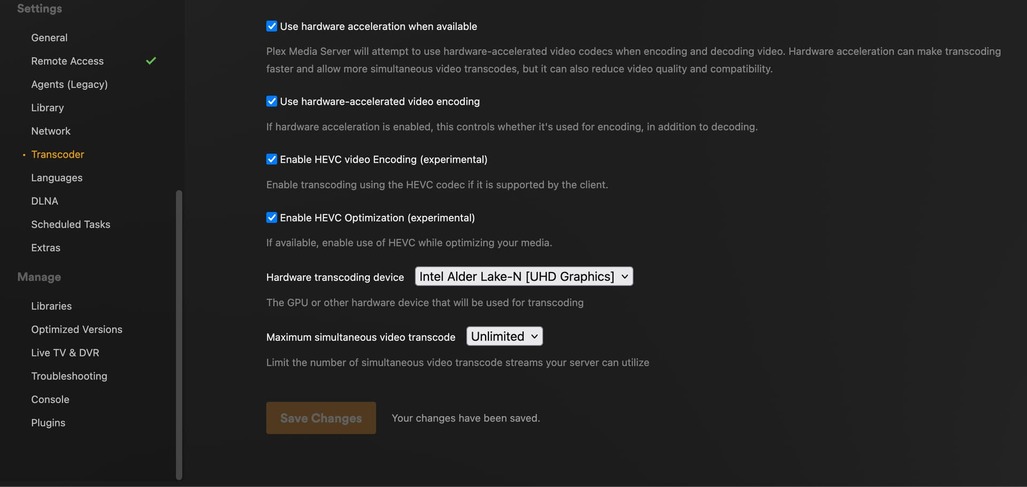
I don’t think that it’s using hardware transcoding. Did you pass the gpu thru to the docker container?
On the `settings -> transcoder` screen do you see a gpu under “Hardware Transcoding Device,” at the bottom like here?
---
### Author:  [@Saren081](https://forums.plex.tv/u/Saren081)
#### Post date: [February 24, 2025, 11:29pm UTC](https://forums.plex.tv/t/issue-with-ugreen-dxp4800plus/906775/4 "2025-02-24T23:29:41Z")
It’s using hardware transcoding

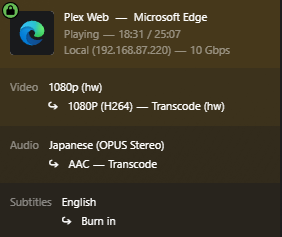
You can also see there that on the server dashboard is showing 10 Gbps which it obviously is not doing on an 1 Gbps lan connection. Something is being report incorrectly on the plex media server causing issues on the app that can be fixed by using the “Disable Bitrate Limiting”

This is the actual bitrate
---
### Author:  [@Saren081](https://forums.plex.tv/u/Saren081)
#### Post date: [February 25, 2025, 1:24am UTC](https://forums.plex.tv/t/issue-with-ugreen-dxp4800plus/906775/5 "2025-02-25T01:24:32Z")
Did some more testing after the “Disable Bitrate Limiting” fixed most of the issue but there is still an issue and i’m able to replicate it on the web player so it’s not an issue with the TV

on the ugreen nas with pentium gold 8505 cpu just as the scene changes to the door the picture is heavily pixelated but recovers to normal within a few seconds

doing the exact same thing on the synology nas with celeron j4125 produces no pixelation on the scene change
both ugreen and synology apears in the dashboard as shown below
---
### Author:  [@pshanew](https://forums.plex.tv/u/pshanew)
#### Post date: [February 25, 2025, 1:39am UTC](https://forums.plex.tv/t/issue-with-ugreen-dxp4800plus/906775/6 "2025-02-25T01:39:40Z")
This may be of interest to you, given the Pentium Gold 8505 is a 12th gen Alder Lake CPU with corresponding Gen 12 graphics:
> [@Intel Quick Sync transcode quality issues on Intel 12th/13th gen CPUs](https://forums.plex.tv/t/intel-quick-sync-transcode-quality-issues-on-intel-12th-13th-gen-cpus/832304):
>
> Server Version#: 1.31.0.6654 Player Version#: 4.101.1 (Plex Web – Also able to reproduce on Samsung TV Smart App) – Update 4: The quality issues appear to be directly related to the Plex server settings for Internet upload speed and Limit remote stream bitrate, along with the client side setting Maximum Remote Quality. The artifacts appear during playback if the ‘Limit remote stream bitrate’ is left to maximum and the Internet upload speed is left blank for unlimited. – The Samsung Tizen app …
---
### Author:  [@Saren081](https://forums.plex.tv/u/Saren081)
#### Post date: [February 25, 2025, 7:40am UTC](https://forums.plex.tv/t/issue-with-ugreen-dxp4800plus/906775/7 "2025-02-25T07:40:42Z")
While it didn’t make much sense to play with “Internet upload speed” and “Limit remote stream bitrate” considering i was having issues localy with the server, pc and tv on the same LAN… it did make a difference
Setting “Internet upload speed” to my current internet speed made no diference
Setting “Limit remote stream bitrate” from “Original (No Limit)” to “40 Mbps (4k)” seems to make the issue go away on local play
Now i wish there was a “60 Mbps (4k)” setting or an 8k setting since some 4k content excedes 40 Mbps making them unplayable in direct play if you dont have “Limit remote stream bitrate” on “Original (No Limit)”
Need to do more testing but seems like this could be a pick your poison scenario unless plex fixes the issue or adds more higher limit options
---
### Author:  [@Saren081](https://forums.plex.tv/u/Saren081)
#### Post date: [February 25, 2025, 10:35am UTC](https://forums.plex.tv/t/issue-with-ugreen-dxp4800plus/906775/8 "2025-02-25T10:35:24Z")
While the setting made a difference for webplayer and fixed the issue there it did not fix the issue on the TV ☹
I think i will likely return the ugreen DXP4800PLUS and instaid focus my efforts on looking at nvidia shield pro or the new google tv streamer
---
### Author:  [@system](https://forums.plex.tv/u/system)
#### Post date: [May 26, 2025, 10:35am UTC](https://forums.plex.tv/t/issue-with-ugreen-dxp4800plus/906775/9 "2025-05-26T10:35:43Z")
This topic was automatically closed 90 days after the last reply. New replies are no longer allowed.