# Issues Setting Up Remote Access - Help Requested
**URL:** https://forums.plex.tv/t/issues-setting-up-remote-access-help-requested/549878
**Category:** Remote Access
**Tags:** server-synology
**Created:** [March 2, 2020, 10:27am UTC](https://forums.plex.tv/t/issues-setting-up-remote-access-help-requested/549878 "2020-03-02T10:27:32Z")
**Posts on this page:** 4
**Page:** 1
### Author:  [@peteresavage\_gmail\_com](https://forums.plex.tv/u/peteresavage_gmail_com)
#### Post date: [March 2, 2020, 10:27am UTC](https://forums.plex.tv/t/issues-setting-up-remote-access-help-requested/549878/1 "2020-03-02T10:27:32Z")
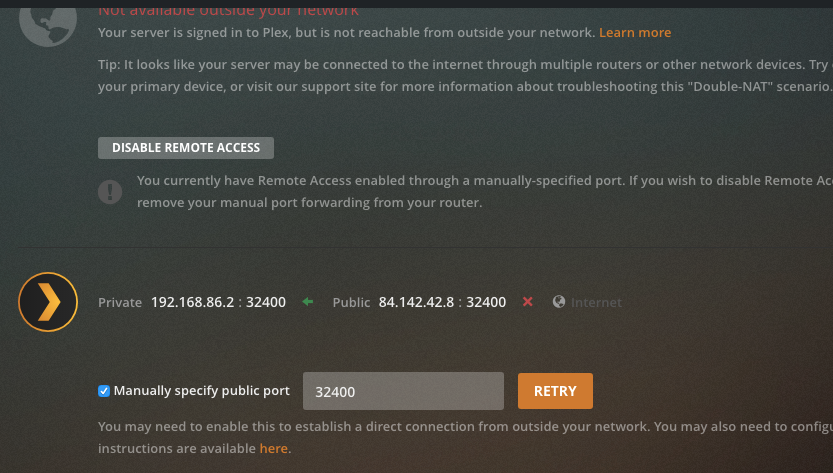 
Dear Forum. I am having issues setting up Plex remote access (needed to make Plex work on Sonos). I have no double NAT issue (checked) so I think it is about the port forwarding settings that I have set up. I attach 3 screenshots; one of the port-forwarding screen in my router; one from my Plex settings; one from my Synology NAS settings (static IP address page).
The static IP address of Synology DS218play NAS is 192.168.86.2. One thing that I don’t understand, but may be relevant is that my NAS always uses 192.168.86.1 for the gateway, but my router shows 192.168.1.1.
This is my router: [https://www.telekom.de/hilfe/downloads/bedienungsanleitung.pdf](https://www.telekom.de/hilfe/downloads/bedienungsanleitung.pdf)
I would be grateful for any advice that can be offered on the topic. Many thanks, Peter 
---
### Author:  [@tom80H](https://forums.plex.tv/u/tom80H)
#### Post date: [March 2, 2020, 11:27am UTC](https://forums.plex.tv/t/issues-setting-up-remote-access-help-requested/549878/2 "2020-03-02T11:27:07Z")
You might want to look into the actual router configuration and preferably establish the port reservation there (page 125 of your manual).
I suppose the issue might be along the setting of a „static“ IP address of the device only on the Synology. This could also explain the difference in IP bands you experience between the router and how you configured the Synology
---
### Author:  [@peteresavage\_gmail\_com](https://forums.plex.tv/u/peteresavage_gmail_com)
#### Post date: [March 2, 2020, 12:43pm UTC](https://forums.plex.tv/t/issues-setting-up-remote-access-help-requested/549878/3 "2020-03-02T12:43:17Z")
Thanks for the response Tom. Could the issue also be DNS related? I use a SmartStream service on my router ([https://www.streamvia.com/](https://www.streamvia.com/)) and for this service to work I have manual DNS entries that are given to me by the provider. These DNS entries are on both my router and also my Google WiFi network.
---
### Author:  [@system](https://forums.plex.tv/u/system)
#### Post date: [May 31, 2020, 10:27am UTC](https://forums.plex.tv/t/issues-setting-up-remote-access-help-requested/549878/5 "2020-05-31T10:27:42Z")
This topic was automatically closed after 90 days. New replies are no longer allowed.