# Libraries in settings inaccessable
**URL:** https://forums.plex.tv/t/libraries-in-settings-inaccessable/815163
**Category:** Plex Media Server
**Tags:** photos-library, plex-web, other-dev
**Created:** [October 17, 2022, 6:24pm UTC](https://forums.plex.tv/t/libraries-in-settings-inaccessable/815163 "2022-10-17T18:24:56Z")
**Posts on this page:** 14
**Page:** 1
### Author:  [@bladewarrior5000](https://forums.plex.tv/u/bladewarrior5000)
#### Post date: [October 17, 2022, 6:24pm UTC](https://forums.plex.tv/t/libraries-in-settings-inaccessable/815163/1 "2022-10-17T18:24:56Z")
Server Version#: 1.29.0.6244
Player Version#:
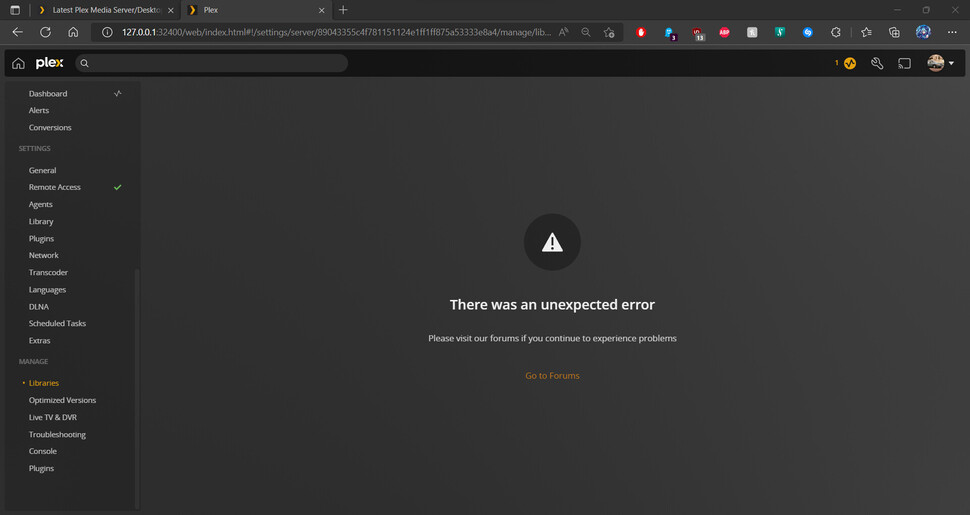
When trying to reach the libraries in the settings, it gives an unexpected error.
i cannot get rid of the games folder because i cannot access this section of the settings.
this is my second post. i need help please. please let me know if there is anything else i can do to try to resolve this.
Thank you in advance.
[Plex Media Server Logs\_2022-10-17\_14-22-08.zip](https://forums.plex.tv/uploads/short-url/hTP1Opigpflg8u9O3kXlwJk8hWl.zip) (4.2 MB)
Thank you very much in advance
BladeWarrior5000
---
### Author:  [@BigWheel](https://forums.plex.tv/u/BigWheel)
#### Post date: [October 17, 2022, 6:56pm UTC](https://forums.plex.tv/t/libraries-in-settings-inaccessable/815163/2 "2022-10-17T18:56:07Z")
Can you please uncheck verbose logging, save settings, restart server, go there again to reproduce error and then get logs.

Can you delete it from the libraries sidebar menu?

---
### Author:  [@bedelman0731](https://forums.plex.tv/u/bedelman0731)
#### Post date: [October 17, 2022, 7:01pm UTC](https://forums.plex.tv/t/libraries-in-settings-inaccessable/815163/3 "2022-10-17T19:01:04Z")
I’m getting the same “There was an unexpected error” message when I go to manage libraries as well. Using Plex Media Server 1.29.0.6244 on macOS.
I’ve tried to stop/start the application as well as restart the computer - same thing.
I also have the now-defunct “Games” library as well. The only choice from the three-dots menu is to “Pin” it - there is no other option
---
### Author:  [@BigWheel](https://forums.plex.tv/u/BigWheel)
#### Post date: [October 17, 2022, 7:14pm UTC](https://forums.plex.tv/t/libraries-in-settings-inaccessable/815163/4 "2022-10-17T19:14:57Z")
ok can you get the logs again after turning off verbose logging and reproducing. Verbose logging is mostly useless info for most problems and causes the logs roll over too quickly and makes it harder to find things
---
### Author:  [@bedelman0731](https://forums.plex.tv/u/bedelman0731)
#### Post date: [October 17, 2022, 7:20pm UTC](https://forums.plex.tv/t/libraries-in-settings-inaccessable/815163/5 "2022-10-17T19:20:05Z")
OK - I disabled verbose logging, stop/started the application, triggered the error, and downloaded the log zip file. Now what should I do with it?
---
### Author:  [@BigWheel](https://forums.plex.tv/u/BigWheel)
#### Post date: [October 17, 2022, 7:22pm UTC](https://forums.plex.tv/t/libraries-in-settings-inaccessable/815163/6 "2022-10-17T19:22:16Z")
You can attach it to a message it to me ( click on my username to see message button) or attach it here like you did in your first post
---
### Author:  [@bedelman0731](https://forums.plex.tv/u/bedelman0731)
#### Post date: [October 17, 2022, 7:25pm UTC](https://forums.plex.tv/t/libraries-in-settings-inaccessable/815163/7 "2022-10-17T19:25:32Z")
I messaged the zip file to you - I’m a different person that the one who sent you the log file at the beginning of this thread
---
### Author:  [@BigWheel](https://forums.plex.tv/u/BigWheel)
#### Post date: [October 17, 2022, 7:46pm UTC](https://forums.plex.tv/t/libraries-in-settings-inaccessable/815163/8 "2022-10-17T19:46:55Z")
Looks like there is a fix in the works to purge any games libraries, but it is a couple server updates away. I’m checking with folks to see if there is another way to manually get rid of the Games library which should solve the access to the library settings.
---
### Author:  [@bladewarrior5000](https://forums.plex.tv/u/bladewarrior5000)
#### Post date: [October 17, 2022, 8:00pm UTC](https://forums.plex.tv/t/libraries-in-settings-inaccessable/815163/9 "2022-10-17T20:00:02Z")
Thank you so much. i truely appriciate your help to solve this.
---
### Author:  [@nibbles](https://forums.plex.tv/u/nibbles)
#### Post date: [October 18, 2022, 12:46am UTC](https://forums.plex.tv/t/libraries-in-settings-inaccessable/815163/10 "2022-10-18T00:46:47Z")
Would it be worth trying `Plex Media Scanner` in this situation to delete the library?
I aliased mine to `pscan` so I can type faster. Below I have a test library called _Gamer_ with one video in it. The first command removes any videos in the library. The second deletes the library itself.
```auto
$ pscan -l
1: Movies
3: Music
4: Photos
2: TV Shows
6: Gamer
$ pscan -w -c 6
deleting 1 items.
$ pscan -D -c 6
$
```
---
### Author:  [@BigWheel](https://forums.plex.tv/u/BigWheel)
#### Post date: [October 18, 2022, 1:51am UTC](https://forums.plex.tv/t/libraries-in-settings-inaccessable/815163/11 "2022-10-18T01:51:47Z")
I suppose it is worth a try if they are willing to delve into command line.
info about it here. [https://support.plex.tv/articles/201242707-plex-media-scanner-via-command-line/](https://support.plex.tv/articles/201242707-plex-media-scanner-via-command-line/)
---
### Author:  [@bladewarrior5000](https://forums.plex.tv/u/bladewarrior5000)
#### Post date: [October 18, 2022, 2:11am UTC](https://forums.plex.tv/t/libraries-in-settings-inaccessable/815163/12 "2022-10-18T02:11:48Z")
this definitanately worked on my end. sorry not the best at powershell so i didn’t know how to use the variables to make pSCAN but i know my commands and your command instructions worked like a charm.

Terminal instructions

library afterwards
---
### Author:  [@bedelman0731](https://forums.plex.tv/u/bedelman0731)
#### Post date: [October 18, 2022, 1:20pm UTC](https://forums.plex.tv/t/libraries-in-settings-inaccessable/815163/13 "2022-10-18T13:20:59Z")
This worked for me as well - I am now able to get to the Manage → Libraries page without seeing that error
---
### Author:  [@system](https://forums.plex.tv/u/system)
#### Post date: [January 16, 2023, 1:21pm UTC](https://forums.plex.tv/t/libraries-in-settings-inaccessable/815163/14 "2023-01-16T13:21:56Z")
This topic was automatically closed 90 days after the last reply. New replies are no longer allowed.