# Linux server - Address resolution issues
**URL:** https://forums.plex.tv/t/linux-server-address-resolution-issues/874131
**Category:** Plex Media Server
**Tags:** server-linux
**Created:** [April 4, 2024, 9:05pm UTC](https://forums.plex.tv/t/linux-server-address-resolution-issues/874131 "2024-04-04T21:05:25Z")
**Posts on this page:** 9
**Page:** 1
### Author:  [@formeroosid](https://forums.plex.tv/u/formeroosid)
#### Post date: [April 4, 2024, 9:05pm UTC](https://forums.plex.tv/t/linux-server-address-resolution-issues/874131/1 "2024-04-04T21:05:25Z")
Server Version#: 1.40.1.8227
Player Version#: N/A
I’m running plex on Ubuntu Linux - 22.04.4. My server has run well for years. I’ve been having a problem recently where my server will announce “This application is at _hostname_ and is not hosted by Plex.” The server also appears as unavailable to my external users when this happens. Restarting the plexmediaserver service will restore functionality.
I keep seeing the following in the logs:
> Apr 04, 2024 09:29:56.714 [140476053658424] WARN - [HttpClient/HCl#50] HTTP error requesting GET [https://plex.tv/api/v2/server/users/services?auth\_token=xxxxxxxxxxxxxxxxxxxx](https://plex.tv/api/v2/server/users/services?auth_token=xxxxxxxxxxxxxxxxxxxx) (6, Couldn’t resolve host name) (Could not resolve host: plex.tv)
> Apr 04, 2024 09:59:56.696 [140476053658424] WARN - [HttpClient/HCl#51] HTTP error requesting GET [https://plex.tv/api/v2/server/users/services?auth\_token=xxxxxxxxxxxxxxxxxxxx](https://plex.tv/api/v2/server/users/services?auth_token=xxxxxxxxxxxxxxxxxxxx) (6, Couldn’t resolve host name) (Could not resolve host: plex.tv)
> Apr 04, 2024 10:27:13.105 [140476053658424] WARN - [HttpClient/HCl#52] HTTP error requesting GET [https://v4.plex.tv/pms/:/ip](https://v4.plex.tv/pms/:/ip) (6, Couldn’t resolve host name) (Could not resolve host: v4.plex.tv)
> Apr 04, 2024 10:27:13.105 [140475996244792] ERROR - PublicAddressManager: Unable to get public IP adddress from myPlex (httpCode=-6):
> Apr 04, 2024 10:29:56.606 [140476053658424] WARN - [HttpClient/HCl#53] HTTP error requesting GET [https://plex.tv/api/v2/server/users/services?auth\_token=xxxxxxxxxxxxxxxxxxxx](https://plex.tv/api/v2/server/users/services?auth_token=xxxxxxxxxxxxxxxxxxxx) (6, Couldn’t resolve host name) (Could not resolve host: plex.tv)
> Apr 04, 2024 10:59:56.677 [140476053658424] WARN - [HttpClient/HCl#54] HTTP error requesting GET [https://plex.tv/api/v2/server/users/services?auth\_token=xxxxxxxxxxxxxxxxxxxx](https://plex.tv/api/v2/server/users/services?auth_token=xxxxxxxxxxxxxxxxxxxx) (6, Couldn’t resolve host name) (Could not resolve host: plex.tv)
> Apr 04, 2024 11:27:13.388 [140476053658424] WARN - [HttpClient/HCl#55] HTTP error requesting GET [https://v4.plex.tv/pms/:/ip](https://v4.plex.tv/pms/:/ip) (6, Couldn’t resolve host name) (Could not resolve host: v4.plex.tv)
> Apr 04, 2024 11:27:13.389 [140475992025912] ERROR - PublicAddressManager: Unable to get public IP adddress from myPlex (httpCode=-6):
> Apr 04, 2024 11:29:56.608 [140476053658424] WARN - [HttpClient/HCl#56] HTTP error requesting GET [https://plex.tv/api/v2/server/users/services?auth\_token=xxxxxxxxxxxxxxxxxxxx](https://plex.tv/api/v2/server/users/services?auth_token=xxxxxxxxxxxxxxxxxxxx) (6, Couldn’t resolve host name) (Could not resolve host: plex.tv)
> Apr 04, 2024 11:56:11.873 [140476053658424] WARN - [HttpClient/HCl#58] HTTP error requesting GET [https://plex.tv/updater/products/5/check.xml?build=linux-x86\_64&channel=8&distribution=debian&version=1.40.1.8227-c0dd5a73e](https://plex.tv/updater/products/5/check.xml?build=linux-x86_64&channel=8&distribution=debian&version=1.40.1.8227-c0dd5a73e) (6, Couldn’t resolve host name) (Could not resolve host: plex.tv)
> Apr 04, 2024 11:56:11.873 [140476036279096] ERROR - [Req#28f] HTTP -6 downloading url [https://plex.tv/updater/products/5/check.xml?build=linux-x86\_64&channel=8&distribution=debian&version=1.40.1.8227-c0dd5a73e](https://plex.tv/updater/products/5/check.xml?build=linux-x86_64&channel=8&distribution=debian&version=1.40.1.8227-c0dd5a73e)
I can resolve plex.tv on the machine:
> $ dig plex.tv
>
> ; \<\<\>\> DiG 9.18.18-0ubuntu0.22.04.2-Ubuntu \<\<\>\> plex.tv
> ;; global options: +cmd
> ;; Got answer:
> ;; -\>\>HEADER\<\<- opcode: QUERY, status: NOERROR, id: 27053
> ;; flags: qr rd ra; QUERY: 1, ANSWER: 2, AUTHORITY: 0, ADDITIONAL: 1
>
> ;; OPT PSEUDOSECTION:
> ; EDNS: version: 0, flags:; udp: 1232
> ;; QUESTION SECTION:
> ;plex.tv. IN A
>
> ;; ANSWER SECTION:
> plex.tv. 50 IN A 52.17.160.217
> plex.tv. 50 IN A 52.18.41.238
>
> ;; Query time: 27 msec
> ;; SERVER: 192.168.86.100#53(192.168.86.100) (UDP)
> ;; WHEN: Thu Apr 04 13:44:58 PDT 2024
> ;; MSG SIZE rcvd: 68
My remote settings look good:
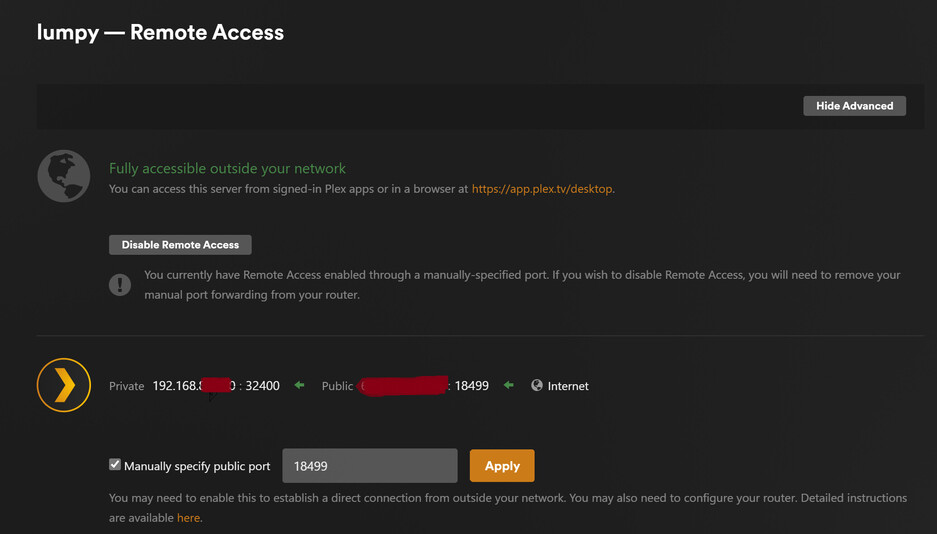
I double-checked by DNS settings on the server. I don’t have any other address resolution issues. I’ve tried disabling the ‘Enable Relay’ in the network settings. I’ve also ensured that the NTP sync is setting the correct time on the server, as I’ve seen that suggested as a remote access issue.
Not sure what else to try. Your help is appriciated.
Jamie
---
### Author:  [@hokierulz](https://forums.plex.tv/u/hokierulz)
#### Post date: [April 4, 2024, 9:30pm UTC](https://forums.plex.tv/t/linux-server-address-resolution-issues/874131/2 "2024-04-04T21:30:38Z")
Are you running pihole or any other add blocker? I’m not seeing what I would expect in your dig, buy it is worth asking because I was seeing the same inability to resolve plex.tv in my logs, along with some oddly inconsistent issues with Plex, and eventually found the issue was that I had “Enable DNSSEC” enabled in my pihole instances.
This is something I really want turned on, but plex.tv has a problem with DNSSEC per [this thread](https://forums.plex.tv/t/fixing-dnssec-for-plex-tv/870631). I’ve even considered a pihole instance specifically dedicated for my Plex Server instance DNS resolution. The fundamental issue is that .tv is actually the internet county code top level domain for the country of Tuvalu, and according to GoDaddy DNSSEC can’t be used for .tv domains.
---
### Author:  [@formeroosid](https://forums.plex.tv/u/formeroosid)
#### Post date: [April 4, 2024, 9:41pm UTC](https://forums.plex.tv/t/linux-server-address-resolution-issues/874131/3 "2024-04-04T21:41:28Z")
Ok, that’s it. I’m running Pi-Hole and my own resolver, Unbound. I’ll disable DNSSEC and see what happens.
Thanks!
Jamie
---
### Author:  [@hokierulz](https://forums.plex.tv/u/hokierulz)
#### Post date: [April 4, 2024, 10:06pm UTC](https://forums.plex.tv/t/linux-server-address-resolution-issues/874131/4 "2024-04-04T22:06:00Z")
I’m pihole and unbound also. Hopefully this works for you also.
---
### Author:  [@formeroosid](https://forums.plex.tv/u/formeroosid)
#### Post date: [April 4, 2024, 10:07pm UTC](https://forums.plex.tv/t/linux-server-address-resolution-issues/874131/5 "2024-04-04T22:07:26Z")
Now I’m getting these. An improvement, I suppose. 🤷♂️
| Apr 04, 2024 15:04:21.481 | WARN | [HttpClient/HCl#91] HTTP error requesting GET undefined (6, Couldn’t resolve host name) (Could not resolve host: undefined) |
| --- | --- | --- |
| Apr 04, 2024 15:04:21.475 | WARN | [HttpClient/HCl#90] HTTP error requesting GET undefined (6, Couldn’t resolve host name) (Could not resolve host: undefined) |
| Apr 04, 2024 15:04:21.474 | WARN | [HttpClient/HCl#8f] HTTP error requesting GET undefined (6, Couldn’t resolve host name) (Could not resolve host: undefined) |
---
### Author:  [@hokierulz](https://forums.plex.tv/u/hokierulz)
#### Post date: [April 4, 2024, 11:00pm UTC](https://forums.plex.tv/t/linux-server-address-resolution-issues/874131/6 "2024-04-04T23:00:26Z")
Are these warnings in the Plex [Server logs?](https://support.plex.tv/articles/200250417-plex-media-server-log-files/) I haven’t seen these warnings in my logs BUT: Are pihole and unbound new to your environment, and are you running them bare metal, docker, LXC, or something else? A number of thoughts if these are new to your environment - sorry if you already know this stuff:
- If you are running pihole in docker, then make sure in your docker compose file that you haven’t set DNSSEC to be on. Otherwise every time you restart your docker container or reboot DNSSEC will be turned back on.
- Have you set your unbound instance to exclude plex.direct from dns rebinding protection?
- In pihole under dns settings your only enabled upstream DNS server should be 127.0.0.1#5335 (assuming pihole and unbound are on the same server).
- Also in pihole under dns settings, if you have it set to “only allow local requests” then depending on your network you may need to look at changing to another option. Make sure to read the warnings and that this is appropriate for your setup.
- I don’t know if your pihole instance is your local network DNS resolver, but if it isn’t you may need to turn on conditional forwarding to have your router resolve your lan device names.
---
### Author:  [@MiHGroup](https://forums.plex.tv/u/MiHGroup)
#### Post date: [April 5, 2024, 4:45am UTC](https://forums.plex.tv/t/linux-server-address-resolution-issues/874131/7 "2024-04-05T04:45:28Z")
Im using bind (and no RPZ zones for pihole) and yes now i set validation exemption for plex.tv but this is not a solution… solution is for domain to fix their dnssec implementations or get rid of it 🙂
---
### Author:  [@formeroosid](https://forums.plex.tv/u/formeroosid)
#### Post date: [April 5, 2024, 4:41pm UTC](https://forums.plex.tv/t/linux-server-address-resolution-issues/874131/8 "2024-04-05T16:41:40Z")
Super cool. Thanks. Unbound is new in my environment. I’ve run Pi-hole for quite some time.
I’ll make the adjustments.
Jamie
---
### Author:  [@system](https://forums.plex.tv/u/system)
#### Post date: [July 4, 2024, 4:42pm UTC](https://forums.plex.tv/t/linux-server-address-resolution-issues/874131/9 "2024-07-04T16:42:08Z")
This topic was automatically closed 90 days after the last reply. New replies are no longer allowed.