# Lost Matches
**URL:** https://forums.plex.tv/t/lost-matches/377020
**Category:** General Discussions
**Tags:** library-management
**Created:** [February 17, 2019, 11:11am UTC](https://forums.plex.tv/t/lost-matches/377020 "2019-02-17T11:11:16Z")
**Posts on this page:** 5
**Page:** 1
### Author:  [@Simpsons](https://forums.plex.tv/u/Simpsons)
#### Post date: [February 17, 2019, 11:11am UTC](https://forums.plex.tv/t/lost-matches/377020/1 "2019-02-17T11:11:16Z")
Hi, my internet connection dropped out about 1/2 way through updating a huge library, as such it appears that only 1/2 of the titles were matched. The other half appear to be unmatched titles with thumb shots of the footage.
Is there a way to bulk update/match the remaining library titles? I’ve tried to re-fresh metadata, but that doesn’t match the titles.
All the files are in a correctly named format and selecting individual entries and using the “match” or “fix match” feature works fine. but there’s over 2k entries to select (manually doing this is insane). I found a way to select all the entries, but there is no “fix match” option to fix them
Why does Plex server not allow to re-match when the db matching is clearly broken? and is there a way to bulk match? (or do I have to try my luck again and spend over a week wiping and re-doing the library files?)
---
### Author:  [@tom80H](https://forums.plex.tv/u/tom80H)
#### Post date: [February 17, 2019, 11:19am UTC](https://forums.plex.tv/t/lost-matches/377020/2 "2019-02-17T11:19:27Z")
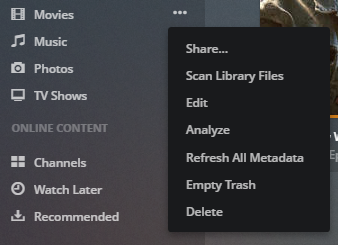
if the titles aren’t matched, click the `...` context menu for that library and select `Scan Library Files`.
---
### Author:  [@Simpsons](https://forums.plex.tv/u/Simpsons)
#### Post date: [February 17, 2019, 12:22pm UTC](https://forums.plex.tv/t/lost-matches/377020/3 "2019-02-17T12:22:25Z")
The titles are matched correctly and were so when first added. Scan library does nothing.
---
### Author:  [@ajwoods1978\_yahoo\_com](https://forums.plex.tv/u/ajwoods1978_yahoo_com)
#### Post date: [February 17, 2019, 4:12pm UTC](https://forums.plex.tv/t/lost-matches/377020/4 "2019-02-17T16:12:39Z")
I am having something similar. When I add new movies Plex doesn’t match it. So I use the fix match and choose the correct movie but it doesn’t bring any info over for the movie. I have to go manually match up the poster art and there is no metadata tide to the movie. I have already rebuilt the library twice and when I do that Plex goes out and populates everything. Once it is done any movie I add after that Plex won’t update.
---
### Author:  [@system](https://forums.plex.tv/u/system)
#### Post date: [May 18, 2019, 4:12pm UTC](https://forums.plex.tv/t/lost-matches/377020/5 "2019-05-18T16:12:52Z")
This topic was automatically closed 90 days after the last reply. New replies are no longer allowed.