### Author:  [@swann866](https://forums.plex.tv/u/swann866)
#### Post date: [April 28, 2024, 11:34am UTC](https://forums.plex.tv/t/managed-account-can-view-plex-server-home-admin-cant/876254/1 "2024-04-28T11:34:54Z")
Server Version#: TOS app centre says 1.31.2.6783 (I thought I had updated to 1.40 – maybe as per [https://forum.terra-master.com/en/viewtopic.php?t=2340](https://forum.terra-master.com/en/viewtopic.php?t=2340), it’s not updating the app screen with the new version?)
Player Version#: Settings \> Plex Web \> General says “Version 4.125.1”
\
Context: I had Plex set up and working fine, on a Terramaster F2-221 (TOS v5.1.29). However, since updating to a new internet provider and migrating the Plex over to the new internet set-up, the managed user I have set up for my partner to use can see the Plex media server files, but the home admin account sees no files.
What the home admin sees under Settings (i.e. nothing about the server in the left-hand nav)
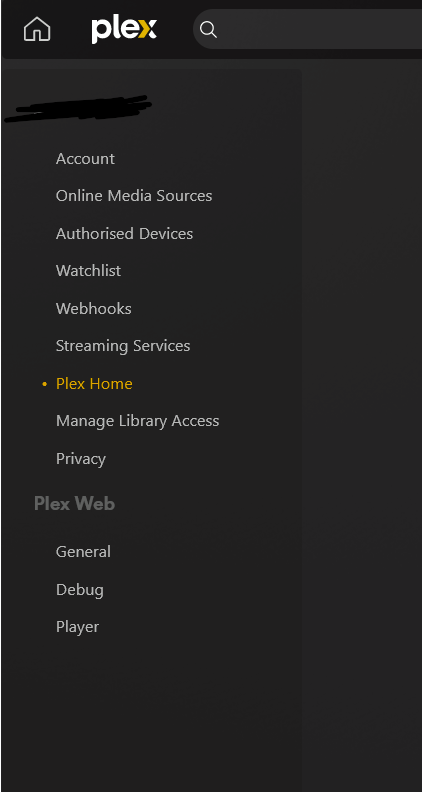
In the main navigation, if the Home Admin clicks “Your media” there’s a prompt to “Get Plex Media Server” (??)
The question: what can I do to get my Home Admin to regain access to the media server? It means I’ve lost all ability to configure things, I think!
(can provide logs on request, but I have no idea what thing to even provide)
---
### Author:  [@swann866](https://forums.plex.tv/u/swann866)
#### Post date: [April 28, 2024, 11:37am UTC](https://forums.plex.tv/t/managed-account-can-view-plex-server-home-admin-cant/876254/2 "2024-04-28T11:37:03Z")
Oh, also:
- I saw the advice in [Reddit - Dive into anything](https://www.reddit.com/r/PleX/comments/yfusqx/all_my_content_is_missing_on_the_home_admin/), which was basically “have you tried restarting the NAS” (yes I have, it didn’t fix it!)
- I saw [Managed User Has No Access to Libraries, Admin Account Has No Problems - #7 by tommytg2](https://forums.plex.tv/t/managed-user-has-no-access-to-libraries-admin-account-has-no-problems/815906/7), but the advice confused me (I work in website management, but I am far from a network specialist, so I struggle with the network detail bits!)
---
### Author:  [@tommytg1](https://forums.plex.tv/u/tommytg1)
#### Post date: [April 29, 2024, 4:41pm UTC](https://forums.plex.tv/t/managed-account-can-view-plex-server-home-admin-cant/876254/3 "2024-04-29T16:41:06Z")
Hey @swann866 I read your question and I’m not sure I can help, but here is goes. It seems like my struggle was the opposite of yours. My admin account was fine, my user accounts were going out my firewall and back in as if they were remote users outside the house. This was even though both admin and user accounts were accessing the home server at home. Because I’m a networking guy, I was able to put a rule in my firewall that caught the outgoing plex traffic and redirected to the internal IP of the server. I only realized it was an issue when 4k media was playing at a low bit rate - the Plex was dumbing the bitrate down because it was determining that it was a remote user. I have a little experience with NAS devices, and I don’t want to frustrate further with stupid questions, but from the screenshot it looks like you are not logged into Plex. Anyway, hope that helps.
---
### Author:  [@swann866](https://forums.plex.tv/u/swann866)
#### Post date: [May 1, 2024, 6:53am UTC](https://forums.plex.tv/t/managed-account-can-view-plex-server-home-admin-cant/876254/4 "2024-05-01T06:53:07Z")
Hey, thanks for the reply. Could you give any specific guidance for next steps? How could I tell if there was a routing issue – is that something you could help diagnose if I shared the logs, and if so, what would you need logs of?
---
### Author:  [@tommytg1](https://forums.plex.tv/u/tommytg1)
#### Post date: [May 1, 2024, 2:17pm UTC](https://forums.plex.tv/t/managed-account-can-view-plex-server-home-admin-cant/876254/5 "2024-05-01T14:17:59Z")
Sure, I can try to help. Let me verify some facts. The problem is your partner can see content and the admin account does not see content, instead the admin is prompted with “Get Plex Media Server”?
Do you have Plex Pass? Is the partner account accessing plex from the same network as the admin account? What player are you both using, just the web or is it an app on a player?
---
### Author:  [@swann866](https://forums.plex.tv/u/swann866)
#### Post date: [May 3, 2024, 1:50am UTC](https://forums.plex.tv/t/managed-account-can-view-plex-server-home-admin-cant/876254/6 "2024-05-03T01:50:14Z")
Amazing, thanks! To answer the Qs:
- You’re correct about the description of the problem.
- I don’t have Plex Pass (I didn’t before either, when both accounts could access the NAS fine)
- Yes, both the managed account for my partner, and the admin account, will get different results on the same device on the same network (we live together)
- I see the same issue with both the web player, and also the Samsung smart TV Plex app
---
### Author:  [@BigWheel](https://forums.plex.tv/u/BigWheel)
#### Post date: [May 3, 2024, 3:20am UTC](https://forums.plex.tv/t/managed-account-can-view-plex-server-home-admin-cant/876254/7 "2024-05-03T03:20:24Z")
are you accessing it from the local IP or app.plex.tv ?
---
### Author:  [@swann866](https://forums.plex.tv/u/swann866)
#### Post date: [May 8, 2024, 9:00am UTC](https://forums.plex.tv/t/managed-account-can-view-plex-server-home-admin-cant/876254/8 "2024-05-08T09:00:05Z")
Just tried now, and:
- On app.plex.tv, the admin account is as above, and also my partners’ account can see the NAS in the sidebar but it says it’s “currently unavailable” (I don’t think that used to be true? But is right now when I just checked)
- On the local IP access, my partners’ account can access the NAS, but the admin account is as above.
---
### Author:  [@swann866](https://forums.plex.tv/u/swann866)
#### Post date: [June 23, 2024, 5:34pm UTC](https://forums.plex.tv/t/managed-account-can-view-plex-server-home-admin-cant/876254/9 "2024-06-23T17:34:25Z")
Does anyone else have any guidance? It’s pretty frustrating!
---
### Author:  [@Frosty5592](https://forums.plex.tv/u/Frosty5592)
#### Post date: [June 26, 2024, 3:00am UTC](https://forums.plex.tv/t/managed-account-can-view-plex-server-home-admin-cant/876254/10 "2024-06-26T03:00:37Z")
I’ve got the same issue as you, by the sounds of things. I just posted here [Can't view my plex server or content libraries via primary account but I can via a managed account - #4 by geraldgg](https://forums.plex.tv/t/cant-view-my-plex-server-or-content-libraries-via-primary-account-but-i-can-via-a-managed-account/880575/4)
An interesting thing I’ve noticed is that I had a plex client still open on one of my devices from before the issue started occuring, and on that device I can still use my admin account to interact with the library and watch content. But on any other device I have, my admin account cannot see the libraries and I have to use a managed account instead.
It’s frustrating that you’ve had no help for nearly 2 months. I’m not hopeful I’ll get a quick resolution either.
---
### Author:  [@geraldgg](https://forums.plex.tv/u/geraldgg)
#### Post date: [July 6, 2024, 2:14pm UTC](https://forums.plex.tv/t/managed-account-can-view-plex-server-home-admin-cant/876254/11 "2024-07-06T14:14:31Z")
Hi,
If you look at my thread, I solved my issue. With new internet provider (Free), my box had a different gateway and my server was using the old one, so no access to plex server.
You might look into that.
---
### Author:  [@swann866](https://forums.plex.tv/u/swann866)
#### Post date: [July 8, 2024, 6:10pm UTC](https://forums.plex.tv/t/managed-account-can-view-plex-server-home-admin-cant/876254/12 "2024-07-08T18:10:00Z")
Oh that’s super helpful, thanks! I can imagine it could be a gateway issue, as I did recently switch internet provider. That said, I don’t know how to fix that issue either 🫠 is there any guidance you can give me about how you fixed this, or give any guidance you followed? I’m not really a knowledgable network person! Thanks
---
### Author:  [@geraldgg](https://forums.plex.tv/u/geraldgg)
#### Post date: [July 8, 2024, 6:25pm UTC](https://forums.plex.tv/t/managed-account-can-view-plex-server-home-admin-cant/876254/13 "2024-07-08T18:25:14Z")
You can see your gateway by typing route
Then you delete the current gateway:
sudo route delete default gw 192.168.22.1
and add the new one
sudo route add default gw 192.168.22.254
---
### Author:  [@swann866](https://forums.plex.tv/u/swann866)
#### Post date: [July 8, 2024, 10:52pm UTC](https://forums.plex.tv/t/managed-account-can-view-plex-server-home-admin-cant/876254/14 "2024-07-08T22:52:41Z")
I did the `route` command, and did see that it was looking up the old router. I used the commands you suggested, and that seemed to switch it over to the new one – thanks for that!
However, the main Plex account still doesn’t have the device in the left-hand nav etc., as before. Is there any kinda caching problem I need to resolve, do you think? Or could there be some other related problem somewhere in the config? I tried restarting the NAS, but that didn’t help…
---
### Author:  [@geraldgg](https://forums.plex.tv/u/geraldgg)
#### Post date: [July 11, 2024, 7:04am UTC](https://forums.plex.tv/t/managed-account-can-view-plex-server-home-admin-cant/876254/15 "2024-07-11T07:04:15Z")
Try to look at this thread [Plex Server doesn't show my libraries and I can't add others](https://forums.plex.tv/t/plex-server-doesnt-show-my-libraries-and-i-cant-add-others/880831)
Also check the logs if you see something.
---
### Author:  [@swann866](https://forums.plex.tv/u/swann866)
#### Post date: [July 11, 2024, 8:47am UTC](https://forums.plex.tv/t/managed-account-can-view-plex-server-home-admin-cant/876254/16 "2024-07-11T08:47:06Z")
Thanks for this – I didn’t see anything specific about gateways in that thread, guidance-wise. I also tried looking at the logs, but there are 10s of logs, each with 10,000s of rows. I tried checking the Plex Media [Server log](https://support.plex.tv/articles/200250417-plex-media-server-log-files/) (felt the most relevant) for “error” or “gateway” or the gateway IPs I updated based on your last advice, and nothing obvious sprung out to me – but conscious that I don’t really know what I’m looking for.
Any advice you can give on keywords to look for in the logs, that could help pinpoint a problem? Things I should expect to see / not see?
---
### Author:  [@geraldgg](https://forums.plex.tv/u/geraldgg)
#### Post date: [July 11, 2024, 10:08am UTC](https://forums.plex.tv/t/managed-account-can-view-plex-server-home-admin-cant/876254/17 "2024-07-11T10:08:42Z")
More than the what, it is the “when” to look at.
You can stop plex, clean the logs, and start plex, and look again, amount of logs will be reduced. There should be connection to plex.tv, check the errors if there are any.
---
### Author:  [@system](https://forums.plex.tv/u/system)
#### Post date: [October 9, 2024, 10:09am UTC](https://forums.plex.tv/t/managed-account-can-view-plex-server-home-admin-cant/876254/18 "2024-10-09T10:09:34Z")
This topic was automatically closed 90 days after the last reply. New replies are no longer allowed.