# Media Unavailable message
**URL:** https://forums.plex.tv/t/media-unavailable-message/826821
**Category:** Plex Media Server
**Tags:** server-linux
**Created:** [January 14, 2023, 4:05pm UTC](https://forums.plex.tv/t/media-unavailable-message/826821 "2023-01-14T16:05:50Z")
**Posts on this page:** 20
**Page:** 1
### Author:  [@digitalpurchase999\_gmail\_com](https://forums.plex.tv/u/digitalpurchase999_gmail_com)
#### Post date: [January 14, 2023, 4:05pm UTC](https://forums.plex.tv/t/media-unavailable-message/826821/1 "2023-01-14T16:05:50Z")
Server Version#:plexmediaserver\_1.30.1.6562-915986d62\_amd64
Player Version#:Amazon
Perfectly acceptable PLEX server on the NAS that worked well but running out of space. So I decided to copy my existing and functional PLEX library to a different and larger disk in the NAS. The name of the various files and folders is identical. All of them work when accessed individually but when PLEX is used with AMAZON fire the following message:
_Media Unavailable_
_The file associated with this item is not accessible by the server. Please verify that the file exists and the necessary drive is accessible._
When accessed from the NAS itself the following information is displayed.

Before I ruin everything I thought I would get an opinion on how to straighten out this circumstance.
Any help would be appreciated.
---
### Author:  [@dbirch](https://forums.plex.tv/u/dbirch)
#### Post date: [January 14, 2023, 4:08pm UTC](https://forums.plex.tv/t/media-unavailable-message/826821/2 "2023-01-14T16:08:50Z")
Either the path or permissions changed so Plex cannot see the movie.
---
### Author:  [@digitalpurchase999\_gmail\_com](https://forums.plex.tv/u/digitalpurchase999_gmail_com)
#### Post date: [January 14, 2023, 5:50pm UTC](https://forums.plex.tv/t/media-unavailable-message/826821/3 "2023-01-14T17:50:21Z")
I checked permissions and they seemed good. How/where do I set the PLEX pathing locations?
---
### Author:  [@ChuckPa](https://forums.plex.tv/u/ChuckPa)
#### Post date: [January 14, 2023, 6:27pm UTC](https://forums.plex.tv/t/media-unavailable-message/826821/4 "2023-01-14T18:27:29Z")
May I ask where it’s mounted and what the mount point permissions are ?
---
### Author:  [@digitalpurchase999\_gmail\_com](https://forums.plex.tv/u/digitalpurchase999_gmail_com)
#### Post date: [January 14, 2023, 8:16pm UTC](https://forums.plex.tv/t/media-unavailable-message/826821/5 "2023-01-14T20:16:17Z")
I am not an expert on this stuff. I do not understand mount point..
It is installed on the NETGEAR NAS box.
Used to work
From a Windows perspective here is a view

From the ReadyNAS perspective it is ‘mounted’ on a separate Share with SMB, Rsync and DNLA access and all have read/write access.
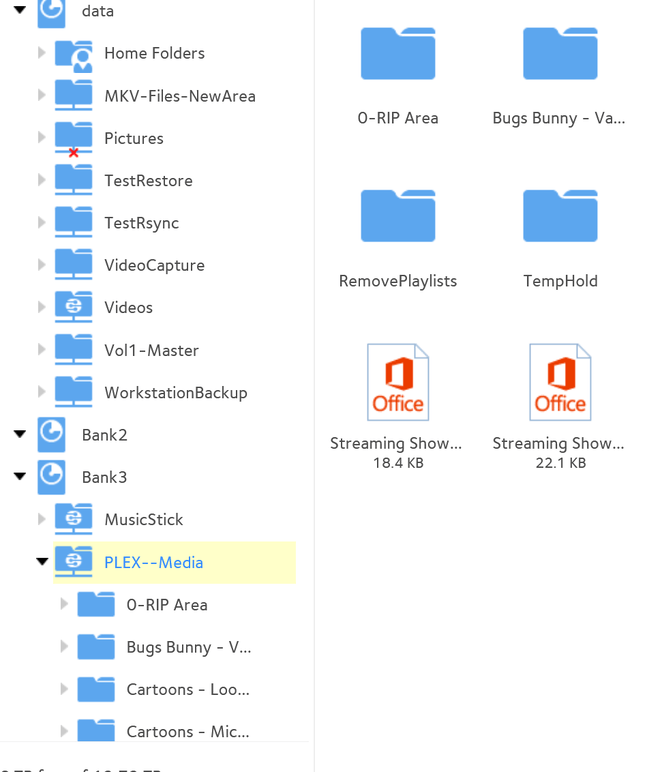
The only change involved is that it is now part of a separate volume in the ReadyNAS than it was before because of the copy actions.
The change of volume did not affect Windows access but it might affect PLEX.
Where are those values set or established.?
---
### Author:  [@ChuckPa](https://forums.plex.tv/u/ChuckPa)
#### Post date: [January 14, 2023, 8:48pm UTC](https://forums.plex.tv/t/media-unavailable-message/826821/6 "2023-01-14T20:48:58Z")
The paths are stored in the library sections themselves.
EDIT a library section,
Select ‘Folders’.
---
### Author:  [@digitalpurchase999\_gmail\_com](https://forums.plex.tv/u/digitalpurchase999_gmail_com)
#### Post date: [January 14, 2023, 10:44pm UTC](https://forums.plex.tv/t/media-unavailable-message/826821/7 "2023-01-14T22:44:45Z")
It is clear that I am in over my head here. In fact, I will actually pay money for somebody to educate me on the PLEX overview so I can understand the installation and usage paradigm.
Netgear NAS running PLEX for several years. Life is good.
Netgear NAS is being phased out – a variety of issues. The basic concern is that the current disks are becoming full and upgrades will be required.
Purchased Synology 923+ with DSM 7.
Copied all of the PLEX data (located in a specific share using Netgear terminology) to a different Netgear area using rsync. All of the data is sequestered (compartmentalized) on a different disk and all files will ‘work’ if the individual .mp4 file is accessed vie shared folders process in Windows workstation.
The new area that the files were copied to was renamed using Netgear tools to be the same share name as the old (pre-copy) name. Access via SMB seems to work.
PLEX is now ‘broken’. Cannot locate the actual .mp4 files but does display the summary information on various items – assumed to be in the database and not attached to the actual .mp4 files.
Synology NAS was installed on the same network in contemplation of removing the Netgear NAS. The Synology NAS seems operational. Installed PLEX on the Synology NAS. Opens and sort of works…
The ‘new’ Synology NAS located and sees all of the Netgear NAS PLEX stuff. Attempts to configure the ‘new’ NAS with a different library have been unsuccessful – files were copied but the library in PLEX shows it is empty.
Obviously, I attempted to migrate to the new NAS but failed.
All of the data is available, it is just the PLEX program that does not recognize or deal with the remaining data.
So how do I blow away the ‘old’ database and software on the Netgear NAS and instead move to the Synology NAS?
My assumption is that the client (Amazon FireCube) is incidental to this issue but is mentioned only for completeness.
---
### Author:  [@dbirch](https://forums.plex.tv/u/dbirch)
#### Post date: [January 15, 2023, 2:21am UTC](https://forums.plex.tv/t/media-unavailable-message/826821/8 "2023-01-15T02:21:20Z")
So you have 2 options and both are fairly easy.
1. Delete your database files and start over. Plex will re-index and re-download the metadata for your media.
2. Follow the correct steps for migrating your database to a new server. ([https://support.plex.tv/articles/201370363-move-an-install-to-another-system/](https://support.plex.tv/articles/201370363-move-an-install-to-another-system/))
:A) Disable emptying trash on your old server
:B) Install new clean version of Plex on the Syno
:C) Close / Turn off both Servers
:D) Move the database and preference files from the netgear to the syno
:E) Start the Syno server
:F) Edit the Library settings to point to the new locations of the media
:G) Let Plex scan and re-index the files (it should reconnect to the existing records in your database)
:H) Remove the original paths from the netgear from the Libraries
:I) Empty the Trash, Clean Bundles, and Optimize the database.
EDIT:
Since plex isnt seeing the copied files, lets include a copy of the [server log](https://support.plex.tv/articles/200250417-plex-media-server-log-files/) files, the name and location of one of the affected files.
---
### Author:  [@digitalpurchase999\_gmail\_com](https://forums.plex.tv/u/digitalpurchase999_gmail_com)
#### Post date: [January 15, 2023, 5:20pm UTC](https://forums.plex.tv/t/media-unavailable-message/826821/9 "2023-01-15T17:20:51Z")
Thank you for your reply.
Unfortunately I am not very nimble in the Linux environment. That said I can get SSH access to both devices.
To follow your directions I need to turn off the PLEX service.
The Netgear device has a App ‘button’ that will allow the program to be stopped.
The Synology device does not have the equivalent – so I cannot determine how to turn off or disable the service. Any help in that area would be useful so I can follow your directions.
---
### Author:  [@dbirch](https://forums.plex.tv/u/dbirch)
#### Post date: [January 15, 2023, 6:01pm UTC](https://forums.plex.tv/t/media-unavailable-message/826821/10 "2023-01-15T18:01:31Z")
> [@digitalpurchase999\_gmail\_com](#):
>
> The Synology device does not have the equivalent
The Syno does, I think Its in the package center or somewhere… @ChuckPa I checked the FAQ but that basic issue isnt covered, can you help with where to stop plex?
---
### Author:  [@ChuckPa](https://forums.plex.tv/u/ChuckPa)
#### Post date: [January 15, 2023, 6:34pm UTC](https://forums.plex.tv/t/media-unavailable-message/826821/11 "2023-01-15T18:34:08Z")
> [@digitalpurchase999\_gmail\_com](#):
>
> To follow your directions I need to turn off the PLEX service.
>
> The Netgear device has a App ‘button’ that will allow the program to be stopped.
>
> The Synology device does not have the equivalent – so I cannot determine how to turn off or disable the service. Any help in that area would be useful so I can follow your directions.
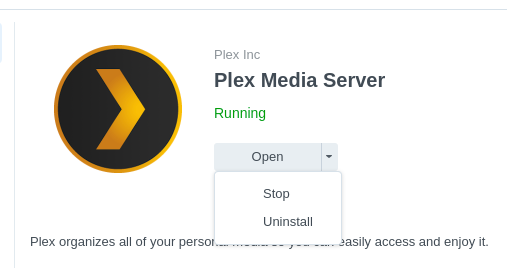
Deleting stuff because of “unavailable” is extreme.
Unavailable is either Wrong Path or Permissions (Most Common problem).
> [@Synology FAQ - Questions, Answers, and How-To's](https://forums.plex.tv/t/synology-faq-questions-answers-and-a-few-how-tos/490215/37):
>
> FAQ 29 - DSM 7 - Give PlexMediaServer access to your media When you migrate to DSM 7, are installing a server for the first time, or just adding a new shared folder / sub-folder for media , folks forget to read the popup at the end of every installation which tells them about how to set permissions. This FAQ shows in detail how to do what those instructions state. When might you need to perform these steps? When upgrading, changing permissions from Plex to PlexMediaServer is overlook…
---
### Author:  [@digitalpurchase999\_gmail\_com](https://forums.plex.tv/u/digitalpurchase999_gmail_com)
#### Post date: [January 15, 2023, 7:45pm UTC](https://forums.plex.tv/t/media-unavailable-message/826821/12 "2023-01-15T19:45:54Z")
Thanks to those who are trying to help. I fiddled some more and ‘located’ the area where PLEX saves it Library pathing. Turns out that the volume name is part of the path – not what I expected. Since I moved stuff around the volume name had changed. So now after applying the changes within PLEX I have an operational PLEX system on the old Netgear server.
In order to follow the prior advice before I migrate I need to stop the Synology version of PLEX. Can anyone tell me the name of the service or equivalent. If I had that I could stop the service on the Synology system.
Again, thanks to those who have helped thus far.
---
### Author:  [@FordGuy61](https://forums.plex.tv/u/FordGuy61)
#### Post date: [January 15, 2023, 7:54pm UTC](https://forums.plex.tv/t/media-unavailable-message/826821/13 "2023-01-15T19:54:49Z")
> [@digitalpurchase999\_gmail\_com](#):
>
> In order to follow the prior advice before I migrate I need to stop the Synology version of PLEX. Can anyone tell me the name of the service or equivalent. If I had that I could stop the service on the Synology system.
Start / stop Plex Media Server using Synology Package Center.
---
### Author:  [@digitalpurchase999\_gmail\_com](https://forums.plex.tv/u/digitalpurchase999_gmail_com)
#### Post date: [January 15, 2023, 9:18pm UTC](https://forums.plex.tv/t/media-unavailable-message/826821/14 "2023-01-15T21:18:41Z")
Thanks – was not obvious to me.
---
### Author:  [@digitalpurchase999\_gmail\_com](https://forums.plex.tv/u/digitalpurchase999_gmail_com)
#### Post date: [January 18, 2023, 5:00pm UTC](https://forums.plex.tv/t/media-unavailable-message/826821/15 "2023-01-18T17:00:44Z")
Thanks for all who have helped thus far. I apologize for my apparent ignorance.
As is probably obvious, I am not a Lunix expert. I now have two different NAS systems with different software structures. At this point the environment is stable but does not function as it should.
NAS1 – Netgear system = Old system
NAS2 = Synology system = New system
Amazon Fire Cube is client
PLEX installed on both systems. Data was copied from Old to New into equivalent directories. New was opened in PLEX and all of the media folders were added as libraries. Larger directories took quite a while to be added. As I look at the PLEX info on either server (Settings\>Manage\>Libraries) I can see two different PLEX servers - Old and New, both at different fixed IP addresses on the Network.
Both systems will find information on their respective servers and play it.
Turned off Old system
Went to FireCube client to play something from New and all I see is a spinning circle – most likely trying to locate something.
Two questions…
How do I get the FireCube client to find the New system?
Can I actually have two PLEX servers operational with different systems and they will in turn serve different media content relative to their libraries?
---
### Author:  [@FordGuy61](https://forums.plex.tv/u/FordGuy61)
#### Post date: [January 18, 2023, 5:18pm UTC](https://forums.plex.tv/t/media-unavailable-message/826821/16 "2023-01-18T17:18:12Z")
> [@digitalpurchase999\_gmail\_com](#):
>
> Can I actually have two PLEX servers operational with different systems and they will in turn serve different media content relative to their libraries?
You can have multiple servers on one account. Many people do this.
> [@digitalpurchase999\_gmail\_com](#):
>
> How do I get the FireCube client to find the New system?
Make sure both servers are registered with plex.tv and available via Plex Web.
Both servers must be running. Give them ~5 minutes to fully boot if necessary.
Both servers should be visible using hosted Plex Web: [https://app.plex.tv/desktop/](https://app.plex.tv/desktop/)
a) From the home page, click on `More >`. You should see both servers listed and be able to pin the desired libraries to your home page.
b) Settings for both should be available via [https://app.plex.tv/desktop/#!/settings/web/general](https://app.plex.tv/desktop/#!/settings/web/general). Click on the server name to switch between servers.
On the FireTV Cube:
Launch the Plex app. On the home screen, at the bottom of the list of libraries you should see `... More` (above Settings). It is the same as `More >` on Plex Web. Select it. Pin the desired libraries to the home page.
---
### Author:  [@digitalpurchase999\_gmail\_com](https://forums.plex.tv/u/digitalpurchase999_gmail_com)
#### Post date: [January 18, 2023, 9:15pm UTC](https://forums.plex.tv/t/media-unavailable-message/826821/17 "2023-01-18T21:15:42Z")
Thanks to FordGuy61 for a little education and hints to get stuff working.
Something hinky…
Only when I signed out completely from the FireCube and then signed in again with the four digit display code could I see the two servers. There is something amiss between the FireCube and ‘downtown plex’. It seems OK now but I really do not like it when I cannot determine what I did to correct stuff.
So, my last question relates to retiring the old server.
Just turn it off or decommission it somehow or ??
---
### Author:  [@FordGuy61](https://forums.plex.tv/u/FordGuy61)
#### Post date: [January 18, 2023, 11:28pm UTC](https://forums.plex.tv/t/media-unavailable-message/826821/18 "2023-01-18T23:28:16Z")
> [@digitalpurchase999\_gmail\_com](#):
>
> Just turn it off or decommission it somehow or ??
Step 1 is optional, but if the server is still running go ahead with it.
1. Go into server settings for the OLD server.
[Settings](https://app.plex.tv/desktop/#!/settings/web/general) → Server\_Name → General.
It will say Server signed in as your\_email\_address.
Click Sign Out.
2. Go to [Authorized Devices](https://app.plex.tv/desktop/#!/settings/devices/pms). If the OLD server is still listed, delete it (red `X`). If it is not listed, then all good.
The server is now completely removed from your Plex account.
3. On your Plex clients (FireTV, Web, etc), if you pinned any libraries from the old server to a home page / home screen, you may have to unpin them.
If you’ve no intention of running Plex on the server in the future, you may want to uninstall the Plex software, but that is not required. If you do not remove the Plex software, stop/disable it so it will not start when the server reboots.
---
### Author:  [@dbirch](https://forums.plex.tv/u/dbirch)
#### Post date: [January 19, 2023, 12:32am UTC](https://forums.plex.tv/t/media-unavailable-message/826821/19 "2023-01-19T00:32:40Z")
> [@digitalpurchase999\_gmail\_com](#):
>
> OK now but I really do not like it when I cannot determine what I did to correct stuff.
What you ran into is fairly common, the plex client (aka fire app) cached the server info from when you logged in. By logging out and back in, that information gets refreshed.
---
### Author:  [@digitalpurchase999\_gmail\_com](https://forums.plex.tv/u/digitalpurchase999_gmail_com)
#### Post date: [January 19, 2023, 1:33pm UTC](https://forums.plex.tv/t/media-unavailable-message/826821/20 "2023-01-19T13:33:22Z")
Thanks to everyone who helped me. I definitely appreciate you effort.
The documentation regarding migrating servers is a skosh ambiguous – I would correspond with anyone who is in charge of that document and offer some suggestions.
dbirch pointed out the apparent cache issue with the FireCube. That too might be pointed out somewhere. My notion was when I turned off the TV and FireCube that it would refresh with new stuff when turned back on. Obviously not the case.
Thanks again folks.
[Next page](https://forums.plex.tv/t/media-unavailable-message/826821.md?page=2)