# Merged episodes not playing back
**URL:** https://forums.plex.tv/t/merged-episodes-not-playing-back/623463
**Category:** Plex Media Server
**Tags:** server-windows
**Created:** [August 14, 2020, 12:54am UTC](https://forums.plex.tv/t/merged-episodes-not-playing-back/623463 "2020-08-14T00:54:54Z")
**Posts on this page:** 9
**Page:** 1
### Author:  [@dan\_decoyle\_com](https://forums.plex.tv/u/dan_decoyle_com)
#### Post date: [August 14, 2020, 12:54am UTC](https://forums.plex.tv/t/merged-episodes-not-playing-back/623463/1 "2020-08-14T00:54:55Z")
Server Version#:
Player Version#:
I put all of one season in a single merge but now only the first one will play. Is there a way to have it roll to the next? I used movie as the library type because TV shows did not find all of my files.
---
### Author:  [@Volts](https://forums.plex.tv/u/Volts)
#### Post date: [August 14, 2020, 1:04am UTC](https://forums.plex.tv/t/merged-episodes-not-playing-back/623463/2 "2020-08-14T01:04:10Z")
When you merge items, you are telling Plex that they are _one_ item.
That might sound a bit funny, but it’s pretty normal to have multiple encodings of a single movie. Having 720p, 1080p, and (maybe) 4k encodings, for instance. You would merge those files.
You don’t want to merge TV episodes. You almost certainly want to un-merge your items.
Bear with me - can you share a screenshot of your file naming? Maybe we can get these working as TV episodes. TV episodes, with seasons, work better _overall_ in TV Libraries.
---
### Author:  [@BigWheel](https://forums.plex.tv/u/BigWheel)
#### Post date: [August 14, 2020, 1:04am UTC](https://forums.plex.tv/t/merged-episodes-not-playing-back/623463/3 "2020-08-14T01:04:56Z")
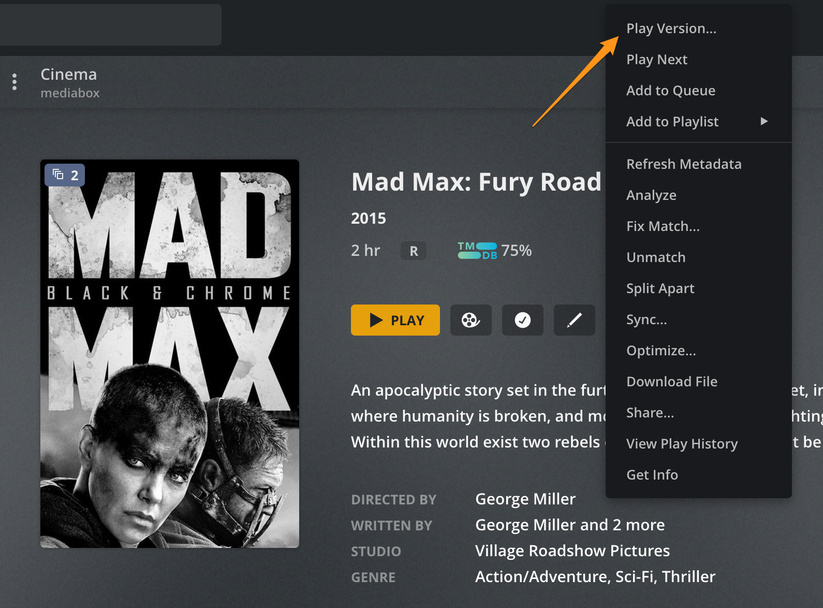
If you are putting them in movie library and merging them you need to select “play version” to play a different file if Plex thinks they are the same movie.
> [@dan\_decoyle\_com](#):
>
> because TV shows did not find all of my files
name the files the way the scanner expects them. [https://support.plex.tv/articles/#cat-your-media](https://support.plex.tv/articles/#cat-your-media)
---
### Author:  [@dan\_decoyle\_com](https://forums.plex.tv/u/dan_decoyle_com)
#### Post date: [August 14, 2020, 1:05am UTC](https://forums.plex.tv/t/merged-episodes-not-playing-back/623463/4 "2020-08-14T01:05:55Z")

---
### Author:  [@BigWheel](https://forums.plex.tv/u/BigWheel)
#### Post date: [August 14, 2020, 1:08am UTC](https://forums.plex.tv/t/merged-episodes-not-playing-back/623463/5 "2020-08-14T01:08:38Z")
You could probably get way with. `The Big Bang Theory_S1_E1` but that `D1` means nothing to Plex and probably causing issues.
`The Big Bang Theory S01E01` is what the scanner is expecting.
suggest using filebot or other bulk file renamer
---
### Author:  [@Volts](https://forums.plex.tv/u/Volts)
#### Post date: [August 14, 2020, 1:08am UTC](https://forums.plex.tv/t/merged-episodes-not-playing-back/623463/6 "2020-08-14T01:08:52Z")
Yeah, like @BigWheel says. Name those according to the naming rules, and use a TV Library.
If you try `Play Version ...` you’ll see why that’s not a good alternative. Or maybe it is, if you want to play “Big Bang Roulette”!
There are a bunch of tools that can help with file naming. FileBot is excellent. TinyMediaManager is too, and priced right. 🙂
---
### Author:  [@dan\_decoyle\_com](https://forums.plex.tv/u/dan_decoyle_com)
#### Post date: [August 14, 2020, 1:10am UTC](https://forums.plex.tv/t/merged-episodes-not-playing-back/623463/7 "2020-08-14T01:10:18Z")
Thank you both. I’ll rename and see if I can pull them in as TV Shows
---
### Author:  [@jgbrown54](https://forums.plex.tv/u/jgbrown54)
#### Post date: [August 14, 2020, 1:52am UTC](https://forums.plex.tv/t/merged-episodes-not-playing-back/623463/8 "2020-08-14T01:52:05Z")
A good and free Bulk Rename Utility that I use is “Bulk Rename Utility” It’s available here. [https://www.bulkrenameutility.co.uk/](https://www.bulkrenameutility.co.uk/)
---
### Author:  [@system](https://forums.plex.tv/u/system)
#### Post date: [November 12, 2020, 1:52am UTC](https://forums.plex.tv/t/merged-episodes-not-playing-back/623463/9 "2020-11-12T01:52:14Z")
This topic was automatically closed 90 days after the last reply. New replies are no longer allowed.