### Author:  [@gbreb](https://forums.plex.tv/u/gbreb)
#### Post date: [January 27, 2026, 8:18pm UTC](https://forums.plex.tv/t/missing-movies-in-a-library/935806/1 "2026-01-27T20:18:23Z")
Server Version#:
Player Version#:
\
Plex will not add a few of my movies to a Library. Most made it and I’ve edited a lot of the Metadata for other movies. So, if I delete the Library and start over (so hopefully) all of the movies are added, will I lose all of the edited Metadata?
Things I’ve tried:
I looked at all of the permissions and all of the files are the same.
I copied the files into a different directory, created a new library and the movies were imported to the new library. There appears to no way to move the movies from Library to Library.
I also renamed the movie and it still doesn’t show up. I looked at the file properties and there is no difference - all appear to have the same permissions and properties.
Any help would be appreciated.
P.S. if you’d like to get the Server and Player versions, where can I find them?
---
### Author:  [@BigWheel](https://forums.plex.tv/u/BigWheel)
#### Post date: [January 27, 2026, 8:27pm UTC](https://forums.plex.tv/t/missing-movies-in-a-library/935806/2 "2026-01-27T20:27:26Z")
how are the files organized on drive. I’m wondering if they just got merged in as a duplicate of some other movie
---
### Author:  [@FordGuy61](https://forums.plex.tv/u/FordGuy61)
#### Post date: [January 27, 2026, 8:49pm UTC](https://forums.plex.tv/t/missing-movies-in-a-library/935806/3 "2026-01-27T20:49:38Z")
> [@gbreb](#):
>
> P.S. if you’d like to get the Server and Player versions, where can I find them?
**Plex Android TV Client**
Server: Settings → Plex Media Server
([Plex Docs](https://support.plex.tv/articles/) → -\> [Nvidia Shield](https://support.plex.tv/articles/categories/player-apps-platforms/nvidia-shield-player-apps-platforms/) → [Setting Up and Managing Plex Media Server on NVIDIA SHIELD](https://support.plex.tv/articles/221099988-setting-up-and-managing-plex-media-server-on-nvidia-shield/#toc-2))
Client: Settings. Look in lower right corner of the screen.
**Authorized Devices**
Server: [https://app.plex.tv/desktop/#!/settings/devices/pms](https://app.plex.tv/desktop/#!/settings/devices/pms)
Client: [https://app.plex.tv/desktop/#!/settings/devices/android](https://app.plex.tv/desktop/#!/settings/devices/android)
**Plex Web**
Server: [Settings](https://app.plex.tv/desktop/#!/settings/web/general) → _server\_name_ → General
---
### Author:  [@thenextbutton](https://forums.plex.tv/u/thenextbutton)
#### Post date: [January 28, 2026, 10:08pm UTC](https://forums.plex.tv/t/missing-movies-in-a-library/935806/4 "2026-01-28T22:08:20Z")
Hi,
Have you organised them in the way that has described in the kb articles?
[https://support.plex.tv/articles/naming-and-organizing-your-movie-media-files/](https://support.plex.tv/articles/naming-and-organizing-your-movie-media-files/)
[https://support.plex.tv/articles/naming-and-organizing-your-tv-show-files/](https://support.plex.tv/articles/naming-and-organizing-your-tv-show-files/)
---
### Author:  [@gbreb](https://forums.plex.tv/u/gbreb)
#### Post date: [January 29, 2026, 10:23pm UTC](https://forums.plex.tv/t/missing-movies-in-a-library/935806/5 "2026-01-29T22:23:40Z")
Yes they’re in the proper folders, etc. The problem is a conflict with “Blade Runner” and “Blade Runner 2049” Also with “Poseidon” and the “The Poseidon Adventure”. I checked the “Info” on “Poseidon” and it shows 2 files:
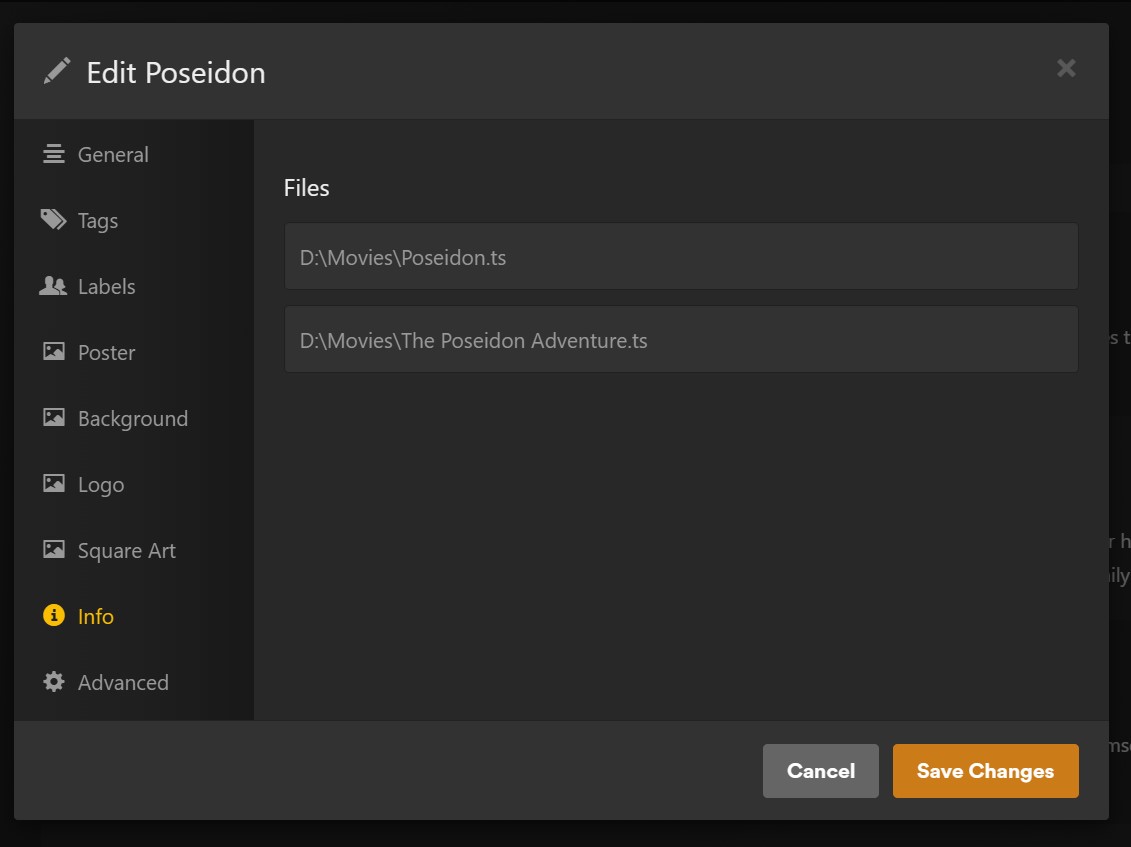
Simply renaming the files (in the Windows folder) doesn’t work.
The movie “Poseidon” is in the media server, but “The Poseidon Adventure” is not.
The movie “Blade Runner” is in the media server, but “Blade Runner 2049” is not.
---
### Author:  [@BigWheel](https://forums.plex.tv/u/BigWheel)
#### Post date: [January 29, 2026, 10:29pm UTC](https://forums.plex.tv/t/missing-movies-in-a-library/935806/6 "2026-01-29T22:29:48Z")
You are not putting them in separate folders for each movie. Put the year of the movies in parenthesis at the end as well. You can also add the IMDb is in {} at the end. This is all mentioned in the articles.
This type of issue is why doing those things recommended in the articles others linked
---
### Author:  [@Insomnic\_1](https://forums.plex.tv/u/Insomnic_1)
#### Post date: [January 29, 2026, 10:37pm UTC](https://forums.plex.tv/t/missing-movies-in-a-library/935806/7 "2026-01-29T22:37:27Z")
> [@BigWheel](#):
>
> Put the year of the movies in parenthesis at the end as well.
I can attest that if you’re using bulk folders (I do similarly though [working on fixing that](https://forums.plex.tv/t/updating-file-naming-and-structure-for-better-compliance/931994)), then including the year in parenthesis after the title in the file name really needs to be there _at least_ for movies with similar titles but really for all titles it helps the agent find the right title to match. Using the IMDB flags also works but the year function helps no matter which media server you’re using.
---
### Author:  [@gbreb](https://forums.plex.tv/u/gbreb)
#### Post date: [January 30, 2026, 6:07am UTC](https://forums.plex.tv/t/missing-movies-in-a-library/935806/8 "2026-01-30T06:07:50Z")
I couldn’t possibly put everything in separate folders - including my music it would be hundreds of folders.
---
### Author:  [@tom80H](https://forums.plex.tv/u/tom80H)
#### Post date: [January 30, 2026, 6:25am UTC](https://forums.plex.tv/t/missing-movies-in-a-library/935806/9 "2026-01-30T06:25:57Z")
Yes. And it’ll make a noticeable difference on the performance when scanning your library. There’s apps like FileBot that can help naming/organizing your files if you feel this is too much work.
Using dedicated folders for each movie will also simplify managing local assets (posters, clear logs, backgrounds…) and local extras if you start using those.
---
### Author:  [@thenextbutton](https://forums.plex.tv/u/thenextbutton)
#### Post date: [January 30, 2026, 9:23am UTC](https://forums.plex.tv/t/missing-movies-in-a-library/935806/10 "2026-01-30T09:23:07Z")
But you absolutely should 😆
In my music folder along, I have 219GB of music, Containing 14292 songs and 704 folder.
There is a degree of manual work to it but there are very much applications out there that can help. Musicbrainz Picard to give an example, which is what I use, there is a template setting that once you match up the music it can then sort it in to folders for you.
I do not have access to my computer at the moment to give the exact template settings but it goes along the lines of:
`\artists\album\