# My media
**URL:** https://forums.plex.tv/t/my-media/774336
**Category:** Plex Media Server
**Tags:** server-western-digital
**Created:** [February 2, 2022, 8:14pm UTC](https://forums.plex.tv/t/my-media/774336 "2022-02-02T20:14:42Z")
**Posts on this page:** 8
**Page:** 1
### Author:  [@islandguy5](https://forums.plex.tv/u/islandguy5)
#### Post date: [February 2, 2022, 8:14pm UTC](https://forums.plex.tv/t/my-media/774336/1 "2022-02-02T20:14:43Z")
Server Version#:1.23.6.4881
Player Version#:
Have two WD PR2100 NAS. I have been using one just fine for years with no problems. The one I have been using died so I tried to use the other one. Set it up with no problems with another app for my antenna works fine. Set up Plex and all I can get is web programs. Plex will not let me see my NAS when trying to add my media. Tried different browsers. Emptied
histories. I can see the server name but it is grayed out at the top left of window. Some help would be appreciated.
---
### Author:  [@tom80H](https://forums.plex.tv/u/tom80H)
#### Post date: [February 2, 2022, 9:43pm UTC](https://forums.plex.tv/t/my-media/774336/2 "2022-02-02T21:43:54Z")
I’m not quite sure I understand how far you got with this setup?
Where exactly are you not able to select folders from your NAS? Did you already finish setting up that new server (through http://[WD PR2100 NAS ip address]:32400/web)?
---
### Author:  [@islandguy5](https://forums.plex.tv/u/islandguy5)
#### Post date: [February 3, 2022, 1:49pm UTC](https://forums.plex.tv/t/my-media/774336/3 "2022-02-03T13:49:29Z")
Thanks for your response. I have plex installed on my NAS when I try to configure there is no option to add my media.
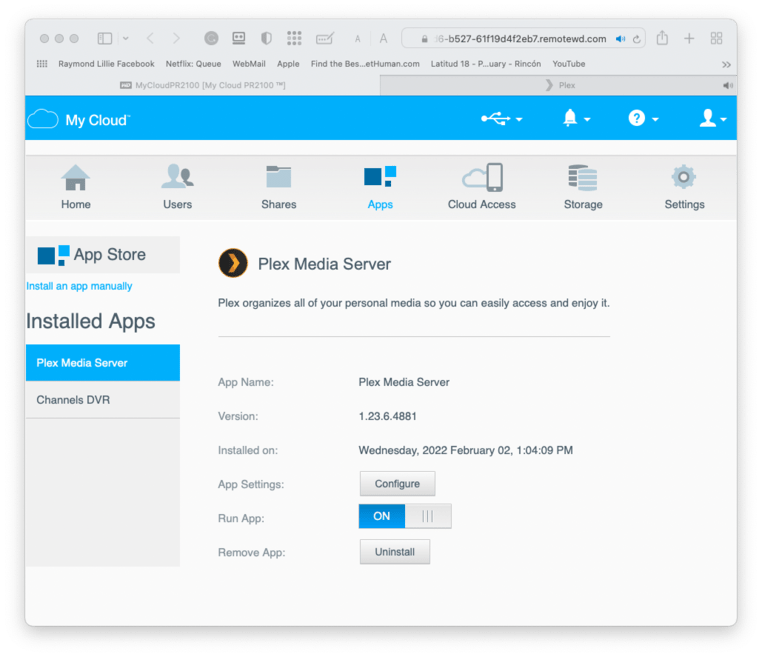

I have been trying to figure this out. I think the problem is plex thinks I am hooked to the old drive and I don’t know how to change it. I can see my media useing the drive software just not with plex.
---
### Author:  [@tom80H](https://forums.plex.tv/u/tom80H)
#### Post date: [February 3, 2022, 5:06pm UTC](https://forums.plex.tv/t/my-media/774336/4 "2022-02-03T17:06:34Z")
Are you accessing the NAS’ local IP from within the same subnet?
Did you have a previous installation of Plex on this NAS (maybe using a different Plex account)?
---
### Author:  [@islandguy5](https://forums.plex.tv/u/islandguy5)
#### Post date: [February 3, 2022, 7:07pm UTC](https://forums.plex.tv/t/my-media/774336/5 "2022-02-03T19:07:59Z")
Yes it was on a different plex account. Yes It is on the local network. Same as the other one
---
### Author:  [@tom80H](https://forums.plex.tv/u/tom80H)
#### Post date: [February 3, 2022, 9:09pm UTC](https://forums.plex.tv/t/my-media/774336/6 "2022-02-03T21:09:03Z")
> [@islandguy5](#):
>
> Yes it was on a different plex account.
In that case the server is probably still linked to that account – which means you can use the web app but you’ll have no access to the server itself (server settings, local media…).
#
If you still have that old account, you could use a different browser, sign into that old account and open the server through its local IP address. Then you should be able to sign the server out (`Settings` \> `[Server Name]` \> `General` → `Sign Out`). Once it’s no longer linked to an account you should be able to access it from your regular Plex Pass account and claim the server.
There’s an alternative procedure – though I’m not sure if this can be applied on the WD PR2100.
[https://support.plex.tv/articles/204281528-why-am-i-locked-out-of-server-settings-and-how-do-i-get-in/](https://support.plex.tv/articles/204281528-why-am-i-locked-out-of-server-settings-and-how-do-i-get-in/)
---
### Author:  [@islandguy5](https://forums.plex.tv/u/islandguy5)
#### Post date: [February 4, 2022, 12:20pm UTC](https://forums.plex.tv/t/my-media/774336/7 "2022-02-04T12:20:16Z")
You were right. I went in and removed the old account at Plex. I then removed the preferences file. I tried using the terminal but didn’t work so I deleted the file and reinstalled plex on the PR2100. There the server was.That was painful!
Thanks so much for your help.
---
### Author:  [@system](https://forums.plex.tv/u/system)
#### Post date: [May 5, 2022, 12:21pm UTC](https://forums.plex.tv/t/my-media/774336/8 "2022-05-05T12:21:00Z")
This topic was automatically closed 90 days after the last reply. New replies are no longer allowed.