# Naming help versus database lookup
**URL:** https://forums.plex.tv/t/naming-help-versus-database-lookup/783932
**Category:** Plex Media Server
**Tags:** server-linux
**Created:** [March 26, 2022, 8:14pm UTC](https://forums.plex.tv/t/naming-help-versus-database-lookup/783932 "2022-03-26T20:14:35Z")
**Posts on this page:** 16
**Page:** 1
### Author:  [@digitalpurchase999\_gmail\_com](https://forums.plex.tv/u/digitalpurchase999_gmail_com)
#### Post date: [March 26, 2022, 8:14pm UTC](https://forums.plex.tv/t/naming-help-versus-database-lookup/783932/1 "2022-03-26T20:14:35Z")
Server Version#:plexmediaserver\_1.25.7.5604-980a13e02\_amd64
Player Version#:
Naming help
I am puzzled regarding how PLEX names TV Media shows.
I have read and think I have followed the guidelines/instructions regarding file naming.
I have several Great Course media – probably not in the media reference archives that PLEX looks into for naming but I do not know for sure.
Every episode has the name Episode X even though the file name has the actual name in the format that should work.
Other more recognized TV stuff seems to work and the file naming seems identical in format and the names of the shows match what the file name indicates.
Does PLEX ignore the file name in favor of its database lookup?
---
### Author:  [@anon5074910](https://forums.plex.tv/u/anon5074910)
#### Post date: [March 26, 2022, 8:42pm UTC](https://forums.plex.tv/t/naming-help-versus-database-lookup/783932/2 "2022-03-26T20:42:07Z")
Have you seen this document [Naming and Organizing Your TV Show Files | Plex Support](https://support.plex.tv/articles/naming-and-organizing-your-tv-show-files) ? The examples at the bottom are pretty self explanatory.
Over and above the naming, the plex TV agent/scanner can be configured to based on naming from the tmdb or tvdb. These can be configured per library or by each show if you wish.
---
### Author:  [@FordGuy61](https://forums.plex.tv/u/FordGuy61)
#### Post date: [March 27, 2022, 3:57am UTC](https://forums.plex.tv/t/naming-help-versus-database-lookup/783932/3 "2022-03-27T03:57:42Z")
> [@digitalpurchase999\_gmail\_com](#):
>
> Does PLEX ignore the file name in favor of its database lookup?
Yes. Plex uses the show name and sXXeYY to determine show, season, and episode. It ignores everything after sXXeYY. For TV shows, Plex pulls information from TheMovieDatabase and [TheTVDB.com](http://TheTVDB.com). It uses that information to populate episode names, descriptions, etc.
> [@digitalpurchase999\_gmail\_com](#):
>
> I have several Great Course media – probably not in the media reference archives that PLEX looks into for naming but I do not know for sure.
Available at [TheTVDB.com](http://TheTVDB.com): [The Great Courses - TheTVDB.com](https://thetvdb.com/companies/the-great-courses)
Follow the document @anon5074910 linked.
Name the shows as they appear on [themoviedb.org](http://themoviedb.org) or [TheTVDB.com](http://TheTVDB.com).
For example:
```auto
/TV Shows <-- folder added to TV show library
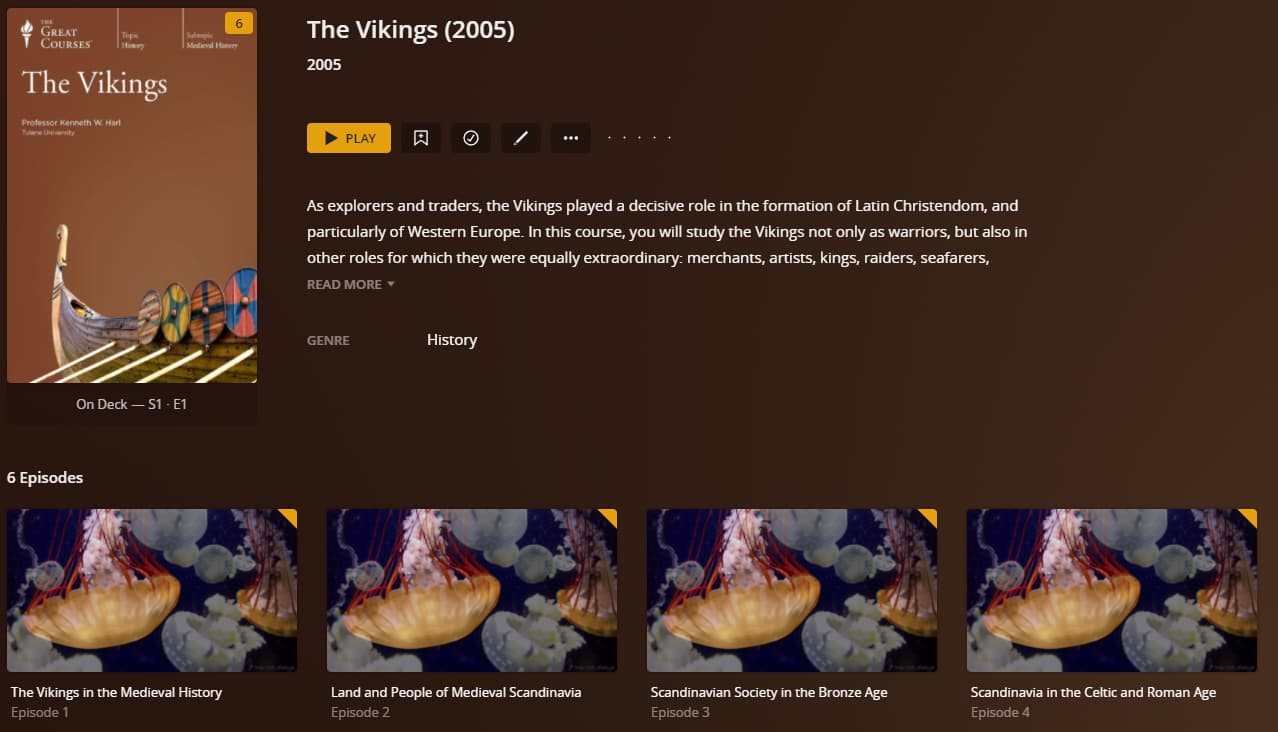
../The Vikings (2005) {tvdb-411693} <-- ID optional, helps with matching.
..../Season 01 <-- "Season" in English, two digits for number
....../The Vikings (2005) s01e01.ext <-- ext = mp4/mkv/ext
```
* * *
PMS 1.25.8.5663, Synology DS918+
Library configured to use episode ordering information from [TheTVDB.com](http://TheTVDB.com) ([The Vikings (2005) - TheTVDB.com](https://thetvdb.com/series/the-vikings-2005)).
Using [JellyFish](https://jell.yfish.us/) test files in place of actual episodes:
---
### Author:  [@digitalpurchase999\_gmail\_com](https://forums.plex.tv/u/digitalpurchase999_gmail_com)
#### Post date: [March 27, 2022, 5:51pm UTC](https://forums.plex.tv/t/naming-help-versus-database-lookup/783932/4 "2022-03-27T17:51:14Z")
It is clear that I am confused by either the instruction or my miss-understanding (aka ‘thick head’)
History of Blah, Blah - 1X1 - L1 Cities, Civilizations, and Sources.mp4
is the name of a .mp4 file that is one episode
PLEX recognizes it as Season 1 but does not name episodes. Most likely my file name format is incorrect.
All files are named so that humans and identify by the name what the file is related to.
The text **L1 Cities, Civilizations, and Sources** is what I would like in the Episode Name. Is there a way to do that? The instructions refer to this as optional info but I do not understand how to make PLEX use that optional info for the Episode name. Possibly there, is no way but I would like to know so I do not keep trying to do something that is not possible.
If the TVDB is going to be used then I think the file names should be
History of Blah, Blah - s01e01 [- L1 Cities, Civilizations, and Sources].mp4
Am I correct or is the format ?
Thanks for any help to cure the “thick head” syndrome.
---
### Author:  [@FordGuy61](https://forums.plex.tv/u/FordGuy61)
#### Post date: [March 27, 2022, 6:10pm UTC](https://forums.plex.tv/t/naming-help-versus-database-lookup/783932/5 "2022-03-27T18:10:06Z")
> [@digitalpurchase999\_gmail\_com](#):
>
> History of Blah, Blah - 1X1 - L1 Cities, Civilizations, and Sources.mp4
> is the name of a .mp4 file that is one episode
You need to follow Plex’s naming requirements. See the support document linked above.
> [@digitalpurchase999\_gmail\_com](#):
>
> The text **L1 Cities, Civilizations, and Sources** is what I would like in the Episode Name. Is there a way to do that?
Plex ignores the episode name in the file name.
Plex uses episode names as listed on TheTVDB or The Movie Database.
If the show is not listed at TheTVDB or The Movie Database, you can treat it as personal media (like home movies, etc). Setup is more involved, since Plex does not try to match to online databases. See [Personal Media Files](https://support.plex.tv/articles/categories/your-media/naming-and-organizing-personal-media/) → [Naming Home Series Media](https://support.plex.tv/articles/200265256-naming-home-series-media/).
---
### Author:  [@digitalpurchase999\_gmail\_com](https://forums.plex.tv/u/digitalpurchase999_gmail_com)
#### Post date: [March 27, 2022, 6:14pm UTC](https://forums.plex.tv/t/naming-help-versus-database-lookup/783932/6 "2022-03-27T18:14:13Z")
Thanks for the reply.
Does the following follow the naming conventions?
History of Blah, Blah(valid name) - s01e01 [- L1 Cities, Civilizations, and Sources].mp4
I think it does but maybe I am missing something here.
---
### Author:  [@OttoKerner](https://forums.plex.tv/u/OttoKerner)
#### Post date: [March 27, 2022, 6:16pm UTC](https://forums.plex.tv/t/naming-help-versus-database-lookup/783932/7 "2022-03-27T18:16:29Z")
It is valid.
There is actually no need for the square brackets, because that part of the file name is ignored anyway.
If you want to force an episode title, you can use embedded meta tags in your mp4 files.
(this is only possible with mp4/m4v files in Plex)
---
### Author:  [@FordGuy61](https://forums.plex.tv/u/FordGuy61)
#### Post date: [March 27, 2022, 6:27pm UTC](https://forums.plex.tv/t/naming-help-versus-database-lookup/783932/8 "2022-03-27T18:27:13Z")
> [@digitalpurchase999\_gmail\_com](#):
>
> History of Blah, Blah
What is the actual name of the show?
---
### Author:  [@FordGuy61](https://forums.plex.tv/u/FordGuy61)
#### Post date: [March 27, 2022, 6:51pm UTC](https://forums.plex.tv/t/naming-help-versus-database-lookup/783932/9 "2022-03-27T18:51:50Z")
Found it: [History of the Ancient World](https://thetvdb.com/series/history-of-the-ancient-world-a-global-perspective)
```auto
/TV Shows
../History of the Ancient World {tvdb-357930}
..../Season 01
....../History of the Ancient World s01e01.ext
```
TMDB does not list a year for the show. Adding the ID helps matching.
---
### Author:  [@digitalpurchase999\_gmail\_com](https://forums.plex.tv/u/digitalpurchase999_gmail_com)
#### Post date: [March 27, 2022, 8:19pm UTC](https://forums.plex.tv/t/naming-help-versus-database-lookup/783932/10 "2022-03-27T20:19:12Z")
Here are the first three of about 15 file names…
History of the Ancient World - A Global Perspective - s01e01 - L1 Cities, Civilizations, and Sources.mp4
History of the Ancient World - A Global Perspective - s01e02 - L2 From Out of the Mesopotamian Mud.mp4
History of the Ancient World - A Global Perspective - s01e03 - L3 Cultures of the Acncent Near East.mp4
The TVDB finds the series name but PLEX does not substitute the episode names as shown on the TVDB. Instead it says Episode 1, Episode 2, etc.
Is this the expected result?
Do the “s” and “e” need to be caps?
---
### Author:  [@digitalpurchase999\_gmail\_com](https://forums.plex.tv/u/digitalpurchase999_gmail_com)
#### Post date: [March 27, 2022, 8:25pm UTC](https://forums.plex.tv/t/naming-help-versus-database-lookup/783932/11 "2022-03-27T20:25:09Z")
Wait a minute…
I added a new database and named it Great Courses. It is not inside the directory hierarchy under TV Shows.
Is that necessary?
---
### Author:  [@shark2k](https://forums.plex.tv/u/shark2k)
#### Post date: [March 27, 2022, 8:31pm UTC](https://forums.plex.tv/t/naming-help-versus-database-lookup/783932/12 "2022-03-27T20:31:42Z")
You need to go to the shows page from your Plex server and then click on the edit icon (pen/pencil icon). In the edit modal, click on Advanced on the left menu then in the right panel change the value in the drop down for the episode ordering option to “The TVDB (Aired)” from “Library Default” and then click “Save changes”. Finally refresh the metadata for the show by clicking the 3 dots icon and then clicking on “Refresh Metadata” and then the episode names should appear.
-Shark2k
---
### Author:  [@digitalpurchase999\_gmail\_com](https://forums.plex.tv/u/digitalpurchase999_gmail_com)
#### Post date: [March 27, 2022, 8:39pm UTC](https://forums.plex.tv/t/naming-help-versus-database-lookup/783932/13 "2022-03-27T20:39:31Z")
YUP – that worked.
Thank you very much.
This topic could use some better documentation in my opinion.
---
### Author:  [@digitalpurchase999\_gmail\_com](https://forums.plex.tv/u/digitalpurchase999_gmail_com)
#### Post date: [March 28, 2022, 1:56am UTC](https://forums.plex.tv/t/naming-help-versus-database-lookup/783932/14 "2022-03-28T01:56:15Z")
Thank everyone who helped me.
I have determined that two of the items I wanted to establish are not in the TVDB. If they are not there setting them up as a Home Series Media is possible.
From what I read, Home Series Media will not allow the Episodes to be the names of the files but instead be labeled as Episode 1, Episode 2, etc.
Is my understand correct?
The ability to have an actual name associated with the Episode information would be a nice improvement for the future.
---
### Author:  [@OttoKerner](https://forums.plex.tv/u/OttoKerner)
#### Post date: [March 28, 2022, 7:35am UTC](https://forums.plex.tv/t/naming-help-versus-database-lookup/783932/15 "2022-03-28T07:35:05Z")
> [@digitalpurchase999\_gmail\_com](#):
>
> From what I read, Home Series Media will not allow the Episodes to be the names of the files but instead be labeled as Episode 1, Episode 2, etc.
This where the embedded metadata come into play, which I mentioned above.
Plex can read the episode title from inside the embedded "Title"tag.
See [Title of TV Shows not showing - #6 by OttoKerner](https://forums.plex.tv/t/title-of-tv-shows-not-showing/289096/6)
---
### Author:  [@system](https://forums.plex.tv/u/system)
#### Post date: [June 26, 2022, 7:35am UTC](https://forums.plex.tv/t/naming-help-versus-database-lookup/783932/16 "2022-06-26T07:35:40Z")
This topic was automatically closed 90 days after the last reply. New replies are no longer allowed.