# Nvidia shield plex media server problem
**URL:** https://forums.plex.tv/t/nvidia-shield-plex-media-server-problem/875380
**Category:** Plex Media Server
**Tags:** server-nvidia-shield
**Created:** [April 18, 2024, 6:02pm UTC](https://forums.plex.tv/t/nvidia-shield-plex-media-server-problem/875380 "2024-04-18T18:02:48Z")
**Posts on this page:** 3
**Page:** 1
### Author:  [@sloniecki](https://forums.plex.tv/u/sloniecki)
#### Post date: [April 18, 2024, 6:02pm UTC](https://forums.plex.tv/t/nvidia-shield-plex-media-server-problem/875380/1 "2024-04-18T18:02:48Z")
Server Version#:v1. 40.1.8251
Player Version#:10.13.0.466
\
Today my server stopped working I have no access to all my media stored on external HDD conected to shield. Hdd works fine as I checked it on PC. After reinstalling plex and PMS I get error message " A problem has been detected with a core component of Plex Media Server" I gave all permissions to allow access to files for both plex and PMS I changed PMS to use external HDD and still the same I looked online for any possible solution but frankly not found any so I’m here hoping to get it resolved.
It worked perfectly fine so far, and today it suddenly stopped
I appreciate any help
[Plex Media Server Logs\_2024-04-18\_18-23-42.zip](https://forums.plex.tv/uploads/short-url/7ZpDWkphGeKFqRxk7fUjMLbGLiH.zip) (744.4 KB)
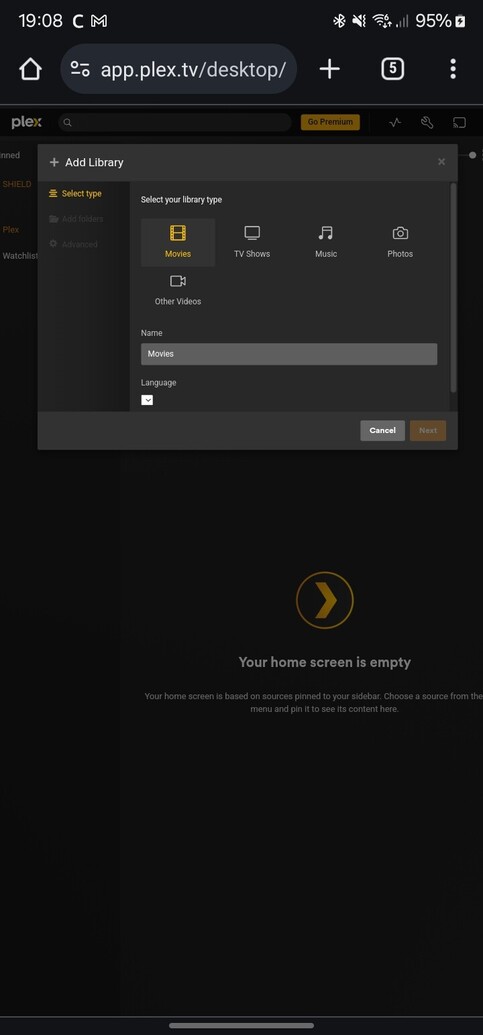
Also when I try to add libraries add folders is greyed out
---
### Author:  [@gunnersboy](https://forums.plex.tv/u/gunnersboy)
#### Post date: [April 18, 2024, 6:04pm UTC](https://forums.plex.tv/t/nvidia-shield-plex-media-server-problem/875380/2 "2024-04-18T18:04:31Z")
Beta version already released…Can sign up here: [https://play.google.com/apps/testing/com.plexapp.mediaserver.smb](https://play.google.com/apps/testing/com.plexapp.mediaserver.smb)
> [@Plex Media Server](https://forums.plex.tv/t/plex-media-server/30447/623):
>
> Plex Media Server 1.40.2.8395 is now available to Plex Pass users in the Beta update channel. NEW: (PLEASE NOTE) Please also be patient when updating to this version if you have a very large database and allow the upgrade process to finish. Rename ‘un/played’ to ‘un/watched’ terminology for video types (PM-1042) We have identified an issue where automatic updates were not respecting custom paths for existing Windows 64-bit installs. Unfortunately, any automatic fix would introduce security vu…
---
### Author:  [@system](https://forums.plex.tv/u/system)
#### Post date: [July 17, 2024, 9:24pm UTC](https://forums.plex.tv/t/nvidia-shield-plex-media-server-problem/875380/4 "2024-07-17T21:24:39Z")
This topic was automatically closed 90 days after the last reply. New replies are no longer allowed.