# NVIDIA Shield - remote access
**URL:** https://forums.plex.tv/t/nvidia-shield-remote-access/799785
**Category:** Remote Access
**Tags:** server-nvidia-shield
**Created:** [July 6, 2022, 2:46pm UTC](https://forums.plex.tv/t/nvidia-shield-remote-access/799785 "2022-07-06T14:46:37Z")
**Posts on this page:** 20
**Page:** 2
### Author:  [@FordGuy61](https://forums.plex.tv/u/FordGuy61)
#### Post date: [July 7, 2022, 8:55pm UTC](https://forums.plex.tv/t/nvidia-shield-remote-access/799785/21 "2022-07-07T20:55:32Z")
Interesting. I have not seen canyouseeme give incorrect results. Especially if the Plex remote access page indicates things are working.
One other way to verify:
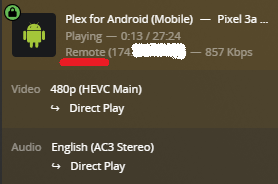
Check the [Plex Dashboard](https://support.plex.tv/articles/200871837-status-and-dashboard/#toc-1) when someone is streaming remotely (click the button thingy on the right to expand the view).
Is the connection local, remote, or indirect?
If indirect, then it is using Plex Relay, which tunnels the stream through a Plex host.
It indicates remote access is not working correctly.
---
### Author:  [@scotsold\_gmail\_com](https://forums.plex.tv/u/scotsold_gmail_com)
#### Post date: [July 7, 2022, 9:07pm UTC](https://forums.plex.tv/t/nvidia-shield-remote-access/799785/22 "2022-07-07T21:07:13Z")
I’ll give that a shot too - thanks!
---
### Author:  [@scotsold\_gmail\_com](https://forums.plex.tv/u/scotsold_gmail_com)
#### Post date: [July 8, 2022, 7:55pm UTC](https://forums.plex.tv/t/nvidia-shield-remote-access/799785/23 "2022-07-08T19:55:27Z")
This was Nvidia’s explanation of the Network Prefix Length. I’m not really following it though -

---
### Author:  [@scotsold\_gmail\_com](https://forums.plex.tv/u/scotsold_gmail_com)
#### Post date: [July 9, 2022, 11:08am UTC](https://forums.plex.tv/t/nvidia-shield-remote-access/799785/24 "2022-07-09T11:08:31Z")
So, I’m scratching my head a bit. I followed all the steps we discussed - Static IP address on the Shield, Port forwarding to 32,400 both internal and external. Port forwarding to 32,400 w/in the router. I will maintain green for a few hours but will always revert to red. Frustrating. Any thoughts?
---
### Author:  [@FordGuy61](https://forums.plex.tv/u/FordGuy61)
#### Post date: [July 12, 2022, 10:15pm UTC](https://forums.plex.tv/t/nvidia-shield-remote-access/799785/25 "2022-07-12T22:15:16Z")
Definitely frustrating. Searched the forum for other posts with people using Orbi routers. Did not see anything similar.
When Plex says remote access is working, can you actually stream remotely? Wondering if you’re getting a false positive. If it does work, make sure it is not using Plex Relay. The Plex Dashboard should show the connection as Remote, not Indirect.
The log files might show something. The next time it fails, pull the log files (Settings → Troubleshooting), and upload them to the thread. They might show something.
---
### Author:  [@scotsold\_gmail\_com](https://forums.plex.tv/u/scotsold_gmail_com)
#### Post date: [July 13, 2022, 10:41am UTC](https://forums.plex.tv/t/nvidia-shield-remote-access/799785/26 "2022-07-13T10:41:23Z")
The connection is definitely not indirect. I found the connection was indirect when I first inadvertently gave the router vs. the server a static IP address. Once I fixed the router back to DHCP, indirect went away. I seem to be switching between 32400 and 13103 which is the external port that UPnP shows. It will stay green as I rotate these back and forth. I had everything green with the external port set to 32400. I turned of UPnP and it failed immediately. So, I do need to keep the UPnP on.
---
### Author:  [@scotsold\_gmail\_com](https://forums.plex.tv/u/scotsold_gmail_com)
#### Post date: [July 13, 2022, 12:44pm UTC](https://forums.plex.tv/t/nvidia-shield-remote-access/799785/27 "2022-07-13T12:44:12Z")
Here are the logs - not quite sure what I’m looking for/at
[com.plexapp.agents.fanarttv.log](https://forums.plex.tv/uploads/short-url/cOOE9XFKPnOmZwWwk8nvLT08gUZ.log) (14.4 KB)
[com.plexapp.agents.htbackdrops.log](https://forums.plex.tv/uploads/short-url/pdOasypjQAFQUPLWnoeP6bp4l0p.log) (9.4 KB)
[com.plexapp.agents.imdb.log](https://forums.plex.tv/uploads/short-url/9IbobXtQ3qoM8rzOFwXQFhYgReq.log) (8.1 KB)
[com.plexapp.agents.lastfm.log](https://forums.plex.tv/uploads/short-url/rpW3hQvftosEDFO3un7iVg6IvIn.log) (9.8 KB)
[com.plexapp.agents.localmedia.log](https://forums.plex.tv/uploads/short-url/sGM5CIepKXXzhTWzLRQS2PU2kkD.log) (28.5 KB)
[com.plexapp.agents.lyricfind.log](https://forums.plex.tv/uploads/short-url/318MZ9b3lhsHT4SJxNzhpokVSPV.log) (7.1 KB)
[com.plexapp.agents.movieposterdb.log](https://forums.plex.tv/uploads/short-url/bkI7pGlAJG93wsKYGrwO9iT5WVg.log) (7.0 KB)
[com.plexapp.agents.none.log](https://forums.plex.tv/uploads/short-url/zjDBmtVgWqQPHfwPUwWsWK8novG.log) (17.0 KB)
[com.plexapp.agents.opensubtitles.log](https://forums.plex.tv/uploads/short-url/dpI0FDjb9vsovcIIBW0ZCV4XMIt.log) (9.0 KB)
[com.plexapp.agents.plexthememusic.log](https://forums.plex.tv/uploads/short-url/6izx2ISoctnQMUHsa0Dz6QjNPan.log) (7.2 KB)
[com.plexapp.agents.themoviedb.log](https://forums.plex.tv/uploads/short-url/4RazSB3d0gy8qgEa23hWGx6QlBy.log) (123.5 KB)
[com.plexapp.agents.thetvdb.log](https://forums.plex.tv/uploads/short-url/9NIrYkn2EsF1L4dMLQ4WYDe5Sdg.log) (8.9 KB)
[com.plexapp.system.log](https://forums.plex.tv/uploads/short-url/d2QG5wK7FjxhLftwqeYj47TLnxK.log) (37.4 KB)
[org.musicbrainz.agents.music.log](https://forums.plex.tv/uploads/short-url/pG4DFiRzoWNtIjBdEg0t12xtFo.log) (9.4 KB)
[Plex Media Scanner Analysis.1.log](https://forums.plex.tv/uploads/short-url/mfjQ2NWcDmQJ6uwLGGwlTXKzAXC.log) (98.5 KB)
[Plex Media Scanner Analysis.2.log](https://forums.plex.tv/uploads/short-url/5CC6DBIeVpzc2LdrDxNVfF9QAVh.log) (283.8 KB)
[Plex Media Scanner Analysis.3.log](https://forums.plex.tv/uploads/short-url/gV9jDGFYFAGkhCQmqjk9UpSLhPQ.log) (191.1 KB)
[Plex Media Scanner Analysis.4.log](https://forums.plex.tv/uploads/short-url/ofw0DOKgQQ0JJj353dHnuNlEvYt.log) (168.0 KB)
[Plex Media Scanner Analysis.5.log](https://forums.plex.tv/uploads/short-url/gGhFlX13uJcUoNaR4pSmZnEAc21.log) (126.3 KB)
[Plex Media Scanner Analysis.log](https://forums.plex.tv/uploads/short-url/az7t8cfMVuPW8D9BF2vQGS3VJFv.log) (5.7 KB)
[Plex Media Scanner Chapter Thumbnails.1.log](https://forums.plex.tv/uploads/short-url/kF5uiJKmunqNsxm5WnHOSwg8zZx.log) (202.9 KB)
[Plex Media Scanner Chapter Thumbnails.2.log](https://forums.plex.tv/uploads/short-url/hJpmCR8LrhJ7nL0rB6mhLrxe1OJ.log) (7.0 KB)
[Plex Media Scanner Chapter Thumbnails.3.log](https://forums.plex.tv/uploads/short-url/jdysO6XVOvZ4FPR4KyqxgPEI2me.log) (10.8 KB)
[Plex Media Scanner Chapter Thumbnails.4.log](https://forums.plex.tv/uploads/short-url/h0LRO80sgzimgPQYWimtuBA55Xe.log) (8.9 KB)
[Plex Media Scanner Chapter Thumbnails.5.log](https://forums.plex.tv/uploads/short-url/jUXOFDGoHe9cBKS2fmrERhgOj7u.log) (13.3 KB)
[Plex Media Scanner Chapter Thumbnails.log](https://forums.plex.tv/uploads/short-url/1FqJRG4aA4x5cVBEMuGnAHkUl1z.log) (4.5 KB)
[Plex Media Scanner Deep Analysis.1.log](https://forums.plex.tv/uploads/short-url/zehcFrLV8x5i3dFVG8umj7qJPbb.log) (7.0 KB)
[Plex Media Scanner Deep Analysis.2.log](https://forums.plex.tv/uploads/short-url/wD1HpzgHYZ6G4OfyB4T8eeinjz4.log) (8.7 KB)
[Plex Media Scanner Deep Analysis.3.log](https://forums.plex.tv/uploads/short-url/6TptxvauP26CCT2uIlZsLRODjv9.log) (8.0 KB)
[Plex Media Scanner Deep Analysis.4.log](https://forums.plex.tv/uploads/short-url/26mjEE8MerxFJgkQrmba09VmVlB.log) (8.8 KB)
[Plex Media Scanner Deep Analysis.5.log](https://forums.plex.tv/uploads/short-url/joUWYzOXZvhREAHRvxHEY7b4WfO.log) (9.6 KB)
[Plex Media Scanner Deep Analysis.log](https://forums.plex.tv/uploads/short-url/9RZS0w0DoBIw5vvnIR95PRbeZQL.log) (7.3 KB)
[Plex Media Scanner Matcher.1.log](https://forums.plex.tv/uploads/short-url/4XHiYZCmpQgy5cavVL6giJV760o.log) (3.8 KB)
[Plex Media Scanner Matcher.2.log](https://forums.plex.tv/uploads/short-url/85D95ucybJcMbYf1im15knHnJfx.log) (1.0 KB)
[Plex Media Scanner Matcher.3.log](https://forums.plex.tv/uploads/short-url/nSseQUkEL9FKWHhxbU9IIekm1zw.log) (1.1 KB)
[Plex Media Scanner Matcher.4.log](https://forums.plex.tv/uploads/short-url/nFqUmiLbMAPEgsVtmtoiZVPeAy8.log) (3.9 KB)
[Plex Media Scanner Matcher.5.log](https://forums.plex.tv/uploads/short-url/hBTFC8p9XspsUzcWvPB8rYShjxD.log) (1.1 KB)
[Plex Media Scanner Matcher.log](https://forums.plex.tv/uploads/short-url/vIu5QJQHP4z7oBXTA7P3rW96oEa.log) (3.9 KB)
[Plex Media Scanner.1.log](https://forums.plex.tv/uploads/short-url/kkP6kaNAnyeDeIEVEyybMqdsFLC.log) (34.5 KB)
[Plex Media Scanner.2.log](https://forums.plex.tv/uploads/short-url/kONgce0L6o3y7utWOsM8Cs6SWSZ.log) (205.2 KB)
[Plex Media Scanner.3.log](https://forums.plex.tv/uploads/short-url/ft1u4V6r9t5Kvb0sjTMoFJ7FrTW.log) (178.8 KB)
[Plex Media Scanner.4.log](https://forums.plex.tv/uploads/short-url/jULuhCBbBhs9x2SnJFGIReQLZf1.log) (156.9 KB)
[Plex Media Scanner.5.log](https://forums.plex.tv/uploads/short-url/bQa4KLk1kDR5m2DRU1zI7N8ZkOj.log) (1.6 MB)
[Plex Media Scanner.log](https://forums.plex.tv/uploads/short-url/rGkvMuZJ6isVigSLWFqNaL0AXc4.log) (50.7 KB)
[Plex Media Server.1.log](https://forums.plex.tv/uploads/short-url/2wOeMhE8N6iYDo9dInmgvFrkRSV.log) (92.1 KB)
[Plex Media Server.2.log](https://forums.plex.tv/uploads/short-url/ipFVsAiRNhk1utwHEWWmdDq0fLY.log) (1.8 MB)
[Plex Media Server.3.log](https://forums.plex.tv/uploads/short-url/726KSh2nw4e8qXJWbPxknRpeEpl.log) (4.4 MB)
[Plex Media Server.4.log](https://forums.plex.tv/uploads/short-url/dwZHB3b9uG7LZIMtr518ZE4rQ8o.log) (99.7 KB)
[Plex Media Server.5.log](https://forums.plex.tv/uploads/short-url/Aef7VgPR0K2gLvthxfo67CJyuJ9.log) (412.7 KB)
[Plex Media Server.log](https://forums.plex.tv/uploads/short-url/eDw60gBTRJKSo6Db35wHVk1VYR0.log) (479.9 KB)
[Plex Transcoder Statistics.1.log](https://forums.plex.tv/uploads/short-url/ysCxT0uSLtBoWUYjLSrLy3Rqk9M.log) (29.1 KB)
[Plex Transcoder Statistics.2.log](https://forums.plex.tv/uploads/short-url/aEkFB7cXpRw7HHWWaQD4hbI5VJE.log) (8.6 KB)
[Plex Transcoder Statistics.3.log](https://forums.plex.tv/uploads/short-url/ugRpGsnCpGStda1GNfZYngXlvQy.log) (4.4 KB)
[Plex Transcoder Statistics.4.log](https://forums.plex.tv/uploads/short-url/cM89m3T9xNMFYdsox9IY6Av0EAs.log) (2.5 MB)
[Plex Transcoder Statistics.5.log](https://forums.plex.tv/uploads/short-url/is39XIaeNGdpBtAoV94I6yp7nAm.log) (92.2 KB)
[Plex Transcoder Statistics.log](https://forums.plex.tv/uploads/short-url/pQvWoI2QuBPFZYKKAdsbP0dbrwl.log) (3.5 KB)
[Plex Tuner Service.1.log](https://forums.plex.tv/uploads/short-url/1LSmyDSASIVvm32RumSQqE3pbDx.log) (1.9 KB)
[Plex Tuner Service.2.log](https://forums.plex.tv/uploads/short-url/oipdTriw8ZvCu3s1KvQ3w6zSYDp.log) (2.7 KB)
[Plex Tuner Service.3.log](https://forums.plex.tv/uploads/short-url/eBTbw3RKtJ7OM9Wpqzk2ygcLJ2Q.log) (1.8 KB)
[Plex Tuner Service.4.log](https://forums.plex.tv/uploads/short-url/h6kqcrInFkkUWUSw69ahzamKG4M.log) (2.6 KB)
[Plex Tuner Service.5.log](https://forums.plex.tv/uploads/short-url/n1Jfp3MVVgmQBXEJlyU7Kh9ZqVE.log) (2.6 KB)
[Plex Tuner Service.log](https://forums.plex.tv/uploads/short-url/vN2VPtYh5QYuDe17toG9jqoPTwu.log) (1.9 KB)
---
### Author:  [@FordGuy61](https://forums.plex.tv/u/FordGuy61)
#### Post date: [July 13, 2022, 6:27pm UTC](https://forums.plex.tv/t/nvidia-shield-remote-access/799785/28 "2022-07-13T18:27:12Z")
Thanks for the log files.
FYI, you can upload the entire ZIP file instead of each individual log file.
For remote access, the `Plex Media Server.log` has the info we’re after.
Plex is seeing a double-NAT, or router behind router, situation.
```auto
Jul 13, 2022 06:32:57.018 [11927] DEBUG - [EventSourceClient/pubsub/(redacted):443] MyPlex: reachability check - current mapping state: 'Mapped - Not Published'.
Jul 13, 2022 06:32:57.018 [11927] ERROR - [EventSourceClient/pubsub/(redacted):443] MyPlex: mapping failed due to potential double NAT configuration
Jul 13, 2022 06:32:57.018 [11927] DEBUG - [EventSourceClient/pubsub/(redacted):443] MyPlex: mapping state set to 'Mapped - Not Published (Double NAT)'.
```
Are you running a VPN on the Shield, the Orbi, or something else between the Shield and the Internet? VPNs and Plex generally don’t play well with each other. A VPN on your personal computer, phone, etc won’t matter as they don’t sit between the Shield and the Internet.
To what is the Orbi connected? Is that device also functioning as a router?
If you are in a double-NAT situation, it can be resolved by placing one of the routers in bridge mode. This disables routing and the NAT function on that device.
On some mesh network devices, disabling routing also hinders or disables the mesh capability. If this is the case with Orbi, then the other device would need to be placed in bridge mode.
If neither device can be placed in bridge mode, then you can use a double-port forward. The first device forwards to the Orbi, when then forwards to the Shield. It requires additional work to configure, but others have used it successfully.
Additional Information:
> **[Troubleshooting Remote Access | Plex Support](https://support.plex.tv/articles/200931138-troubleshooting-remote-access/#toc-2)**
>
> Most people attempting to enable Remote Access for their Plex Media Server shouldn’t run into issues. However, if you do...
---
### Author:  [@scotsold\_gmail\_com](https://forums.plex.tv/u/scotsold_gmail_com)
#### Post date: [July 13, 2022, 8:18pm UTC](https://forums.plex.tv/t/nvidia-shield-remote-access/799785/29 "2022-07-13T20:18:05Z")
Hey, thanks for taking a look. I had no clue what I was looking at. I am running the RBR750. Connected to the RBR750 is an ARRIS SURFboard SB6141 DOCSIS 3.0 Cable Modem. I have never run a VPN and have nothing hardware or software between the router and the Shield other than a Gigabit switch. But I can’t imagine the Switch would cause a Double NAT scenario. I could connect the shield directly to the router and circumvent the switch. That’s the only conceivable variable I could foresee. I’ll go do that now.
---
### Author:  [@FordGuy61](https://forums.plex.tv/u/FordGuy61)
#### Post date: [July 13, 2022, 10:50pm UTC](https://forums.plex.tv/t/nvidia-shield-remote-access/799785/30 "2022-07-13T22:50:13Z")
Here’s what is happening:
1. The Shield has a 192.168.1.x address. This is good.
`Jul 12, 2022 21:57:30.573 [11882] DEBUG - * 6 eth0 (192.168.1.52) (00-00-00-00-00-00) (loopback: 0)`
2. The router is telling Plex Media Server it has a WAN IP address of 192.168.0.3. This is bad.
`Jul 12, 2022 21:57:34.009 [11943] DEBUG - PublicAddressManager: got WAN IP 192.168.0.3 from router`
3. The router should tell PMS the WAN IP is your public IP address, 174.x.x.x.
4. Plex Media Server sees the 192.168.0.3 address, which is a private IP address, and thinks it is in a double NAT situation.
I’m not sure why this is happening.
Suggestion: A network reboot.
- Power off the cable modem, Orbi mesh (including any satellites), switch, and Shield.
- Power them back on one at a time, working from the Internet out towards the Shield.
- Cable modem → Orbi router → switch → Shield.
- If the Shield is connected to the Orbi router, leave the satellites powered off for now.
- Wait for each device to fully boot and come online before proceeding to the next device.
Give the Plex Media Server 2 - 3 minutes to fully boot. Then check remote access status.
If remote access still is not working, pull a new set of Plex log files.
If Plex is logging the same messages, then there is probably an Orbi configuration problem or the cable modem is acting very strange, assigning a private instead of public IP address to the router.
FYI, the cable modem is easy to test. Connect a PC to its Ethernet port, pull up a command window, and issue the ipconfig command, `c:\ipconfig`. You should see a public IP address, 174.x.x.x. You will most likely need to power cycle the cable modem after connecting it to the PC. You’ll need to power cycle it again after reconnecting it to the router.
---
### Author:  [@scotsold\_gmail\_com](https://forums.plex.tv/u/scotsold_gmail_com)
#### Post date: [July 13, 2022, 11:10pm UTC](https://forums.plex.tv/t/nvidia-shield-remote-access/799785/31 "2022-07-13T23:10:04Z")
I connected the Shield directly to the back of the router. The Internet IP address shows this in the router settings -

The WAN IP address is: 174.106.199.144
---
### Author:  [@FordGuy61](https://forums.plex.tv/u/FordGuy61)
#### Post date: [July 13, 2022, 11:51pm UTC](https://forums.plex.tv/t/nvidia-shield-remote-access/799785/32 "2022-07-13T23:51:29Z")
Thanks for the update.
That looks like the cable modem is providing a 192.168.0.3 address to the Orbi.
It should provide a public IP address - 174.x.x.x.
Can you connect a PC directly to the cable modem to confirm? You could use the Shield if that’s easier, configure it for a dynamic instead of static address, then look in the Shield settings to see what address is assigned.
If the cable modem is handing out 192.168.0.x addresses, you will need to contact your ISP. Something is probably misconfigured on their end.
---
### Author:  [@FordGuy61](https://forums.plex.tv/u/FordGuy61)
#### Post date: [July 13, 2022, 11:59pm UTC](https://forums.plex.tv/t/nvidia-shield-remote-access/799785/33 "2022-07-13T23:59:11Z")
Is Charter/Spectrum your ISP (I did a [reverse lookup](https://mxtoolbox.com/SuperTool.aspx) on your public IP)?
I’ve the same ISP. I’m using their cable modem. It provides a public IP to my Asus router (or whatever I attach directly to the cable modem).
If your modem is supplying a private address, then it is either misconfigured (by Charter) or they’ve changed how they handle IP addressing in their network.
---
### Author:  [@scotsold\_gmail\_com](https://forums.plex.tv/u/scotsold_gmail_com)
#### Post date: [July 14, 2022, 9:24am UTC](https://forums.plex.tv/t/nvidia-shield-remote-access/799785/34 "2022-07-14T09:24:51Z")
I’m using an Arris SBG6400 DOCSIS 3.0 Modem. I also have on hand an Arris SB8200 DOCSIS 3.1 modem I could switch out. I’d just have to register it with Spectrum. I noticed that the internal Netgear was throwing off another domain too, but thought it was something internal. I broke everything down this morning. Pulled the modem up first, then the router while the satellite is unpowered. Still showing the IP address for the router as 192.168.0.3. So, scratching my head. Getting ready to go reconnect my satellite.
---
### Author:  [@FordGuy61](https://forums.plex.tv/u/FordGuy61)
#### Post date: [July 14, 2022, 10:03am UTC](https://forums.plex.tv/t/nvidia-shield-remote-access/799785/35 "2022-07-14T10:03:55Z")
Talk with Spectrum. Seems like something off with how they register your cable modem. It should provide a public IP address.
Reconnect the satellite. Does not seem to be a problem.
---
### Author:  [@scotsold\_gmail\_com](https://forums.plex.tv/u/scotsold_gmail_com)
#### Post date: [July 14, 2022, 2:06pm UTC](https://forums.plex.tv/t/nvidia-shield-remote-access/799785/36 "2022-07-14T14:06:42Z")
I switched out the Modem to the Faster Arris SB8200, DOCSIS 3.1 and am now getting these for my IP address for the Router/Gateway- The numbers/addresses now match my Public IP address in the Remote Access settings for plex. Gone are 192.168.0.3 and 192.168.0.1 -

---
### Author:  [@scotsold\_gmail\_com](https://forums.plex.tv/u/scotsold_gmail_com)
#### Post date: [July 14, 2022, 2:42pm UTC](https://forums.plex.tv/t/nvidia-shield-remote-access/799785/37 "2022-07-14T14:42:09Z")
[Canyouseeme.org](http://Canyouseeme.org) is working now too!!
---
### Author:  [@FordGuy61](https://forums.plex.tv/u/FordGuy61)
#### Post date: [July 14, 2022, 5:18pm UTC](https://forums.plex.tv/t/nvidia-shield-remote-access/799785/38 "2022-07-14T17:18:08Z")
Nice. Internet connection now working properly.
Plex remote access working as well?
---
### Author:  [@scotsold\_gmail\_com](https://forums.plex.tv/u/scotsold_gmail_com)
#### Post date: [July 14, 2022, 5:34pm UTC](https://forums.plex.tv/t/nvidia-shield-remote-access/799785/39 "2022-07-14T17:34:52Z")
Y-E-S…after all that, it seems as thought the Arris SB6141 modem was the weak link in the chain. I put my better modem, Arris SB8200, DOCSIS 3.1 in it’s place - fixed everything and I picked up another 100 mb/s in D/L speed. THANK YOU for all of your help!!!
---
### Author:  [@system](https://forums.plex.tv/u/system)
#### Post date: [October 12, 2022, 5:35pm UTC](https://forums.plex.tv/t/nvidia-shield-remote-access/799785/40 "2022-10-12T17:35:41Z")
This topic was automatically closed 90 days after the last reply. New replies are no longer allowed.
[Previous page](https://forums.plex.tv/t/nvidia-shield-remote-access/799785.md?page=1)