Last comment to say that I disabled the opportunistic lock on my NAS (Synology), and now the 30s delay is gone for me.
Yes, it’s a solution but it creates another problems:
- opportunistic lock offers better performance when you want to edit files over SMB protocol. For example, if you want to edit music files with MP3tag, it will be very very slow!
- SMB v1 is very slow and not secure.
Another workaround is to enable “SMB2 lease” if you have a Synology. But, sometimes, we can have the same issue: movies can take 30s to load…
I hope Plex team will find a solution…
I’m assuming this is still an issue? I decided to try Plex on my Shield and I really like the interface, scanning, channels, etc. But, playing a movie is often painfully slow. My wife has learned to hate it so back to MrMc we go. Our movies are stored on a WD My Cloud NAS device, everything plays just fine from SPMC, Kodi, MrMC, VLC. Only Plex is slow. I’d jump on a Plex Pass no questions asked if this actually worked.
Yes. The problem still exists with the current Plex version 8.11.0.22186 and SHIELD Experience v8.2.2.
The effect is so bad that with Opportunistic Locking enabled, the Plex client is currently barely usable for playing any video.
1 Like
Same problem here
WD My Cloud Mirror NAS - very slow to start / change audio / turn on subtitles
When I set NAS to SMB1 - everything works fine except I can’t see shares / mapped drives in Windows.
Hi guys - not sure if we’re experiencing the same problem. Does your video play at all?
I have PMS installed on a nvidia shield 2017. My media stored on an external hdd.
I am unable to play any videos from any of the plex apps. Whether Android (Shield/phone) or Windows. It buffers constantly, playing for 2-5 seconds before buffering again. Completely useless.
What’s weird is:
The same video streams fine via any browser.
Music streams fine on all devices.
It’s just videos in the plex app. Doesn’t work at all. Any ideas?
@ziabo, you should not use SMB1, but keep SMB2 and disable opportunistic lock. Most probably you don’t see shares in Windows because it refuses to use such an old network stack. If you search on the net, you’ll see tips on how to force Windows to use SMB1 but the best is to keep SMB2 and disable opp. lock.
As for finding a workaround that would keep opp. lock, I doubt it will exist. That’s a limitation of the network stack, nothing Plex can do anything about (or maybe they’d need to dive into windows internals). The real fix there is to install Plex on your NAS directly (something you can do today, but you’ll need a powerful one to transcode), or add an external drive to your Shield. Or maybe SMB1 helps, with the caveat above.
1 Like
If you disable opp. Lock, file operations will be very very slow! I tested with my Synology it’s not a good workaround.
The best way: enable opp. Lock AND SMB2 Lease. For me it works.
For sure it’s an issue with Plex because if you play movies with VLC and SMB share, it works perfectly!
Thanks mate
Unfortunately i don’t have “opp. lock” setting on my NAS. So i switched everything to SMB1, otherwise it’s unusable.
Hope there will be a solution soon.
Cheers
SMB2 lease doesn’t work for me. WIth that setting I have again the 30s delay. If htere is anything else to do, please tell me.

The comment on VLC + SMB is fair enough. I guess the problem comes from the multi-user / multi-client nature of Plex. But that’s indeed an annoying regression.
You can test disable encryption (smb is used locally I guess, like me)
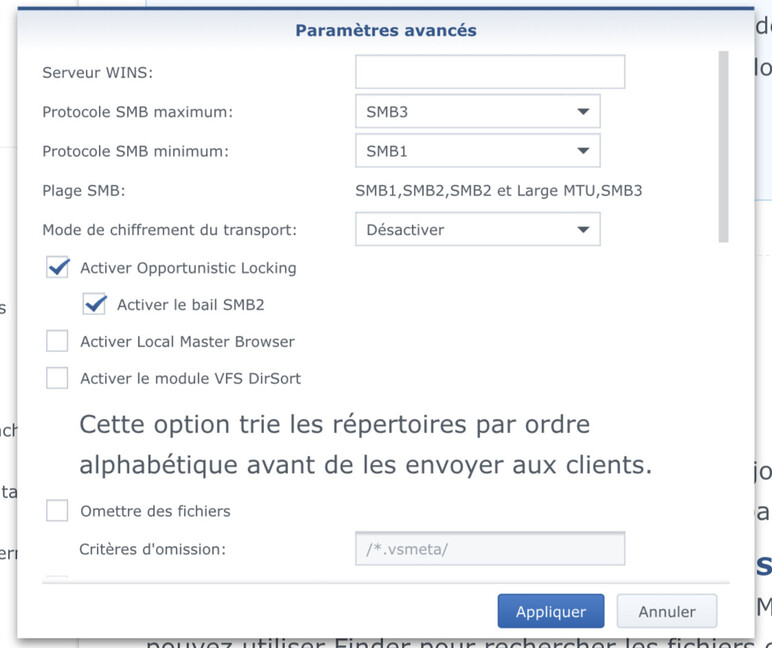
I have smb3 enabled for windows otherwise is too slow when I edit my files from my PC.
I have slowness sometimes but it’s better
With my Shield Pro 2019 and my WD My Cloud NAS,
I also had problems with slowness when starting movies (around 30s)
I solved the problem by enabling the IPV6 protocol in addition to the IPV4 already enabled by default in my WD.
Since this activation, I have no longer slowness, a movie starts in 2s now.
I want to chime in and say that this problem is ruining my experience. I am running the 2019 Nvidia Shield TV Pro as my media server accessing a 16TB hard drive.
Long story short Plex is sloooooow. Never had any problems with 4K content after updating everything now takes over 30 seconds to even begin to load. The biggest headache though is that simple 1080p 5.1 DTS files are buffering while playing every 20 seconds or so… never had this problem before and ruining my movie watching experience.
Same here.
Started about Nov. 2020 -Plex app feels like molasses, especially when loading a movie.
My app will often crash out as well.
Running Shield Pro + Synology 213jNas
Sad as I had just opted in for he life time version of Plex because I liked it so much.
Same situation here, i run QNAP plex server and i use Shield Pro 2019 as a player. I get stutter and laggy playback and unresponsive plex app during playing (pause, forward etc takes ages to input).
I get a flawless playback with VLC app from Shield in same setup.
What is going on? any reply from Plex Staff?
Any news regarding this problem ?.
Same issue here. Just brought up my PMS on my old shield as replacrment for Tivo in Live TV / DVR setting. Both local and remote I am getting incredible delays on stream startup to the Shield. Browser from another web-client seems fine.
Plex - comments?
Same issue here…
Same issue here… Updated some days ago and since then it’s impossible to use PLEX on Nvidia Shield TV  Before the update it worked like a charm
This is my Setup:
Plex Media Server (Dockerized on NAS): 1.22.0.4163-d8c4875dd
Plex Client (Nvidia Shield TV 2019): 8.14.1.23548 (88dd4b13)
Nvidia Shield TV: 8.2.2 (32.6.509.0)
Same issue here. Plex is now unusable on Nvidia Shield. Looking for updates.
