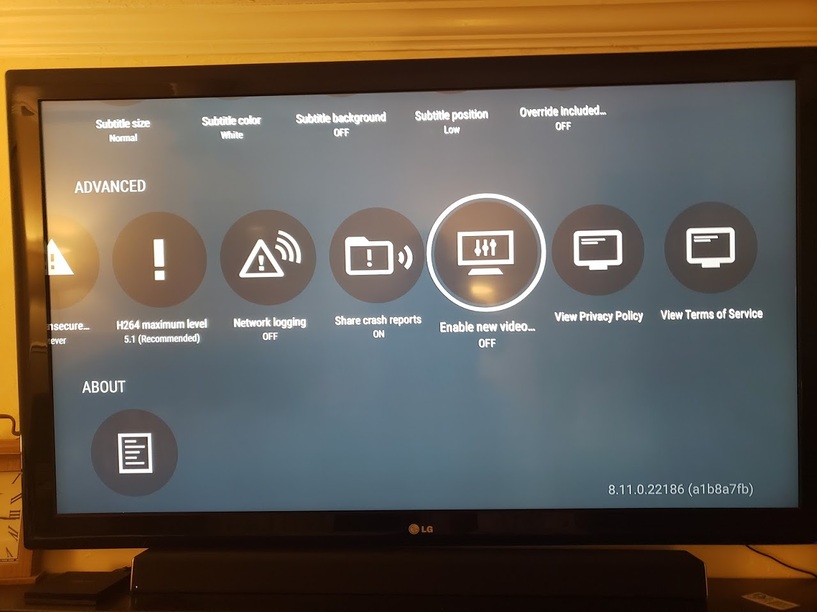
Server Version#: 1.21.3.4046 on Freenas
Player Version#: 8.13.1.23036
Hello,
I am receiving this error “An error occurred while attempting to play this video. Please check your connection and try again.” on certain movies. This is while other mkv videos are working just fine on the same server through the FireTV. In the past, I would work around this issue by disabling the “Enhanced Video Player” . However this is no logger an option under the Settings → Advanced menu
This issue is limit to the FireTV. I am able to play the mvk videos on my Samsung phone running the same version of plex. Android phone Version#: 8.13.1.23036
I could just revert back to a previous version of Plex however I prefer to have a proper fix.
I reverted back to Plex for Android 8.11.0 (post link) so that I have the ability to turn off the “Enable New Video Player” not the “Enhanced Video Player” that I presumed earlier.
Once installed go to Settings → Advanced → Set the Enable new video player to OFF
I look forward to @Plexinfo fixing this issue and allowing us to update our installed application for the full experience as well as security of our devices.
thanks for sharing your findings! i followed all steps and reverted to 8.12 as well, however, i don’t have the option to change the video player in the advanced field of the settings menu
While in the Plex client on the FireTV, go to settings, scroll to advanced, and look to disable the “Advanced Video Player” or “Enhanced Video Player”. The option is not under video.
I’ll double check the version and pull a screenshot of the settings menu when I get home later today.
would be cool if you can create a screenshot. in my advanced section i have passthrough, refresh rate, resolution switch, insecure connections, h264 level, logging, crash reports and a couple of policies but no player settings.
nice! the downgrade works for me as well, it’s not even necessary to disable the new player, the films i tried just work. thank you for researching and sharing a workaround!
I just setup a Fire Stick for the first time and was quite upset that NOTHING would play via Plex from it.
I followed the steps to downgrade the version and disabled the “New” player and it works fine now.
@Plexinfo - Why would you remove the option to use the working player when there are reports of Plex not playing content back properly with the new player?? Either fix the new player or continue giving the option for the old player. Thanks.
I refuse to have to “sideload” plex in order to revert back to an older version of Plex. But now my entire library no longer plays on ANY of my Fire TV devices. Been using Plex for years, as a replacement to Kodi. Now I’m afraid I’ll be searching for a new replacement to Plex soon.