# Plex addon on Home Assistant
**URL:** https://forums.plex.tv/t/plex-addon-on-home-assistant/921272
**Category:** General Discussions
**Created:** [June 4, 2025, 12:44pm UTC](https://forums.plex.tv/t/plex-addon-on-home-assistant/921272 "2025-06-04T12:44:14Z")
**Posts on this page:** 6
**Page:** 1
### Author:  [@maayan\_11](https://forums.plex.tv/u/maayan_11)
#### Post date: [June 4, 2025, 12:44pm UTC](https://forums.plex.tv/t/plex-addon-on-home-assistant/921272/1 "2025-06-04T12:44:14Z")
Hi,
I have Plex server installed as an addon on HAOS. I also have a Pi NAS connected and I managed to connect it all together with Samba following this brilliant guide: [https://www.youtube.com/watch?v=eu6IDFeyfwE](https://www.youtube.com/watch?v=eu6IDFeyfwE)
I’m running into a weird scenario tho:
1. When I try and stream content from the PiNAS storage via Plex I’m getting the Plex paywall that I need Remote Watch Pass to view remote content although everything is on my local network.
2. When I try and stream it via Chrome on my Windows machine everything is happy.
I don’t have any kind of vlan or sub networks in my network. It is a simple HA, Plex add on and raspberrypi as a NAS that the Plex is connected to.
Android 192.168.20.9
Windows 192.168.20.24
Any ideas?
---
### Author:  [@peter\_276](https://forums.plex.tv/u/peter_276)
#### Post date: [June 26, 2025, 3:24pm UTC](https://forums.plex.tv/t/plex-addon-on-home-assistant/921272/2 "2025-06-26T15:24:48Z")
Can you elaborate more in detail your point 1? In point 2, you’re using your window ( chrome browser ) as client to connect to your plex server installed on your HAOS. What url are you using to reach your HAOS - plexserver?
Your HAOS, runnning the plex server, is installed on which IP?
Which client are you using in point 1? Plexamp application on Android device?
---
### Author:  [@maayan\_11](https://forums.plex.tv/u/maayan_11)
#### Post date: [June 29, 2025, 1:26am UTC](https://forums.plex.tv/t/plex-addon-on-home-assistant/921272/3 "2025-06-29T01:26:07Z")
Hi, please find more details:
I have the Plexserver installed as a HA addon on my HA. The files (directory) that thr plex is connecting to are located on my NAS.
The HA and Plex server has the same IP. I connect to the Plex server with the same IP and “:32400/Web” i.e. :32400/web
Yes, I’m using my Android when I’m getting this error. I also tried it with my wife’s iPhone and we’re getting the same result. On my Windows machine with Chrome everything works great. All are on thr same network and connected to the wifi. I validated the IPs.
---
### Author:  [@Divideby0](https://forums.plex.tv/u/Divideby0)
#### Post date: [June 29, 2025, 2:32pm UTC](https://forums.plex.tv/t/plex-addon-on-home-assistant/921272/4 "2025-06-29T14:32:52Z")
Looking around, it sounds like HAOS isolates addons from eachother using a virtual network, which might be why you see _“remote watch!”_ messages. Either your clients cannot connect to the server due to this network isolation and are falling back on the [plex relay](https://support.plex.tv/articles/216766168-accessing-a-server-through-relay/), or they cannot find the server at all.
Looking around, you can set up Plex addon to use the “Host network”, which will remove this network isolation. See [Add-on configuration article](https://developers.home-assistant.io/docs/add-ons/configuration/#optional-configuration-options) for the `host_network` option and see if you can turn that to `true` for Plex.
_(Edit: on relook, I worry that might be a setting for HA, not on HAOS. Some pages mention that HAOS configures network isolation, and cannot be manually set to host network…)_
Alternatively, I think you might be able to set up in Plex `Settings > Network > LAN Networks` and enter the IP/netmask of your normal home network (`192.168.20.0/24`) to see if this resolves the “remote watch” message.
Edit edit: Hah, thought I had a post that solved it, but I believe it is YOUR post on the HA community, and it ended with a comment to come here…
One last edit: When you say you stream via chrome on your windows machine, how _exactly_ do you do that? What client, or site do you access to stream?
---
### Author:  [@Divideby0](https://forums.plex.tv/u/Divideby0)
#### Post date: [June 30, 2025, 2:50am UTC](https://forums.plex.tv/t/plex-addon-on-home-assistant/921272/5 "2025-06-30T02:50:54Z")
I think I realized why your Windows client can view content fine, but you get an error on an android client. It’s because Plex (the company) is now requiring that any client that streams content from a server _remotely_, you must pay Plex something (a Plex Pass, or a remote streaming pass). However, they are rolling out the payment requirement to clients one by one, and I believe so far only the mobile apps and MAYBE the set top boxes have it. Web clients do not, and I don’t think the Plex-for-Windows will get it (they are threatening to phase that client out, I think).
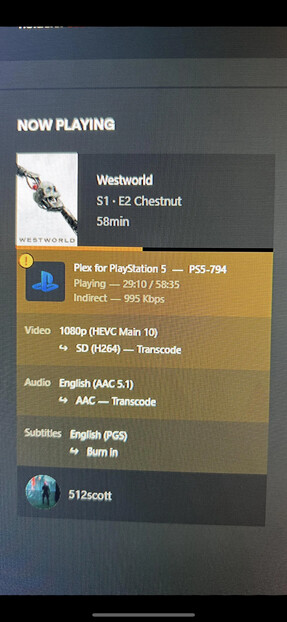
This would explain why one thing in the same sub-net are showing an error, while the other isn’t. I believe that - to the server - you are viewing “remotely”, possibly even using the relay. When the windows client is viewing content, what does the Plex Dashboard show? Does the indicator for the client say “Indirect” like this?
---
### Author:  [@system](https://forums.plex.tv/u/system)
#### Post date: [September 28, 2025, 2:51am UTC](https://forums.plex.tv/t/plex-addon-on-home-assistant/921272/6 "2025-09-28T02:51:21Z")
This topic was automatically closed 90 days after the last reply. New replies are no longer allowed.