Server Version#: 1.19.4.2902 & 1.18.8.2527
Player Version#: Samsung Smart TV (model: The Frame)
Hello,
I recently upgraded my home server from a near unsupported version (19.10) to Ubuntu 20.04 LTS and at the same time updated Plex to 1.19.4.2902. Unfortunately in the upgrade the setup has gone from near perfect playback to struggling to play anything at all without constant buffering.
I’ve tried rolling back the version of the server to see if that was the cause but it had made no difference. Looking at the resource graphs the server doesn’t seem to be struggling at all:
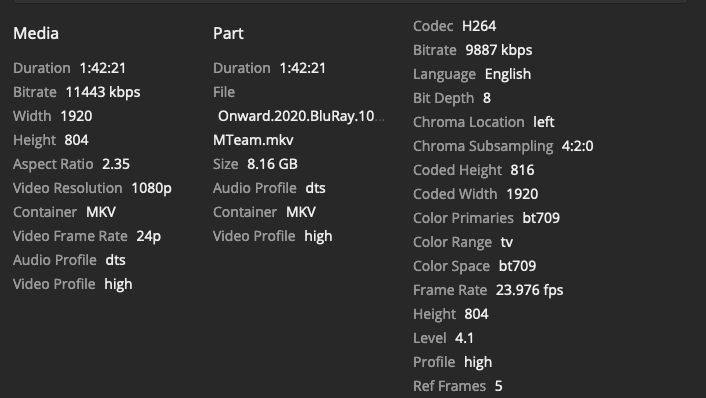
I’ve tried both the original version of multiple videos, and also the ‘optimised for TV’ versions and the buffering still occurs. An example of an original video that buffers is below:
I believe it must be a transcoding issue of some sort. But having changed settings, nothing seems to help. It’s also worth noting that I’m having the same issues via the web player in a browser, so I don’t think it is a player issue.
More than happy to provide more information as needed.
The file never actually played in the end. I’ve actually noticed that when SSH’ing into the server the terminal becomes sluggish (in that at takes a couple of seconds for characters to show up). So I’m not sure how true the graphs actually are if the CPU is the bottleneck.
Sorry I’ve not posted logs to the forum before. The Plex Media Server.log is very large so I assume I only copy / paste from the part that is relevant? And are there parts that should be stripped out for privacy reasons?
Ok I didn’t mean that part, but the one where one sees if it is transcoding or direct playing
It’s dts and firefox, so at least audio will be transcoded for sure. Mkv might be remuxed, but I am not sure about that.
Any reason why you use Firefox and not a more capable app? What OS is the client?
In general the logs can be upload as the complete zip that is produced, there is nothing sensitive in there. Only exception is that if you use a custom domain this might be disclosed.
Edit: if the client is also Linux you might miss the required codecs on the client side, I had the same issue recently when upgrading/reinstalling.
Edit2: you say player is Samsung but then you show from Firefox. Please stay with one client to begin with. I might also have this misunderstood and you are still playing from Samsung and only providing the screenshot from Firefox, not sure about that.
Right sorry, I misunderstood your request! I believe it is transcoding as when I run top in the terminal i can see the transcoder listed (but I will check).
Firefox is just the browser I use on a day to day basis, and happened to have it open to see if I could get the server to play anything. This is on OSX.
So on the TV (Samsung) it plays for 10-15 seconds, then buffers for 8-9 seconds, then repeats this process. The first graph in the thread is what is displayed in the dashboard when I play from that player.
I was using FF example for testing to see if I could play through a browser, so that’s the second graph I posted. Hopefully that makes sense. I will stick with the TV player from now on. Details about the TV client: