# Plex HDR problems (even with direct play)
**URL:** https://forums.plex.tv/t/plex-hdr-problems-even-with-direct-play/909074
**Category:** General Discussions
**Created:** [March 16, 2025, 3:57pm UTC](https://forums.plex.tv/t/plex-hdr-problems-even-with-direct-play/909074 "2025-03-16T15:57:45Z")
**Posts on this page:** 10
**Page:** 1
### Author:  [@EcstasyOfGold](https://forums.plex.tv/u/EcstasyOfGold)
#### Post date: [March 16, 2025, 3:57pm UTC](https://forums.plex.tv/t/plex-hdr-problems-even-with-direct-play/909074/1 "2025-03-16T15:57:45Z")
Server:
- Windows 11
- Plex Server _Version 1.41.5.9522_
- Intel Core i5-12600K (Intel® UHD Graphics 770)
- Ethernet (1Gig fibre internet)
Everything is working well otherwise (instant media loads local and remote) but I couldn’t help but notice that HDR looks pretty bad.
To make sure I wasn’t imagining it I tested with some media on a device under these parameters:
- Macbook Pro (M1 with latest Sequoia OS)
- brightness set to max with automatic brightness turned off
- same 4K episode of TV show with hybrid Dolby Vision / HDR10+ / HDR
> HDR format: Dolby Vision, Version 1.0, Profile 8.1, dvhe.08.06, BL+RPU, no metadata compression, HDR10 compatible / SMPTE ST 2094 App 4, Version HDR10+ Profile B, HDR10+ Profile B compatible
- **Test A** - Plex Mac app _Version 1.108.1.307-dd5b87aa_ (to ensure direct play) accessing via local network
- **Test B** - IINA Player (supports HDR and falling back to HDR from Dolby Vision Profile 8+, but not Dolby Vision Profile 5)
The problem is that the HDR looks great on the media player (B) but does not look right on Plex via the official app (A). Below is a link to a gallery that shows the issue I am having,
> **[imgbox - fast, simple image host](https://imgbox.com/NtRSlQCf)**
>
> Use imgbox to upload, host and share all your images. It's simple, free and blazing fast!
Or here is a timeslide GIF that will also show it but in lower quality:
> **[imgbox - fast, simple image host](https://imgbox.com/o3TFeb1I)**
>
> Use imgbox to upload, host and share all your images. It's simple, free and blazing fast!
And I will again confirm that Plex is delivering the media **via Direct Play** and **not transcoding**.
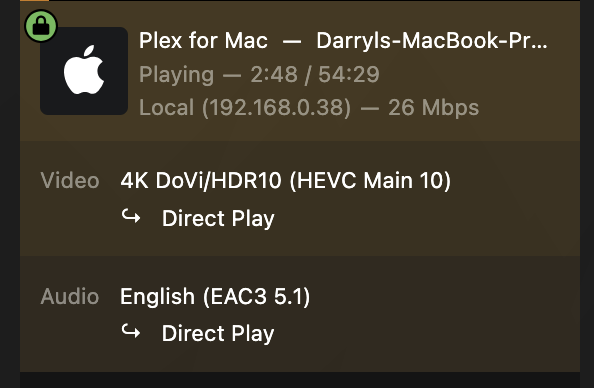
Any advice would be appreciated. Thanks!
---
### Author:  [@d0nch1ch1o](https://forums.plex.tv/u/d0nch1ch1o)
#### Post date: [March 20, 2025, 2:27am UTC](https://forums.plex.tv/t/plex-hdr-problems-even-with-direct-play/909074/2 "2025-03-20T02:27:28Z")
Happening to me now too
---
### Author:  [@EcstasyOfGold](https://forums.plex.tv/u/EcstasyOfGold)
#### Post date: [March 20, 2025, 10:15am UTC](https://forums.plex.tv/t/plex-hdr-problems-even-with-direct-play/909074/3 "2025-03-20T10:15:36Z")
Unfortunately I don’t have any fix yet ☹
Next I plan to do some tests on my OLED. To make it a fair test I will add the media to a USB and play via the native WebOS player and see how HDR looks. Then I will play via the Plex app (I can test both the TV Plex and the Xbox Plex) and see how it looks.
If I see more results that suggest Plex is making HDR look poor then I will have to think about canceling my Plex pass. I have 8 family/ friends using my server and they only have Plex pass for this reason, they will also all be cancelling if I drop Plex, so Plex only hurt themselves with this poor experience then not offering any insights.
---
### Author:  [@MovieFan](https://forums.plex.tv/u/MovieFan)
#### Post date: [March 21, 2025, 7:38pm UTC](https://forums.plex.tv/t/plex-hdr-problems-even-with-direct-play/909074/4 "2025-03-21T19:38:36Z")
Dows your Mac support HDR? The Plex app does not convert from HDR to SDR. It will play it as is. If you need the video converted to SDR, enable this on your server.
---
### Author:  [@EcstasyOfGold](https://forums.plex.tv/u/EcstasyOfGold)
#### Post date: [March 21, 2025, 8:06pm UTC](https://forums.plex.tv/t/plex-hdr-problems-even-with-direct-play/909074/5 "2025-03-21T20:06:09Z")
@MovieFan if my Mac didn’t support HDR then how would the media player I used in **Test B** show HDR perfectly. I detailed it all in the initial post.
---
### Author:  [@pshanew](https://forums.plex.tv/u/pshanew)
#### Post date: [March 21, 2025, 8:44pm UTC](https://forums.plex.tv/t/plex-hdr-problems-even-with-direct-play/909074/6 "2025-03-21T20:44:04Z")
Do you have any media you can test which only has the HDR10 layer, not Dolby Vision (just as a test)? My experience is that Dolby Vision in this environment (Plex App on Mac) can have a kind of dim, green hue; however, HDR10 looks great. I just performed so quick tests to confirm that.
Plex has had some DV issues recently but I think they’re working on sorting them out.
---
### Author:  [@mark40511](https://forums.plex.tv/u/mark40511)
#### Post date: [April 18, 2025, 9:48am UTC](https://forums.plex.tv/t/plex-hdr-problems-even-with-direct-play/909074/8 "2025-04-18T09:48:29Z")
This reminds me somewhat of a Roku Ultra 4k issue with certain x265 files where it would be saturated in red and it took YEARS for them to finally fix it… It would happen on Plex but also outside of Plex… so it was a Roku issue they finally fixed.
---
### Author:  [@ale5506](https://forums.plex.tv/u/ale5506)
#### Post date: [April 25, 2025, 6:12pm UTC](https://forums.plex.tv/t/plex-hdr-problems-even-with-direct-play/909074/9 "2025-04-25T18:12:57Z")

The current player just does not want to direct play or transcode my video here with the AppleTV plex player. Same issue with ipad pro M2, iphone 15 pro, however it works perfectly with emby on all platforms in directplay, it works on my MAC with plex direct play. So, it seems like the new player has a nice bug here…
---
### Author:  [@robertsig](https://forums.plex.tv/u/robertsig)
#### Post date: [May 30, 2025, 1:56am UTC](https://forums.plex.tv/t/plex-hdr-problems-even-with-direct-play/909074/10 "2025-05-30T01:56:36Z")
When did they finally fix this? I’ve been avoiding HEVC/x265 files for years because of it.
---
### Author:  [@system](https://forums.plex.tv/u/system)
#### Post date: [August 28, 2025, 1:56am UTC](https://forums.plex.tv/t/plex-hdr-problems-even-with-direct-play/909074/11 "2025-08-28T01:56:59Z")
This topic was automatically closed 90 days after the last reply. New replies are no longer allowed.