# Plex library problem
**URL:** https://forums.plex.tv/t/plex-library-problem/569594
**Category:** General Discussions
**Tags:** server-windows, plex-web, library-management
**Created:** [April 7, 2020, 4:14pm UTC](https://forums.plex.tv/t/plex-library-problem/569594 "2020-04-07T16:14:17Z")
**Posts on this page:** 7
**Page:** 2
### Author:  [@teof13](https://forums.plex.tv/u/teof13)
#### Post date: [April 11, 2020, 12:44pm UTC](https://forums.plex.tv/t/plex-library-problem/569594/21 "2020-04-11T12:44:32Z")
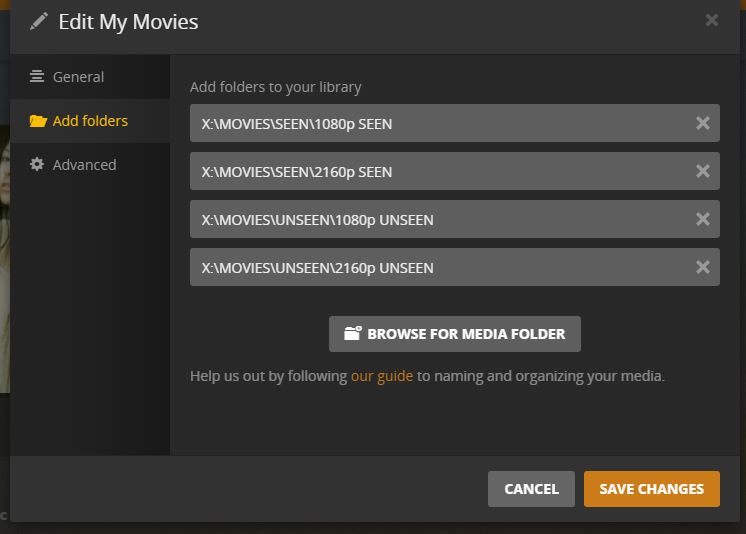
they are 4 differrent folders, but in the same parent folder
---
### Author:  [@anon18523487](https://forums.plex.tv/u/anon18523487)
#### Post date: [April 12, 2020, 8:46am UTC](https://forums.plex.tv/t/plex-library-problem/569594/22 "2020-04-12T08:46:40Z")
That’s the cause. As mentioned, folder view is not a real folder structure. Plex treats those folders as the source for that library and only shows subfolders from that level on. You should instead point your library to “X:\Movies”. Those 4 folders will then be subfolders.
---
### Author:  [@teof13](https://forums.plex.tv/u/teof13)
#### Post date: [April 12, 2020, 10:19am UTC](https://forums.plex.tv/t/plex-library-problem/569594/23 "2020-04-12T10:19:55Z")
How can I do that without having to rebuild the library? Is there any way?
---
### Author:  [@anon18523487](https://forums.plex.tv/u/anon18523487)
#### Post date: [April 13, 2020, 8:00am UTC](https://forums.plex.tv/t/plex-library-problem/569594/24 "2020-04-13T08:00:33Z")
And the main folder to the list. Scan for files. This will result in duplicates of your movies. Edit the library and remove the old folders. Scan again. That will remove the duplicates.
---
### Author:  [@teof13](https://forums.plex.tv/u/teof13)
#### Post date: [April 13, 2020, 10:03am UTC](https://forums.plex.tv/t/plex-library-problem/569594/25 "2020-04-13T10:03:18Z")
With this way plex will scan and analyze again all the videos from the beginning? Like they are new videos?
---
### Author:  [@anon18523487](https://forums.plex.tv/u/anon18523487)
#### Post date: [April 13, 2020, 8:07pm UTC](https://forums.plex.tv/t/plex-library-problem/569594/26 "2020-04-13T20:07:48Z")
No. If if allow the duplicates, they will maintain the information from the original. If you just add the main folder and remove the old folders in one step, then they could end up being considered as new. The steps I provided should keep things from changing.
---
### Author:  [@system](https://forums.plex.tv/u/system)
#### Post date: [July 12, 2020, 8:08pm UTC](https://forums.plex.tv/t/plex-library-problem/569594/27 "2020-07-12T20:08:03Z")
This topic was automatically closed 90 days after the last reply. New replies are no longer allowed.
[Previous page](https://forums.plex.tv/t/plex-library-problem/569594.md?page=1)