# Plex Live TV DVR Not Capturing Date/Originally Available
**URL:** https://forums.plex.tv/t/plex-live-tv-dvr-not-capturing-date-originally-available/465950
**Category:** Live TV & DVR
**Tags:** livetv-dvr
**Created:** [September 24, 2019, 5:52am UTC](https://forums.plex.tv/t/plex-live-tv-dvr-not-capturing-date-originally-available/465950 "2019-09-24T05:52:13Z")
**Posts on this page:** 20
**Page:** 1
### Author:  [@Mike-E](https://forums.plex.tv/u/Mike-E)
#### Post date: [September 24, 2019, 5:52am UTC](https://forums.plex.tv/t/plex-live-tv-dvr-not-capturing-date-originally-available/465950/1 "2019-09-24T05:52:13Z")
Running into an issue here where the date is not being picked up by Plex 1.17.0.1709:

Help. 🙂
---
### Author:  [@Mike-E](https://forums.plex.tv/u/Mike-E)
#### Post date: [September 25, 2019, 7:24am UTC](https://forums.plex.tv/t/plex-live-tv-dvr-not-capturing-date-originally-available/465950/2 "2019-09-25T07:24:26Z")
It would seem that at the very least it would use the created date of the video file? Bug, perhaps?
---
### Author:  [@Mike-E](https://forums.plex.tv/u/Mike-E)
#### Post date: [September 30, 2019, 10:49am UTC](https://forums.plex.tv/t/plex-live-tv-dvr-not-capturing-date-originally-available/465950/3 "2019-09-30T10:49:59Z")
Week 4, still occurring:

☹
---
### Author:  [@sa2000](https://forums.plex.tv/u/sa2000)
#### Post date: [September 30, 2019, 3:06pm UTC](https://forums.plex.tv/t/plex-live-tv-dvr-not-capturing-date-originally-available/465950/4 "2019-09-30T15:06:06Z")
I will reproduce this and look into it.
What lineup and channel this was recorded from ?
Not specifically related to this, but … I have been recommending users switch to using the Personal Media Shows agent for NFL and other sports recordings - creating a tv library for sport and editing advanced settings switching the agent from theTVDB to Personal Media Showd
---
### Author:  [@Mike-E](https://forums.plex.tv/u/Mike-E)
#### Post date: [September 30, 2019, 4:38pm UTC](https://forums.plex.tv/t/plex-live-tv-dvr-not-capturing-date-originally-available/465950/5 "2019-09-30T16:38:54Z")
Cool! Thank you for your reply @sa2000 … FWIW this occurs on CBS 3.1/6.1 and Fox 17.1/47.1 here in the 48813 area code. All channels result in the same strange errant date.
I have switched the library from `TheTVDB` → `Personal Media Shows` and will keep an eye on it and update here accordingly. Unfortunately the Lions have a bye week next week so it might be a bit of a wait. 😁
---
### Author:  [@Mike-E](https://forums.plex.tv/u/Mike-E)
#### Post date: [October 22, 2019, 11:59am UTC](https://forums.plex.tv/t/plex-live-tv-dvr-not-capturing-date-originally-available/465950/6 "2019-10-22T11:59:42Z")
Unfortunately @sa2000, after the bye week (and a game on ESPN which confoundingly is not available OTA) this appears to be a problem even after switching to `TheTVDB`:

☹
---
### Author:  [@Mike-E](https://forums.plex.tv/u/Mike-E)
#### Post date: [October 23, 2019, 8:03am UTC](https://forums.plex.tv/t/plex-live-tv-dvr-not-capturing-date-originally-available/465950/7 "2019-10-23T08:03:27Z")
Good news. I think I found the problem. I have been using MCEBuddy for my conversions, and I noticed that in the resulting `.m4v` file there is a `1900` in the file’s `Year` attribute, whereas the original `.ts` file does not.
I looked in the conversion task and there seems to be a download/add metadata section for the conversion process under `Expert Settings`, basically duplicating the feature that Plex already does.
I have disabled that and will keep an eye open for the next conversion set for this next Sunday. I will update here on the result.
---
### Author:  [@Mike-E](https://forums.plex.tv/u/Mike-E)
#### Post date: [November 4, 2019, 9:26am UTC](https://forums.plex.tv/t/plex-live-tv-dvr-not-capturing-date-originally-available/465950/8 "2019-11-04T09:26:02Z")
Boh… I spoke too soon. It appears that even after turning off MCEBuddy2x’s information download, the metadata simply is not getting copied correctly:

Agent is set to `TheTVDB`, which I recall setting to `Personal Media Shows` but somehow it got set back? Grr…
Further, I also noticed that the language of the library – for whatever reason – was set to `Dansk` and not `English`. Perhaps this might be causing some of the problem here?
Will keep an eye on it for next week. 😛
Lions are sucking this year so it’s a good time to get all the problems ironed out. 😆
---
### Author:  [@Mike-E](https://forums.plex.tv/u/Mike-E)
#### Post date: [November 11, 2019, 9:03am UTC](https://forums.plex.tv/t/plex-live-tv-dvr-not-capturing-date-originally-available/465950/9 "2019-11-11T09:03:19Z")
Tried to fix this with absolute numbering, but even that doesn’t work:
> [@Plex Server 1.18.1.1973 Doesn't Properly Sort Library Items as Configured](https://forums.plex.tv/t/plex-server-1-18-1-1973-doesnt-properly-sort-library-items-as-configured/488840):
>
> Server Version#: 1.18.1.1973 Player Version#: Version 4.12.2 I am attempting to sort episodes by absolute numbering. You will first notice that a message says that it cannot be saved: [image] However, attempting a 2nd time passes and the desired setting is applied when re-opening edit: [image] However, however joy the items in the library do not sort as configured: [image] Known issue?
---
### Author:  [@sa2000](https://forums.plex.tv/u/sa2000)
#### Post date: [November 13, 2019, 4:58pm UTC](https://forums.plex.tv/t/plex-live-tv-dvr-not-capturing-date-originally-available/465950/10 "2019-11-13T16:58:08Z")
Update:
Plex Media Server 1.18.2.2029 has just been released as beta
It has the changes for sports and news which led to incorrect matching of recordings. The changes also fix the issue when recording multiple sports games on the same day
> [@Plex Media Server](https://forums.plex.tv/t/plex-media-server/30447/300):
>
> Plex Media Server 1.18.2.2029 is now available in the Beta update channel FIXES: (DVR) Preserve EPG metadata when assimilating Sports and News recordings. (#10544) (Playlists) Recently added playlists were not sorted correctly
- (DVR) Preserve EPG metadata when assimilating Sports and News recordings. (#10544)
Sports and News recordings will no longer get matched with tvdb and will preserve the EPG data
---
### Author:  [@Mike-E](https://forums.plex.tv/u/Mike-E)
#### Post date: [November 13, 2019, 5:17pm UTC](https://forums.plex.tv/t/plex-live-tv-dvr-not-capturing-date-originally-available/465950/11 "2019-11-13T17:17:40Z")
Fantastic! Thank you @sa2000 and team for your work on this! FWIW, MCEBuddy also made a fix on their side as well, fixing the code that was adding a `1900` for the `Year` attribute on processed files:
> **[\[BUG\] MCEBuddy writing incomplete/invalid metadata](https://discussion.mcebuddy2x.com/t/bug-mcebuddy-writing-incomplete-invalid-metadata/3242)**
>
> Request Type: BUG MCEBuddy Version and Type (32bit or 64bit): 2.5.1 (02 Nov) - 64-bit Operating System and Type (32bit or 64bit): Windows 10 64-bit Summary of the problem or suggestion: I’ve been battling a Plex issue for some time: Turns...
I can confirm 1.18.2.2029 installed… I will let you know of the results this weekend after the games. 🕶
---
### Author:  [@Mike-E](https://forums.plex.tv/u/Mike-E)
#### Post date: [November 16, 2019, 9:33pm UTC](https://forums.plex.tv/t/plex-live-tv-dvr-not-capturing-date-originally-available/465950/12 "2019-11-16T21:33:03Z")
Unfortunately it doesn’t look like this is off to a good start, @sa2000.
In addition to:
> [@Something Bad Happen on 1.18.2.2029: Recording Finished Earlier Than Expected](https://forums.plex.tv/t/something-bad-happen-on-1-18-2-2029-recording-finished-earlier-than-expected/491614):
>
> Server Version#: 1.18.2.2029 Player Version#: NA We just had a recording go sour after an hour and 18 minutes into a 3 hour 30 minute football game. I can’t seem to find anything obvious in the logs. Searching for Michigan State turns up nothing that I can see. Any guidance to help track down what happened here would be greatly appreciated. +1
… what game we did manage to record still ended up with a 1900 timestamp:

This is despite the file having the year empty, which in the past also had 1900 (so this does indeed look fixed on MCEBuddy’s side):

Also, the episode sorting still appears to be not honoring settings:

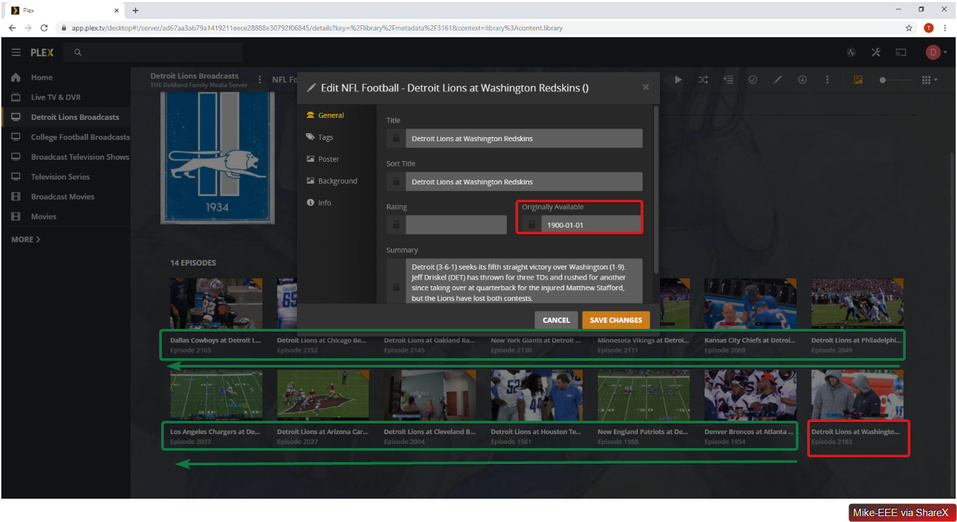
Even though it is set to `Absolute Numbering`, the errant episode sorts correctly when correcting the `1900` to its rightful date (so `2019-11-16` in this case).
---
### Author:  [@Mike-E](https://forums.plex.tv/u/Mike-E)
#### Post date: [November 25, 2019, 6:14am UTC](https://forums.plex.tv/t/plex-live-tv-dvr-not-capturing-date-originally-available/465950/13 "2019-11-25T06:14:54Z")
> [@Mike-E](#):
>
> Even though it is set to `Absolute Numbering` , the errant episode sorts correctly when correcting the `1900` to its rightful date (so `2019-11-16` in this case).
I can confirm this still occurs on `Version 1.18.2.2058`.
---
### Author:  [@Mike-E](https://forums.plex.tv/u/Mike-E)
#### Post date: [December 9, 2019, 10:18am UTC](https://forums.plex.tv/t/plex-live-tv-dvr-not-capturing-date-originally-available/465950/14 "2019-12-09T10:18:41Z")
> [@Mike-E](#):
>
> I can confirm this still occurs on `Version 1.18.2.2058` .
This is still occurring on `Version 1.18.3.2129`.
Note the items in red. They each have their dates set to the errant `1900` as being assigned by Plex (for whatever reason).
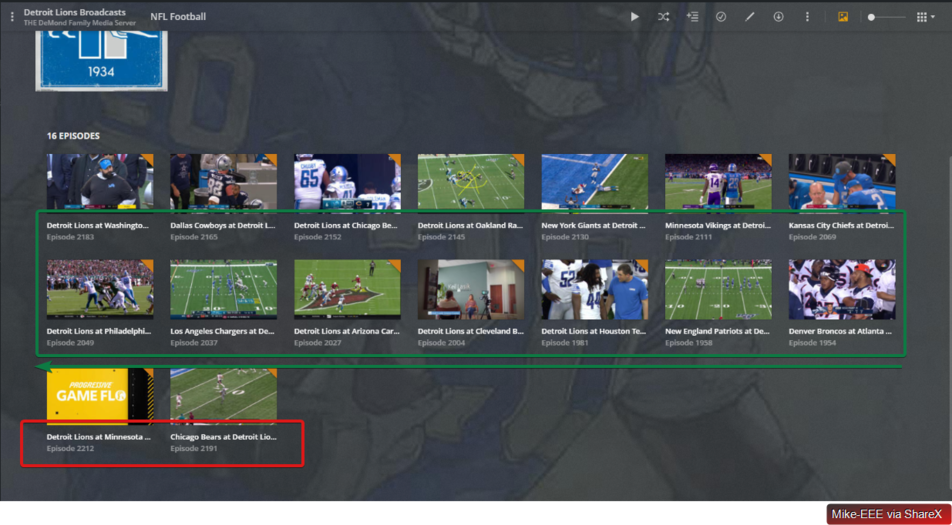
It would seem that even though a sort order (shown below) is provided, it is still ordered by Date, which (again, for whatever reason) is being assigned incorrectly by Plex.

Also, as shown, I did try to change this setting to `Airing Time` and then back to `Absolute numbering`. Each time resulted in the displayed message `Your changes could not be saved.` However, pressing `Save Changes` and then re-opening the settings show that the setting was, indeed, saved.
Regardless, neither “saved” setting resulted in changing the sorting of the items.
Is this a known issue?
---
### Author:  [@sa2000](https://forums.plex.tv/u/sa2000)
#### Post date: [December 9, 2019, 11:50am UTC](https://forums.plex.tv/t/plex-live-tv-dvr-not-capturing-date-originally-available/465950/15 "2019-12-09T11:50:04Z")
I will try and reproduce this. If not, I would need server logs for the changes could not be saved error
I will also check the 1900 date issue
---
### Author:  [@Mike-E](https://forums.plex.tv/u/Mike-E)
#### Post date: [December 9, 2019, 11:57am UTC](https://forums.plex.tv/t/plex-live-tv-dvr-not-capturing-date-originally-available/465950/16 "2019-12-09T11:57:40Z")
Awesome, thank you @sa2000 it is much appreciated. I know this is beta software, so setting expectations accordingly. 🙂
The requested files are attached. Please let me know if there is any further information I can provide to help diagnose/troubleshoot this issue. 👍
[Plex Media Server Logs\_2019-12-09\_06-51-23.zip](https://forums.plex.tv/uploads/short-url/uhnsAZvNGJe6Ypy5EZ5xB34BWKW.zip) (7.8 MB)
---
### Author:  [@sa2000](https://forums.plex.tv/u/sa2000)
#### Post date: [December 10, 2019, 12:16pm UTC](https://forums.plex.tv/t/plex-live-tv-dvr-not-capturing-date-originally-available/465950/17 "2019-12-10T12:16:24Z")
> [@Mike-E](#):
>
> Awesome, thank you @sa2000 it is much appreciated. I know this is beta software, so setting expectations accordingly. 🙂
>
> The requested files are attached. Please let me know if there is any further information I can provide to help diagnose/troubleshoot this issue. 👍
Could you look for this directory, copy it out and zip and let me have the zip
`D:\Plex Media Server\Metadata\TV Shows\b\33f563247b21d9afd771aa0f1d616e8d9e7621a.bundle`
Has the error for editing and saving changes for the sort order started after the Plex Media Server change for not using thetvdb for sport / news?
could you also get me the media info xml for one of the episodes
See [https://support.plex.tv/articles/201998867-investigate-media-information-and-formats/](https://support.plex.tv/articles/201998867-investigate-media-information-and-formats/)
With regards to the year “1900” - I setup a DVR using Lineup “Broadcast TV Lansing OTA Broadcast” and selected channels
```auto
3.1 CBS WWMTDT
6.1 CBS WLNSHD
17.1 FOX WXMIH
47.1 FOX WSYM
```
None of the airings had a year of 1900
Could you give me a specific airing / channel where you see the year 1900
---
### Author:  [@Mike-E](https://forums.plex.tv/u/Mike-E)
#### Post date: [December 10, 2019, 2:40pm UTC](https://forums.plex.tv/t/plex-live-tv-dvr-not-capturing-date-originally-available/465950/18 "2019-12-10T14:40:06Z")
Sweet… thank you for your continued assistance, @sa2000!
> [@sa2000](#):
>
> Could you look for this directory, copy it out and zip and let me have the zip
Done: [33f563247b21d9afd771aa0f1d616e8d9e7621a.bundle.zip](https://forums.plex.tv/uploads/short-url/so271NzGnL7Na8tgfhaYy6RrZzP.zip) (896.6 KB)
> [@sa2000](#):
>
> Has the error for editing and saving changes for the sort order started after the Plex Media Server change for not using thetvdb for sport / news?
So the problems here occur with either TheTVDB enabled or not. I’ve tried debugging this a couple times switching back between the two and attempting to use different settings.
Currently the setting for this library is on `TheTVDB` as it was demonstrating the same problems with `Personal Media Shows` enabled as well.
I’ve also changed it back to `Personal Media Shows` and can verify that the same error message is displayed when trying to save the sort order field. I will also continue to keep it back on `Personal Media Shows` for this weekend to re-verify that the `1900` issue remains there, as well.
> [@sa2000](#):
>
> could you also get me the media info xml for one of the episodes
Unfortunately I do not have content from this weekend. After the content is captured, I do another pass through MCEBuddy Custom Cuts to further compress and cut out missed commercials. This process overwrites the original file. Before doing so I verify that the `1900` bug exists, so the problem happens before this. Incidentally enough, there was a problem also with MCEBuddy capturing `1900` for the release date of processed video but [this has been confirmed as fixed](https://discussion.mcebuddy2x.com/t/bug-mcebuddy-writing-incomplete-invalid-metadata/3242) and it is no longer occurring.
All that stated I will make sure to get you the requested data from one of the next recordings this next weekend. 👍
> [@sa2000](#):
>
> None of the airings had a year of 1900
> Could you give me a specific airing / channel where you see the year 1900
So this is a good point. We are not using the built-in guides but are using zap2xml [as described here](https://support.plex.tv/articles/using-an-xmltv-guide/). Could this be part of our problem? For your reference I have included our current guide here:
[xmltv.zip](https://forums.plex.tv/uploads/short-url/tWhaOgGrpwyR1TMX1PLQA8gS94y.zip) (2.0 MB)
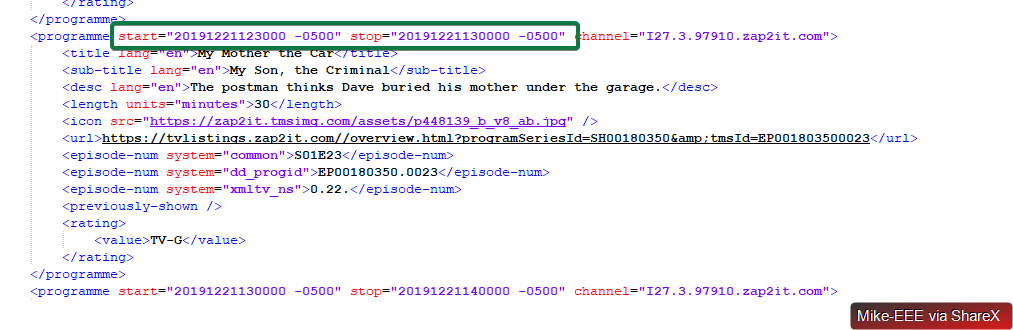
I did do a cursory look and see that `start` and `stop` fields are provided throughout, so it would seem dates are being provided as expected:
Please let me know what other information you require to continue diagnosing this. I sincerely appreciate you taking the time to assist and improving the quality of your beta. 👍
---
### Author:  [@sa2000](https://forums.plex.tv/u/sa2000)
#### Post date: [December 11, 2019, 1:37pm UTC](https://forums.plex.tv/t/plex-live-tv-dvr-not-capturing-date-originally-available/465950/19 "2019-12-11T13:37:44Z")
> [@Mike-E](#):
>
> So this is a good point. We are not using the built-in guides but are using zap2xml [as described here](https://support.plex.tv/articles/using-an-xmltv-guide/). Could this be part of our problem? For your reference I have included our current guide here:
Well yes. It is why the fix for Sports / News is not active
There are two things here.
At the moment, if a user opts for the “Enhanced Guide” option, then our solution for News/Sports is bypassed and an attempt is made to match the recorded event against the metadata services.
I will raise this as an issue - that perhaps our solution for Sport / News should apply regardless of whether the “Enhanced Guide” option is selected in DVR Settings
The second point here, is that the use of xmltv guides always invokes the “Enhanced Guide” option. You can unset it - but it would get reinstated if you recreate the DVR
---
### Author:  [@Mike-E](https://forums.plex.tv/u/Mike-E)
#### Post date: [December 11, 2019, 3:29pm UTC](https://forums.plex.tv/t/plex-live-tv-dvr-not-capturing-date-originally-available/465950/20 "2019-12-11T15:29:50Z")
OK that is good to know, @sa2000, thank you. I have disabled the `Enhanced Guide` option and we’ll see how that treats us now. I noticed it says that it will lead to slower refresh times which is a bummer as we are already facing a considerable undertaking with our guide update time as discussed here:
> [@Refreshing Guide Takes Inordinate Amount of Time](https://forums.plex.tv/t/refreshing-guide-takes-inordinate-amount-of-time/504451):
>
> Server Version#: Version 1.18.3.2129 Player Version#: NA We have our guide set to use an XML file, and it seems that whenever the guide refreshes now it takes a longggggggggggggggggggg time. Over an hour. It used to happen in a couple minutes. Known issue, perhaps?
I will keep an eye on this and update here of any success/failure. 👍
(Hopefully success 😁)
[Next page](https://forums.plex.tv/t/plex-live-tv-dvr-not-capturing-date-originally-available/465950.md?page=2)