Plex lost access to file mid-song

Server Version#: 4.113.2

I recently updated my headless Plex server to run on a new Pi 4. I had it all up and running, was able to watch a few things and listen to a lot of my music. The other day, in the middle of a song, Plex suddenly lost access to the file. Whenever I try to stream anything now, I get the following error: Please check that the file exists and the necessary drive is mounted.

I am able to access and play the file when I VNC to my server (on the Pi desktop) and I’m able to access the file via the shared folder on my laptop, so the file is definitely present.

I did struggle with getting permissions set up in a way so Plex could access the actual files on the drive attached to the Pi, but I don’t know how any of those could have changed all of a sudden.

Possibly pertinent: We left town for a few days to escape a heat wave, and I turned the power off to the internet and the Pi for that time. This happened after turning it back on and continuing to play the last playlist I accessed before turning off the power.

Any ideas would be very helpful.

EDIT: When I do go into the Libraries section to try to add a new folder, the main directory where all my files are stored does appear to be empty, which was the problem I was having before I got permissions worked out.

When you returned and resumed play it was probably playing the cached portion of the file, but the file mount was down and it could not fetch the next chunk. I don’t know why things changed, but start from the beginning on mounting that drive, and test it through server reboots.

Ah, so I may need to remount the drive even though it’s accessible through the actual desktop? I may not fully understand what it means to mount a drive… I’ll give that a try and will report back.

Update: I mounted the drive and updated the fstab file to automount the drive on every reboot, then rebooted and now the host is down. I think I messed something up in that file, because that’s the only change I made.

I have unplugged the pi and plugged it back in, when I ping it, I get “zping: sendto: Host is down”, when I try to ssh into it, I get “ssh: connect to host vrpi port 22: Host is down”

I’m now trying to access raspi-config, but it’s asking me for a password and it’s not recognizing my superuser password.

Yeah a bad /etc/fstab can cause problems for sure.

It seems like there should be a way to log in via SSH even in that case … can you hook up a monitor to see what is going on? There may be a way to boot to single-user mode with a minimal system before it tries to boot the main system and chokes. That’s what I am used to on other unix-like systems.

If you do not have a lot of Plex customization work to save you could always start over and reinstall everything on the Pi. That might be less work than a rescue depending on what is wrong.

I reinstalled the OS and started all over. That was a good suggestion. I can currently access my folders, but I think I may also need to figure out that automount at some point.

This is tangentially related, but I think I also don’t understand exactly how user and group permissions work here. I initially added the plex user to the superuser’s group (the new pi user), but that doesn’t grant the plex user access to the folder owned by the superuser’s group and I don’t know why. I figured that should be enough.

As it stands, I can’t access the files unless the plex user is the owner of all the file folders and one of the higher level folders. That’s the next thing I need to puzzle out.

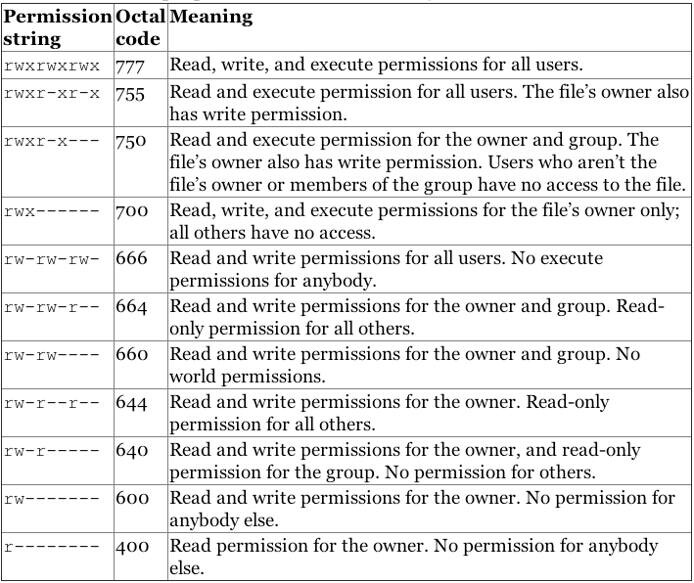
Adding Plex to the superuser group can help in some cases, but each file and directory has separate permissions for the user and group… So if the group privs also aren’t correct, you can still have an access problem.

If you haven’t seen these diagrams yet, they may help.

Permissions issues can be tricky!

image

Thank you for that! I think I’m starting to better understand this, but I have hit another roadblock…

I was trying to add some music folders to my larger Music directory, but I got a permission error. Here’s what my entire media directory’s permissions looked like when I entered ‘ls -l’ into the command line:

drwxr-x—+ 3 plex plex 4096 Aug 23 16:34 vrpi

With this set of permissions, I was able to access and play everything in the directory as my pi user (who is in the plex group), but wasn’t able to create or move directories.

If I’m reading the above correctly, that’s because I had ‘rwx’ for my plex user and ‘r-x’ for my plex group, correct?

I wanted to fix this, so I entered ‘sudo chown 770 /Data’. I this gave me the settings I thought I was looking for. ‘rwxrwx—’, which I thought would grant the plex user read, write, and execute, and the plex group (and all its members) read, write, and execute, and then leave all other users unable to do anything.

Instead, I lost all access to all folders. I have since done ‘sudo chown 777’, which makes me nervous, because now all users have all permissions on the drive, right

Why didn’t 770 work?

EDIT: Okay, I changed everything to 775 (rwxrwxr-x) recursively, and I can access and play contents from every folder, but I can’t add/move folders. Plex can access files and play them.

Does this mean that my pi user, who is in the plex group, is considered part of that third “Other” group?
