# Plex Media Server Crash
**URL:** https://forums.plex.tv/t/plex-media-server-crash/758078
**Category:** Plex Media Server
**Tags:** server-linux, android-tv, ios-legacy, plex-web
**Created:** [November 16, 2021, 12:46am UTC](https://forums.plex.tv/t/plex-media-server-crash/758078 "2021-11-16T00:46:31Z")
**Posts on this page:** 20
**Page:** 1
### Author:  [@Davidtt485](https://forums.plex.tv/u/Davidtt485)
#### Post date: [November 16, 2021, 12:46am UTC](https://forums.plex.tv/t/plex-media-server-crash/758078/1 "2021-11-16T00:46:31Z")
Server Version#: 1.25.0.5220
Player Version#: Version 4.66.1
When attempting to play a movie, on the Web Player or my TV, I will get a playback error message, and the server will appear offline for a small period of time, like 2-5 minutes. If I try playback using an IOS app it works fine. If I access the File from a PC located on the NAS it playbacks fine on explorer. This error appeared to have started AFTER I was asked to swap to the media fetcher.
[Plex Media Server Logs\_2021-11-16\_00-43-50.zip](https://forums.plex.tv/uploads/short-url/kJyRt0sW3W7aiRDa5JjfqBMydyi.zip) (3.1 MB)
---
### Author:  [@Davidtt485](https://forums.plex.tv/u/Davidtt485)
#### Post date: [November 18, 2021, 9:40pm UTC](https://forums.plex.tv/t/plex-media-server-crash/758078/2 "2021-11-18T21:40:21Z")
Any ideas or help with this would be appreciated it’s been an issue for a while now
---
### Author:  [@ChuckPa](https://forums.plex.tv/u/ChuckPa)
#### Post date: [November 18, 2021, 10:03pm UTC](https://forums.plex.tv/t/plex-media-server-crash/758078/3 "2021-11-18T22:03:45Z")
Would you please do the following
1. Turn VERBOSE logging off again. It’s generating so much noise in the logs that It’s extremely difficult to follow.
2. Now recreate if you can?
3. Download and attach a fresh set of logs ?
What I’m seeing is a Plex/web client.
I think it’s trying to transcode but don’t see the FFMPEG invocation.
I do see some DirectStreaming (so it must be transcoding somewhere)
PS: If you turned on transcoder logging to VERBOSE, please put that back at DEBUG.
---
### Author:  [@Davidtt485](https://forums.plex.tv/u/Davidtt485)
#### Post date: [November 18, 2021, 10:47pm UTC](https://forums.plex.tv/t/plex-media-server-crash/758078/4 "2021-11-18T22:47:43Z")
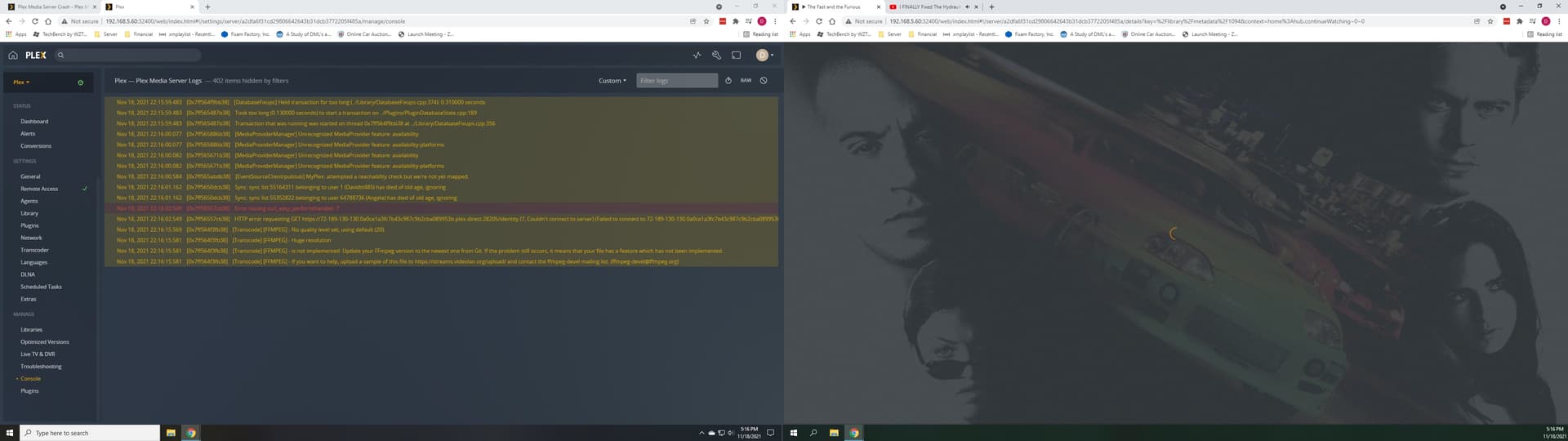
I agree it seems to be a Transcode issue, I did some well timed screenshots to hopefully help. Also worth saying this server is a dedicated linux box that has been running fine for months.[Plex Media Server Logs\_2021-11-18\_22-46-09.zip](https://forums.plex.tv/uploads/short-url/tBORKidWtg4hm32NYlCTLtZlbVj.zip) (1.3 MB)
---
### Author:  [@ChuckPa](https://forums.plex.tv/u/ChuckPa)
#### Post date: [November 18, 2021, 11:37pm UTC](https://forums.plex.tv/t/plex-media-server-crash/758078/5 "2021-11-18T23:37:21Z")
@Davidtt485
May I have the XML for the file which you show in your screenshot and logs ?
Need the `` through `` part only.
The rest is metadata fluff
---
### Author:  [@insanemal](https://forums.plex.tv/u/insanemal)
#### Post date: [November 19, 2021, 12:20am UTC](https://forums.plex.tv/t/plex-media-server-crash/758078/6 "2021-11-19T00:20:29Z")
I’m having this exact same issue. Segfaults trying to fire up hardware transcoding.
I’ve got an Intel GPU so it lines up with the new XE support update.
I’d love to get you .dmp files except they aren’t saving. It segfaults and says it dumped a file but it didn’t. So that’s fun.
---
### Author:  [@ChuckPa](https://forums.plex.tv/u/ChuckPa)
#### Post date: [November 19, 2021, 12:23am UTC](https://forums.plex.tv/t/plex-media-server-crash/758078/7 "2021-11-19T00:23:50Z")
@insanemal
Can you provide the XML and DEBUG logs which capture the failure?
I’ve already spoken to the team. They’re pretty sure they know the problem.
They’ll come take a look.
The more data we can give them, the better.
---
### Author:  [@insanemal](https://forums.plex.tv/u/insanemal)
#### Post date: [November 19, 2021, 12:25am UTC](https://forums.plex.tv/t/plex-media-server-crash/758078/8 "2021-11-19T00:25:51Z")
@ChuckPa I’d love to. Where do I find them? I can’t seem to find anything in the Crash Reporting folder. Just empty folders no files.
---
### Author:  [@ChuckPa](https://forums.plex.tv/u/ChuckPa)
#### Post date: [November 19, 2021, 12:27am UTC](https://forums.plex.tv/t/plex-media-server-crash/758078/9 "2021-11-19T00:27:21Z")
1. Hover over the item . → Get Info → View XML
we only need a small part from the top of the XML
From `` through `` tags
1. The DEBUG loggs are easy - Settings - Server - Troubleshooting (left panel) - Download Logs. Attach the ZIP file it gives you
---
### Author:  [@insanemal](https://forums.plex.tv/u/insanemal)
#### Post date: [November 19, 2021, 12:38am UTC](https://forums.plex.tv/t/plex-media-server-crash/758078/10 "2021-11-19T00:38:31Z")
Oh it breaks for any playback that uses transcode.
I’ll attach the logs tho
[Plex Media Server Logs\_2021-11-19\_11-37-47.zip](https://forums.plex.tv/uploads/short-url/gdbl5ZEqaPmngTdjzFG9CGhOjHs.zip) (767.9 KB)
---
### Author:  [@ChuckPa](https://forums.plex.tv/u/ChuckPa)
#### Post date: [November 19, 2021, 12:40am UTC](https://forums.plex.tv/t/plex-media-server-crash/758078/11 "2021-11-19T00:40:46Z")
@insanemal
You have the XML section please? We need that too to confirm.
---
### Author:  [@insanemal](https://forums.plex.tv/u/insanemal)
#### Post date: [November 19, 2021, 12:43am UTC](https://forums.plex.tv/t/plex-media-server-crash/758078/12 "2021-11-19T00:43:41Z")
Yeah, I’ll just go with the one I’ve been testing.
```auto
```
---
### Author:  [@insanemal](https://forums.plex.tv/u/insanemal)
#### Post date: [November 19, 2021, 12:45am UTC](https://forums.plex.tv/t/plex-media-server-crash/758078/13 "2021-11-19T00:45:41Z")
Disabling Hardware Acceleration on the plex server fixes the issue but also disables Direct Play. Which makes no sense.
Is there a way to disable hardware acceleration on the sever without killing client side acceleration?
---
### Author:  [@ChuckPa](https://forums.plex.tv/u/ChuckPa)
#### Post date: [November 19, 2021, 1:38am UTC](https://forums.plex.tv/t/plex-media-server-crash/758078/14 "2021-11-19T01:38:00Z")
Which client? Which acceleration? you’re a bit shy on the specifics. 🙂
---
### Author:  [@insanemal](https://forums.plex.tv/u/insanemal)
#### Post date: [November 19, 2021, 1:47am UTC](https://forums.plex.tv/t/plex-media-server-crash/758078/15 "2021-11-19T01:47:17Z")
When I go into this menu and disable “Use hardware acceleration when available” my clients lose the ability to do direct play. As this is an option on the “Transcoding” menu and seems to predominately talking about the server, it just strikes me as odd that direct play stops working as that case requires no transcoding
Obviously I’ve got that disabled at the moment as it resolves the issue with Plex sever crashing when transcoding is asked for

---
### Author:  [@Davidtt485](https://forums.plex.tv/u/Davidtt485)
#### Post date: [November 19, 2021, 1:57am UTC](https://forums.plex.tv/t/plex-media-server-crash/758078/17 "2021-11-19T01:57:26Z")
```auto
```
---
### Author:  [@Davidtt485](https://forums.plex.tv/u/Davidtt485)
#### Post date: [November 20, 2021, 2:05am UTC](https://forums.plex.tv/t/plex-media-server-crash/758078/18 "2021-11-20T02:05:19Z")
Any updates or advice?
---
### Author:  [@Davidtt485](https://forums.plex.tv/u/Davidtt485)
#### Post date: [November 21, 2021, 2:30pm UTC](https://forums.plex.tv/t/plex-media-server-crash/758078/19 "2021-11-21T14:30:54Z")
Any status change is there something we can do or is there a fix coming ?
---
### Author:  [@ChuckPa](https://forums.plex.tv/u/ChuckPa)
#### Post date: [November 21, 2021, 2:42pm UTC](https://forums.plex.tv/t/plex-media-server-crash/758078/20 "2021-11-21T14:42:48Z")
@Davidtt485
You posted in the other thread as well as here.
Again I ask -
Do you have DEBUG log files which capture this failure ?
---
### Author:  [@Davidtt485](https://forums.plex.tv/u/Davidtt485)
#### Post date: [November 21, 2021, 4:40pm UTC](https://forums.plex.tv/t/plex-media-server-crash/758078/21 "2021-11-21T16:40:19Z")
If you scroll up I posted the logs taken after the failure as well as a screenshot of the console from when the crash happened.
[Next page](https://forums.plex.tv/t/plex-media-server-crash/758078.md?page=2)