# Plex Media Server hardware transcoding not working ubuntu 24.04
**URL:** https://forums.plex.tv/t/plex-media-server-hardware-transcoding-not-working-ubuntu-24-04/903860
**Category:** Plex Media Server
**Tags:** server-linux
**Created:** [January 28, 2025, 6:31am UTC](https://forums.plex.tv/t/plex-media-server-hardware-transcoding-not-working-ubuntu-24-04/903860 "2025-01-28T06:31:46Z")
**Posts on this page:** 20
**Page:** 1
### Author:  [@ExHongKonger](https://forums.plex.tv/u/ExHongKonger)
#### Post date: [January 28, 2025, 6:31am UTC](https://forums.plex.tv/t/plex-media-server-hardware-transcoding-not-working-ubuntu-24-04/903860/1 "2025-01-28T06:31:47Z")
Server Version#: Version 1.41.4.9399 (Linux)
Player Version#: Version 1.107.2.300-7093f413 (Mac)
I recently migrated Plex Media Server from Synology to a mini PC running Ubuntu 24.04. The mini PC has an Intel n150 CPU which should support hardware transcoding.
However, even though the GPU is selected under the transcoder settings, Plex only transcodes in software. intel\_gpu\_top also reports all engines as idle during transcoding.
I’m sure I must be doing something wrong, but I don’t know what.
I did upgrade the kernel to get support for the GPU in Linux.
Any help is appreciated.
[Plex Media Server Logs\_2025-01-27\_22-11-48.zip](https://forums.plex.tv/uploads/short-url/zg25Z6EjNmAQKnwUVoCt4eqcwPw.zip) (2.2 MB)
---
### Author:  [@FordGuy61](https://forums.plex.tv/u/FordGuy61)
#### Post date: [January 28, 2025, 6:50am UTC](https://forums.plex.tv/t/plex-media-server-hardware-transcoding-not-working-ubuntu-24-04/903860/2 "2025-01-28T06:50:20Z")
> [@ExHongKonger](#):
>
> I did upgrade the kernel to get support for the GPU in Linux.
Which kernel?
Another person with an N150 updated to 24.10 and it detects the hardware: [Intel N150 Hardware Transcoding on Ubuntu LTS 24.04.1 LTS - #9 by chris.round](https://forums.plex.tv/t/intel-n150-hardware-transcoding-on-ubuntu-lts-24-04-1-lts/899721/9)
24.10 has the 6.11 kernel: [Canonical Releases Ubuntu 24.10 Oracular Oriole](https://canonical.com/blog/canonical-releases-ubuntu-24-10-oracular-oriole)
---
### Author:  [@ExHongKonger](https://forums.plex.tv/u/ExHongKonger)
#### Post date: [January 28, 2025, 4:13pm UTC](https://forums.plex.tv/t/plex-media-server-hardware-transcoding-not-working-ubuntu-24-04/903860/3 "2025-01-28T16:13:16Z")
I updated to kernel version 6.12.3-061203-generic
I think the the hardware is being detected. Both during install (i915 found), and in the Plex application (it has a dropdown option for “Intel Alder Lake-N [Intel Graphics]”).
I ran the command suggested by @ChuckPA in the other thread:
$ echo /sys/module/i915/drivers/pci:i915/_:_:_._
/sys/module/i915/drivers/pci:i915/0000:00:02.0
I think that means that it’s being seen by the kernel correctly.
I’m guessing it could be a permissions issue, but I’ve already set the Plex Media Server folder ownership to plex:plex and set it to the permissions to 755.
I also made plex a member of the video and render groups as I saw that fixed the issue for someone else.
Edit to add: this is my first time running a Linux box since 1999 (and that was a simple RedHat mail server), so please assume that I know nothing.
Edit: I rolled back the kernel to 6.11 (and removed/reinstalled PMS) to see if it would fix things. The issue persists.
I noticed that dev/dri has the GPU listed as card1, rather than card0. Could this be the issue?
$ ls -la /dev/dri
total 0
drwxr-xr-x 3 root root 100 Jan 28 10:12 .
drwxr-xr-x 20 root root 4720 Jan 28 10:42 …
drwxr-xr-x 2 root root 80 Jan 28 10:12 by-path
crw-rw----+ 1 root video 226, 1 Jan 28 10:36 **card1**
crw-rw----+ 1 root video 226, 128 Jan 28 10:36 renderD128
---
### Author:  [@treeger1](https://forums.plex.tv/u/treeger1)
#### Post date: [January 28, 2025, 7:40pm UTC](https://forums.plex.tv/t/plex-media-server-hardware-transcoding-not-working-ubuntu-24-04/903860/4 "2025-01-28T19:40:12Z")
im fedora i juste update my package and transcoding with hevc with nvidia stop working. but on fire tv that work but not on browser or plex app on pc. i discovers 2 new option for hevc transcoding add from last update i think problem come with that.
---
### Author:  [@ChuckPa](https://forums.plex.tv/u/ChuckPa)
#### Post date: [January 28, 2025, 9:14pm UTC](https://forums.plex.tv/t/plex-media-server-hardware-transcoding-not-working-ubuntu-24-04/903860/5 "2025-01-28T21:14:33Z")
@ExHongKonger
Check the group which owns /dev/dri and make sure `plex` is a member of that group.
The card0/card1 issue was caused by the Linux kernel changing (again). The solution we have now with ‘card1’ is a Canonical change and they handled it in 22.04 by writing a series of udev rules for drm.
PMS can deal with card0 or card1 (or card2 -haha)
```auto
[chuck@lizum ~.2000]$ ls -la /dev/dri
total 0
drwxr-xr-x 3 root root 160 Jan 26 20:11 ./
drwxr-xr-x 23 root root 5880 Jan 26 20:16 ../
drwxr-xr-x 2 root root 140 Jan 28 12:43 by-path/
crw-rw----+ 1 root render 226, 0 Jan 26 20:11 card0
crw-rw----+ 1 root render 226, 1 Jan 26 20:11 card1
crw-rw----+ 1 root render 226, 2 Jan 28 12:43 card2
crw-rw----+ 1 root render 226, 128 Jan 26 20:11 renderD128
crw-rw----+ 1 root render 226, 129 Jan 26 20:11 renderD129
[chuck@lizum ~.2001]$
```
card0 = the desktop VGA
card1 = the UHD 770
card2 = the Nvidia RTX 2000 card
The Alderlake’s 770 and Nvidia work correctly but you must SELECT it in transcoder’s settings.
* * *
I upgraded to 24.04.1 last night.
This is my Xeon + P2200 machine.
```auto
[chuck@lizum ~.2000]$ gog ls -laR /dev/dri
/dev/dri:
total 0
drwxr-xr-x 3 root root 120 Jan 28 02:30 .
drwxr-xr-x 19 root root 5400 Jan 28 02:30 ..
drwxr-xr-x 2 root root 100 Jan 28 02:30 by-path
crw-rw---- 1 root render 226, 0 Jan 28 02:30 card0
crw-rw---- 1 root render 226, 1 Jan 28 02:30 card1
crw-rw---- 1 root render 226, 128 Jan 28 02:30 renderD128
/dev/dri/by-path:
total 0
drwxr-xr-x 2 root root 100 Jan 28 02:30 .
drwxr-xr-x 3 root root 120 Jan 28 02:30 ..
lrwxrwxrwx 1 root root 8 Jan 28 02:30 pci-0000:07:00.0-card -> ../card1
lrwxrwxrwx 1 root root 13 Jan 28 02:30 pci-0000:07:00.0-render -> ../renderD128
lrwxrwxrwx 1 root root 8 Jan 28 02:30 pci-0000:0d:00.0-card -> ../card0
[chuck@lizum ~.2001]$
```
Notice how it now maps out
Also notice the group should be `render` on Ubuntu (how I coded it in the native installer)
```auto
[chuck@glockner rules.d.2002]$ cat 60-plex-hw-transcoding.rules
SUBSYSTEM=="drm", GROUP="render" , MODE="0660"
[chuck@glockner rules.d.2003]$
```
If you still have ‘video’ then I wonder if `udevadm --trigger` hasn’t fired
-or-
`plex:plex` is not a member of groups `video` and `render`
(I add plex to both groups in the native app)
---
### Author:  [@ExHongKonger](https://forums.plex.tv/u/ExHongKonger)
#### Post date: [January 28, 2025, 10:30pm UTC](https://forums.plex.tv/t/plex-media-server-hardware-transcoding-not-working-ubuntu-24-04/903860/6 "2025-01-28T22:30:28Z")
@ChuckPa
I double checked and `plex:plex` _is_ a member of groups `video` and `render`
$ groups plex
plex : plex video render
The GPU is selected in transcoder settings

I believe you may be correct when you say `udevadm --trigger` hasn’t fired as the group is still set to `video` when I use ls -laR on /dev/dri. Could this be because I migrated the installation from Synology?
How do I force it to fire? I tried udevadm trigger, but didn’t notice any difference in the end result.
---
### Author:  [@ChuckPa](https://forums.plex.tv/u/ChuckPa)
#### Post date: [January 28, 2025, 10:58pm UTC](https://forums.plex.tv/t/plex-media-server-hardware-transcoding-not-working-ubuntu-24-04/903860/7 "2025-01-28T22:58:31Z")
sequence;
1. Check for:
`/lib/udev/rules.d/60-plex-hw-transcoding.rules`
2. `sudo udevadm --trigger`
You should see /dev/dri change to group `render`
```auto
[chuck@glockner ~.2003]$ ls -la /dev/dri
total 0
drwxr-xr-x 3 root root 120 Jan 28 02:30 ./
drwxr-xr-x 19 root root 5400 Jan 28 02:30 ../
drwxr-xr-x 2 root root 100 Jan 28 02:30 by-path/
crw-rw---- 1 root render 226, 0 Jan 28 02:30 card0
crw-rw---- 1 root render 226, 1 Jan 28 02:30 card1
crw-rw---- 1 root render 226, 128 Jan 28 02:30 renderD128
[chuck@glockner ~.2004]$
```
```auto
[chuck@glockner ~.2004]$ dpkg -l | grep udev
ii libgudev-1.0-0:amd64 1:238-5ubuntu1 amd64 GObject-based wrapper library for libudev
ii libudev1:amd64 255.4-1ubuntu8.4 amd64 libudev shared library
ii python3-pyudev 0.24.0-1 all Python3 bindings for libudev
ii sg3-utils-udev 1.46-3ubuntu4 all utilities for devices using the SCSI command set (udev rules)
ii systemd-hwe-hwdb 255.1.4 all udev rules for hardware enablement (HWE)
ii udev 255.4-1ubuntu8.4 amd64 /dev/ and hotplug management daemon
[chuck@glockner ~.2005]$
```
This makes me also ask if you’re using the HWE on ubuntu ?
---
### Author:  [@ExHongKonger](https://forums.plex.tv/u/ExHongKonger)
#### Post date: [January 29, 2025, 12:54am UTC](https://forums.plex.tv/t/plex-media-server-hardware-transcoding-not-working-ubuntu-24-04/903860/8 "2025-01-29T00:54:38Z")
@ChuckPa Thanks for your help! Embarrassingly for me, I didn’t know what HWE was until I looked it up after reading your post. I’m still not 100% sure, but if I run `hwe-support-status --verbose` I get the following response:
> Your Hardware Enablement Stack (HWE) is supported until May 2029.
Which I _think_ means that it’s enabled.
When I open `/lib/udev/rules.d/60-plex-hw-transcoding.rules` I see it contains only one line:
> SUBSYSTEM==“drm”, GROUP=“video” , MODE=“0660”
Note: this is also showing the `video` group, not `render`
`sudo udevadm --trigger` returns `udevadm: unrecognized option '--trigger'`.
Using `sudo udevadm trigger` (without the dashes), _after_ changing the `GROUP` in `/lib/udev/rules.d/60-plex-hw-transcoding.rules` to `render`, does change the /dev/dri group change to `render`. As seen below:
> /dev/dri:
> total 0
> drwxr-xr-x 3 root root 100 Jan 28 10:12 **.**
> drwxr-xr-x 20 root root 4720 Jan 28 10:42 **…**
> drwxr-xr-x 2 root root 80 Jan 28 10:12 **by-path**
> crw-rw----+ 1 root render 226, 1 Jan 28 16:06 **card1**
> crw-rw----+ 1 root render 226, 128 Jan 28 16:06 **renderD128**
>
> /dev/dri/by-path:
> total 0
> drwxr-xr-x 2 root root 80 Jan 28 10:12 **.**
> drwxr-xr-x 3 root root 100 Jan 28 10:12 **…**
> lrwxrwxrwx 1 root root 8 Jan 28 10:12 **pci-0000:00:02.0-card** → **…/card1**
> lrwxrwxrwx 1 root root 13 Jan 28 10:12 **pci-0000:00:02.0-render** → **…/renderD128**
Unfortunately, transcoding still seems to be software only.
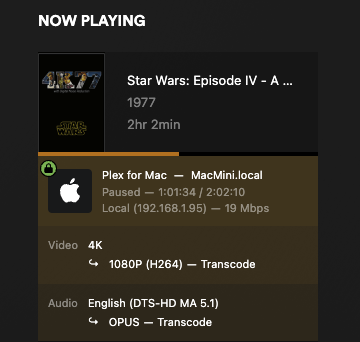
So, I’ve uploaded another log file.
[Plex Media Server Logs\_2025-01-28\_16-17-49.zip](https://forums.plex.tv/uploads/short-url/AoxhbB1IbLhUSHrooqrAnu6XkCU.zip) (3.9 MB)
---
### Author:  [@ChuckPa](https://forums.plex.tv/u/ChuckPa)
#### Post date: [January 29, 2025, 3:38am UTC](https://forums.plex.tv/t/plex-media-server-hardware-transcoding-not-working-ubuntu-24-04/903860/9 "2025-01-29T03:38:51Z")
My apologies.
The command is `sudo udevadm trigger`
There is no `--` in Ubuntu udev.
I’m really confused why your machine comes up with `video` when mine comes up with `render`
If you want to try changing it, you only need to edit the group name in the
`/lib/udev/rules.d/60-plex-hw-transcoding.rules` file to be `render` and run `sudo udevadm trigger` to make it effective.
You will need to restart PMS after doing so.
I’m even more troubled that the N150 isn’t working but the N150 might not have UHD graphics.
Compare this:
[https://www.intel.com/content/www/us/en/products/sku/241636/intel-processor-n150-6m-cache-up-to-3-60-ghz/specifications.html](https://www.intel.com/content/www/us/en/products/sku/241636/intel-processor-n150-6m-cache-up-to-3-60-ghz/specifications.html)

`GPU Name Intel® Graphics`

Compared to my N100 which is
[https://www.intel.com/content/www/us/en/products/sku/231803/intel-processor-n100-6m-cache-up-to-3-40-ghz/specifications.html](https://www.intel.com/content/www/us/en/products/sku/231803/intel-processor-n100-6m-cache-up-to-3-40-ghz/specifications.html)
`GPU Name‡ Intel® UHD Graphics`

What happens if you try 1080p H264 ?
---
### Author:  [@ExHongKonger](https://forums.plex.tv/u/ExHongKonger)
#### Post date: [January 29, 2025, 6:39am UTC](https://forums.plex.tv/t/plex-media-server-hardware-transcoding-not-working-ubuntu-24-04/903860/10 "2025-01-29T06:39:39Z")
> If you want to try changing it, you only need to edit the group name in the
> `/lib/udev/rules.d/60-plex-hw-transcoding.rules` file to be `render` and run `sudo udevadm trigger` to make it effective.
Yes, that’s what I did, and then restarted PMS.
> What happens if you try 1080p H264 ?
That option doesn’t explicitly show as a transcode option. Even though I have HEVC optimization enabled.
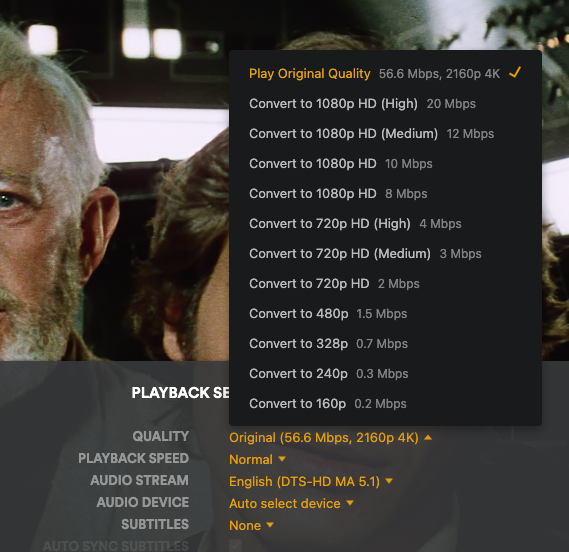
I have until Friday to return the MiniPC if it’s not capable. The only thing that keeps my trying to get it to work is that I read other people have been successful in doing so.
You do bring up a good point about the UHD graphics I don’t know if this is just a branding issue, or a bigger difference.
Looking at Intel’s website seems to show that the processors have almost identical capabilities:

Another odd thing that I noticed is that the n150 as advertised as Twin Lake, yet my PMS says that it’s detecting an Alder Lake processor. This may just be a matter of updating a definitions table, or perhaps the drivers in the kernel are screwy.
Unless you have any suggestions, I’m going to wipe the box clean and start again (if I get time).
---
### Author:  [@ChuckPa](https://forums.plex.tv/u/ChuckPa)
#### Post date: [January 29, 2025, 7:01am UTC](https://forums.plex.tv/t/plex-media-server-hardware-transcoding-not-working-ubuntu-24-04/903860/11 "2025-01-29T07:01:18Z")
I will speak to the Transcoder engineer about the DeviceID
TwinLake is a new GPU and probably not fully supported.
If you have the opportunity to swap it for a N100, I would recommend it.
While the few extra perf points are nice, you probably want to use it now instead of later 😉
My N100 works flawlessly. See below.
```auto
root@pve:~# grep 'model name' /proc/cpuinfo | uniq
model name : Intel(R) N100
root@pve:~#
```

---
### Author:  [@ExHongKonger](https://forums.plex.tv/u/ExHongKonger)
#### Post date: [January 29, 2025, 5:14pm UTC](https://forums.plex.tv/t/plex-media-server-hardware-transcoding-not-working-ubuntu-24-04/903860/12 "2025-01-29T17:14:14Z")
Acknowledged. I guess this is just a case of early adopter blues.
I will give it one more try. This time I’ll update the kernel before installing Plex and see how that works.
---
### Author:  [@ExHongKonger](https://forums.plex.tv/u/ExHongKonger)
#### Post date: [January 29, 2025, 11:37pm UTC](https://forums.plex.tv/t/plex-media-server-hardware-transcoding-not-working-ubuntu-24-04/903860/13 "2025-01-29T23:37:09Z")
I tried again. Clean install of 24.10.
HW transcoding still doesn’t work, but I did notice a few things:
Firstly, the `render` group was properly created by the Plex installer and `/dev/dri` & `/lib/udev/rules.d/60-plex-hw-transcoding.rules` settings were correct without me having to mess with them.
Secondly, `intel-gpu-top` is also identifying the CPU as Alder Lake. So it’s not just a Plex issue.

Thirdly, `hwe-support-status --verbose` now returns the following message:
> Only LTS releases have Hardware Enablement stacks
It looks like I’ll be ordering a n100.
---
### Author:  [@ChuckPa](https://forums.plex.tv/u/ChuckPa)
#### Post date: [January 30, 2025, 12:21am UTC](https://forums.plex.tv/t/plex-media-server-hardware-transcoding-not-working-ubuntu-24-04/903860/14 "2025-01-30T00:21:36Z")
24.10 is not a LTS release.
24.04.1 and 24.04.2 are LTS releases (The April releases)
The `.10` never is. (October release)
you can go to 24.04 and take it straight up to 24.04.1 LTS with HWE
care to quick try that before the swap? It’ll give you apples-apples comparison to mine
---
### Author:  [@ExHongKonger](https://forums.plex.tv/u/ExHongKonger)
#### Post date: [January 30, 2025, 6:59am UTC](https://forums.plex.tv/t/plex-media-server-hardware-transcoding-not-working-ubuntu-24-04/903860/15 "2025-01-30T06:59:02Z")
24.04.01 + upgraded kernel to 6.11 to get the gpu drivers.
Sadly, I’m getting the same results.
Although in this `release intel-gpu-top` now identifies the GPU as it’s CPU type & device ID number, rather than Alderlake\_n.

I have an n100 arriving sometime tomorrow.
---
### Author:  [@ChuckPa](https://forums.plex.tv/u/ChuckPa)
#### Post date: [January 30, 2025, 7:39am UTC](https://forums.plex.tv/t/plex-media-server-hardware-transcoding-not-working-ubuntu-24-04/903860/16 "2025-01-30T07:39:10Z")
Then that confirms you do need the 24.04.2 release plus the 6.12 kernel to support the CPU.
That’s unfortunate.
---
### Author:  [@ExHongKonger](https://forums.plex.tv/u/ExHongKonger)
#### Post date: [January 31, 2025, 10:17pm UTC](https://forums.plex.tv/t/plex-media-server-hardware-transcoding-not-working-ubuntu-24-04/903860/17 "2025-01-31T22:17:27Z")
Hi @ChuckPa ,
I’m getting the same issues on the n100 box. No (HW) during transcoding.
Ubuntu 24.04.01
PMS Version 1.41.4.9399
I did notice the following errors in the logs:

When I look up this error online I get lots of references for Docker installs, but my installation isn’t in Docker.
I followed your guide for the migration: [Linux Tips - #23 by ChuckPa](https://forums.plex.tv/t/linux-tips/276247/23)
This installation was originally on a Synology, is there anything I need to edit in the ‘preferences.xml’ file to get HW transcoding working?
---
### Author:  [@ExHongKonger](https://forums.plex.tv/u/ExHongKonger)
#### Post date: [January 31, 2025, 11:08pm UTC](https://forums.plex.tv/t/plex-media-server-hardware-transcoding-not-working-ubuntu-24-04/903860/18 "2025-01-31T23:08:39Z")
I found it! ‘Preferences.xml’ contained a `VaapiDriver="i965"` setting. I replaced it with `VaapiDriver="iHD"` and HW transcoding works now on the n100.
Perhaps there should be a note about this on the guide?
I’m going to try this on the n150 and report back.
---
### Author:  [@ExHongKonger](https://forums.plex.tv/u/ExHongKonger)
#### Post date: [February 1, 2025, 12:23am UTC](https://forums.plex.tv/t/plex-media-server-hardware-transcoding-not-working-ubuntu-24-04/903860/19 "2025-02-01T00:23:21Z")
@ChuckPa
I can confirm that the `Preferences.xml` edit above also fixes the problem for the n150.

The n150 GPU is activated:

Thanks for your help in troubleshooting. This should be an easy fix for other folks now.
---
### Author:  [@ChuckPa](https://forums.plex.tv/u/ChuckPa)
#### Post date: [February 1, 2025, 1:08am UTC](https://forums.plex.tv/t/plex-media-server-hardware-transcoding-not-working-ubuntu-24-04/903860/20 "2025-02-01T01:08:43Z")
Outstanding.
[Next page](https://forums.plex.tv/t/plex-media-server-hardware-transcoding-not-working-ubuntu-24-04/903860.md?page=2)