# Plex Media Server randomly has no remote access
**URL:** https://forums.plex.tv/t/plex-media-server-randomly-has-no-remote-access/451776
**Category:** General Discussions
**Tags:** server-windows
**Created:** [August 25, 2019, 8:03am UTC](https://forums.plex.tv/t/plex-media-server-randomly-has-no-remote-access/451776 "2019-08-25T08:03:55Z")
**Posts on this page:** 4
**Page:** 1
### Author:  [@lelei33](https://forums.plex.tv/u/lelei33)
#### Post date: [August 25, 2019, 8:03am UTC](https://forums.plex.tv/t/plex-media-server-randomly-has-no-remote-access/451776/1 "2019-08-25T08:03:55Z")
Hello,
I would have refreshed my [old topic](https://forums.plex.tv/t/plex-server-not-reachable-from-external-remote-access/383715), but I couldn’t - but still have the same issue. When travelling I can’t watch anything from my server at home. When I look at the local Web Gui (connect via VPN to check) there is often a red warning sign against “Remote Access”, when I click on Remote Access it turns green instantly and remote clients could watch movies or tv shows from Plex. That works as long as I watch. After a while, without watching, it falls back to the state of the red warning sign. Port is manually forwarded in my Router and so it is setup in the GUI of Plex - as you can see.
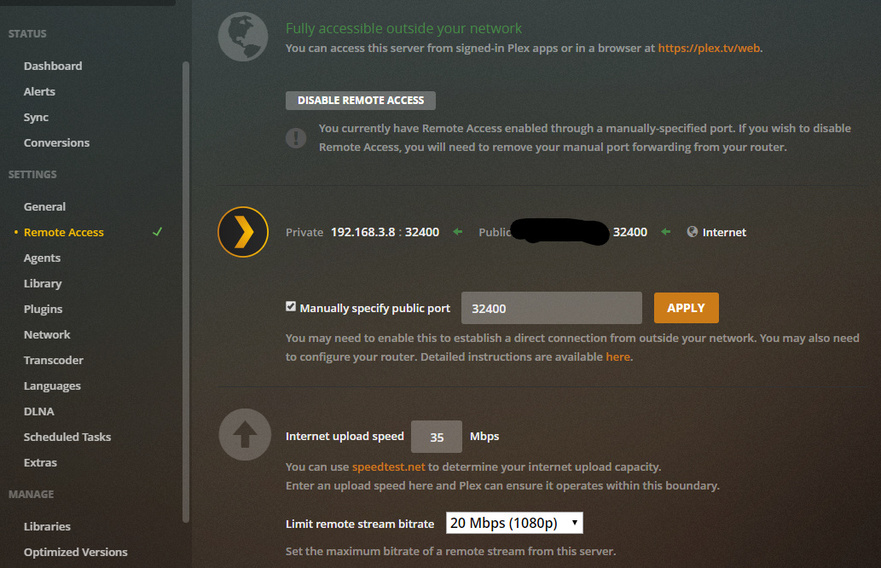
Which log file would it be? Would appreciate any technical help or settings to tweak to keep connection alive all the time.
cheers
---
### Author:  [@OttoKerner](https://forums.plex.tv/u/OttoKerner)
#### Post date: [August 26, 2019, 5:18am UTC](https://forums.plex.tv/t/plex-media-server-randomly-has-no-remote-access/451776/2 "2019-08-26T05:18:09Z")
I experienced this sometimes as well, until I disabled power-saving on the network adapter in the server.
---
### Author:  [@lelei33](https://forums.plex.tv/u/lelei33)
#### Post date: [August 26, 2019, 6:31am UTC](https://forums.plex.tv/t/plex-media-server-randomly-has-no-remote-access/451776/3 "2019-08-26T06:31:48Z")
I would have to check the settings once I am back home. But, I just noticed that I don’t even have to connect to VPN and use the local IP to manage, it is enough to go to **[app.plex.tv](http://app.plex.tv)** and go to my server - first to see the red warning sign, which turns instantly green, when I click on it. Then any player could play.
But if friends (shared library) would like to watch something, that does work - because they can’t access my servers settings. I really don’t think that this is somehow network settings related.
Which logfile could be used to troubleshot?
---
### Author:  [@system](https://forums.plex.tv/u/system)
#### Post date: [November 24, 2019, 6:38am UTC](https://forums.plex.tv/t/plex-media-server-randomly-has-no-remote-access/451776/4 "2019-11-24T06:38:17Z")
This topic was automatically closed 90 days after the last reply. New replies are no longer allowed.