@vladimircaniga_gmail_com
User-facing plug-ins were removed by the PMS team – true.
Subtitles still do exist in limited extent and I think Sub-Zero or OpenSubtitles are supported in there. It’s in the library settings - Advanced tab IIRC
@vladimircaniga_gmail_com
User-facing plug-ins were removed by the PMS team – true.
Subtitles still do exist in limited extent and I think Sub-Zero or OpenSubtitles are supported in there. It’s in the library settings - Advanced tab IIRC
Gross hacks work just fine for now; it’s easy enough to copy the relevant info to the old Plex share and let my existing backup job catch it. I very much look forward to seeing the Backup/Restore/Import goodies to come in the future!
Thank you for all the work getting this to launch smoothly with the release of DSM 7, and for the lightning quick response.
Hi @ChuckPa
Sorry to send you another message about a problem with plex and DSM 7.
I have done the upgrade to DSM 7 without thinking about Plex so i don’t read your recommandation and so i don’t uninstall PMS for DSM 6.
I tried to repare it after the DSM 7 upgrade, but like the other users it was a failure.
So i tried to install manually the good package of PMS for DSM 7 (PlexMediaServer-1.23.4.4712-1f0ed4aea-x86_64_DSM7.spk), the installation was good.
I have access to my plex but, plex doesn’t see the folders in my VIDEO share folder :

When i try to lauch a movie i have this error message :

(in english > check that the file exist and that the HDD is accessible).
I put the permission on the user “PlexMediaServer” :


But its the same error, Plex doesn’t see the inside of the VIDEOS folder.
Before trying your last recommandations, i would like to know, if i’m uninstalling and erasing the PMS package for DMS 7 (that i have installed now), my library will be save or erase too ?
Am i going to ask Plex to re scan all my files for building ma library again ?
Or all the library will be saved and active automatically in the new installation ?
Thank you very much for your time :-).
Jean-Jacques
Isn’t that the default Synology shared folder ?
If it is the default shared folder then you unfortunately have no options other than to make a new one.
Synology claims exclusive ownership of the shared folder for their applications and your username and their applications (not a service application name) .
Would it be a conflict to:
Create a shared folder named “Media” with all the permissions set.
Add the shared folder to Plex while it is empty.
Settings - Server - Library - Turn off
a. Automatic scanning
b. Periodic scan
c. Empty trash (most important)
Now move the entire contents from VIDEOS to Media
a. DSM will think about it for a bit
b. But then move it at the last second.
Go into Plex
For each library section
a. EDIT the library section
b. ADD the new location (/volumeX/Media)
c. DO NOT delete the old one
d. SAVE the change.
e. Observe as PMS scans the media in that section.
f. You should see the “(2)” appear as PMS detects duplicate entries … this is expected.
g. When scanning is complete.
h. EDIT the librray definition again.
i. REMOVE the /volume1/VIDEOS reference
j. SAVE
k. Let PMS scan it again.
After all library sections have been edited to the new location,
Scan files
Refresh All Metadata
Settings - Server - Library – Enable the options you previously had.
Empty Trash
Clean Bundles
Optimize Database.
I have dim 7 downloaded, not installed yet, and I have the plex dim 7 version also downloaded.
what do I need to do?
do I installed dim 7, then uninstall the old plex version, then install the dsm 7 version?
YES…
which instructions?
Did all steps, I’m shocked, but Media Server starts and doesn’t suggest me to set up a server and choose shared folders with media contents. Its just starts with online content. Is it possible to fully reset it maybe in command line because “Erase option” doesn’t help. Thanks!
TAKE YOUR TIME. It is very detailed (sorry)
Did you start over ?
@ChuckPa
I dont understand this 2 points below :
?
So if i understand i will lost all my plex library and plex will rescan my files and folder to recreate an another one?
But the movies that marked like seen, i will have to remark manually again?
Thks
Jean-Jacques
Please have Plex “Scan all files”
Next, Download the Logs
Attach the ZIP file please.
We are losing things in translaton. (I am sorry my French is insufficient)
Yes, I tried to start over.  I stopped Plex app, uninstalled it with full erase option, renamed old plex share directory, switched off old user “plex”, installed PlexMediaServer-1.23.4.4712-1f0ed4aea-x86_64_DSM7.spk and now it suggest me to download Media Server.
And I have no server options in settings…
@ChuckPa
Sorry i dont understand what you are asking me to do ?
Hey everyone, great guide @ChuckPa!
I upgraded today, and did the migration thing but without uninstalling the old DSM 6 package. Well, it then failed because of the lack of permissions, and somehow the old version got uninstalled. I was left with neither. Then gave the permission to the Plex share to the new internal user, and installed the DSM 7 compatible package again with the claim option. And it’s working fine so far, everything migrated well.
PS: One side question I have, if I access my PMS via my domain address https://my.domain.com it uses the certificate I have for this domain, but If I access it by internal IP https://192.168.1.X, PMS uses some sort of internal certificate. Is this normal behaviour ?
Let me know if the wizard does not start.
PMS always has its own cert which it uses to talk to Plex.tv
PMS has plex.direct for all LAN https operations.
This is an overlay domain.
For you to use your cert, you must add it to PMS (Settings - Server - Network) .
Be certain to include the CA with the rest of the credentials.
I do not yet know how external drives behave… too many 

@ChuckPa Can you please clarify user permissions, given the new PlexMediaServer superuser?
In the past, it was possible to limit the ‘plex’ user to read-only access for specific media folders, read-write only to folders like DVR, and ensure that ‘plex’ had not other folder access.
Is this still possible?
DSM 7 users
System Internal User (not even a full user) has no privilege beyond what is granted in Control Panel → Shared Folder.
As a Service Class user, it cannot be promoted to Administrator
“PlexMediaServer” has privileges lower than most “Guest” accounts.
@ChuckPa - I know you’re a busy guy here, but wondering if you can comment on restoring the connection to my server after upgrading to DSM 7.0 and following all of the DSM 7.0/Plex steps you’ve provided.
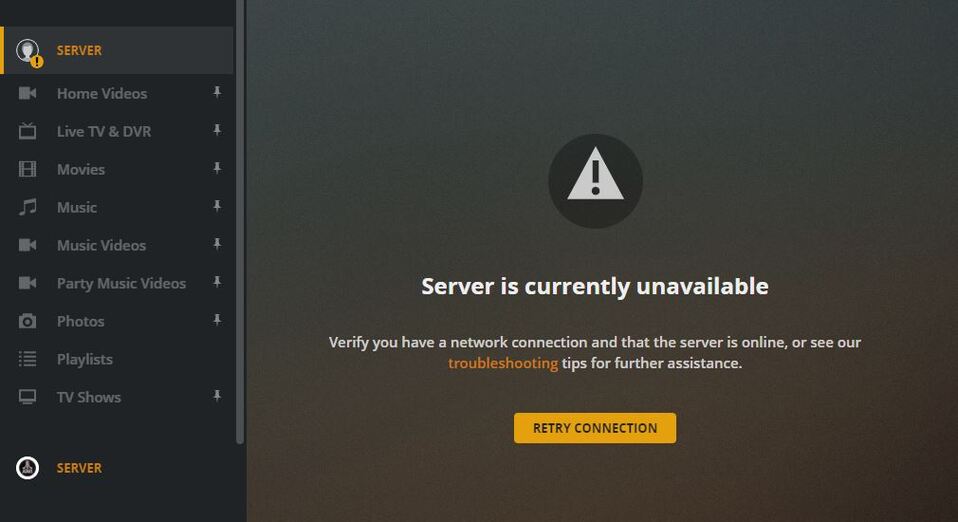
After reinstalling PMS on my DS1817+ running DSM 7.0-41882 and installing PMS 1.23.2.4600-7000, I can’t seem to get the migration to happen. All I get is the following error connecting to my server (top left) with all existing libraries grayed out. I see a NEW entry for my server (simply called ‘server’) in the bottom left. And while I can re-add my libraries, I’d like to avoid losing years of work customizing the movie poster and backgrounds for all 2000+ of my movies. I’ve created all of the necessary permissions for the new PlexMediaServer ‘System Internal User’ as indicated, but can’t seem to kick off migration after PMS reinstallation.
Do you know if there’s anything I can do to reestablish my existing server, libraries and customized settings instead of rebuilding them all from scratch? It doesn’t seem like I can successfully bootstrap the migration process - even after uninstalling and preserving settings as your online posts indicate…