# Plex not using All available CPU
**URL:** https://forums.plex.tv/t/plex-not-using-all-available-cpu/760041
**Category:** Plex Media Server
**Tags:** server-linux
**Created:** [November 25, 2021, 2:41am UTC](https://forums.plex.tv/t/plex-not-using-all-available-cpu/760041 "2021-11-25T02:41:39Z")
**Posts on this page:** 12
**Page:** 1
### Author:  [@fanta06](https://forums.plex.tv/u/fanta06)
#### Post date: [November 25, 2021, 2:41am UTC](https://forums.plex.tv/t/plex-not-using-all-available-cpu/760041/1 "2021-11-25T02:41:39Z")
Server Version#: Version 1.25.0.5246
Player Version#:IOS 7.25 and Web Version 4.66.1
OS: Rocky Linux Also Tested with CentOS Stream
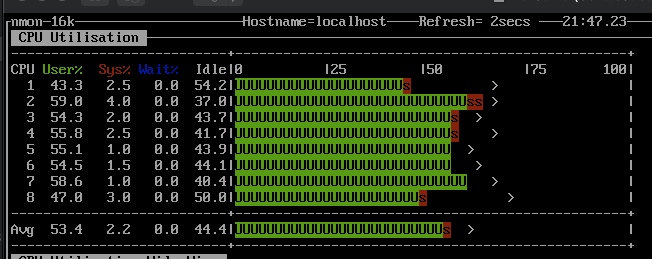
I have a plex virtual machine and I have tried with 4 CPUs and 6 CPUs and 8 CPUs assigned. However when I play a movie with a high bit rate and it attempts to transcode the video for the player it does not use all the CPU. I will try to upload a screen shot using nmon on server during transcode. The play back stutters and hangs. I would expect that the cpu would be 100% if it didn’t have enough power.
I have also set it to 8 CPU and the total use of the CPUs sits about 50-55% of use.
Why is plex not using all the CPU % available? is it worth to continue to try different linux distros?
Has anyone else seen this behavior?

---
### Author:  [@ChuckPa](https://forums.plex.tv/u/ChuckPa)
#### Post date: [November 25, 2021, 2:59am UTC](https://forums.plex.tv/t/plex-not-using-all-available-cpu/760041/2 "2021-11-25T02:59:10Z")
You’ll never use every single bit of the CPU.
Transcoding is multi-threaded.
1. Input demultiplexer thread
2. Video decode threads
3. Audio decode threads
4. Subtitle burning thread (if subtitles are burning-n)
5. Subtitle conversion thread (if subtitle format is being converted
6. Audio encoding threads
7. Video encoding threads
8. Output Multiplexing thread
All of which must stay in time-sync with the resultant stream’s timing requirements.
The OS CPU scheduler is going to bounce the threads around to the next available core.
In the end, you’ll never have “100% saturation” due to the inter-stream data dependencies before the packets can be sent
You also have wait time inherent to memory and disk I/O.
---
### Author:  [@ChuckPa](https://forums.plex.tv/u/ChuckPa)
#### Post date: [November 25, 2021, 3:03am UTC](https://forums.plex.tv/t/plex-not-using-all-available-cpu/760041/3 "2021-11-25T03:03:05Z")
> [@fanta06](#):
>
> The play back stutters and hangs. I would expect that the cpu would be 100% if it didn’t have enough power.
Can you provide the DEBUG logs which capture the stuttering so we can find out where the problem is?
---
### Author:  [@fanta06](https://forums.plex.tv/u/fanta06)
#### Post date: [November 25, 2021, 3:03am UTC](https://forums.plex.tv/t/plex-not-using-all-available-cpu/760041/5 "2021-11-25T03:03:58Z")
Sure let me work on that.
---
### Author:  [@fanta06](https://forums.plex.tv/u/fanta06)
#### Post date: [November 25, 2021, 3:05am UTC](https://forums.plex.tv/t/plex-not-using-all-available-cpu/760041/6 "2021-11-25T03:05:06Z")
Let me move additional info here in the thread sorry for the confusion.
Additional Info It seems when I set the player to resolution under 8mbps then it plays fine but 8mps or up does not play smoothly. The CPU usage is the same no matter the player resolution selection. So it seems that the transcoding is working but it doesn’t seem to be able to transmit the data rate out. If you have a way you want me to test that connection I can but I"m pretty sure it’s 1Gbps connection LAN. Actually I’m playing the web on the OS host so it’s a software switch and I’m pretty sure it should have fast connection.
Also I get this issue on my IOS. But odd thing is that only on high bitrate 4k Lower than 60000 kbps it can transcode and play fine. And I assume the outgoing bit rate is the same on transcoded no matter the starting bit rate.
---
### Author:  [@ChuckPa](https://forums.plex.tv/u/ChuckPa)
#### Post date: [November 25, 2021, 3:09am UTC](https://forums.plex.tv/t/plex-not-using-all-available-cpu/760041/7 "2021-11-25T03:09:36Z")
> [@fanta06](#):
>
> . Actually I’m playing the web on the OS host so it’s a software switch and I’m pretty sure it should have fast connection.
Browsers are very limited. I have an i7-8809G CPU and, in Chrome, it can’t manage more than 30 Mbps reliably without jittering all over the place.
You will see the transcoder build up an output buffer (about 2 minutes worth) before going into “sloth” mode (which is in the logs that way).
Debug logs ZIP file, capturing the playback (start – play 30 seconds - stop – wait 30 seconds - Download the ZIP file – Attach ) … and I’ll look at what’s going on.
---
### Author:  [@fanta06](https://forums.plex.tv/u/fanta06)
#### Post date: [November 25, 2021, 3:17am UTC](https://forums.plex.tv/t/plex-not-using-all-available-cpu/760041/8 "2021-11-25T03:17:13Z")
Thanks for your help. I’ll upload another screen shot in case it’s useful and logs.
For mine it won’t do over 8Mbps But I also see this in the IOS app as well. I can get you more screen shots of info if helpful.
[Plex Media Server Logs\_2021-11-24\_22-13-02.zip](https://forums.plex.tv/uploads/short-url/2alVqEMMG04nAh6LP4HunCEzwEI.zip) (507.0 KB)

---
### Author:  [@ChuckPa](https://forums.plex.tv/u/ChuckPa)
#### Post date: [November 25, 2021, 3:34am UTC](https://forums.plex.tv/t/plex-not-using-all-available-cpu/760041/9 "2021-11-25T03:34:28Z")
Thanks for the logs.
I immediately see the problem.
SkyLake cannot process HEVC in hardware. You need its bigger brother (i7-7700) to decode HEVC.
You can’t get more than those 8 Mbps out of it because you’re trying to transcode HEVC. The raw CPU clock can’t keep up with the demand due to memory bus latency. HEVC must have hardware support to be viable.
In your favor – most of the distros ship with drivers for an i7-7700 (and higher).
Further in your favor - IIRC – SkyLake and Kabylake (i7-7xxx) are pin-for-pin compatible in all regards.
I ran into this same issue with QNAP (skylake vs kabylake) and swapping for the kabylake solved it.
I recommend doing the bit of research to confirm pin-for-pin compatibility and then consider your options for upgrading.
---
### Author:  [@fanta06](https://forums.plex.tv/u/fanta06)
#### Post date: [November 26, 2021, 1:55am UTC](https://forums.plex.tv/t/plex-not-using-all-available-cpu/760041/10 "2021-11-26T01:55:48Z")
Thank you for the info. So if I understand it correctly the memory bus on that CPU can’t feed the CPU fast enough. So the CPU can’t get to 100% usage because it’s not getting the data fast enough do do any processing. I guess it’s the type of data the HEVC is that doesn’t allow the pipline to run at full 100%.
If I’m not saying that correct you can correct me. I just like to understand in somewhat normal speak terms of the issue.
I wish I could just throw more cores at the problem.
It’s a bummer when the issue is hardware. I did check and the 7700 does look like it would be compatible with my motherboard. That seems an option.
Possibly moving the plex server out of the VM on to the host OS, if I have the right graphics card could plex use that to help? I think I have seen articles about possible graphics card. I’ll have to check if I have one that could help with that transcode. I’ve always like the idea of having the plex server isolated on a VM, but probably not for any really good reasons.
Another option may be to use optimized version creation. I’m going to create another post related to optimized versions and how players interact, it might save me some testing.
---
### Author:  [@TeknoJunky](https://forums.plex.tv/u/TeknoJunky)
#### Post date: [November 26, 2021, 3:40am UTC](https://forums.plex.tv/t/plex-not-using-all-available-cpu/760041/11 "2021-11-26T03:40:21Z")
> [@\[INFO\] Plex, 4k, transcoding, and you - aka the rules of 4k](https://forums.plex.tv/t/info-plex-4k-transcoding-and-you-aka-the-rules-of-4k/378203):
>
> NOTE: for 2022 – Plex has come a long way since this FAQ was originally written, HW transcoding has become more available and more stable, and tone mapping was recently added to address the hdr/sdr color conversion issues. The first 4 ‘rules’ generally are no longer as important as they once were, but may still be a good thing to bear in mind. Dolby Vision, is an entirely other mess. THIS thread/FAQ is NOT about DV. DV work is still in progress, and there are no perfect TV’s or external devic…
---
### Author:  [@ChuckPa](https://forums.plex.tv/u/ChuckPa)
#### Post date: [November 26, 2021, 7:18am UTC](https://forums.plex.tv/t/plex-not-using-all-available-cpu/760041/12 "2021-11-26T07:18:20Z")
@fanta06
You don’t ‘throw more cores at the problem’.
This is a “work smarter” , not “work harder” problem.
HEVC was designed this way. They wanted to require hardware.
Lucky for us, the hardware exists which does it effortlessly.
My server i7-8809 (refined i7-7700 with AMD GPU as well)
- HW decode of the HEVC
- HW tone mapping HDR → SDR
- HW encoding to H.264 at the required bitrate
- about 10% CPU with audio conversion and PMS multiplexing the stream for output.
The biggest load, which is a ‘more cores’ problem is audio and subtitle burning (which I avoid whenever I can).
The i7-7xxx class can easily do 5 full HEVC → H.264 trancodes simultaneously (based on 80 Mbps inputs). You don’t run into memory issues because it’s done at such a low level we’re not starving the CPU to feed it instructions to execute. It has access to the full memory bus speed as block transfers in the GB/sec.
---
### Author:  [@system](https://forums.plex.tv/u/system)
#### Post date: [February 24, 2022, 7:18am UTC](https://forums.plex.tv/t/plex-not-using-all-available-cpu/760041/13 "2022-02-24T07:18:54Z")
This topic was automatically closed 90 days after the last reply. New replies are no longer allowed.