# Plex not using Quicksync
**URL:** https://forums.plex.tv/t/plex-not-using-quicksync/750441
**Category:** Plex Media Server
**Tags:** server-linux
**Created:** [October 13, 2021, 1:59pm UTC](https://forums.plex.tv/t/plex-not-using-quicksync/750441 "2021-10-13T13:59:43Z")
**Posts on this page:** 5
**Page:** 1
### Author:  [@Conversation](https://forums.plex.tv/u/Conversation)
#### Post date: [October 13, 2021, 1:59pm UTC](https://forums.plex.tv/t/plex-not-using-quicksync/750441/1 "2021-10-13T13:59:43Z")
Server Version#: 1.24.4.5081
Player Version#: Doesnt use hw transcoding on any player.
Hello guys, I have the problem that plex is not using intel quicksync on my debian 11 stable server. Yesterday I made sure and read many post containing fixes for this. I still have the problem. I choosed one my Media’s as example for not transcoding, but it happens on all types when it needs to transcode.
[Plex Media Server Logs\_2021-10-13\_13-31-42.zip](https://forums.plex.tv/uploads/short-url/rkyPbHIL51VczhgXbhv0DRnqM9j.zip) (4.0 MB)
**Hardware:**
CPU: Intel Core i5-2520M (Sandy bridge) (quicksync supported)
[https://ark.intel.com/content/www/us/en/ark/products/52229/intel-core-i5-2520m-processor-3m-cache-up-to-3-20-ghz.html](https://ark.intel.com/content/www/us/en/ark/products/52229/intel-core-i5-2520m-processor-3m-cache-up-to-3-20-ghz.html)

(I also have Nvidia NVS 4200 gpu, but dont bother with it, im not gonna use it. I just want to use quicksync.)
**Software:**
Debian 11 stable with kernel 5.10.0-9-amd64
Plex Server Version: 1.24.4.5081 (Yes I have plex pass)
**Media File Type:**
I created a short file sample
[https://www.mediafire.com/file/5rw6q4svdounmop/samplefile.zip/file](https://www.mediafire.com/file/5rw6q4svdounmop/samplefile.zip/file)
#### Media

(Subtitles off)
- Duration 1:08:05
- Bitrate 20253 kbps
- Width 3840
- Height 2160
- Aspect Ratio 1.78
- Video Resolution 4K
- Container MKV
- Video Frame Rate 24p
- Audio Profile lc
- Video Profile main 10
#### Part
- Duration 1:08:05
- File Westworld S1E1.mkv
- Size 9.52 GB
- Audio Profile lc
- Container MKV
- Video Profile main 10
- Codec HEVC
- Bitrate 15673 kbps
- Bit Depth 10
- Chroma Subsampling 4:2:0
- Coded Height 2160
- Coded Width 3840
- Color Primaries bt2020
- Color Range tv
- Color Space bt2020nc
- Color Trc smpte2084
- Frame Rate 23.976 fps
- Height 2160
- Level 5.1
- Profile main 10
- Ref Frames 1
- Width 3840
- Display Title 4K (HEVC Main 10 HDR)
- Extended Display Title 4K (HEVC Main 10 HDR)
- Codec TRUEHD
- Channels 8
- Bitrate 3671 kbps
- Language English
- Language Tag en
- Audio Channel Layout 7.1
- Bit Depth 24
- Sampling Rate 48000 Hz
- Display Title English (TRUEHD 7.1)
- Extended Display Title English (TRUEHD 7.1)
- Codec AC3
- Channels 6
- Bitrate 448 kbps
- Language English
- Language Tag en
- Audio Channel Layout 5.1(side)
- Sampling Rate 48000 Hz
- Display Title English (AC3 5.1)
- Extended Display Title English (AC3 5.1)
**Troubleshooting:**
Hardware transcoding is on
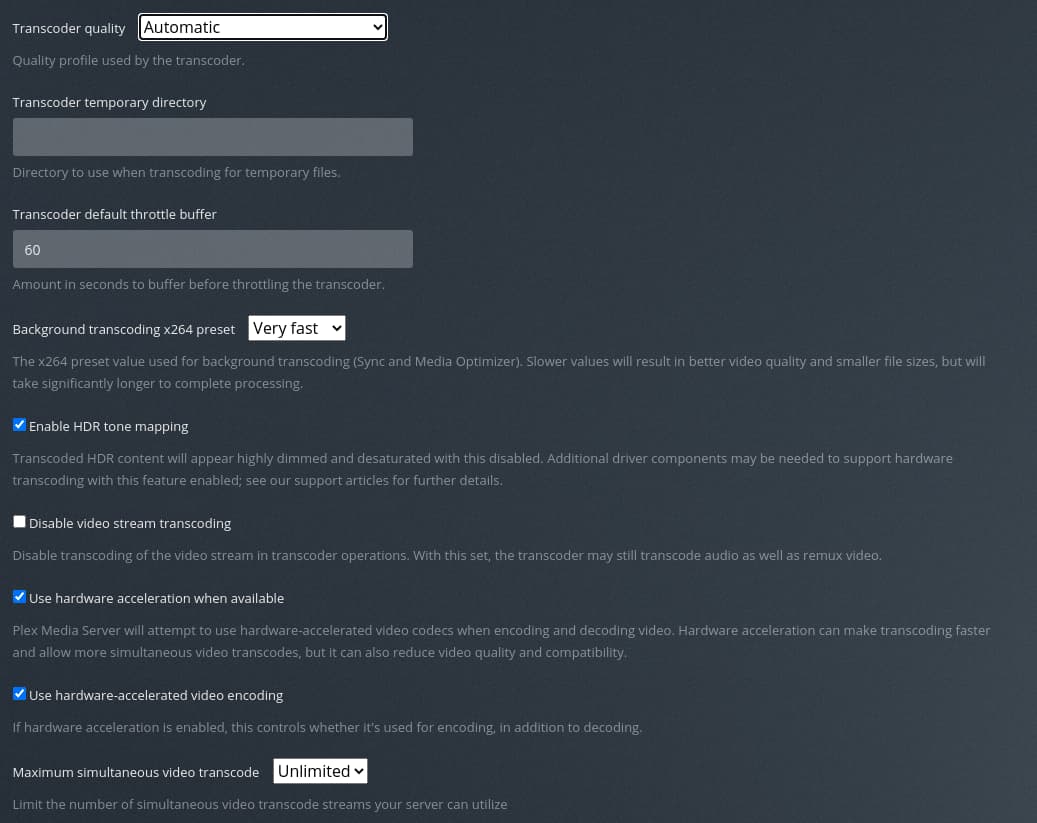
**vainfo**

**lsmod | grep i915**

**ls -la /dev/dri**

**grep render /etc/group**

**grep video /etc/group**

**apt install ocl-icd-libopencl1 beignet-opencl-icd**

I dont understand what’s the problem? Is it because my cpu doesnt support it? Or do I have to install something/configure? I dont use an hdmi dummy plug.
Thank you all very much!
---
### Author:  [@ChuckPa](https://forums.plex.tv/u/ChuckPa)
#### Post date: [October 13, 2021, 2:47pm UTC](https://forums.plex.tv/t/plex-not-using-quicksync/750441/2 "2021-10-13T14:47:11Z")
The SandyBridge class machines do not support HEVC.
You minimally need a SkyLake class machine to decode HEVC SDR or a KabyLake class machine to decode HEVC SDR
```auto
Oct 13, 2021 12:48:30.325 [0x7fb7d146cb38] DEBUG - [Transcode] MDE: Selected protocol dash; container: mp4
Oct 13, 2021 12:48:30.325 [0x7fb7d146cb38] DEBUG - [Transcode] MDE: analyzing media item 2693
Oct 13, 2021 12:48:30.326 [0x7fb7d146cb38] DEBUG - [Transcode] MDE: E1 - Das Original: Direct Play is disabled
Oct 13, 2021 12:48:30.326 [0x7fb7d146cb38] DEBUG - [Transcode] MDE: E1 - Das Original: media must be transcoded in order to use the dash protocol
Oct 13, 2021 12:48:30.326 [0x7fb7d146cb38] DEBUG - [Transcode] MDE: E1 - Das Original: no direct play video profile exists for http/mkv/hevc
Oct 13, 2021 12:48:30.326 [0x7fb7d146cb38] DEBUG - [Transcode] MDE: E1 - Das Original: no direct play video profile exists for http/mkv/hevc/truehd
Oct 13, 2021 12:48:30.326 [0x7fb7d146cb38] DEBUG - [Transcode] MDE: E1 - Das Original: no direct play video profile exists for http/mkv/hevc/ac3
```
---
### Author:  [@Conversation](https://forums.plex.tv/u/Conversation)
#### Post date: [October 13, 2021, 4:53pm UTC](https://forums.plex.tv/t/plex-not-using-quicksync/750441/3 "2021-10-13T16:53:29Z")
Thank you Chuck.
---
### Author:  [@ChuckPa](https://forums.plex.tv/u/ChuckPa)
#### Post date: [October 13, 2021, 5:35pm UTC](https://forums.plex.tv/t/plex-not-using-quicksync/750441/4 "2021-10-13T17:35:21Z")
Errata in my previous:
SkyLake = HEVC SDR
KabyLake = HEVC **HDR**
---
### Author:  [@system](https://forums.plex.tv/u/system)
#### Post date: [January 11, 2022, 5:35pm UTC](https://forums.plex.tv/t/plex-not-using-quicksync/750441/5 "2022-01-11T17:35:44Z")
This topic was automatically closed 90 days after the last reply. New replies are no longer allowed.