# Plex not working
**URL:** https://forums.plex.tv/t/plex-not-working/868825
**Category:** General Discussions
**Created:** [February 10, 2024, 10:01am UTC](https://forums.plex.tv/t/plex-not-working/868825 "2024-02-10T10:01:57Z")
**Posts on this page:** 11
**Page:** 1
### Author:  [@kimchideluxe](https://forums.plex.tv/u/kimchideluxe)
#### Post date: [February 10, 2024, 10:01am UTC](https://forums.plex.tv/t/plex-not-working/868825/1 "2024-02-10T10:01:57Z")
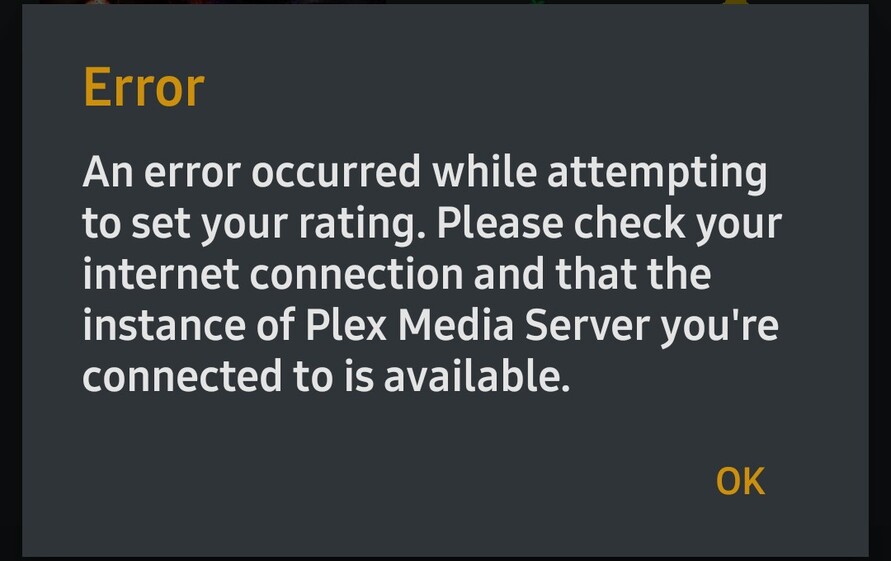
I am getting an error message that is saying, “An error occurred while attempting to set your rating. Please check your Internet connection and that the instance of Plex Media Server you’re connected to is available.”
I had a server but I deleted it because I only really use Plex for my watchlist and sometimes to watch movies already on there. So, how can I fix this issue and get it working again? It doesn’t allow me to do ratings, add to watchlist, play movies/series, watch live TV, or anything else. I’m a lifetime subscriber so is there an update that I should need to do?
Thank you.
---
### Author:  [@Philly30](https://forums.plex.tv/u/Philly30)
#### Post date: [February 10, 2024, 10:59am UTC](https://forums.plex.tv/t/plex-not-working/868825/2 "2024-02-10T10:59:11Z")
I think plex is having a problem right now, I can not access anything in my watchlist or add anything to the watchlist, I tried the live tv channels and most I tried do not work ,I just get a spinning circle
---
### Author:  [@kimchideluxe](https://forums.plex.tv/u/kimchideluxe)
#### Post date: [February 10, 2024, 11:18am UTC](https://forums.plex.tv/t/plex-not-working/868825/3 "2024-02-10T11:18:44Z")
Exact same thing with me. Just glad I’m not the only one. I don’t know much about servers or anything so I was afraid I’ll lose stuff on my account 😅
---
### Author:  [@anon5074910](https://forums.plex.tv/u/anon5074910)
#### Post date: [February 10, 2024, 11:25am UTC](https://forums.plex.tv/t/plex-not-working/868825/4 "2024-02-10T11:25:42Z")
Plex certainly is having an issue ATM. Accessing [https://app.plex.tv/desktop/#!/settings/watchlist](https://app.plex.tv/desktop/#!/settings/watchlist) returns an error.
Also, at the time of writing on my android tv app via nvidia shield I could not open or play an media until I disconnected the shield from the internet giving it only local network access.
Problem started around 11am GMT, Sat 10th Feb.
---
### Author:  [@oliviab297](https://forums.plex.tv/u/oliviab297)
#### Post date: [February 10, 2024, 11:31am UTC](https://forums.plex.tv/t/plex-not-working/868825/5 "2024-02-10T11:31:30Z")
Today is Feb. 10th 2024. PLEX is NOT working thru my Roku device. I have uninstalled, installed twice. Still NOT connecting. Restarted restarted Roku device and restarted my Wi-Fi connection. After these basic suggestions, PLEX is still NOT working.
---
### Author:  [@Mitzsch](https://forums.plex.tv/u/Mitzsch)
#### Post date: [February 10, 2024, 11:54am UTC](https://forums.plex.tv/t/plex-not-working/868825/6 "2024-02-10T11:54:29Z")
It seems the issue Plex is having right now is affecting the user interface quite a bit… Currently, everything is slow as a\*\* when navigating through the interface…
---
### Author:  [@Level99OCR](https://forums.plex.tv/u/Level99OCR)
#### Post date: [February 10, 2024, 11:58am UTC](https://forums.plex.tv/t/plex-not-working/868825/7 "2024-02-10T11:58:12Z")
Also chiming in to say there is noticeable performance degradation on native apps _only_, as far as I can tell. If you connect directly to your server via web interface, everything is great. Going through plex.tv, or any of the native smart TV or mobile device apps, either produces errors or extreme slowness in browsing both seasons and episodes. I’ve rebooted every device in the chain and the only common link is it’s not something I’m hosting.
Really hoping someone from Plex will chime in about their server status.
---
### Author:  [@pl67954](https://forums.plex.tv/u/pl67954)
#### Post date: [February 10, 2024, 12:09pm UTC](https://forums.plex.tv/t/plex-not-working/868825/8 "2024-02-10T12:09:40Z")
Same here. Plex is pretty much unusable on the server or any apps connected to it.
---
### Author:  [@urbnsr](https://forums.plex.tv/u/urbnsr)
#### Post date: [February 10, 2024, 1:02pm UTC](https://forums.plex.tv/t/plex-not-working/868825/9 "2024-02-10T13:02:42Z")
Plex Live TV Streaming seems to be working now.
---
### Author:  [@disenterplex](https://forums.plex.tv/u/disenterplex)
#### Post date: [February 10, 2024, 1:45pm UTC](https://forums.plex.tv/t/plex-not-working/868825/10 "2024-02-10T13:45:48Z")
I’ve had some weird issues too… We watched a movie with dinner, and I had watched tv shows earlier, but when the movie finished, and I went to my ‘continue watching’ to play one of my tv shows, it no longer shows the individual episodes of the season im watching down the bottom with the ticks on the ones i’ve watched. Instead there is only a pull down, way over the right, with the list of episodes in there… it looks horrendous, and I can’t get it back to normal. I tried rolling the server version back and everything. Now it seems somehow the shield is displaying it normally again after messing with it for a couple hours on my server, but when using my pc’s browser, it’s still stuck that way. Yet if i browse to the tv show through the library, the seasons, and episodes are all displayed as normal. It’s only the ‘continue watching’ that has gone to hell… I really wish Plex would stop messing with it. It’s a great program, I’m a lifetime subscriber since the begining … but damn its putting me off. Like its fine to have different interfaces etc, but give us the option to set it how we want? Give it multiple skins?? again, letting people display it how they like.
---
### Author:  [@system](https://forums.plex.tv/u/system)
#### Post date: [May 10, 2024, 1:46pm UTC](https://forums.plex.tv/t/plex-not-working/868825/11 "2024-05-10T13:46:06Z")
This topic was automatically closed 90 days after the last reply. New replies are no longer allowed.