# Plex Player for Windows 11 - No Longer Opens
**URL:** https://forums.plex.tv/t/plex-player-for-windows-11-no-longer-opens/778630
**Category:** Plex Players
**Tags:** player-windows
**Created:** [February 27, 2022, 9:14pm UTC](https://forums.plex.tv/t/plex-player-for-windows-11-no-longer-opens/778630 "2022-02-27T21:14:15Z")
**Posts on this page:** 8
**Page:** 1
### Author:  [@HairNutz](https://forums.plex.tv/u/HairNutz)
#### Post date: [February 27, 2022, 9:14pm UTC](https://forums.plex.tv/t/plex-player-for-windows-11-no-longer-opens/778630/1 "2022-02-27T21:14:16Z")
This started happening 2/26 as far as I can tell. It was working just fine. Ive had it on the Dev version of Windows 11 since it was released. I did a fresh install of Windows 11 Pro Retail the other day and Plex was working. I do show 3 updates from the 25th which Ill uninstall and see if that helps.
The Plex app wont open at all. It doesnt show a splash screen. The .exe runs in Task Manager for 2 seconds then its killed. My server is fine as other devices / windows computers are able to access it. Im just using the Web Browser on this PC for now until I get it figured out. I have uninstalled / reinstalled a few times using the newest .exe from [Plex.com](http://Plex.com). Ive also removed the Plex directories and reg keys.
Faulting application name: Plex.exe, version: 0.0.0.0, time stamp: 0x6213fb68
Faulting module name: KERNELBASE.dll, version: 10.0.22000.527, time stamp: 0x71a5cb5d
Exception code: 0xc0dedead
Fault offset: 0x000000000004478c
Faulting process id: 0x3e24
Faulting application start time: 0x01d82c1d4f0a11d8
Faulting application path: C:\Program Files\Plex\Plex\Plex.exe
Faulting module path: C:\Windows\System32\KERNELBASE.dll
Report Id: d0877a4e-703f-4f7e-af82-dab6519b9200
Faulting package full name:
Faulting package-relative application ID:
Server Version#: Unraid / BinHex Plex Pass - 4.69.1
Player Version#: Plex-1.41.0.2876-e960c9ca-x86\_64
---
### Author:  [@TheTrunkMonkey](https://forums.plex.tv/u/TheTrunkMonkey)
#### Post date: [February 28, 2022, 4:02am UTC](https://forums.plex.tv/t/plex-player-for-windows-11-no-longer-opens/778630/2 "2022-02-28T04:02:43Z")
If you mouse over the taskbar icon do you see a blank thumbnail with a settings cog? If so then I’ve been dealing with this for many week now. Clearing out the Plex directory in AppData always makes it work again, but annoying. I am on Win10 home.
---
### Author:  [@warriorcookie](https://forums.plex.tv/u/warriorcookie)
#### Post date: [February 28, 2022, 5:37pm UTC](https://forums.plex.tv/t/plex-player-for-windows-11-no-longer-opens/778630/3 "2022-02-28T17:37:35Z")
Same issue, noticed this morning. Windows 11 home. App doesn’t open. Thumbnail on taskbar shows blank with settings cog.
Deleting local appdata in user folder resolved the issue.
---
### Author:  [@HairNutz](https://forums.plex.tv/u/HairNutz)
#### Post date: [February 28, 2022, 5:52pm UTC](https://forums.plex.tv/t/plex-player-for-windows-11-no-longer-opens/778630/4 "2022-02-28T17:52:27Z")
No, mine doesnt get far enough to load the taskbar icon. The .exe ends 2 seconds after its launched (taskmgr).
But. Deleting my Appdata\Plex folder allows it to open now so thank you for that! Im not sure what went bad in there especially being a newly imaged machine but for now its working again.
Prior to deleting that folder I did uninstall every update I could, no change.
---
### Author:  [@compact101](https://forums.plex.tv/u/compact101)
#### Post date: [March 1, 2022, 8:34pm UTC](https://forums.plex.tv/t/plex-player-for-windows-11-no-longer-opens/778630/5 "2022-03-01T20:34:00Z")
Cheers had the same issue, this fixed out
---
### Author:  [@TheTrunkMonkey](https://forums.plex.tv/u/TheTrunkMonkey)
#### Post date: [March 3, 2022, 12:21am UTC](https://forums.plex.tv/t/plex-player-for-windows-11-no-longer-opens/778630/6 "2022-03-03T00:21:48Z")
I clicked on the windows app and was disappointed when it didn’t open. Or at least i THOUGHT it didn’t open. I just noticed the very bottom of the app peeking through the top of my desktop,
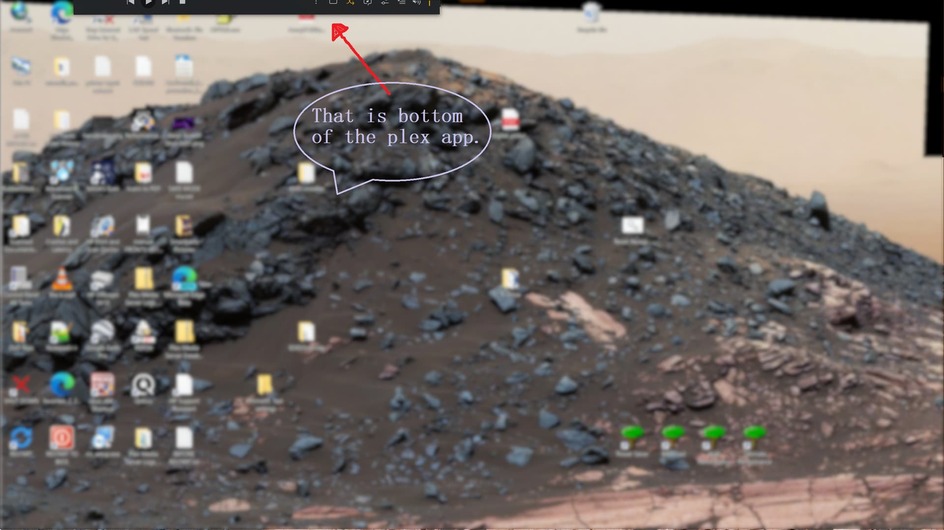
I wonder if this has been the problem all along. Window placement and not an app not opening issue.
---
### Author:  [@19unclejohn72\_gmail\_com](https://forums.plex.tv/u/19unclejohn72_gmail_com)
#### Post date: [March 8, 2022, 8:33pm UTC](https://forums.plex.tv/t/plex-player-for-windows-11-no-longer-opens/778630/7 "2022-03-08T20:33:20Z")
I recently bought a new (refurbished) computer. Thinking of the future I ensured it was installed with Windows 11. Plex desktop was fine for a couple of days. However, after some additional Windows updates Plex desktop started crashing. This was particularly the case when trying play part played shows or movies.
The only way to fix this is to either mark the show or movie as unplayed on another device i.e. web browser. Then restart Plex. Sometimes I have had to uninstall Plex and delete the local data.
I can only guess there is a current conflict between Plex and Windows 11. Which will hopefully be resolved with further updates of both.
---
### Author:  [@system](https://forums.plex.tv/u/system)
#### Post date: [June 6, 2022, 8:33pm UTC](https://forums.plex.tv/t/plex-player-for-windows-11-no-longer-opens/778630/8 "2022-06-06T20:33:38Z")
This topic was automatically closed 90 days after the last reply. New replies are no longer allowed.