# Plex server app on Synology Nas
**URL:** https://forums.plex.tv/t/plex-server-app-on-synology-nas/581074
**Category:** General Discussions
**Created:** [April 26, 2020, 1:20pm UTC](https://forums.plex.tv/t/plex-server-app-on-synology-nas/581074 "2020-04-26T13:20:01Z")
**Posts on this page:** 9
**Page:** 1
### Author:  [@drekko](https://forums.plex.tv/u/drekko)
#### Post date: [April 26, 2020, 1:20pm UTC](https://forums.plex.tv/t/plex-server-app-on-synology-nas/581074/1 "2020-04-26T13:20:01Z")
Hi
I have a Synology DS218play which I wanted to install and test Plex media server on that
I currently have a local plex media server on my PC
When I installed the plex media server app on the NAS its just trying to connect of my first plex media server from m y PC
How do I tell the NAS “you are the server”
I confirmed this as stopped the plex service from the PC and checked the NAS and its saying it
"cannot connect to “oldPlexServerPC” please check connection
---
### Author:  [@JustGoodOldHaroldHere](https://forums.plex.tv/u/JustGoodOldHaroldHere)
#### Post date: [April 26, 2020, 5:31pm UTC](https://forums.plex.tv/t/plex-server-app-on-synology-nas/581074/2 "2020-04-26T17:31:21Z")
How are you getting to the NAS’ plex webui?
---
### Author:  [@FordGuy61](https://forums.plex.tv/u/FordGuy61)
#### Post date: [April 26, 2020, 6:40pm UTC](https://forums.plex.tv/t/plex-server-app-on-synology-nas/581074/3 "2020-04-26T18:40:34Z")
See [Starting Plex Media Server for the first time](https://forums.plex.tv/t/installation-setup-of-plex-media-server-on-synology/572179/7)
If you’ve yet to do so, suggest reading [Installation and Setup of Plex Media Server on Synology](https://forums.plex.tv/t/installation-setup-of-plex-media-server-on-synology/572179) and the [Synology FAQ](https://forums.plex.tv/t/synology-faq-questions-answers-and-a-few-how-tos/490215/). It will potentially save you time and frustration, as there are some items specific to running PMS on Synology vs other platforms.
Edit: Also see Reset Customizations section of [Customizing Plex Web](https://support.plex.tv/articles/customizing-plex-web/) to change your preferred server.
---
### Author:  [@drekko](https://forums.plex.tv/u/drekko)
#### Post date: [April 27, 2020, 1:03am UTC](https://forums.plex.tv/t/plex-server-app-on-synology-nas/581074/5 "2020-04-27T01:03:50Z")
Thanks for the reply. I did all that and installed it through package center on my NAS. WHen I open it it just opens another tab in my browser. Because I am on a windows machine connecting to the NAS it then just tells me to install plex for windows to add my media to it
confused here. I am trying to set up the NAS to be the plex server…
Maybe it doesnt work this way but thats what I thought
---
### Author:  [@drekko](https://forums.plex.tv/u/drekko)
#### Post date: [April 27, 2020, 1:09am UTC](https://forums.plex.tv/t/plex-server-app-on-synology-nas/581074/6 "2020-04-27T01:09:46Z")
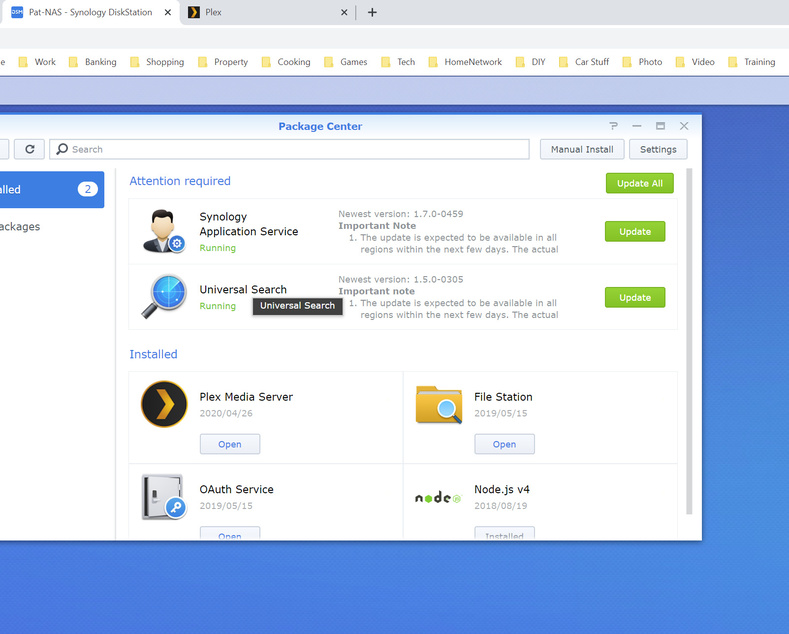


When I navigate to the NAS IP with the Plex Port it brings me to the home page of the plex server thats physically installed on my NAS. But to add my own media it just brings me to download it again for Windows?
The NAS has a drive with all my movies on there so I should just be able to show the media the locations of my movies
---
### Author:  [@FordGuy61](https://forums.plex.tv/u/FordGuy61)
#### Post date: [April 27, 2020, 3:45am UTC](https://forums.plex.tv/t/plex-server-app-on-synology-nas/581074/7 "2020-04-27T03:45:43Z")
What happens if you click on More instead of Your Media?
---
### Author:  [@kneel](https://forums.plex.tv/u/kneel)
#### Post date: [April 27, 2020, 4:10am UTC](https://forums.plex.tv/t/plex-server-app-on-synology-nas/581074/8 "2020-04-27T04:10:33Z")
Had same issue - running Plex on OSX and then installed 2nd PMS on Synology DS918+ NAS. Kept logging me in and looking for old server.
But somehow when I tried for the 3rd time[s a charm], it finally popped up the new server setup screen and could add my new libraries etc.
(shut down 1st plex server on OSX - connected to 2nd Plex server on NAS, signed in with my account, then new server setup wizard happened, and now the new server is configured and in my account)
---
### Author:  [@FordGuy61](https://forums.plex.tv/u/FordGuy61)
#### Post date: [April 27, 2020, 4:11am UTC](https://forums.plex.tv/t/plex-server-app-on-synology-nas/581074/9 "2020-04-27T04:11:17Z")
I searched the forum for similar problems. The resolution seemed to be either (a) reset Plex Web customization, or (b) re-claim the server.
You can reset Plex Web customization in Settings → Plex Web → General ([https://app.plex.tv/desktop#!/settings/web/general](https://app.plex.tv/desktop#!/settings/web/general)), then go to [http://ip.addr.of.syno:32400/web?secure=0](http://ip.addr.of.syno:32400/web?secure=0).
Synology FAQ #15 has instructions on claiming a troublesome server.
> [@Synology FAQ - Questions, Answers, and How-To's](https://forums.plex.tv/t/synology-faq-questions-answers-and-a-few-how-tos/490215/21):
>
> FAQ 15: Claiming & Connecting to a troublesome Synology server This FAQ is for those situations where the normal claim process has failed. There are multiple techniques to accomplish this. DSM 7 Uninstall the package with the “Keep” option Reinstall the package , selecting the “Plex Claim Token” option Click “Get Plex Claim Token”. Browser tab will open and display a “claim-xxxxxxx” token string “COPY” the string Return to the installer window PASTE the claim-xxxxx into the small window …
---
### Author:  [@system](https://forums.plex.tv/u/system)
#### Post date: [July 26, 2020, 4:11am UTC](https://forums.plex.tv/t/plex-server-app-on-synology-nas/581074/10 "2020-07-26T04:11:18Z")
This topic was automatically closed 90 days after the last reply. New replies are no longer allowed.